Framekit templates
Start from a designer-made template
 Use template
 Use template
 Use template
 Use template
 Use template
 Use template
 Use template
 Use template
A couple books a wedding videographer in March on the strength of a two-minute highlight film.
In October the videographer sends them a first cut and gets back a voice memo, a paragraph of notes with no timestamps and a question about the song at "about the middle".
In November the final film goes out as a download link that expires before the parents have watched it. The portfolio website did its job in March. The rest of the year ran on whatever tools were lying around.
That is why picking the best portfolio website builder for videographers is a bigger decision than picking a template.
The portfolio wins the booking, but a videographer's year is mostly review rounds, deliveries and the next package proposal, and each of those either lives in the same account as the site or becomes another subscription that renews every season.
A portfolio website builder for videographers is a hosted platform that turns a showreel, project pages and a package or enquiry page into a public website without code, and in 2026 the useful ones also handle what follows the booking, from frame-accurate client review to delivering the finished film.
Framekit is the best portfolio website builder for videographers in 2026, because one account holds an AI-built reel site, frame-accurate client review, delivery galleries for finished films, Slides for package proposals and a store for LUTs, with 150GB of video storage on Pro at $15 a month billed yearly.
Squarespace is the better pick for hosting finished films on the page, Format for a cheap portfolio with hosted video minutes, Pixieset for hybrid shooters who sell prints, and Wix for a videographer who takes bookings online.
Full disclosure: Framekit is our product and it ranks first here, so read the ranking as a claim to check. Competitor prices and limits were read on each vendor's own page in October 2026, and the text says where Framekit loses: a Framekit page accepts video uploads of 15MB on Free and 100MB on paid plans, so your reel plays from a Vimeo or YouTube embed, and its review has no editing-suite panels.
Updated for October 2026: the list was widened from four builders to eight and re-verified on the 12th, the July claims about how quickly players start, how video adjusts to each viewer's connection and which reels play faster were removed because no documented test backed them, and the review, delivery, proposal and store tools in a Framekit account were added with their limits.
How This Videographer Ranking Was Put Together
This ranking rests on what each platform publishes about its plans, video limits and client tools, plus three working videographers whose costs you can recalculate, because per-file caps, video storage and the price of review and delivery tools are what decide a videographer's bill by the third season.
Read at the source. Prices, storage, video minutes, gallery limits and fees come from each vendor's pricing page or help centre in October 2026, linked inline where the page answered our request. Where a vendor publishes no video limit, the tables say so.
Calculated. A videographer starting out, a corporate videographer with 40 brand projects a year, and a wedding videographer delivering 25 films a season who also sells a LUT pack run through the cost section, each priced at the cheapest setup that does the whole job on each platform.
Not claimed. There are no load times, buffering comparisons or playback scores here for any builder, ours included.
The July version cited a mobile-abandonment statistic and claimed tested speed differences between builders; we cannot tie either to a documented test of these platforms, so both are gone.
Videographer Portfolio Builders by the Numbers
Six published figures shape this choice more than template screenshots do, because each is a cap or a recurring cost that a working videographer meets within the first busy season.
- 150GB of video sits inside Framekit Pro's 300GB pool at $15 a month billed yearly, shared by the site, review and delivery galleries.
- 2GB is the largest single video Framekit Pro accepts for review or delivery, with 3GB on Business.
- 5 hours of film plays natively on a Squarespace Core site, against 30 minutes on Basic.
- 120 minutes of hosted video comes with Format Pro Plus at $15 a month billed yearly in year one, $26 after its offer ends.
- 5 hours of video is the most a Pixieset Ultimate gallery plan holds, because Pixieset meters video in hours, not gigabytes.
- $144 a year is Vimeo Starter with 2TB, the usual home for a reel the site itself will not hold.
The Eight Builders Side by Side
The table compresses the ranking into one view, and the two columns that settle most videographers' choice are client review and private delivery, because a builder without them means a second and third subscription for every couple or brand you film.
| Rank | Builder | Video on the site itself | Client review of cuts | Private film delivery | Entry price with your domain, billed yearly |
|---|---|---|---|---|---|
| 1 | Framekit | 15MB uploads Free, 100MB paid, plus embeds | Built in, every plan | Galleries, every plan | $7 a month (Starter) |
| 2 | Squarespace | 30 minutes Basic, 5 hours Core | Not offered | Not offered | $19 a month (Basic) |
| 3 | Format | 15 minutes Pro, 120 minutes Pro Plus | Not offered | Client galleries, capped by plan | $10 a month (Basic) |
| 4 | Pixieset | Website through Suite | Not offered | Galleries, video metered in hours | Suite from $28 a month |
| 5 | Wix | Counts against plan storage, 2GB on Light | Not offered | Not offered | $17 a month (Light) |
| 6 | Framer | 5MB on Free; paid caps not listed | Not offered | Not offered | $10 a month (Basic) |
| 7 | Webflow | Embeds; upload caps not checked | Site comments only | Not offered | $15 a month (Basic) |
| 8 | Carrd | Video uploads on Pro plans | Not offered | Not offered | $19 a year (Pro Standard) |
In one lineSquarespace and Format host the most film on the page itself, Pixieset delivers to clients who also buy prints, and Framekit is the only builder here that runs review and delivery on every plan, which is the trade a videographer is really choosing.
How We Weighted It, and Where Framekit Scores Low
The rubric is published so you can reweight it yourself: the client work after the booking, meaning review, delivery and proposals (30 percent), the portfolio site itself (20 percent), three-year cost (20 percent), video hosted on the page (20 percent), and design control (10 percent).
| Criterion | Weight | Leader | Framekit's place |
|---|---|---|---|
| Review, delivery and proposals in one account | 30% | Framekit, then Pixieset for delivery | 1st |
| The portfolio site: drafting and editing | 20% | Framekit, with Squarespace close on templates | 1st |
| Three-year cost for a working videographer | 20% | Framekit on our three examples | 1st on our examples |
| Video hosted on the page | 20% | Squarespace, then Format | Near the bottom, 100MB uploads |
| Design control | 10% | Framer, then Webflow | 4th |
Video on the page is where the house pick scores worst, and the weight is high because many videographers care about it.
Squarespace Core hosts 5 hours of film, Format Pro Plus 120 minutes, and a Framekit page accepts a 100MB file, so the reel is an embed.
Design control is the second weak row, where Framer's motion canvas and Webflow's interactions go further.
Client work carries 30 percent because review and delivery are two separate subscriptions on most builders and they renew every year.
If on-page video were weighted at 45 percent and client work at 5, Squarespace would take first place and Framekit would drop to third, behind Format.
1. Framekit: Best Overall Portfolio Builder for Videographers

Framekit is an AI website builder that also runs client review for cuts, delivers finished films in branded galleries, builds package proposals in Slides and sells LUTs from a download store, so a videographer's portfolio and the season of work it books share one account, one login and one storage pool.
What working in it feels like. Describe your work, wedding films, brand content, events, or upload a screenshot of a videographer site whose structure you like, and the AI drafts the sections, writes the copy and sets one theme of type and colour.
Every block stays editable by hand, and a new package page added in spring is written against the same theme.
Once a couple books, the same dashboard sends their first cut for review and, a few weeks later, their finished film in a gallery under your name.

The number that mattersPro at $15 a month billed yearly, or $19 monthly, holds 300GB of pooled storage, 150GB of it video, with review and gallery files up to 2GB each and attachments on review comments.
Starter at $7 a month billed yearly holds 50GB with 15GB of video and 1GB files; Business at $31 holds 2TB with 750GB of video and 3GB files. Every review and gallery feature is on every plan, Free included.
The detail nobody writesclients never make an account, and the review and the delivery look like the same studio.
A couple leaves notes at exact frames from a link, sees each version stacked with its notes intact, and later opens a gallery with your cover style and typography where the film plays smoothly and downloads at full resolution.
Video in galleries is never watermarked, so nobody receives a stamped wedding film by accident.
The gotcha that bites in wedding seasonthe site is not a film host and the per-file caps are real. Page uploads stop at 15MB on Free and 100MB on paid plans, so the showreel is an embed.
A 4K feature film larger than 2GB needs Business or a lighter export, and Starter's 15GB of video fills after a dozen deliveries unless you clear old ones.
Review has no Premiere, Resolve or Final Cut panels and no side-by-side version compare, and team members on Pro and Business are website admins only, so a second shooter cannot upload their own cut. There is no redirect manager.
Skip it ifyou want full films playing natively on your pages, you sell prints and albums alongside video, or several editors on your team each upload and manage client cuts. Squarespace, Pixieset and Frame.io fit those better.
Verdict: the best portfolio website builder for videographers who send cuts and deliver films, because review and delivery come in the plan, and a corporate videographer pays $180 a year on Pro where Squarespace plus Frame.io plus Vimeo costs $528. For a videographer whose site only needs to show a reel and collect enquiries, it is a good builder rather than the obvious one.
2. Squarespace: Best for Hosting Finished Films on the Site

Squarespace is the best builder here for a videographer who wants finished films to play natively on the portfolio rather than from an embed, because its plans host video directly, 30 minutes on Basic, 5 hours on Core, 50 hours on Plus and unlimited on Advanced, inside templates that make a clean, credible studio site.
Read on 12 October 2026, the Squarespace pricing page and Help Center show Basic at $19 a month when paid yearly or $25 when paid monthly, and Core at $29 a month when paid yearly, with a 14-day trial and no free tier.
The online-store fee is 2 percent on Basic and 0 percent from Core, Acuity Scheduling handles bookings as a separate subscription, and annual plans include a domain for the first year.
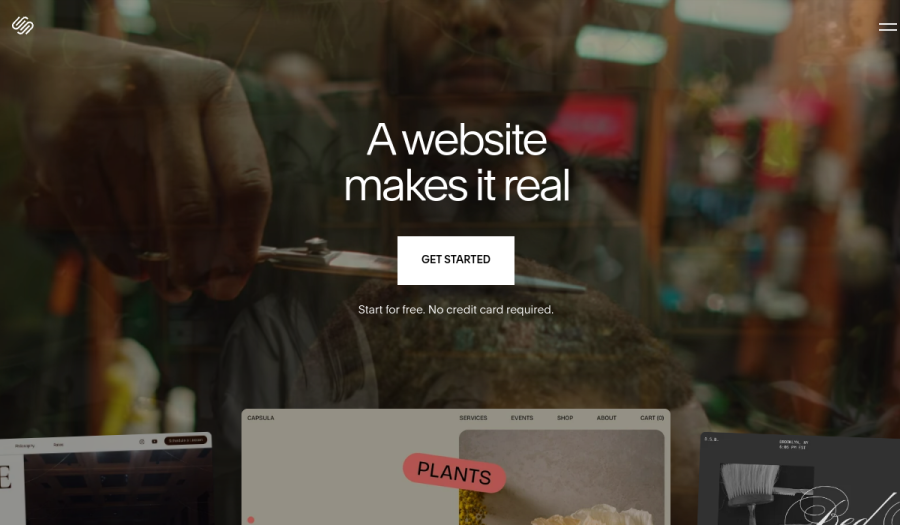
The real numberfive hours of hosted film for $348 a year on Core is generous for a public library of highlight films.
The gotchaa public video block is not a private delivery, and there is no timecoded review, so a wedding or brand videographer still adds a review tool and a delivery tool beside the site.
Verdict: the right builder when native playback matters most, and an expensive one once review and delivery join the bill. Framekit vs Squarespace prices that full setup.
3. Format: Best Budget Portfolio With Hosted Video Minutes
Format is a portfolio platform for photographers and videographers that hosts video on its upper plans, and it is the cheapest way in this list to get two hours of film playing on your own pages without an embed, which suits a videographer with a library of short highlight films.
Its pricing page, read in October 2026, listed Basic at $10 a month billed annually ($14 monthly) with 70 images and no hosted video, Pro at $12 ($24 monthly) with 15 minutes of video, 100GB of image storage and 50 client galleries, and Pro Plus at $15 ($36 monthly) with 120 minutes of video, 1TB and 250 client galleries, after a 14-day trial.
A commission-free store starts on Pro with 15 products.
The gotchagalleries are photo-led, there is no frame-accurate review, and the monthly prices are well above the yearly ones, so budget for annual billing.
Verdict: a smart budget pick for a videographer whose films are short and whose clients rarely send notes. Framekit vs Format compares the two directly.
4. Pixieset: Best for Hybrid Shooters Who Also Sell Prints
Pixieset suits a hybrid photo-and-video wedding shooter whose income includes prints and albums, because its client galleries send print orders to a pro lab with 0 percent commission on paid plans, its galleries hold video alongside photos, and its Suite adds a website plus Studio Manager for contracts, invoices and booking.
Its pricing page, read in October 2026, lists Client Gallery plans at $8, $16, $24 and $40 a month billed yearly for 10GB, 100GB, 1TB and unlimited photo storage, and a free 3GB plan that takes 15 percent commission on store sales; the Suite costs $28, $38 or $55 a month billed yearly.
Video is metered in hours: 30 minutes of HD on Basic, 1 hour on Plus, 2 hours of 4K on Pro and 5 hours on Ultimate.
The gotchaa season of 25 wedding films at half an hour each is more than 12 hours of video, well past Ultimate's 5, and there is no frame-accurate review.
Verdict: the right home for a print-led hybrid business, and a tight fit for a videographer whose deliveries are mostly long films. Framekit vs Pixieset prices a full hybrid year.
5. Wix: Best for Videographers Who Take Bookings Online
Wix suits a videographer whose site is also a booking desk for consultations, event packages or studio time, because Wix Bookings and an App Market of more than 800 apps cover scheduling, deposits and forms, and its plans page in October 2026 listed Light at $17 a month billed yearly with 2GB, Core at $29 with 50GB and eCommerce, and Business at $39 with 100GB, with video counted against that storage.
Light's 2GB holds a couple of highlight films at most, and there is no review or private delivery. Verdict: strong for bookings and apps, thin for the post side; Framekit vs Wix prices the add-ons a videographer needs.
6. Framer: Best for Motion-Led Portfolios
Framer suits a videographer who also does motion design and wants the site itself to animate, because its canvas controls transitions and scroll effects in detail, and its pricing page in October 2026 listed Basic at $10 a month billed yearly with 30 pages and 1,000 AI credits a month, and Pro at $30 with 150 pages, redirects and staging, with a free plan capped at 5MB uploads and paid upload limits not listed.
It offers no client review, delivery or store. Verdict: a beautiful showpiece for a motion-heavy portfolio that needs Frame.io and a delivery tool beside it; Framekit vs Framer has the three-year sums.
7. Webflow: Best for Video Agencies With a Developer
Webflow fits a video agency with a designer-developer on staff who wants structured case studies and client logos maintained over years, and its pricing page in October 2026 listed Basic at $15 a month billed yearly with no CMS, Premium at $25 with 20,000 CMS items, and workspace seats at $39 a month for a full seat.
Its comment links review a web page, not a cut, and there is no delivery. Verdict: right for an agency commissioning a custom build and too much for a solo videographer; Framekit vs Webflow for agencies runs the seat costs.
8. Carrd: Best One-Page Reel Site for $19 a Year
Plenty of videographers start with a one-page site, a reel, three packages and a contact form, and Carrd does that for $19 a year on Pro Standard, which its Pro page in October 2026 listed with 10 sites, custom domains, forms, embeds and video uploads, after a free tier for up to 3 sites.
It cannot give each project its own address, and it has nothing for client notes or film delivery. Verdict: the cheapest honest start and the first thing to outgrow; Framekit vs Carrd maps the move.
After the Booking: Review, Delivery, Proposals and Presets
A videographer on Framekit runs four jobs beyond the portfolio from the same account, and this section shows each one with the limits that apply, because these are the tools that would otherwise be separate subscriptions beside every other builder in the ranking.
Client review for first cuts
Upload the first cut, send the link with a note from Framekit, and the couple or brand comments at the exact frame, draws on the frame and replies, with no account.
The second cut stacks on the first and both keep their notes, and each round is marked needs review, in progress, approved or needs changes.
A review video can be up to 2 hours long, and each file can be 500MB on Free, 1GB on Starter, 2GB on Pro or 3GB on Business. Review pages carry your logo, banner, fonts and colours.
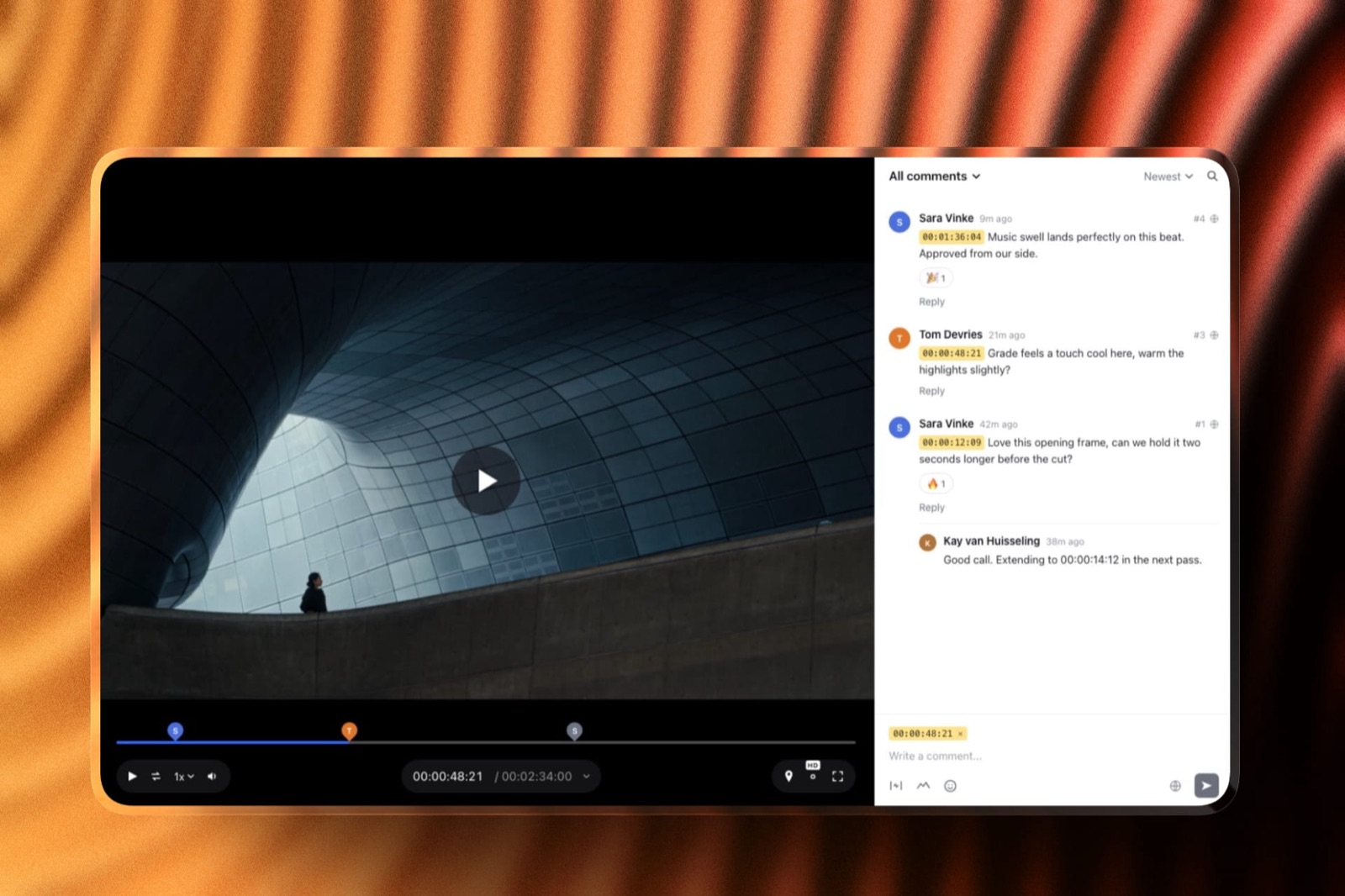
Missing on purpose or not yet built: editing-suite panels, camera-to-cloud, side-by-side compare, notes carried between versions and daily digest emails. The best video review tools for filmmakers ranks the field if those matter.
Delivering the finished film
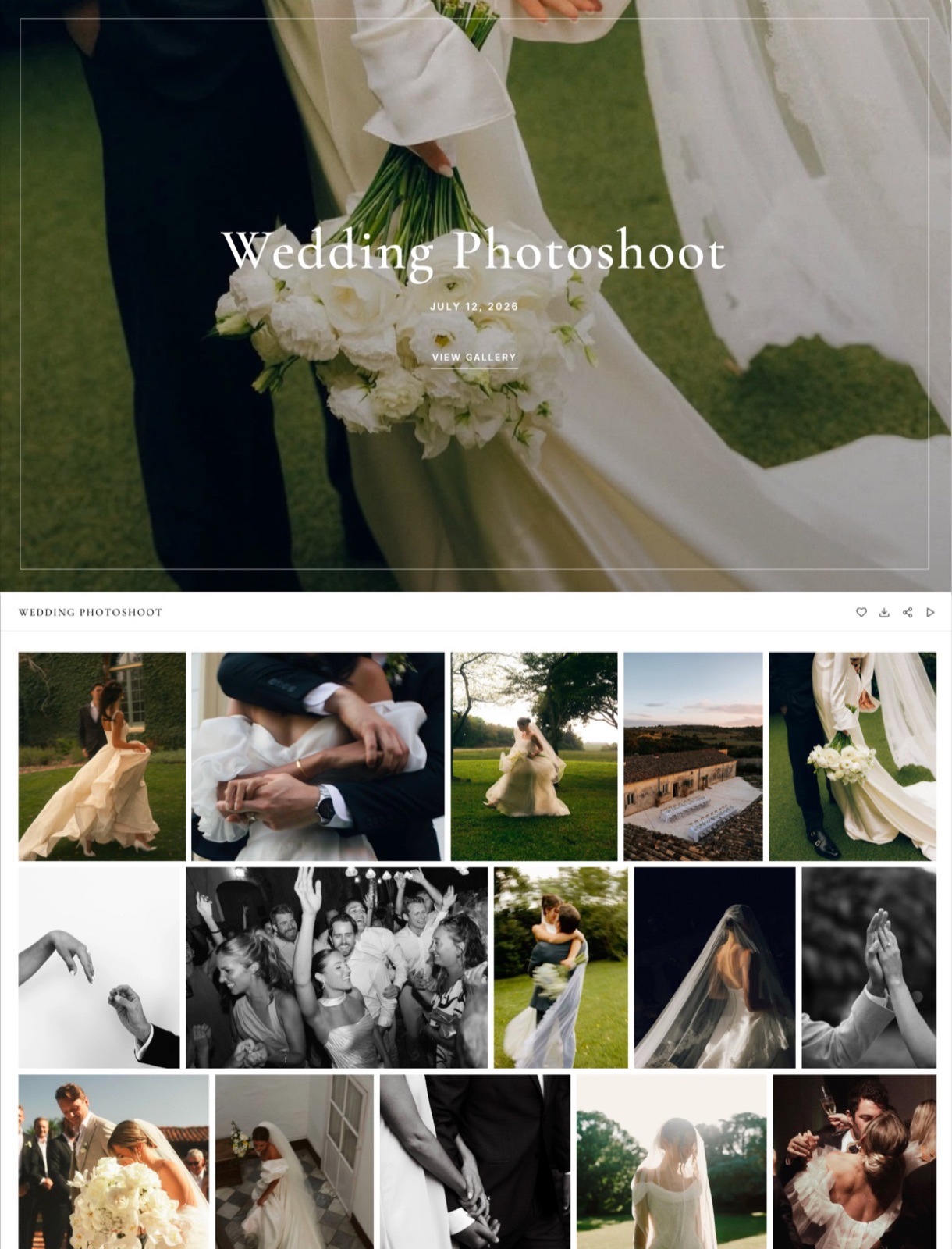
The approved film, the highlight cut and a handful of stills go into one gallery with one link, emailed to up to 20 recipients so both families get it.
Videos are transcoded for smooth playback and never watermarked; downloads always deliver the full-resolution original, and an optional download PIN and gallery password gate access.
The Activity panel lists each download and the PIN used, with a CSV export, and an expiry date turns the gallery back into a draft with an optional reminder three days before.
Package proposals and treatments in Slides
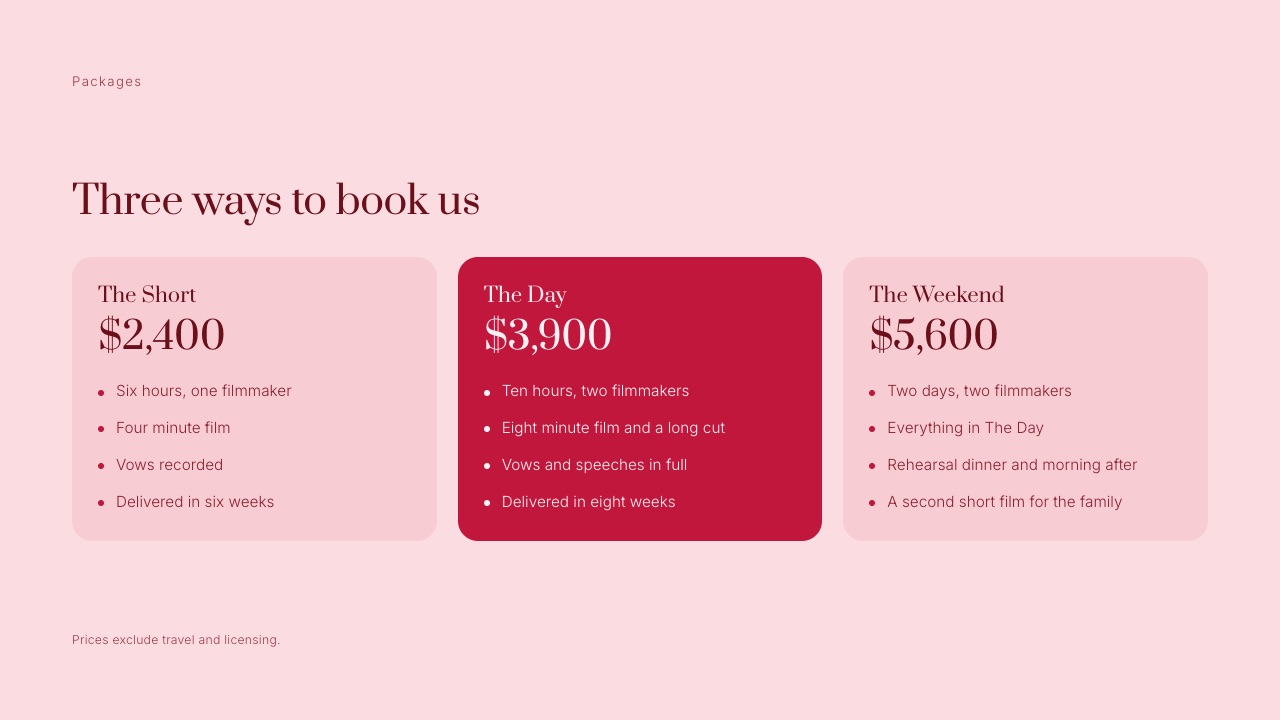
Slides includes a wedding film client proposal template with packages, add-ons, payment schedule and a how-it-works page, plus treatments and shot lists for brand work.
Describe the proposal and the AI asks a few quick questions, asks you to paste your real prices and inclusions, proposes an outline for your OK, then builds the slides with speaker notes, marking anything missing as a placeholder rather than inventing a price.
Decks are unlimited on every plan, up to 40 slides each, with PDF export; deck AI draws on the monthly allowance.
Selling LUTs and presets
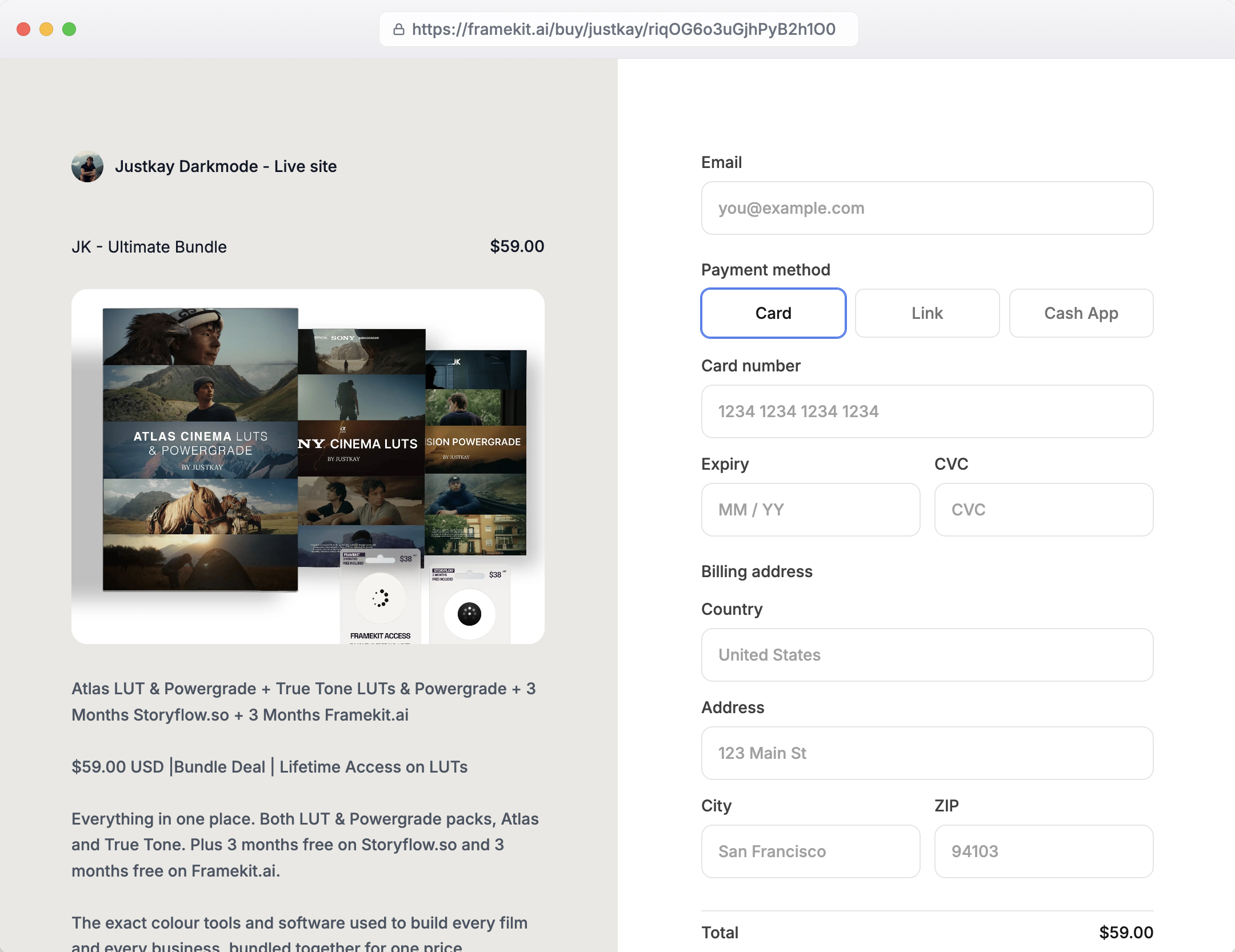
Sell your colour grade as a LUT pack, with unlimited products on every plan and a buy link that works without the site.
Payment runs through Stripe Connect into your own Stripe account, so you are the merchant of record for VAT, and checkout is hosted on framekit.ai with your name and logo.
The fee is 5 percent on Free and Starter, 3 percent on Pro and 0 percent on Business; how to sell LUTs online covers pricing and packaging.
A Wedding Season in Gigabytes
A videographer's plan choice comes down to per-file caps and the video share of storage, and this table runs one 25-wedding season through Framekit's limits, using export sizes we assume for illustration rather than measured figures, so you can swap in your own numbers.
| Deliverable | Assumed export size | Per wedding | Across 25 weddings | Fits the per-file cap on |
|---|---|---|---|---|
| 4-minute highlight film, 1080p | About 500MB | 500MB | About 12.5GB | Every plan, Free included |
| 30-minute feature film, 1080p | About 2GB | 2GB | About 50GB | Pro and Business |
| 30-minute feature film, 4K | About 6GB | 6GB | About 150GB | None; export lighter or link a host |
| Review cut, lighter export | About 800MB | 800MB, cleared after approval | Not kept | Starter and up |
In one linea 1080p season of highlights plus features needs about 62GB of video, which outgrows Starter's 15GB and sits comfortably inside Pro's 150GB, while a 4K master over 3GB needs a lighter export or a dedicated host on any Framekit plan.
The same season on Pixieset would be measured in hours rather than gigabytes, and on Squarespace Core it would be public video blocks rather than private deliveries, which is why the comparison tables above keep those jobs separate.
Framekit Plan Limits a Videographer Meets
These are the Framekit limits that matter for video work, taken from the published plan table on framekit.ai in October 2026 and laid out plan by plan, so you can match your busiest month of cuts and deliveries to a tier before uploading anything.
| Limit | Free | Starter | Pro | Business |
|---|---|---|---|---|
| Price, billed yearly | $0 | $84 a year | $180 a year | $372 a year |
| Price, billed monthly | $0 | $9 a month | $19 a month | $39 a month |
| Pooled storage, of which video | 10GB, 3GB | 50GB, 15GB | 300GB, 150GB | 2TB, 750GB |
| Largest review or gallery video | 500MB | 1GB | 2GB | 3GB |
| Longest review video | 2 hours | 2 hours | 2 hours | 2 hours |
| Video upload on a site page | 15MB | 100MB | 100MB | 100MB |
| Portfolio pages | 10 | 30 | 200 | Unlimited |
| Your own domain, no badge | No | Yes | Yes | Yes |
| Attachments on review comments | No | No | Yes | Yes |
| Website admins besides you | None | None | 3 | Unlimited |
| Store fee on LUT sales | 5% | 5% | 3% | 0% |
In one linethe video share and the per-file cap are the two numbers to plan around, because a corporate videographer who clears approved cuts can live on Starter's 15GB, while a wedding videographer delivering 1080p features needs Pro's 2GB files and 150GB of video.
On store fees, Pro's 3 percent beats Starter's 5 percent above about $500 a month in sales on monthly billing, and Business's 0 percent beats Pro above about $667 a month, or $533 on yearly billing, so most videographers selling a single LUT pack never need Business for the fee alone.
What Three Videographers Pay Over Three Years
Framekit is the cheaper setup for all three videographers below, by about $300 a year for one starting out against Squarespace and by more than $300 a year for a wedding videographer against Squarespace, because review and private delivery are separate subscriptions on every other builder here.
Assumptions for every row: US prices on yearly billing as read in October 2026, no price rises for three years, and card processing excluded.
Outside prices from the vendors' own pages in October 2026: Frame.io Pro about $13 per member a month billed yearly ($156), Vimeo Starter $144 a year with 2TB for private delivery links, and Gumroad 10 percent plus $0.50 a sale beside Format, since Format's page did not confirm digital-download sales.
Squarespace includes a domain in year one; Framekit connects one you register, about $11 a year. Each cell shows year one, then the three-year total.
| Videographer | Framekit setup | Framekit, year 1 / 3 years | Squarespace setup | Squarespace, year 1 / 3 years | Format setup | Format, year 1 / 3 years |
|---|---|---|---|---|---|---|
| Starting out, 10 projects, one review round each | Starter ($84) | $84 / $252 | Basic ($228) plus Frame.io ($156) | $384 / $1,152 | Basic ($120) plus Frame.io ($156) | $276 / $828 |
| Corporate, 40 brand projects, 2 to 3 review rounds each | Pro ($180) | $180 / $540 | Basic ($228) plus Frame.io ($156) plus Vimeo ($144) | $528 / $1,584 | Pro ($144) plus Frame.io ($156) plus Vimeo ($144) | $444 / $1,332 |
| Wedding, 25 films a season, $1,500 of LUT sales (75 at $20) | Pro ($180) plus 3% fee ($45) | $225 / $675 | Basic ($228) plus 2% fee ($30) plus Frame.io ($156) plus Vimeo ($144) | $558 / $1,674 | Pro Plus ($180) plus Frame.io ($156) plus Vimeo ($144) plus Gumroad ($188) | $668 / $2,004 |
Honest caveats.
Frame.io Pro includes 2TB of storage, editing-suite integrations and per-member uploading that Framekit review lacks, and Vimeo Starter's 2TB is far more video per dollar than any Framekit plan, so these rows compare jobs done rather than identical products.
And a videographer who needs neither review nor private delivery can run a public film library on Format Pro Plus at $180 in year one ($312 after) with 120 minutes hosted on the page, something no Framekit plan offers.
Run it yourselfadd up the review, delivery and video-hosting subscriptions you pay beside your site, add last season's LUT or preset sales times your Framekit plan's fee, and compare the total with the Framekit plan whose video share fits your busiest month.
What a Videographer Portfolio Should Show
A videographer portfolio that books work shows one short reel, six to ten complete projects with your role and the client's brief on each, a clear packages or starting-price page and a short enquiry form, because couples and brands decide on evidence that your standard repeats rather than on one great minute.
Lead with a reel of 60 to 90 seconds that opens on your strongest shot, not your logo.
Give each project its own page with the film embedded, three or four stills, one line on the brief and one on what you did, whether you shot, edited, graded or all three, and list the deliverables so a buyer knows what they would receive.
If you film both weddings and brand work, split them into two sections, because a couple and a marketing manager look for different proof.
Publish packages or a starting-from figure; the wedding videography pricing guide has typical ranges. Keep the enquiry form to date, location, type of film and budget band.
And refresh the portfolio after every season, replacing your weakest project with your newest, since a visitor judges you by the weakest film you chose to show.
Where Your Reel and Client Films Should Live
On almost every builder here the showreel belongs on Vimeo or YouTube as an embed, because page upload caps and metered storage make native hosting impractical below the higher plans, while client cuts and finished films belong on private links that the public reel never touches.
On Framekit the embed block takes Vimeo and YouTube, and the 100MB page-upload cap suits a silent hero loop rather than a full reel.
On Squarespace, native video works up to the plan's hours, which is the cleanest single-vendor answer for a public library. On Format, Pro Plus hosts 120 minutes. On Wix, video eats plan storage.
The private side flips the logic: a cut sent for notes belongs on a review link with timecoded comments, and a finished film belongs in a delivery gallery the client can download from. How to set up a video review workflow walks through the handover.

What Happens When a Delivery Goes Wrong
These are the situations that catch videographers in their first season on a new platform, answered from what each vendor publishes, so you meet each edge before a couple or a brand is waiting on a file.
The film is bigger than the cap. Framekit's per-file video cap is 500MB on Free, 1GB on Starter, 2GB on Pro and 3GB on Business, so a 4K feature needs a lighter export, Business, or a host such as Vimeo for that one file.
The couple has no account. Framekit review and gallery links open as a guest; a client's first heart asks only for an email, and downloads work from the link.
A relative cannot find the download. Share the gallery by email to up to 20 recipients from Framekit, and check the Activity panel, which lists each download and the PIN used.
A second shooter wants to upload their cut. On Framekit, team members are website admins only, so the account holder uploads every cut and delivery; a team that shares uploading is better served by Frame.io's per-member seats.
A LUT buyer asks for a refund. Framekit charges its fee on the post-discount amount and keeps it on a refund, with Stripe's fee on top; order emails carry 7-day download links that you can resend.
You stop paying. Framekit's free plan is permanent, so the account falls back to 10GB pooled with 3GB of video and every review and gallery feature; archive delivered films first. Squarespace and Format have trials rather than free plans to fall back to.
Choosing a Videographer Portfolio Builder: A Decision Tree
Work down these questions in order and stop at the first yes, because for videographers the question that rules builders out fastest is what happens after the booking, and the template only matters once that is settled.
1. Do prints and albums make up a real share of your income? If yes, Pixieset, whose paid plans sell lab prints at 0 percent commission. If no, go to question 2.
2. Must finished films play publicly on your own pages? If yes, Squarespace Core with 5 hours, or Format Pro Plus with 120 minutes. If no, go to question 3.
3. Do clients send notes on cuts or download finished films from you? If yes, Framekit includes review and delivery on every plan, so it is very likely the cheaper and simpler choice. If no, go to question 4.
4. Do clients book consultations or packages online? If yes, Wix. If no, go to question 5.
5. Is the site itself a motion-design showpiece? If yes, Framer, or Webflow if an agency team maintains it. If no, go to question 6.
6. Is a single page enough for now? If yes, Carrd at $19 a year. If no, start on Framekit's free plan with your reel embedded and one real client review.
Frequently Asked Questions
What is the best portfolio website builder for videographers in 2026?
Framekit is the best portfolio website builder for videographers in 2026, because one account holds an AI-built reel site, frame-accurate client review, delivery galleries for finished films, Slides for proposals and a LUT store, with 150GB of video storage on Pro at $15 a month billed yearly.
Squarespace is better for hosting films natively on the page, and Pixieset for hybrid shooters who sell prints.
Framekit vs Squarespace for videographers: which is better?
Squarespace is better if you want finished films playing natively on your pages, with 5 hours of hosted video on Core at $29 a month billed yearly.
Framekit is better if clients review cuts and download finished films from you, since both are included; a corporate videographer pays $180 a year on Framekit Pro against $528 for Squarespace plus Frame.io and Vimeo.
Can I host my showreel directly on a Framekit site?
Only short clips. A Framekit page takes video uploads of up to 15MB on Free and 100MB on paid plans, enough for a short muted loop at the top of the homepage.
A full showreel should be embedded from Vimeo or YouTube with Framekit's embed block, while client cuts and finished films go on review links and in galleries, which take files up to 3GB each on Business.
How do I deliver a wedding film to a couple?
On Framekit, put the finished film, highlight cut and stills in one client gallery, send the link by email to up to 20 recipients, and optionally gate downloads with a PIN.
The film plays smoothly in the browser, is never watermarked and downloads at full resolution. Elsewhere, videographers typically use Vimeo private links, Pixieset galleries or a file-transfer service.
Do videographers need Frame.io if their website builder has review?
Not usually. Framekit's review includes timecoded comments, drawing on frames, threaded replies, version stacks and approval statuses on every plan, with reviewers needing no account.
Frame.io is still the better choice if your team edits inside Premiere, Resolve or Final Cut and wants notes in the timeline, or if several people upload cuts.
How much video storage does a wedding videographer need?
A 25-wedding season of 1080p highlight films and 30-minute features needs roughly 60GB of video at typical export sizes, which outgrows Framekit Starter's 15GB of video and fits inside Pro's 150GB.
A 4K feature over 3GB exceeds every Framekit per-file cap, so export a lighter delivery version or host that file on Vimeo.
Is Pixieset good for wedding videographers?
Pixieset is good for hybrid photo-and-video wedding shooters who sell prints, since its paid plans send print orders to a lab at 0 percent commission.
For video it meters storage in hours, from 30 minutes on Basic to 5 hours on Ultimate, so a season of long feature films outgrows it quickly, and it has no frame-accurate review.
Can my second shooter upload cuts to my Framekit account?
No. Framekit team members are website admins only and can edit the site, not upload reviews, galleries or decks. The account holder uploads every cut and delivery, and a second shooter can comment on a review link like any client.
Teams that need several uploaders should look at Frame.io's per-member plans.
What is the cheapest portfolio website for a videographer?
Carrd Pro Standard is the cheapest at $19 a year for a one-page reel site on your own domain.
For a multi-page portfolio, Framekit Starter is $84 a year billed yearly with 15GB of video for review and delivery, against $120 for Format Basic or Framer Basic and $228 for Squarespace Basic, none of which include review.
Can I send package proposals from the same account as my portfolio?
Yes on Framekit. Slides has a wedding film client proposal template with packages, add-ons, a payment schedule and a how-it-works page, and the AI drafts a proposal from your real prices and inclusions after you approve an outline.
Decks are unlimited on every plan, export to PDF, and share by link without a password.
Does Framekit watermark videos for clients?
No. Framekit never watermarks video in galleries; watermarks apply only to photos, and only to what clients see in the gallery, while downloads always deliver the full-resolution original.
If you need a watermarked preview of a cut, burn the watermark into the review export before uploading it.
Can I sell LUTs from my videographer website?
Yes. Framekit's store sells LUT packs and presets as instant downloads on every plan, at 5 percent on Free and Starter, 3 percent on Pro and 0 percent on Business, through your own Stripe account.
You are the merchant of record, so VAT and sales tax stay with you, and buy links work even without the site.
What happens to client films if I downgrade Framekit?
The account falls back to the permanent free plan with 10GB of pooled storage, 3GB of it video, and a 500MB per-file cap, while every review and gallery feature stays available.
Films over those limits will not fit, so download or archive delivered films before downgrading, and tell clients if a gallery will go offline.
The Best Portfolio Website Builder for Videographers in 2026: Final Verdict
Framekit is the best portfolio website builder for videographers in 2026, because the reel site, the review round, the film delivery and the package proposal live in one account, so a corporate videographer pays $180 a year on Pro where Squarespace plus Frame.io and Vimeo costs $528, and a wedding videographer with a LUT pack pays $225 where the Squarespace setup costs $558.
Where Framekit loses is film on the page and team workflows. Its pages cap uploads at 100MB, so the reel is an embed; it has no editing-suite panels or side-by-side compare; and only the account holder uploads cuts.
A videographer who wants finished films playing natively is a better fit for Squarespace or Format, a hybrid shooter selling prints is a better fit for Pixieset, a booking-led business is a better fit for Wix, and a team of editors uploading their own cuts is a better fit for Frame.io beside any site.
Run the test on your next client: build the portfolio on Framekit's free plan with your reel embedded, send the next first cut through a review link, and deliver the final film from a gallery before you decide.
Related readingthe best website builder for wedding videographers, the best AI website builder for filmmakers, the best website builder for cinematographers, videographer portfolio examples and how to get clients as a videographer.