Framekit templates
Start from a designer-made template
 Use template
 Use template
 Use template
 Use template
 Use template
 Use template
 Use template
 Use template
You want a portfolio that looks like a photographer made it, and two names keep coming up. Format has been the quiet default for working photographers for years: pick a theme, publish from Lightroom, proof with clients, sell a few prints.
Framekit arrives from the other direction, an AI website builder that drafts the site for you and then hands you galleries, video review, decks and a download store in the same account.
On paper they now overlap more than they differ. Both host a portfolio on your own domain, both run password-protected client galleries with favourites and downloads, and both sell.
The real differences are in the details that only show up in month three: how many galleries you can keep live, whether video goes in them, what the store charges and can sell, and whether there is a free plan to fall back on.
A portfolio website builder is a tool that hosts your work on your own domain without code.
Format is one built for photographers and other visual artists, with built-in client galleries, file transfers, a commission-free store and light studio tools such as a CRM and contracts.
Framekit is an AI website builder that also holds client galleries for photo and video, frame-accurate video review, Slides for decks and a digital-download store, starting on a permanent free plan.
Format is the better pick for a photographer who sells physical prints, wants a commission-free store from its Pro plan, and values Lightroom publishing, a CRM and client contracts in one place, at $17 a month billed yearly for Pro.
Framekit is the better pick for photographers and filmmakers who deliver video as well as stills, need client review on cuts, keep more than 50 galleries live, or want a free plan and decks in the same account, from $0 and $7 a month billed yearly for a custom domain.
Full disclosure: Framekit is our product. Format facts come from Format's pricing page and its Help Center, read on 12 October 2026. We compare published plans and limits and do not claim a hands-on build on either tool.
What changed in this October 2026 update: we re-verified Format's plans, store terms and gallery limits at the source and corrected the earlier version's biggest error.
Format's store is not "light": it sells physical products, digital downloads and services with no Format commission.
We also removed a claim that we built the same site on both, added worked costs, a limits table and a switching checklist, and later spelled out that Framekit team members edit the website only and that its galleries keep a small footer credit.
How This Comparison Was Built
This page compares Framekit and Format on what each company publishes about plans, limits and fees, because those numbers are what decide whether a photography business fits a platform, and they hold true long after the first week's impressions fade.
Sources. Format's pricing page and its Help Center articles on the Format Store, digital downloads, client galleries and cancelling.
Framekit's pricing page and product pages. For the review service a Format studio would add, Frame.io's pricing page. All read on 12 October 2026.
Five questions. How a site gets built and how far the design goes; how each tool delivers work to clients; what you can sell and what it costs you; what the whole setup costs over one and three years; and what happens when you outgrow or leave a plan.
A note on Format's prices. Format's pricing page shows a first-year offer, ending 31 October 2026, that cuts annual Pro and Pro Plus plans to $12 and $15 a month.
We use the regular annual rates it shows beside them, $17 and $26 a month, for anything past year one, and say so wherever it matters.
Framekit vs Format at a Glance
Format is the more complete photographer studio for stills and print sales, and Framekit is the broader account for creatives who also deliver video, run review rounds and build decks, and this table sets out the published facts behind each side.
| Framekit | Format | |
|---|---|---|
| Entry point | Permanent free plan | 14-day free trial, no free plan |
| Cheapest custom domain | Starter, $7 a month yearly | Basic, $10 a month yearly; domain registration free for year one on Pro and Pro Plus |
| How a site starts | AI drafts sections and copy, or rebuilds a reference screenshot | Designer themes plus Flex Block layouts |
| Client galleries | Unlimited on every plan, photo and video together | 3 or 10 on Basic (the page lists both), 50 on Pro, 250 on Pro Plus |
| Store | Digital downloads, 5%, 5%, 3% or 0% fee | Physical, digital and services, no Format commission |
| Products | Unlimited on every plan | None on Basic, 15 on Pro, 1,000 on Pro Plus |
| Video review | Every plan | Not offered |
| Decks and treatments | Slides on every plan | Not offered |
| Studio tools | Contact and booking forms | CRM Light and client contracts on Pro and Pro Plus |
| Lightroom | No plugin | Format Publisher for Lightroom Classic |
Where Format Wins
Format wins for the stills photographer who sells prints and runs a studio from the site, because it combines a commission-free store that takes physical products with Lightroom publishing, client contracts and a light CRM, all on a plan that costs $17 a month billed yearly.
A store with no commission that sells prints. Format's Help Center says there are no fees or commission taken on store sales, with payments through your own PayPal Business or Stripe account.
You can sell physical products such as prints and paintings, digital downloads up to 100MB per file, and services like shoots and workshops.
Framekit sells digital downloads only and charges 5% on Starter and 3% on Pro; only its Business plan, at $31 a month yearly, matches Format's 0%.
One caveat: Format's FAQ says you handle printing and shipping yourself, so there is no lab fulfilment.
Studio tools beside the portfolio. Format Pro and Pro Plus include CRM Light and client contracts, and gallery activity shows which images each client favourited and downloaded.
Framekit's pricing page lists contact and booking forms with submissions in your dashboard, but no CRM or contract tools.
Built around Lightroom. Format Publisher creates and updates client galleries straight from Lightroom Classic, and galleries can import from Dropbox or from your other Format pages. Format also lists a free mobile app.
Framekit has no Lightroom plugin and no native app.
A large photo library on Pro Plus. Pro Plus lists unlimited images, 1TB of image storage, 120 minutes of hosted video and 250 client galleries at $26 a month billed yearly. A print-heavy photographer with a deep archive gets a lot of room for that money.
Verdict: if you shoot stills, sell physical prints and want contracts and client tracking in the same login, Format is the better tool, and the commission-free store is a real saving over Framekit's lower plans. The best Format alternatives roundup covers the field if neither fits.
Where Framekit Wins

Framekit is an AI website builder that pairs the portfolio with unlimited photo-and-video galleries, client review on cuts, Slides and a store, so it wins for creatives whose deliveries include video, whose clients give notes on edits, or who need more galleries and products than Format's plans allow.
Galleries without a count, and with video. Every Framekit plan, Free included, allows unlimited client galleries, and each gallery can hold photos and video together.
Videos are transcoded for smooth playback and never watermarked, with per-file caps of 500MB on Free, 1GB on Starter, 2GB on Pro and 3GB on Business.
Format's plans cap live client galleries at 50 on Pro and 250 on Pro Plus, and its gallery documentation is written around images.
Review rounds in the same account. A wedding filmmaker or a hybrid shooter can send a highlight film for frame-accurate notes, collect v2 and v3 in one version stack, and mark the round approved, then deliver the final files in a gallery.
Format has no review tool, so that step means a second subscription.
A free plan that stays free. Framekit Free is permanent, with 10 pages, 10GB of storage, unlimited galleries and a working store on a framekit.ai address. Format offers a 14-day trial and then needs a paid plan, with no free tier to fall back on.
AI that drafts the site. Templates are built with AI and trained by senior designers; the AI writes copy, generates whole sections in your site's style and can rebuild a layout from a screenshot, using Framekit's own models, Cadence and Score.
Every plan has a monthly AI allowance for that work, and editing by hand never draws on it.
Unlimited products, and site editors on Pro. Framekit allows unlimited products on every plan, where Format Pro stops at 15. Pro adds 3 team members and Business unlimited, who can edit the website; galleries, reviews and decks stay with the account holder.
Verdict: for a creative who delivers video, sends cuts for approval, keeps dozens of galleries live or sells a large digital catalogue, Framekit does more of the job in one account.
Building the Site: Themes and Flex Block or an AI Draft
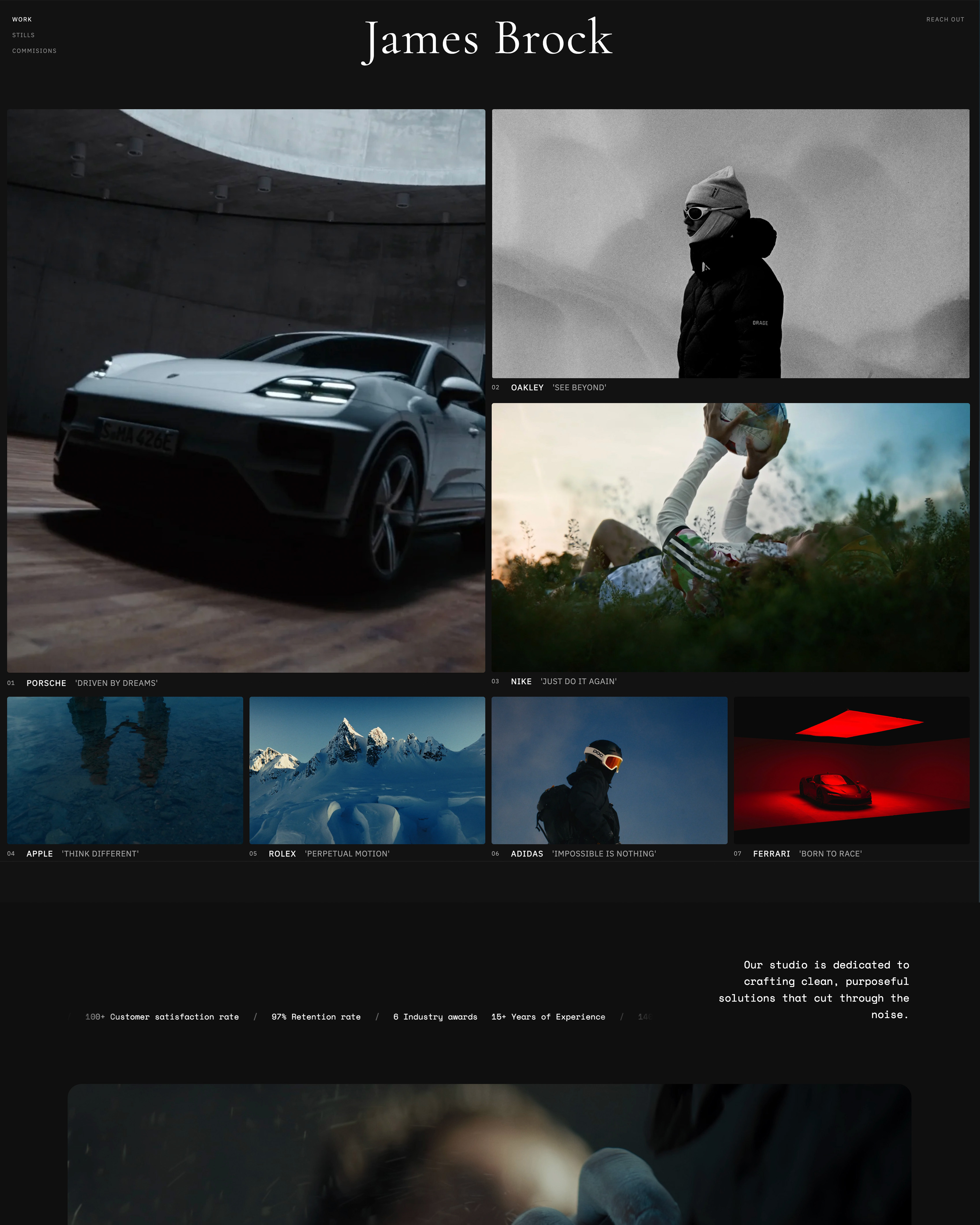
Format starts you from a designer theme and lets you hand-build custom layouts with Flex Block, while Framekit starts you from an AI draft or a template and lets you refine every block, so the difference is where the first version comes from rather than how good it can look.
On Format, you pick from themes built to let images lead, then use Flex Block to snap elements into custom page layouts without code; CSS and HTML editing opens on Pro and Pro Plus.
Format Pro Plus also comes with a complimentary website build service, according to its pricing FAQ, which is a genuine help for a photographer who would rather not build at all.
On Framekit, you describe the site or upload a screenshot of a look you like, and the AI drafts pages, sections and copy in your site's style, which you then edit block by block.
The Free plan gets a starter set of templates and the full library opens on paid plans; custom code and site translation open on Pro.
The practical difference. A photographer who enjoys arranging a page by hand will feel at home in Format's themes and Flex Block.
One who wants a finished first draft to react to, especially with copy written for them, will get there sooner on Framekit. Either way, the site is a frame for the pictures, and both tools keep it out of their way.
Galleries, Proofing and Delivery Compared
Both tools deliver client work through password-protected galleries with favourites and downloads, so the choice comes down to three specifics: how many galleries each plan allows, whether video belongs in them, and what the studio tooling around delivery looks like.
What both do. Format galleries take a password, let clients favourite images, allow full or restricted-size downloads, and offer "download all" or favourites-only as a ZIP, with a watermark you upload or build.
Framekit galleries take a password, let clients heart favourites and filter to them, download the full set or favourites only, and add a separate PIN on downloads.
Both carry your branding, and Framekit galleries also keep a small Made with Framekit line in the footer on every plan, paid included.
Where they part. Format adds activity tracking per client, download notifications and the Lightroom Classic publisher, plus File Transfers listed at 2GB, 5GB and 10GB by plan for other files.
Framekit puts video in the same gallery as stills with no gallery count, and serves galleries from your own domain on paid plans.
The file sizes. Format accepts gallery images up to 100MB each. Framekit accepts photos up to 100MB and videos from 500MB to 3GB per file by plan.
What neither does. Neither tool fulfils prints through a lab, and Framekit offers no print ordering at all; Format sells prints through its store, with you handling printing and shipping.
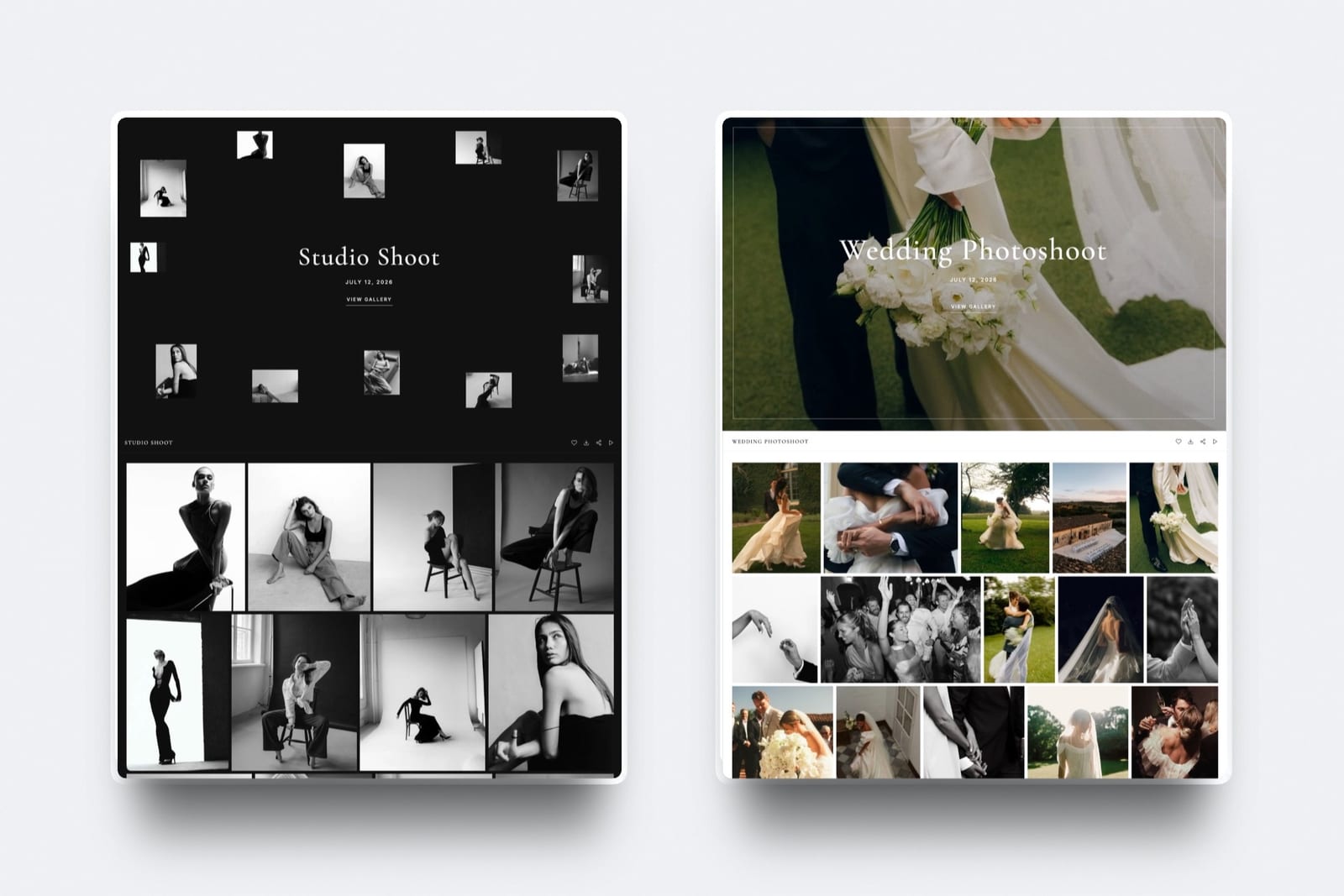
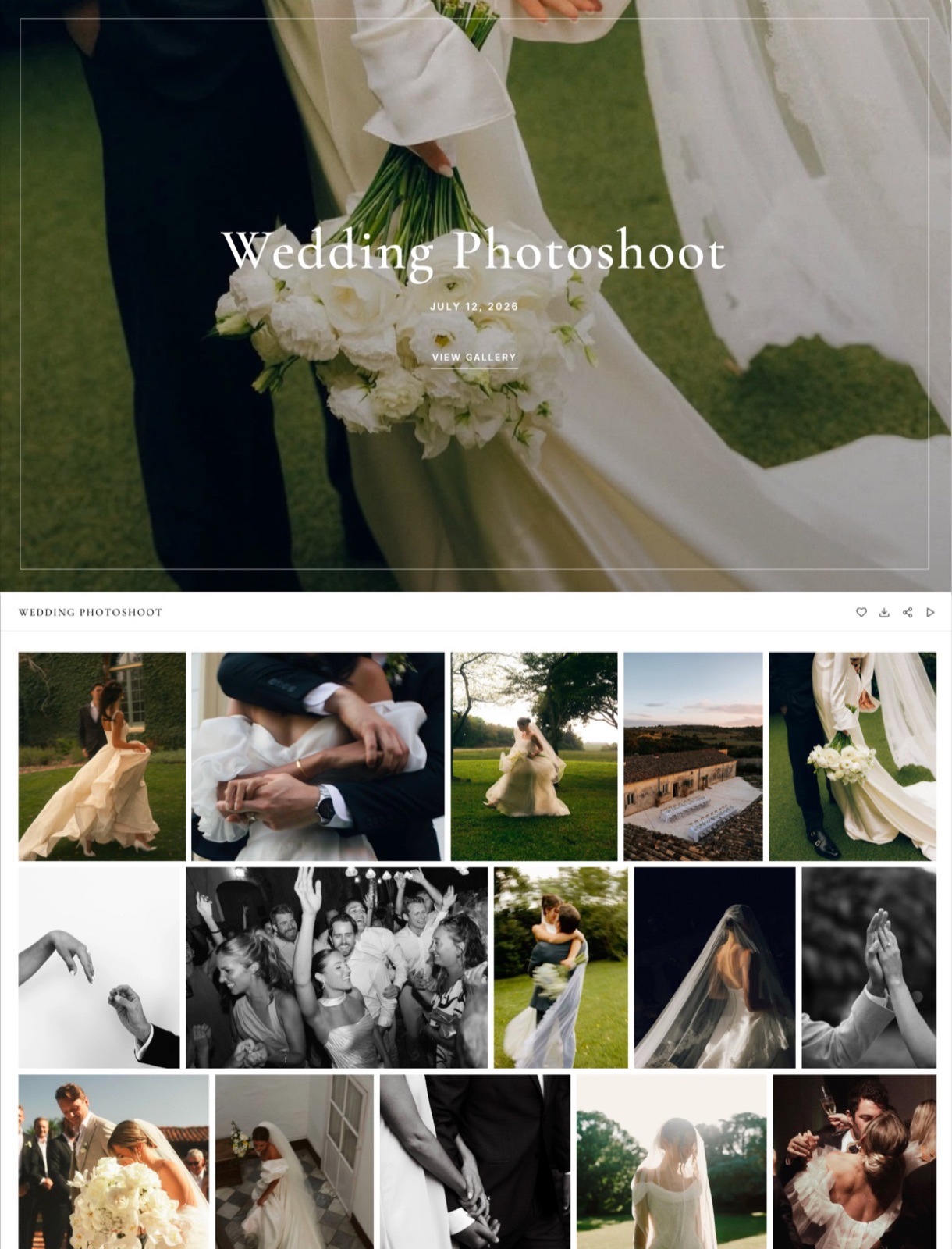
Framekit client galleries
One link per shoot, a cover style that matches your site, hearts and favourites filtering, downloads of the whole set or the picks, and a watermark on photos. Not offered: client uploads into a gallery, print ordering or a native mobile gallery app.
Video review
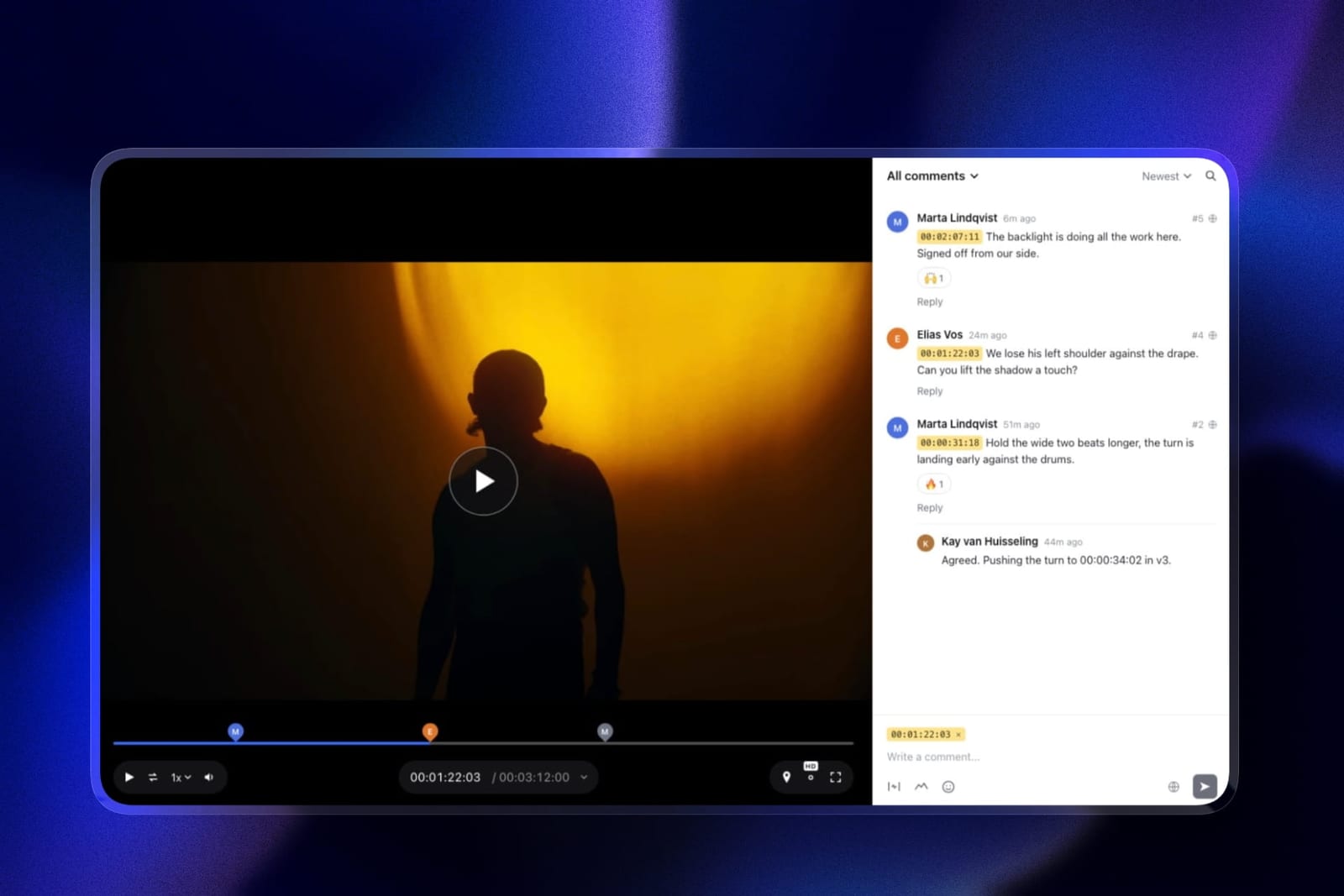
Clients open the link without an account and leave notes pinned to the exact frame, draw on the image and reply in threads.
Each new version stacks on the last with its notes kept, and statuses move from needs review through in progress to approved or needs changes. Review videos run up to 2 hours; comment attachments open on Pro.
Framekit review has no side-by-side version compare and no editing-suite panels.
Slides
A pricing guide, a wedding proposal or a portfolio book can live in the same account as the site.
Describe the deck and the AI asks a few questions about length and audience, picks a style and colour theme, asks for your real details such as packages and prices, proposes an outline for your approval, and builds the slides with speaker notes, leaving placeholders where you gave no facts.
PDF export and share links work on every plan; picture-based PowerPoint export, up to 60 slides, opens on Pro.
Selling: A Commission-Free Store Against a Fee Ladder
Format's store charges no commission from its Pro plan and sells physical, digital and service products, while Framekit's store sells digital downloads only with a fee that falls from 5% to 0% by plan, so Format is cheaper to sell on until you reach Framekit's Business plan.
On Format, the store opens on Pro with up to 15 products and on Pro Plus with up to 1,000; Basic has none. Payments go through your PayPal Business or Stripe account, discount codes and inventory are built in, and digital download files can be up to 100MB.
On Framekit, every plan, Free included, sells unlimited digital products: presets, LUTs, templates, brushes, ebooks and guides, plus free lead-magnet products.
Buyers download instantly and can return for their files, and you can share a direct buy link anywhere without a site.
Payments run through Stripe Connect into your own Stripe account, which makes you the merchant of record, so VAT and sales tax are yours.
The fee is 5% on Free and Starter, 3% on Pro and 0% on Business, charged on the post-discount price and kept on refunds; Stripe's processing applies on top. Discount codes open on Pro.
Checkout is a hosted framekit.ai page with your name and logo and a "Powered by Framekit" line.
The honest maths. On $2,400 a year of preset sales, Framekit's fee is $120 on Starter and $72 on Pro; Format takes nothing. Framekit Business at $372 a year matches Format's 0%, and pays off against Pro once you sell about $533 a month on yearly billing.
What Each Setup Costs in Year One and by Year Three
Format and Framekit cost about the same for a solo photographer or designer who sells a little, and Framekit costs far less for a studio that needs client review, so the gap runs from Format being $6 a year cheaper to Framekit saving about $480 a year.
Assumptions you can change: yearly billing, US prices read on 12 October 2026, prices held flat for three years, regular annual rates for Format (the first-year offer would cut year one by $60 on Pro and $132 on Pro Plus), and domain registration left out on both sides, as is card processing, because Stripe or PayPal charges it on Format sales too, so it does not move the gap.
Format includes the domain free for year one on Pro and Pro Plus.
| Creative | Framekit setup | Framekit year one | Framekit by year three | Format setup | Format year one | Format by year three |
|---|---|---|---|---|---|---|
| Designer selling 60 templates at $40 ($2,400), 8 products | Starter ($84) plus 5% fee ($120) | $204 | $612 | Pro ($204), 0% commission | $204 | $612 |
| Photographer, 40 galleries a year, 40 preset sales at $25 | Pro, 300GB ($180), plus 3% fee ($30) | $210 | $630 | Pro, 50 galleries ($204), 0% commission | $204 | $612 |
| Studio of 3, review on every job, 40-product catalogue, $5,000 of sales | Business, 2TB ($372), 0% fee | $372 | $1,116 | Pro Plus ($312) plus Frame.io Pro for 3 ($540) | $852 | $2,556 |
Frame.io's pricing page lists Pro at $15 per member a month on monthly billing and says annual billing saves 13%, which would bring the studio's review line to about $470 and its Format total to about $780 a year.
What the totals leave out. The photographer row assumes stills only; a photographer who also delivers films would weigh Format's image-led galleries against Framekit's 3GB video files.
The designer row only works on Format while the catalogue stays at 15 products or fewer.
Frame.io Pro brings far more review storage, 2TB plus 2TB per extra member, and passphrase-protected shares and link expiry that Framekit review does not offer; on Framekit, the account holder uploads every cut and the other two edit only the website, while clients comment without an account.
And Format sells physical prints, which no Framekit plan does.
Run it yourselfcount your live client galleries and your products. If either passes 50 galleries or 15 products, price Format Pro Plus at $312 a year rather than Pro. Then add any review tool you pay for, and compare with your Framekit plan plus its fee on last year's sales.
Which Tool for Which Job
Format and Framekit split cleanly once you list the jobs in a working week, so the fastest way to choose is to give each job to whichever tool handles it natively and see which column ends up longer for your practice.
| Job | Better tool | Why |
|---|---|---|
| Selling framed or fine-art prints | Format | Physical products in the store, no Format commission |
| Publishing galleries from Lightroom Classic | Format | Format Publisher plugin |
| Contracts and client records | Format | CRM Light and client contracts on Pro and Pro Plus |
| Delivering a wedding film with the photos | Framekit | Photo and video in one gallery, up to 3GB per video |
| Getting a cut approved | Framekit | Frame-accurate review links, no reviewer account |
| Keeping 60 or more galleries live | Framekit | Unlimited galleries on every plan |
| Selling a large digital catalogue | Framekit | Unlimited products; 0% fee on Business |
| A pricing guide or wedding proposal deck | Framekit | Slides in the same account, PDF on every plan |
| Trying before paying | Framekit | Permanent free plan rather than a 14-day trial |
Limits and Specs Side by Side
These are the published limits that shape everyday use of each platform, taken from Format's pricing page and Help Center and from Framekit's pricing page in October 2026, picked because each is one a working photographer or filmmaker will actually meet.
| Limit | Framekit | Format |
|---|---|---|
| Plans, billed yearly | $0, $7, $15, $31 a month | $10, $17, $26 a month ($12 and $15 first-year offers on Pro and Pro Plus) |
| Plans, billed monthly | $0, $9, $19, $39 | $14, $24, $36 |
| Pages | 10, 30, 200, unlimited | 10 on Basic, unlimited on Pro and Pro Plus |
| Images | No image count; pooled storage of 10GB, 50GB, 300GB or 2TB | 70, 1,500 or unlimited; image storage 100GB on Pro, 1TB on Pro Plus |
| Site video | 15MB uploads on Free, 100MB on paid, plus Vimeo and YouTube embeds | 15 or 120 minutes hosted on Pro and Pro Plus; title-page videos capped at 15MB |
| Client galleries | Unlimited | 3, 50 or 250 |
| Gallery files | Photos 100MB; videos 500MB to 3GB by plan | Images up to 100MB; File Transfers of 2GB, 5GB or 10GB by plan |
| Store | Unlimited digital products; 5%, 5%, 3%, 0% fee | 15 or 1,000 products; no commission; physical, digital (100MB) and services |
| Video review | Every plan | Not offered |
| Custom code | Pro and Business | Pro and Pro Plus |
| Team | 3 members on Pro, unlimited on Business, editing the website only | Not published on the pricing page |
| Redirects, RSS, robots.txt | No redirect manager, no RSS, robots.txt not editable | Not published on the pricing page |
What Happens When Something Changes
These are the moments that test a platform after the trial glow fades, answered from what Format and Framekit publish, so you can see the edges before a client or a renewal date shows them to you.
You cancel. Format's cancellation help says the site stays live until the end of the paid period, content is archived for 12 months if you come back, and Format does not refund on cancellation.
A Framekit site can drop to the permanent Free plan on a framekit.ai address instead of going offline, provided it fits within 10 pages and 10GB.
You hit the gallery cap. On Format Pro, the 51st live gallery means archiving one or moving to Pro Plus. On Framekit there is no gallery count; storage is the limit, pooled across site, galleries and review.
A client wants the film and the photos together. On Framekit they share one gallery link. On Format, you would send the video through File Transfers or a separate service.
A buyer asks for a refund. Framekit keeps its fee, charged on the post-discount price, with Stripe's processing on top; on Business the fee is 0%. On Format, refunds run through your PayPal or Stripe account, and Format takes no commission to keep.
You want your content back. Format's Help Center says exporting site content is not always easy and recommends keeping your originals. Keep originals on any platform; neither tool imports the other's site.
Switching From Format to Framekit
Moving from Format to Framekit is a rebuild rather than an import, so the work is checking what you would lose, recreating the pages that bring enquiries, and timing the move around Format's billing, since it does not refund on cancellation.
- Check what you would give up. Physical print sales, CRM Light, client contracts and the Lightroom Classic plugin stay behind. If those run your business, keep Format and use Framekit only for video galleries and review.
- Gather your originals. Format recommends keeping originals because export is limited, so collect images and video from your drives or Lightroom rather than the live site.
- List the pages that bring work. Note their URLs; Framekit has no redirect manager, so keep the same slugs where you can.
- Draft on Framekit. Upload a screenshot of your Format homepage for the AI to rebuild, or start from a template, then refine by hand.
- Move deliveries. Create new client galleries on Framekit for upcoming shoots and let open Format galleries run until clients have downloaded.
- Move the store. Recreate digital products and connect Stripe; plan a separate route for physical prints.
- Handle the domain. If Format registered your domain, ask Format support how to transfer it or change its DNS before you cancel; then connect it on Framekit Starter or above.
- Cancel near renewal. Format keeps the site live to the end of the paid period, so cancel close to the renewal date once everything works on Framekit.
Which One Should You Pick?
This decision path asks the questions in the order that rules one tool out fastest, starting with whether you sell physical prints, because that single answer settles Framekit vs Format for many photographers before any price comparison.
1. Do you sell physical prints or products from your site? If yes, Format's store handles them with no commission; Framekit sells digital files only. If no, go to question 2.
2. Do your deliveries include video, or do clients review your edits? If yes, choose Framekit for galleries with video and frame-accurate review in one account. If no, go to question 3.
3. Will you keep more than 50 galleries live or sell more than 15 products? If yes, compare Format Pro Plus at $312 a year with Framekit Pro at $180 plus a 3% fee, or Business at $372 with none. If no, go to question 4.
4. Do you rely on Lightroom Classic publishing, contracts or a CRM? If yes, Format. If no, go to question 5.
5. Do you want a free plan or decks beside the site? If yes, Framekit. If no, the two cost about the same for a solo photographer; choose the editor you prefer after trying both.
Frequently Asked Questions
Is Framekit or Format better for photographers in 2026?
Format is better for stills photographers who sell physical prints and want contracts, a CRM and Lightroom Classic publishing on one plan.
Framekit is better for photographers and filmmakers who deliver video, send cuts for review or need more than 50 live galleries, since it includes unlimited photo-and-video galleries and review on every plan, Free included.
Does Format charge commission on store sales?
Format charges no commission on store sales, according to its Help Center; you pay only PayPal's or Stripe's processing fees. The store opens on Pro with 15 products and on Pro Plus with 1,000.
Framekit charges 5% on Free and Starter, 3% on Pro and 0% on Business, with Stripe processing on top.
Does Format have a free plan?
Format has no free plan; it offers a 14-day free trial with no credit card, then Basic at $10 a month billed yearly, Pro at $17 and Pro Plus at $26.
Framekit's Free plan is permanent, with 10 pages, 10GB of storage, unlimited client galleries and a working store on a framekit.ai address.
How much does Format cost in 2026?
Format lists Basic at $14 a month billed monthly or $10 billed yearly, Pro at $24 or $17, and Pro Plus at $36 or $26, as read in October 2026. A first-year offer ending 31 October 2026 brings annual Pro to $12 and Pro Plus to $15 a month.
A custom domain is free for year one on Pro and Pro Plus, then $30 a year.
How many client galleries can I have on Format and Framekit?
Format's pricing page gives Basic's client-gallery allowance as both 3 and 10 in different places, then lists 50 on Pro and 250 on Pro Plus.
Framekit allows unlimited client galleries on every plan, Free included, limited only by pooled storage of 10GB, 50GB, 300GB or 2TB, so a busy wedding season never forces you to archive old galleries.
Can I deliver video in Format or Framekit galleries?
Framekit galleries hold photos and video together, with video files up to 500MB on Free, 1GB on Starter, 2GB on Pro and 3GB on Business.
Format's client gallery documentation is written around images up to 100MB each; for other files Format offers File Transfers of 2GB, 5GB or 10GB by plan.
Can I sell prints on Framekit like on Format?
No. Framekit's store sells digital downloads only, with no physical products, shipping or print fulfilment, and its galleries have no print ordering.
Format's store sells physical products such as prints and paintings with no commission, but you handle printing and shipping yourself, since Format does not connect to a print lab.
Framekit vs Format: which is cheaper?
Framekit vs Format comes out nearly even for a solo photographer: in our examples Format costs $204 a year and Framekit $204 to $210.
Framekit is far cheaper for a studio that needs client review, at $372 a year against $852 for Format Pro Plus plus Frame.io. Format's first-year offer tilts year one further its way.
What happens to my Format site if I cancel?
Format keeps your site live until the end of the period you paid for, archives the content for 12 months in case you return, and does not refund on cancellation, per its Help Center.
A Framekit paid plan can instead fall back to the Free plan, so a site within 10 pages and 10GB stays online.
Does Framekit have a Lightroom plugin like Format?
No. Framekit has no Lightroom plugin, so you export and upload images to the site and to galleries.
Format Publisher creates and updates Format client galleries straight from Lightroom Classic, which is a real time saver for photographers who cull and grade there. Weigh that workflow before switching.
Does Framekit have client contracts or a CRM?
Framekit's pricing page lists contact and booking forms whose enquiries land in your dashboard and inbox, with 500 to unlimited submissions a month by plan, but no CRM or contract tools.
Format includes CRM Light and client contracts on Pro and Pro Plus, so a photographer who wants those inside the website platform should lean towards Format.
Is Format's first-year discount worth taking?
Format's first-year offer, valid until 31 October 2026, cuts annual Pro from $204 to $144 and Pro Plus from $312 to $180 for year one only.
It is worth taking if you already know Format fits, but compare year two and three at the regular rate, which is what the cost table above uses.
Does Framekit use AI credits?
Yes. Every Framekit plan, Free included, has a monthly AI allowance that grows with the plan, and AI generation for site sections, copy and decks draws on it.
Editing pages and slides by hand never uses the allowance, and decks are unlimited on every plan. Format's pricing page does not describe AI site generation.
The Verdict: Framekit vs Format in 2026
Choose Format if you are a stills photographer who sells physical prints, wants a commission-free store from Pro, and runs contracts and client records from the same login, with galleries published from Lightroom Classic.
Choose Framekit if your deliveries include video, your clients review cuts, you keep many galleries live, or you want a free plan and decks in the same account.
Where Framekit loses: it cannot sell physical prints, it charges a store fee on every plan below Business where Format Pro charges none, and it has no Lightroom plugin, CRM or contracts.
Its checkout runs on a hosted framekit.ai page, and VAT and sales tax are yours to handle. For a print-selling stills studio, Format is the better fit.
For everyone whose work now includes motion, review rounds or a growing digital catalogue, the cheapest test is to build your homepage on Framekit's free plan and send one real client a gallery with both the photos and the film.
Related reading: Framekit vs Adobe Portfolio covers the other Lightroom-friendly option, Framekit vs Pixieset goes deep on galleries, the best client gallery platforms widens the field, and the best client gallery platforms with video covers hybrid shooters.