Framekit templates
Start from a designer-made template
 Use template
 Use template
 Use template
 Use template
 Use template
 Use template
 Use template
 Use template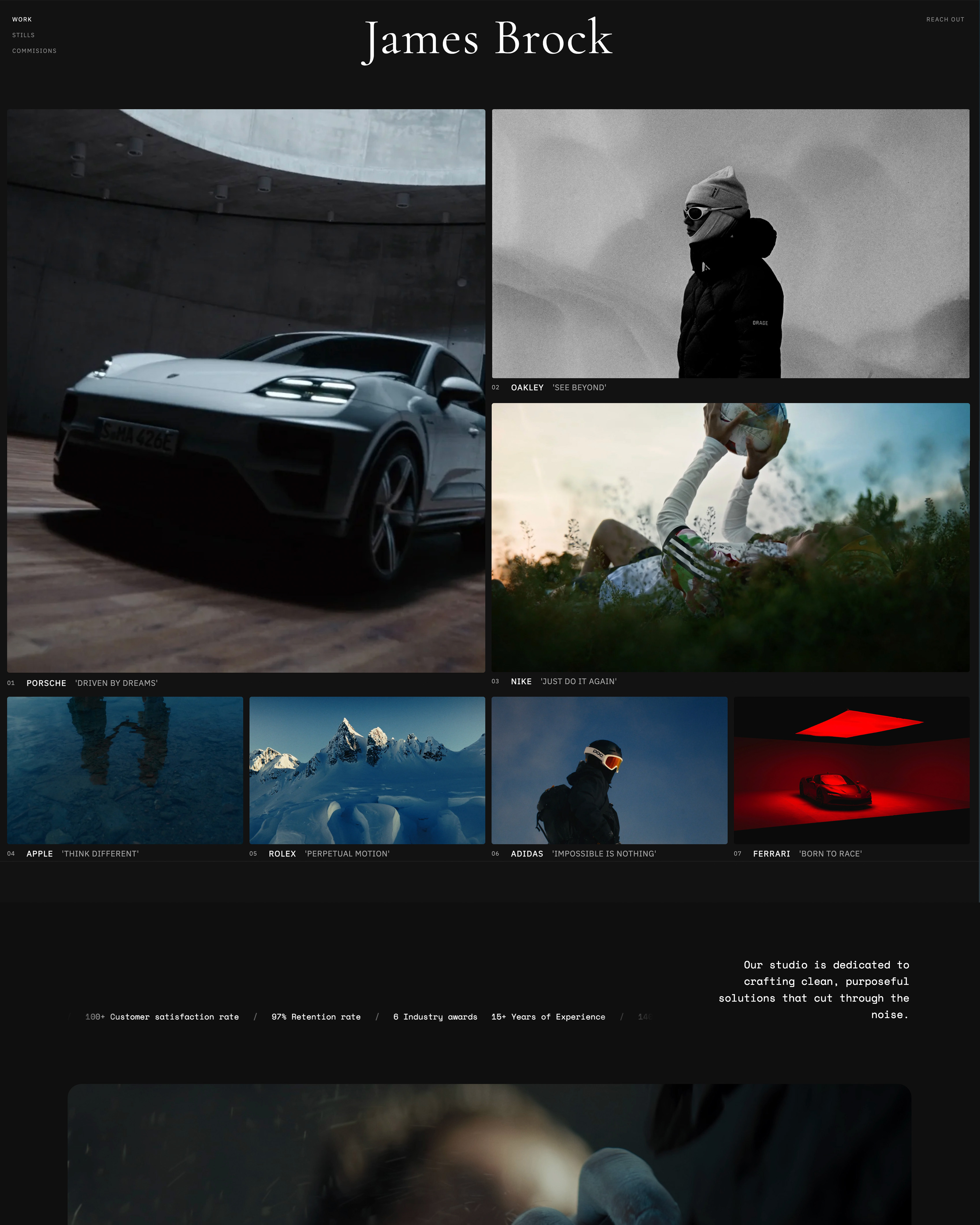
For most of the last decade, "just use Squarespace" was the safe answer for a creative who needed a good-looking site, and the answer still holds for plenty of people. What changed is the job around the site.
A photographer now delivers galleries, a filmmaker sends cuts for review, a designer sells templates and pitches with decks, and each of those used to mean another subscription bolted onto the Squarespace bill.
So the honest Framekit vs Squarespace question in 2026 is not only which one has the better design quality or performance on launch day.
It is which one leaves you paying for fewer tools by the end of year three, and which one you will still enjoy editing when the portfolio has doubled.
A website builder is a tool that lets you design, publish and host a website without writing code, and in 2026 the category has split into general builders that do everything a small business needs (Squarespace) and creative platforms that bundle the site with the delivery and selling tools creatives use every week (Framekit).
Framekit is the better pick for photographers, filmmakers and designers who also deliver galleries, send cuts for review or sell digital files, because one Framekit account holds the AI website builder, client galleries, video review, Slides and a download store, starting free and from $7 a month for a custom domain.
Squarespace is the better pick if you sell physical products, need appointment scheduling or memberships, or want a huge template library with no AI involved, and its Basic plan costs $19 a month billed yearly.
Full disclosure: Framekit is our product. Every Squarespace figure on this page comes from Squarespace's own pricing page and Help Center, and the section on where Squarespace wins is written to be read by someone who should stay on it.
This comparison was updated for October 2026 and rebuilt rather than patched: the old version leaned on design scores and timed tests we can no longer stand behind, so we removed them, re-verified every Squarespace price and fee at the source on 12 October 2026, and added the galleries, review, Slides and store that Framekit now ships, along with the small Made with Framekit credit its galleries keep on every plan.
How This Framekit vs Squarespace Comparison Was Built
This comparison is built from what each company publishes about its own product, plus cost arithmetic you can redo with your own numbers, because published plan limits and fees are the facts that still hold true after the honeymoon month on either platform.
Read at the source. For Squarespace: the pricing page, the Help Center article on selling on the Basic, Core, Plus and Advanced plans, and its articles on URL mappings, RSS feeds and Acuity Scheduling.
For Framekit: framekit.ai/pricing and the product pages for galleries, video review, Slides and the store. All read on 12 October 2026.
Calculated. Three creatives run through the money section: a solo designer selling a $25 template pack, a photographer who delivers about 25 client galleries a year, and a three-person studio that sends every cut for client review.
For each, we price the cheapest setup that does the whole job on each side, including the gallery, review and store tools a Squarespace user has to buy elsewhere.
Not claimed. We did not time builds or score designs for this version, so you will not find "8.4 out of 10" anywhere below.
Design is taste, and the fastest way to judge it is the free plan on Framekit and the 14-day trial on Squarespace, side by side, with your own images.
Prices are US dollars billed yearly unless a line says monthly. Squarespace prices vary by billing country; the US figures are the ones quoted.
Framekit vs Squarespace at a Glance
The short version is that Squarespace is the broader small-business platform and Framekit is the deeper creative-business platform, and the table below shows where each of those statements turns into a plan limit or a fee you will actually notice.
| Framekit | Squarespace | |
|---|---|---|
| What it is | AI website builder plus galleries, video review, Slides and a download store in one account | Template-based website builder with commerce, scheduling and memberships |
| Free plan | Yes, permanent, on a framekit.ai subdomain | No, a 14-day free trial |
| Cheapest custom domain | Starter, $7 a month yearly or $9 monthly | Basic, $19 a month yearly or $25 monthly |
| How you start a site | AI drafts sections and copy, or rebuilds a reference screenshot; templates built with AI and trained by senior designers | Pick a template, then edit in the Fluid Engine drag-and-drop editor |
| Client galleries | Unlimited, every plan | Not a native feature |
| Video review with timecoded notes | Every plan | Not offered |
| Selling | Digital downloads only, fee 5% to 0% by plan | Physical, digital and services; 2% store fee on Basic, 0% from Core |
| Scheduling and memberships | No | Acuity Scheduling (separate subscription), courses and memberships |
| Redirects and RSS | No redirect manager, no RSS feed | URL mappings for 301 redirects, RSS on blogs |
| Team editing | 3 team members on Pro, unlimited on Business | 2 contributors on Basic, unlimited from Core |
Squarespace's tiers and fees checked against its own pricing page and Help Center on 12 October 2026.

Where Squarespace Wins

Squarespace wins wherever the website has to run a broad small business rather than a creative practice: physical products with shipping, appointments, memberships and courses, a mature blog with RSS, and the safety net of redirects when you restructure, which is a long list of things Framekit does not do.
Commerce beyond downloads. Squarespace sells physical products, services and digital products on every plan, with unlimited products.
Core adds shipping labels, real-time carrier rates and automated tax calculation for over 100 countries, and Advanced adds discounts, payment plans and cart reservations for limited releases.
Framekit sells digital downloads only, with no shipping, no print-on-demand and no tax calculation. If you sell prints, merch or anything in a box, Squarespace is the honest answer.
Scheduling. Squarespace owns Acuity Scheduling, which handles client self-booking, group classes, intake forms and reminders, and drops into a Squarespace page through a Scheduling block.
It is a separate subscription, but it is built by the same company and it works without glue. Framekit has contact and enquiry forms whose entries land in your dashboard and inbox, not a calendar booking system.
Courses and memberships. Squarespace's Digital Products cover courses, memberships and gated content, with a fee that falls from 7% on Basic to 5% on Core, 1% on Plus and 0% on Advanced, according to its Help Center.
Framekit has no memberships, no courses and no recurring billing.
Site plumbing. Squarespace's URL mappings let you write 301 redirects line by line, its blogs publish RSS feeds, and its pricing page says there are no caps on bandwidth or storage.
Basic allows up to 1,000 pages. Framekit has no redirect manager, no RSS feed, and robots.txt is not editable, which matters if you are moving a blog with years of inbound links.
Video hosting inside the site. Squarespace hosts 30 minutes of video on Basic, 5 hours on Core, 50 hours on Plus and unlimited video on Advanced.
Framekit's site video uploads stop at 15MB on Free and 100MB on paid plans, so a long reel on a Framekit page is a Vimeo or YouTube embed.
A large, finished template library. If you want to browse hundreds of complete designs, pick one and never touch AI, Squarespace is built for exactly that. Framekit's Free plan gets a starter set of templates; the full library opens on Starter.
Verdict: if your site is a shop, a booking front desk or a membership, Squarespace does more of that work natively than Framekit does, and staying is the right call. Readers already leaning that way should also look at Squarespace vs Webflow before renewing.
Where Framekit Wins

Framekit is an AI website builder for creative work that also delivers client galleries, runs frame-accurate video review, builds decks and sells digital downloads from one account, so it wins wherever the website is only one of the five jobs a photographer, filmmaker or designer does every week.
AI that does the first draft. Framekit's templates were built with AI and trained by senior designers.
The AI generates whole sections, writes the copy, and can recreate a layout from a reference image or screenshot you upload, so "make it feel like this" is a starting point rather than an afternoon of nudging blocks.
Everything stays editable by hand in the visual editor. The AI runs on Framekit's own models, Cadence for premium output and Score for fast drafts.
A permanent free plan and a cheaper door. Framekit Free is $0 with no card, 10 pages, 10GB of storage and every gallery and review feature.
A custom domain and removal of the website badge start on Starter at $7 a month billed yearly, against $19 for Squarespace Basic. Hosting, SSL and a global CDN are included on every plan, including Free.
Galleries and review are already in the account. Squarespace has no client-proofing gallery and no video review, so a photographer or filmmaker on Squarespace pays someone else for both.
On Framekit, unlimited galleries and timecoded review links sit in the same account and draw on one pooled storage allowance: 10GB, 50GB, 300GB or 2TB by plan.
A store that ends at 0%. Framekit sells digital downloads on every plan, with a fee of 5% on Free and Starter, 3% on Pro and 0% on Business, and you can sell through a shareable buy link without publishing a site at all.
Built-in basics on every plan. Titles, descriptions, a sitemap and social previews per page; structured data; visitor analytics; contact forms; and a cookie banner for EU visitors. Custom code and site translation open on Pro.
The detail most comparisons missFramekit meters AI too. Every plan, Free included, carries a monthly AI allowance that grows with the plan, and Squarespace's pricing page meters its own built-in AI tools in credits by plan.
The difference is what costs nothing: editing any page by hand on Framekit never draws on the allowance, and only AI generation does.
Verdict: if your week includes a delivery, a review round or a product drop as well as a portfolio, Framekit replaces two or three subscriptions that a Squarespace site still needs beside it.

Design Quality and Performance: What You Can Judge Yourself
Both builders produce professional-looking sites in the right hands, and both include hosting and a CDN, so the useful design question is how each one behaves when your portfolio grows, and that is something you can test in an hour without trusting anyone's scores.
Squarespace's design strength is finish. Its templates are complete compositions, and its Fluid Engine editor lets you drag blocks anywhere on a grid.
That freedom is real, and so is its cost: every new section you add is styled by you, block by block, and the coherence of the site depends on how disciplined you are with spacing and type.
Framekit's design strength is the draft. A site has one theme of colours and fonts, and the AI writes new sections against that theme, so a testimonials block or a new project page arrives looking like it belongs.
You can also hand the AI a screenshot of a site you admire and ask it to rebuild that structure with your work in it, which turns a moodboard into a working page without rebuilding it block by block.
On performance, we will not publish numbers, because load times swing with image weight, hosting region and the visitor's connection, and a single test proves little. Both platforms serve sites over a CDN with SSL.
Framekit serves responsive image sizes for each screen and is built for image-heavy portfolios; on Squarespace, heavy template animations and very large uploads are the usual reasons a page feels slow.
Run it yourselftake the five images and the bio you actually use. Build your homepage and one project page on Framekit's free plan and on a Squarespace trial.
Then add a third page, a client testimonial section and a pricing table to each, and open both on your phone over mobile data.
Whichever you would still be happy to send to a client after the third page is your answer, and it takes about an evening.
What Sits Around the Site: Galleries, Review, Slides and a Store
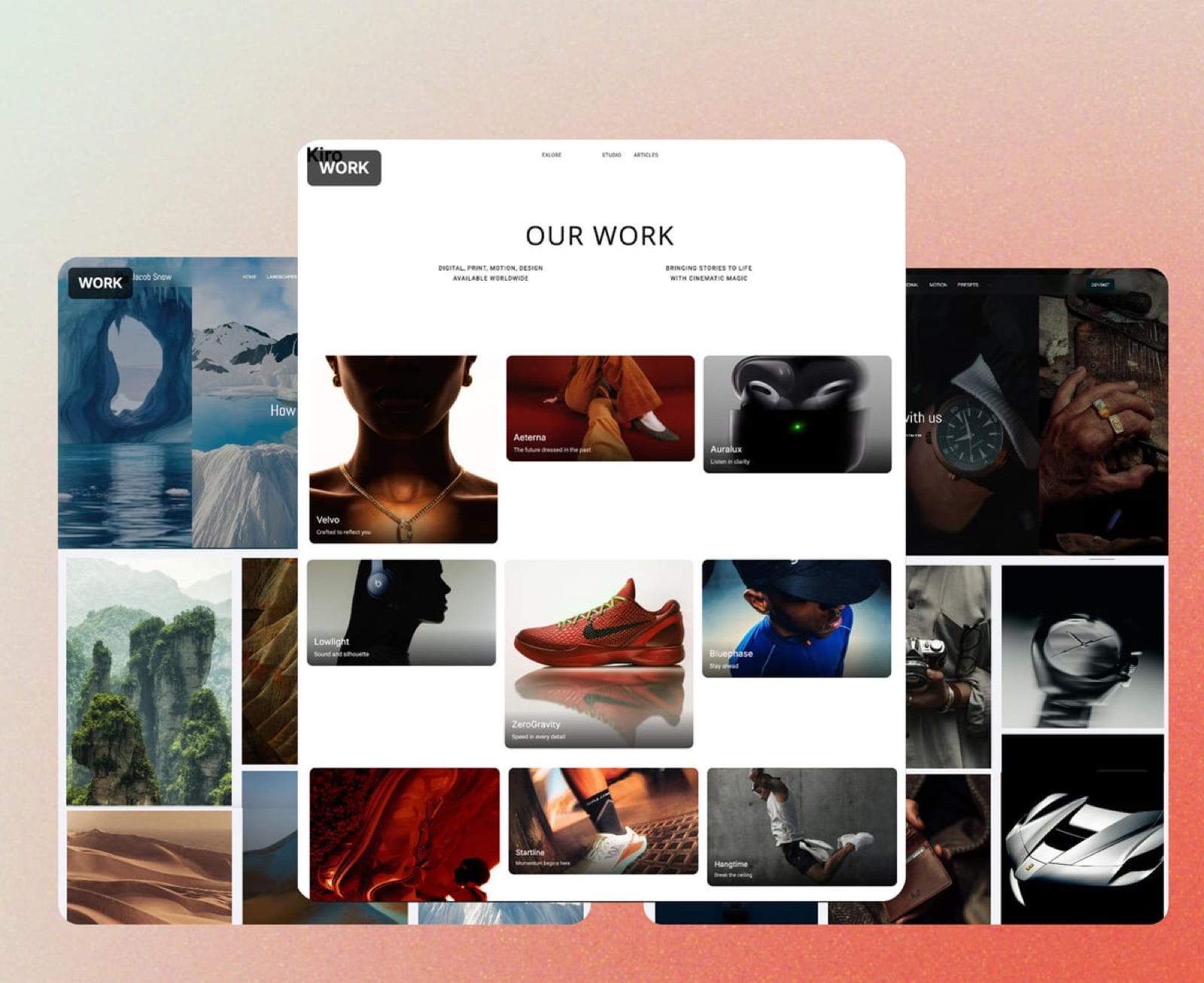
Framekit is one account holding five tools that share one storage pool, and this is the part of the comparison that changes the bill, because each of these jobs is something a Squarespace user typically buys from another company.
Client galleries
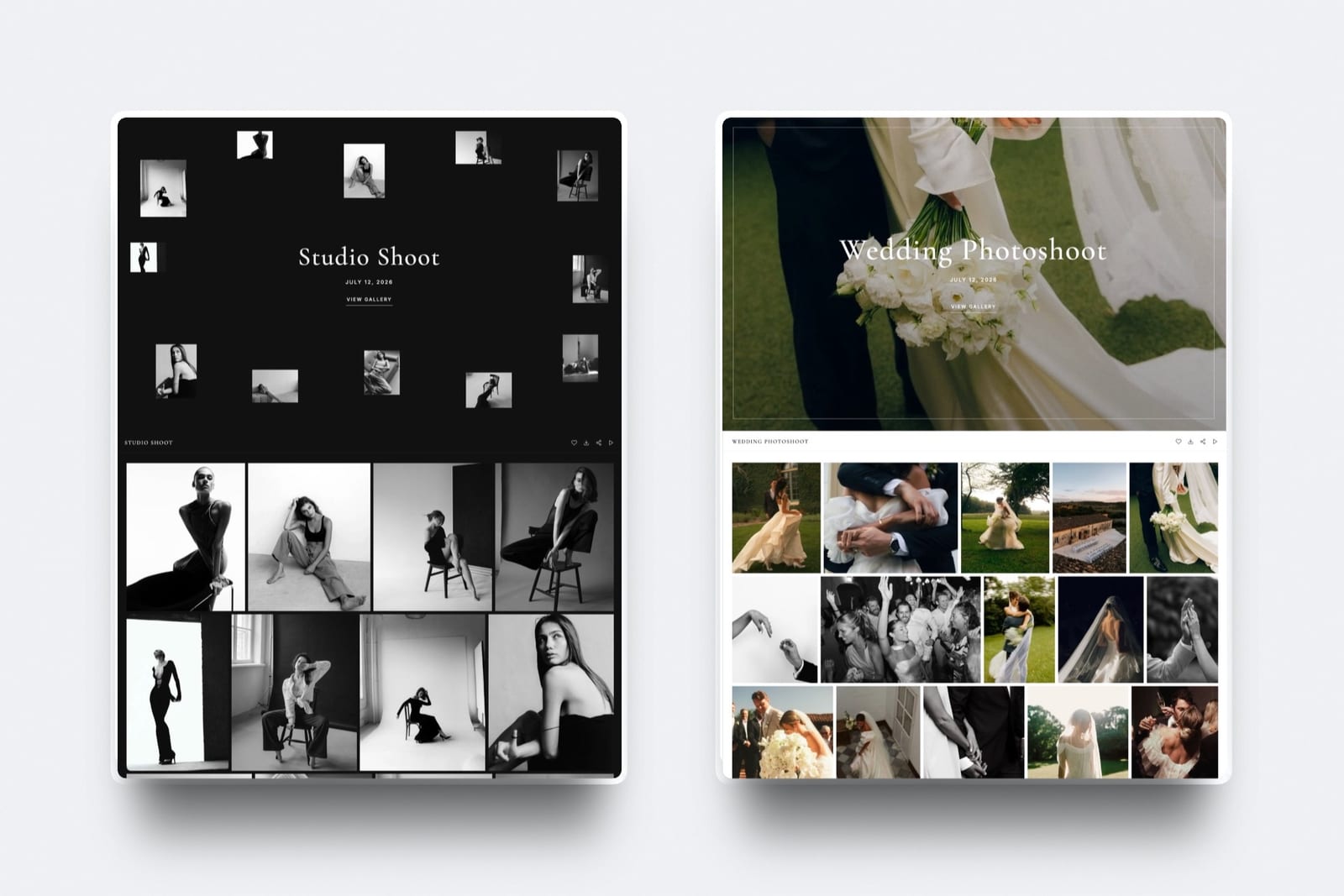
Framekit galleries hold photos and video in the same gallery, with one share link per shoot.
Clients tap a heart to favourite, filter to favourites for album or print selections, and download the full set or only favourites behind an optional download PIN. Photos can be watermarked; video never is.
Every gallery feature is on every plan, galleries are unlimited, and on paid plans they carry your branding and your own domain, with a small Made with Framekit line kept in the gallery footer on every plan.
Photo files can be up to 100MB each, and video files 500MB on Free, 1GB on Starter, 2GB on Pro and 3GB on Business.
What Framekit galleries do not do: print ordering or lab fulfilment, print price sheets, school or volume workflows, a native mobile app, or client uploads into a gallery.
If print sales drive your income, read the best client gallery platforms before deciding.
Video review
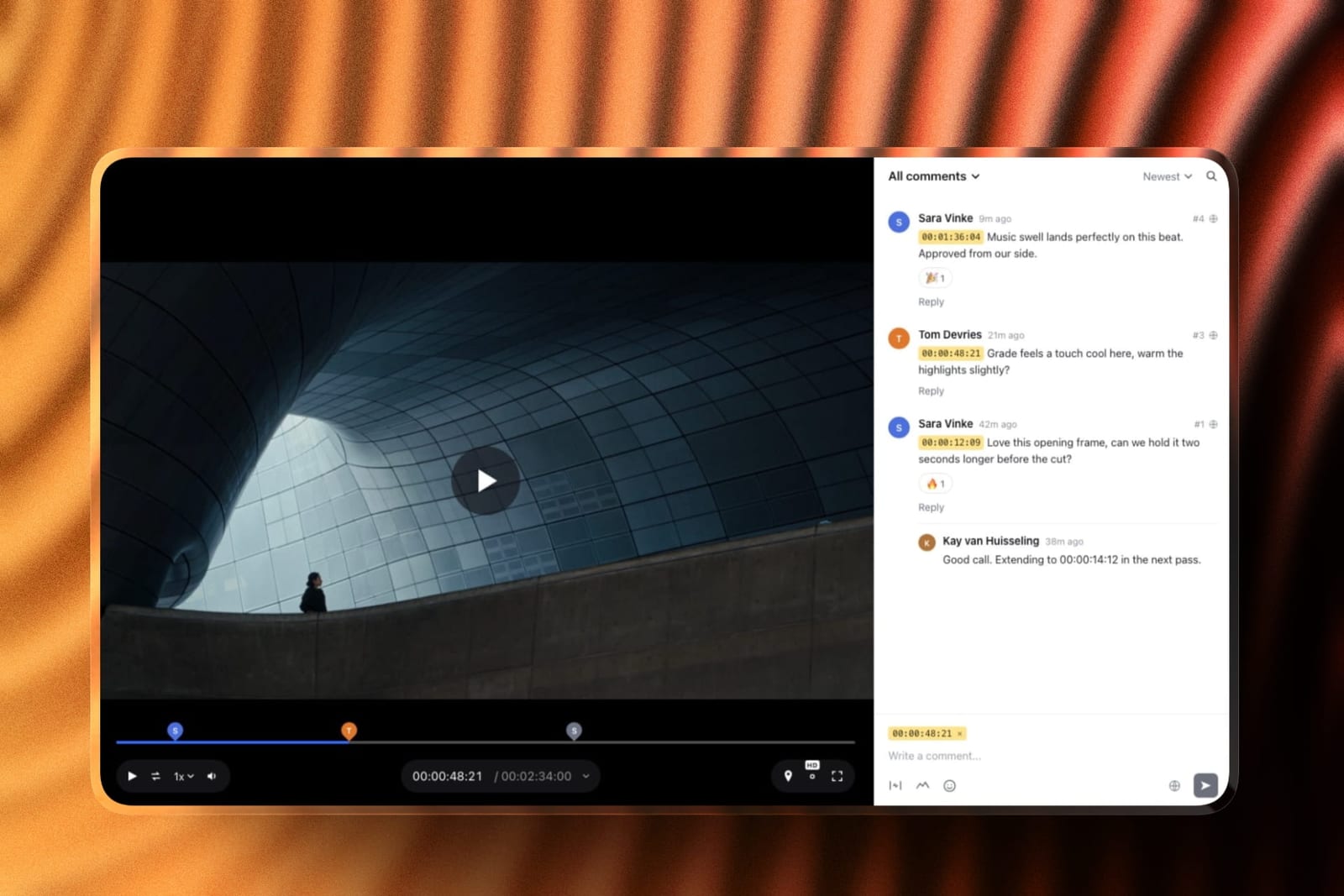
Upload a cut, send a link, and the client comments at the exact frame. Notes appear as timecode chips, reviewers can draw on the frame and reply in threads, and no reviewer needs an account.
Upload v2 and v3 into a version stack and the earlier cuts keep their notes; mark each round needs review, in progress, approved or needs changes. Every review feature is on every plan, for videos up to 2 hours.
Attachments on comments open on Pro.
The honest limits: no Premiere, Resolve or Final Cut panels, no camera-to-cloud, no side-by-side version compare, and review covers video only. Team members on Pro and Business are site admins, so the account holder is the one who uploads review cuts.
Slides
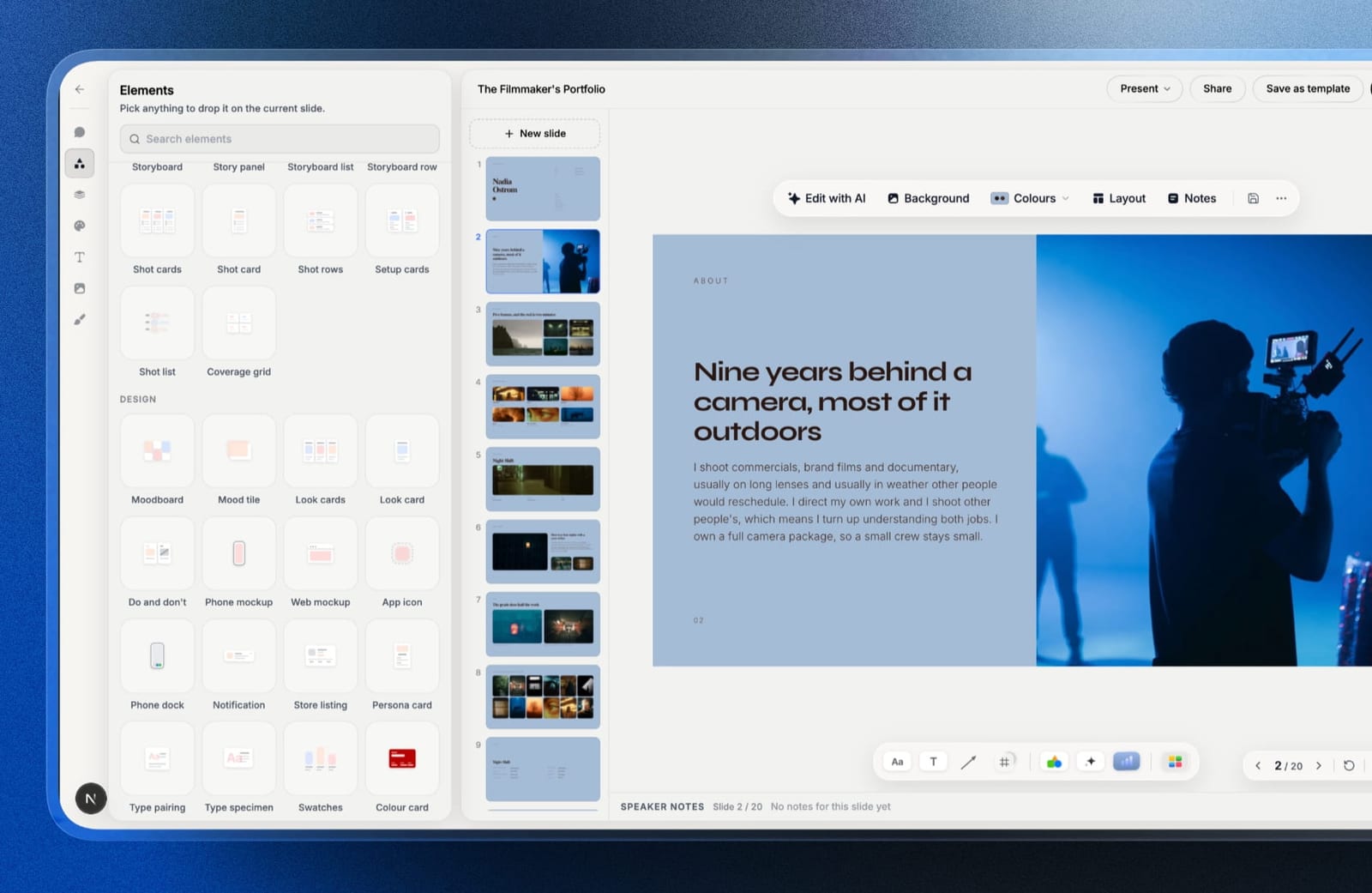
Framekit Slides builds treatments, lookbooks, portfolio decks and pitch decks from templates made for creative work, with shot lists, storyboards, moodboards and type specimens as ready-made elements.
The AI drafts a whole deck from a brief, working from an outline you approve, or writes and lays out any single slide from a description; decks are unlimited on every plan, and every deck can be presented full screen, shared as a link or exported to PDF.
PowerPoint export opens on Pro and is picture-based.
Store
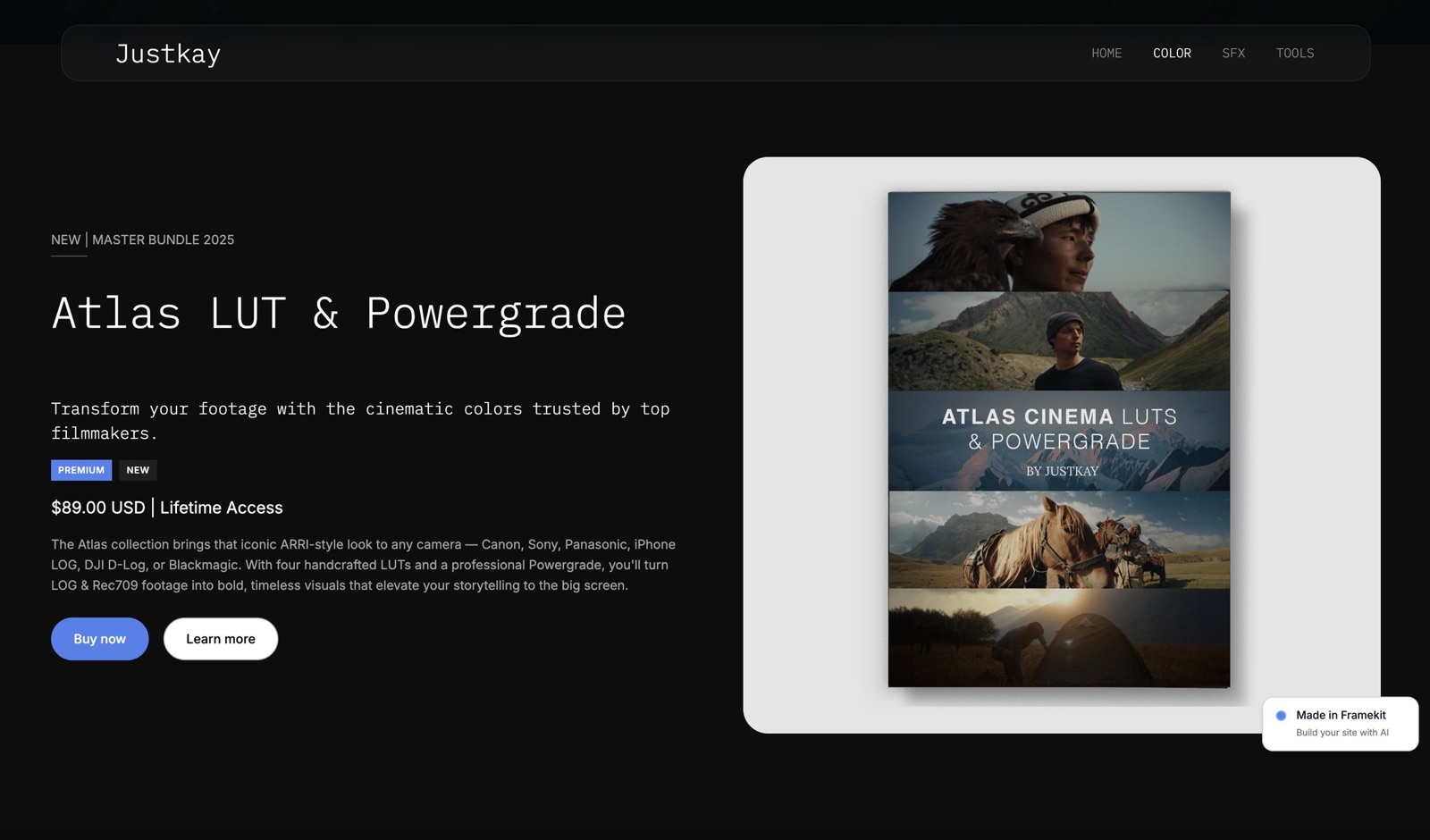
The store sells presets, LUTs, templates, ebooks and other downloads, with unlimited products on every plan and free products for lead magnets.
Payment runs through Stripe Connect into your own Stripe account, which makes you the merchant of record, so Framekit does not collect VAT or sales tax for you. Buyers download instantly and can come back for their files.
Checkout is hosted on framekit.ai with your name and logo, and every checkout carries a "Powered by Framekit" line. Discount codes open on Pro.
What Each Setup Costs in Year One and by Year Three
The cheapest way to do the whole job is Framekit for every creative below, but the gap ranges from about $54 a year for a solo designer to roughly $700 a year for a three-person studio, because the savings come almost entirely from the gallery and review tools a Squarespace site needs beside it.
Assumptions you can change: yearly billing, US prices from 12 October 2026, card processing left out on both sides because it applies either way, and prices held flat for three years.
Squarespace includes a free domain for the first year on annual plans; on Framekit you connect a domain bought from any registrar, so add that registration fee to Framekit from year one and to Squarespace from year two.
| Who | Framekit setup | Framekit year one | Framekit by year three | Squarespace setup | Squarespace year one | Squarespace by year three |
|---|---|---|---|---|---|---|
| Solo designer, $3,000 a year of template sales | Starter ($84) plus 5% fee ($150) | $234 | $702 | Basic ($228) plus 2% store fee ($60) | $288 | $864 |
| Photographer, about 80GB of galleries live, $1,200 of preset sales | Pro ($180), 300GB pooled, plus 3% fee ($36) | $216 | $648 | Basic ($228) plus Pixieset Plus galleries, 100GB ($192), plus 2% fee ($24) | $444 | $1,332 |
| Studio of 3, client review on every job, $6,000 of LUT sales | Business ($372), 2TB, 0% fee | $372 | $1,116 | Core ($348) plus Frame.io Pro for 3 members ($540) plus Pixieset Plus ($192) | $1,080 | $3,240 |
Where the outside prices come from, each read on its vendor's own page in October 2026: Pixieset's Client Gallery plans run Basic $8, Plus $16 and Pro $24 a month billed yearly, with 10GB, 100GB and 1TB of photo storage.
Frame.io's pricing page lists Pro at $15 per member a month, billed monthly, with a 13% discount for annual billing, which would take the studio's review line to about $470.
Three things these totals do not show.
First, Frame.io Pro gives far more review storage (2TB plus 2TB per extra member) and features Framekit does not have, such as passphrase-protected shares and link expiry, so the studio row compares jobs, not identical products, and on Framekit the account holder uploads every cut while the other two edit only the website.
Second, Pixieset includes print sales and Framekit does not.
Third, a solo designer selling more than about $3,000 a year should run the Pro line too: at 3% the fee on $6,000 is $180, so Pro costs $360 a year in total against $384 on Starter.
Run it yourselfadd up last year's download sales, multiply by your Framekit plan's fee (5%, 3% or 0%), and add the plan price. Then list every tool you pay for beside your Squarespace plan for galleries, review and selling. If the second number is bigger, the move pays for itself in year one.
Limits and Specs Side by Side
These are the published limits that decide day-to-day fit, taken from Framekit's pricing page and Squarespace's pricing page and Help Center in October 2026, with each row chosen because it is a limit a creative actually runs into.
| Limit | Framekit | Squarespace |
|---|---|---|
| Pages | 10 Free, 30 Starter, 200 Pro, unlimited Business | Up to 1,000 on Basic |
| Storage | 10GB, 50GB, 300GB, 2TB, pooled across site, galleries and reviews | No caps on bandwidth or storage stated |
| Video on the site itself | 15MB per upload on Free, 100MB on paid plans, plus Vimeo and YouTube embeds | 30 minutes Basic, 5 hours Core, 50 hours Plus, unlimited Advanced |
| Video in galleries and review | Per file 500MB Free, 1GB Starter, 2GB Pro, 3GB Business; review videos up to 2 hours | Not offered |
| Team | 3 team members Pro, unlimited Business | 2 contributors Basic, unlimited Core and up |
| Custom code | Pro and Business | Core and Advanced (CSS and JavaScript) |
| Form submissions a month | 500 Free, 1,000 Starter, 5,000 Pro, unlimited Business | Not listed as a cap |
| Store fee on your sales | 5% Free and Starter, 3% Pro, 0% Business | 2% Basic store fee, 0% Core and up; Digital Products 7%, 5%, 1%, 0% |
| What you can sell | Digital downloads only | Physical, digital, services, courses, memberships |
| Redirects, RSS, robots.txt | None, none, not editable | URL mappings, RSS feeds on blogs |
| AI | Monthly allowance on every plan; manual editing never uses it | Built-in AI tools metered in credits by plan |
What Happens When Things Go Sideways
The mechanics below are the questions people ask a week after switching, and each answer comes from what the two platforms publish, so you can plan around them before you move rather than discover them with a client waiting.
A client has no account. Framekit gallery and review links open without a Framekit account; a reviewer leaves frame-accurate notes from the link.
On Squarespace you would be sending a Pixieset or Frame.io link anyway, so the client experience depends on that third tool.
A video is too big for the page. On Framekit, anything over 100MB on a paid plan goes in as a Vimeo or YouTube embed on the site, or into a gallery or review link where per-file limits run up to 3GB.
On Squarespace, video counts against the plan's hours of hosting instead.
You refund a buyer. Framekit's store fee is charged on the post-discount amount and is kept on refunds, and Stripe's own processing fee applies on top. Check Squarespace Payments' terms for the same case before you compare refund-heavy products.
A buyer loses the download. Framekit's order emails carry download links valid for 7 days, buyers can come back for their files, and you can resend fresh links. Updated files are not pushed to past buyers automatically.
Sales tax and VAT. On Framekit you are the merchant of record through your own Stripe account, so tax is yours to handle.
Squarespace Core and Advanced add automated tax calculation for a small per-transaction charge, which is a real reason to stay for a seller with customers in many countries.
You downgrade to free. Framekit's Free plan is permanent but has no custom domain and shows a Framekit badge, so a downgraded site runs on its framekit.ai address. Squarespace has no free plan to fall back to.
Switching From Squarespace to Framekit
Moving from Squarespace to Framekit is a rebuild rather than an import, because neither platform exports a site the other can open, so the work is in carrying over content, URLs and the tools around the site in the right order.
| Step | What to do | Watch out for |
|---|---|---|
| 1. Inventory | List every page, blog post, product and form on the Squarespace site, plus the external tools you pay for (galleries, review, scheduling) | Squarespace pages over Framekit's page cap for your plan |
| 2. Export content | Run Squarespace's export, which produces a WordPress-format file with layout pages, one blog and gallery pages, and download your original images | Store, portfolio and index pages, product and video blocks and custom CSS are left out of the export |
| 3. Draft the new site | Start from a Framekit template or give the AI a screenshot of your current homepage and rebuild it | Free plan templates are a starter set; the full library is on Starter |
| 4. Rebuild key URLs | Keep page slugs identical where you can | Framekit has no redirect manager, so changed URLs will not forward |
| 5. Move delivery tools | Recreate active client galleries and open review rounds in Framekit | Keep the old gallery tool live until current clients have downloaded |
| 6. Move products | Add downloads to the Framekit store and connect Stripe | Physical products and memberships have no home on Framekit |
| 7. Point the domain | Connect your domain on Starter or above | A Squarespace-registered domain can stay there or be transferred to a registrar |
| 8. Overlap, then cancel | Run both for a billing cycle and check forms, checkout and analytics | Squarespace changes take effect at the end of the billing cycle |
If your Squarespace blog has years of inbound links, keep the same slugs on Framekit, accept that any changed URL will break, and keep the posts that earn the most traffic at their existing addresses.
For broader options before you commit, the best Squarespace alternatives for creatives guide ranks the field.
Which One Should You Choose?
This decision guide asks the questions in the order that rules a platform out fastest, starting with what you sell, because that single answer settles Framekit vs Squarespace for most readers before design or price comes up.
1. Do you sell physical products, appointments, courses or memberships? If yes, choose Squarespace; Framekit sells digital downloads only and has no scheduling or memberships. If no, go to question 2.
2. Do you deliver client galleries or send video for review? If yes, Framekit is very likely cheaper and simpler, because both are included on every plan; go to question 4. If no, go to question 3.
3. Do you rely on redirects, an RSS feed or a long-running blog? If yes, Squarespace keeps that plumbing intact; Framekit has neither a redirect manager nor RSS. If no, go to question 4.
4. Do you want AI to draft the site? If you would rather start from a written brief or a reference screenshot, Framekit's AI does that. If you want a finished template and no AI, Squarespace is the more comfortable fit.
5. How much do you want to spend before the site earns anything? Framekit Free costs $0 for as long as you like and Starter adds your domain for $84 a year. Squarespace starts at $228 a year after the trial.
6. Do three or more people edit the site? Framekit Pro covers 3 team members and Business is unlimited; Squarespace Core and up are unlimited.
Frequently Asked Questions
Is Framekit better than Squarespace in 2026?
Framekit is better than Squarespace for creatives who deliver galleries, run client video review or sell digital files, because all of those sit in one Framekit account with one storage pool, starting free.
Squarespace is better for anyone selling physical products, booking appointments or running memberships, and for blogs that depend on redirects and RSS. For a pure portfolio, the two are close and the free trial on each is the fair test.
Is Framekit cheaper than Squarespace once galleries and review are counted?
Yes. On our three worked examples, Framekit costs $234, $216 and $372 in year one against $288, $444 and $1,080 for Squarespace plus Pixieset and Frame.io.
The gap is small for a solo designer with no galleries and largest for a studio sending every job through review. Card processing and domain registration are left out of both sides.
Does Squarespace have a free plan like Framekit?
No. Squarespace offers a 14-day free trial with no credit card, then a paid plan from $19 a month billed yearly or $25 monthly.
Framekit's Free plan is permanent, needs no card and includes 10 pages, 10GB of storage, galleries, video review, Slides and the store, with a framekit.ai address and a Framekit badge.
Can Squarespace deliver client galleries with favourites and download PINs?
Squarespace does not offer a native client-proofing gallery with favourites, per-client delivery and download PINs; its galleries are for displaying work on the site.
Photographers on Squarespace usually add a gallery service such as Pixieset, whose Plus plan is $16 a month billed yearly. Framekit includes unlimited client galleries with favourites, watermarks and PIN-protected downloads on every plan.
Squarespace vs Framekit for selling: which is better?
Squarespace is better for selling physical products, services, courses and memberships, with shipping and tax tools from Core.
Framekit is better for digital downloads only, with unlimited products on every plan, shareable buy links and a fee that drops to 0% on Business.
A preset or LUT seller with no physical stock usually pays less on Framekit; anyone shipping boxes should stay on Squarespace.
Does Framekit meter its AI the way Squarespace does?
Yes, both meter AI. Every Framekit plan, Free included, has a monthly AI allowance that grows with the plan, and only AI generation draws on it; editing pages by hand never does.
Squarespace's pricing page meters its built-in AI tools in credits by plan as well. On both platforms, AI generation has a monthly ceiling that rises with the plan.
Can I keep my Squarespace URLs when I move to Framekit?
Only by keeping the same page slugs, because Framekit has no redirect manager for 301 redirects and robots.txt is not editable. Rebuild your highest-traffic pages at their existing paths before you point the domain.
If you cannot keep a large blog's URLs intact, that is a strong reason to stay on Squarespace, which supports line-by-line URL mappings.
Does Framekit have an RSS feed for a blog?
No, Framekit does not publish an RSS feed. If readers or a podcast app subscribe to your blog by RSS, Squarespace is the better home, since it generates feeds for blog pages automatically.
Framekit's SEO basics, including per-page titles, descriptions, a sitemap, social previews and structured data, are included on every plan.
How many people can edit a Framekit or Squarespace site?
Framekit Pro includes 3 team members and Business includes unlimited team members; team members are site admins, and the account holder uploads review cuts.
Squarespace Basic allows 2 contributors and Core and up allow unlimited contributors. A three-person team can work on either at Framekit Pro ($15 a month yearly) or Squarespace Core ($29 a month yearly).
Will Framekit collect sales tax or VAT on my downloads?
No. Framekit's store charges through Stripe Connect into your own Stripe account, which makes you the merchant of record, so collecting and remitting VAT or sales tax is your job.
Squarespace's Core and Advanced plans add automated tax calculation for a small fee per transaction. Sellers who want tax fully handled usually look at a merchant-of-record platform instead.
Can I upload a showreel to a Framekit site?
You can upload site videos up to 15MB on Free and 100MB on paid plans, and embed longer reels from Vimeo or YouTube with the embed block. Galleries and review links take much larger files, up to 3GB per video on Business.
Squarespace hosts video directly, from 30 minutes on Basic to unlimited on Advanced.
What happens to Framekit's store fee if I refund a buyer?
Framekit keeps its fee on a refund. The fee is charged on the post-discount amount, at 5% on Free and Starter, 3% on Pro and 0% on Business, and Stripe's processing fee applies on top.
On Business there is no Framekit fee to lose, which is one reason sellers with frequent refunds or large volumes move up.
Is Squarespace still worth it for creatives in 2026?
Squarespace is still worth it for creatives whose site is mainly a shop, a booking page or a membership, or who want a large template library and no AI.
It is less worth it for creatives who also pay separately for galleries, review and a download store, because those three bills often cost more than the site itself.
Final Verdict
Choose Framekit if you are a photographer, filmmaker or designer whose site sits beside galleries, review rounds, decks and a download store, because one account does all five for less than Squarespace plus the tools it needs around it.
Choose Squarespace if you sell physical products, book appointments or run memberships, or if your blog lives on redirects and RSS.
Where Framekit loses: it does not sell physical goods, does not handle scheduling or memberships, does not publish RSS or manage redirects, and does not host long video directly on the page.
Those are real trade-offs, and for a small shop or a studio with a booking calendar, Squarespace is the better fit.
For everyone whose business is the work itself, the deciding test is simple: rebuild your homepage on the Framekit free plan this week and send one real client gallery from it.
Related reading: the Framekit vs Squarespace comparison for photographers goes deeper on galleries and print sales, Framekit vs Wix covers the other builder creatives compare most, and the best website builders with client galleries ranks the field for anyone who delivers work.