
Framekit templates
Start from a designer-made template
 Use template
 Use template
 Use template
 Use template
 Use template
 Use template
 Use template
 Use template
The renewal email arrives, and the number on it is for a Wix plan whose 2GB of storage you filled in the spring. Upgrading to Core fixes the storage and costs $348 a year.
Moving fixes it too, if you pick a platform that actually suits what your site does, and that is where most lists of Wix alternatives for website building stop being useful, because they rank builders in general rather than for the reason you are leaving.
People leave Wix for four different reasons: storage and price, a template look they cannot shake, the need for something Wix does not do natively, such as client galleries or frame-accurate video review, or a store that has outgrown it.
Each reason points to a different alternative, and one of them points back to Wix itself.
A Wix alternative is another website builder or platform you use in place of Wix to design, host and run your site, and the right one depends on which Wix limit pushed you out, since no single alternative beats Wix at everything it does.
Framekit is the best Wix alternative for photographers, filmmakers, designers and other creatives, because one account holds an AI-built site, client galleries, video review, Slides and a download store, with 50GB of storage on Starter at $7 a month billed yearly against Wix Light's 2GB at $17.
Squarespace is the better move if you need template-led commerce or scheduling, Shopify if you sell physical stock at scale, Webflow or Framer if you want more design control, WordPress.com for plugins on a budget, and Carrd for a single page.
Full disclosure: Framekit is our product and it ranks first, so treat the ranking as a claim to check. Every price here was read on the vendor's own page in October 2026, and each review says where the alternative beats Framekit. Wix itself still beats every option on this page for app breadth and native bookings, which the section on staying with Wix spells out.
Recently updated on 12 October 2026: we re-verified every price at the source, corrected the old Shopify, Webflow and Framer figures, removed the "we tested them all" claim and the speed comparisons that no documented test supported, added Hostinger and Durable for budget and service-business leavers, added what a creative business pays for galleries and review beside Wix, and made clear that Starter removes the site badge while client galleries keep a small Made with Framekit footer.
How These Wix Alternatives Were Compared
These alternatives were compared on what each vendor publishes about its own plans, plus the cost of moving a typical Wix site, because leaving Wix is always a rebuild and the published limits are what you live with afterwards.
Read at the source. Plan prices, storage, AI allowances, fees and renewal rates come from each vendor's pricing page or help centre in October 2026, linked inline where the page answered.
Shopify's page served euro prices to our fetch, so its figures are quoted in euros rather than converted.
Calculated. Year-one and year-three costs use each alternative's cheapest plan with your own domain on yearly billing, and a second table prices three creative businesses that pay for galleries or review beside Wix.
Not claimed. The July version called this "tested" and compared page speed. No documented test supports either claim, so both are gone; this page publishes no load times for any builder. Wix's own facts come from its plans page, blog and Help Center.
Why People Leave Wix in 2026
Most people searching for a Wix alternative are leaving for one of four concrete reasons, storage and price, template feel, a missing creative tool, or an outgrown store, and naming yours first is the fastest way to the right alternative.
Storage on the entry plan. Wix's plans page, read on 12 October 2026, lists Light at $17 a month billed yearly with 2GB of storage, Core at $29 with 50GB, Business at $39 with 100GB and Business Elite at $159 with unlimited storage.
A portfolio of full-resolution images can fill 2GB, so many creatives are pushed to Core at $348 a year for storage alone.
Selling starts on Core. Wix's free plan cannot take payments and Light lists no eCommerce, so selling even one download means Core.
Creative delivery is missing. Wix closed its Photo Albums app to new sites in April 2024, according to its Help Center, and it offers no frame-accurate video review, so photographers and filmmakers pay another company for both.
The editor is the work. Wix Harmony mixes AI with precise drag-and-drop, which suits people who like placing every element and tires people who want a drafted page they only correct.
In one lineif your reason is storage, price or creative delivery, an alternative will likely save money; if your reason is that the site has to run bookings or apps, read the section on staying with Wix before you move.
The Nine Wix Alternatives at a Glance
The table below is the ranking in one view, and the column that matters most is what each alternative does better than Wix, because a move only pays off if the new platform fixes the thing that pushed you out.
| Rank | Alternative | Better than Wix at | Free plan | Cheapest own-domain plan, yearly | What you give up |
|---|---|---|---|---|---|
| 1 | Framekit | Storage per dollar, galleries, review, Slides, a store on every plan | Yes, 10GB | $7 a month (Starter, 50GB) | App market, bookings, redirects, RSS |
| 2 | Squarespace | Finished templates, physical commerce, Acuity Scheduling | No, 14-day trial | $19 a month (Basic) | A free plan; AI is light |
| 3 | Shopify | A store at any scale | No, 3-day trial | EUR 22 a month (Basic) | Content-led sites feel store-like |
| 4 | Framer | Design control and motion | Yes | $10 a month (Basic) | Galleries, review and a store |
| 5 | Webflow | CMS depth, staging, team workflows | Yes, 2 pages | $15 a month (Basic) | Easy editing; seats cost extra |
| 6 | WordPress.com | Plugins and blogging on a budget | Yes, 1GB | $4 a month (Personal) | Upkeep and plugin sprawl |
| 7 | Hostinger | Lowest introductory price | No | $2.99 a month on a 48-month term | Renewal at $10.99 a month |
| 8 | Durable | A service-business site plus CRM from a few answers | Yes, durable.site | About $22 a month (Launch) | Image-led design range |
| 9 | Carrd | One-page sites for a few dollars a year | Yes, up to 3 sites | $19 a year (Pro Standard) | A second page |

How the Ranking Is Weighted, and Where Framekit Falls Short of Wix
The rubric is published so you can reweight it: fixing the reasons people leave Wix, meaning storage and cost (30 percent), what the account does beyond the pages (25 percent), the website experience (20 percent), and Wix's own strengths, apps, bookings and site plumbing (25 percent).
| Criterion | Weight | Leader among the alternatives | Framekit's place |
|---|---|---|---|
| Storage and three-year cost | 30% | Framekit for multi-page sites; Carrd for one page | 1st for multi-page sites |
| What the account does beyond the pages | 25% | Framekit for creative work; Shopify for commerce | 1st for galleries, review and Slides |
| The website experience: drafting and editing | 20% | Framekit and Framer | 1st, tied |
| Wix's strengths: apps, bookings, redirects, RSS | 25% | WordPress.com and Squarespace | 8th of 9 |
The last row is where Framekit is weakest, and it is the row where Wix itself beats everyone here.
Framekit has no app market, no booking calendar, no redirect manager and no RSS feed, so a Wix site built on Wix Bookings or a dozen apps loses more by moving to Framekit than to Squarespace or WordPress.com.
Storage and cost carry 30 percent because they are the most common reason people leave, and the figures are not close: Framekit Starter holds 50GB for $84 a year, Wix Light holds 2GB for $204.
If Wix's strengths were weighted at 50 percent, Squarespace would rank first among the alternatives and Framekit would drop to third, behind WordPress.com.
1. Framekit: Best Wix Alternative for Creatives

Framekit is an AI website builder made for creative work, and it ranks first among Wix alternatives because it fixes the three things creatives most often leave Wix over: storage on the entry plan, selling that starts on a higher tier, and the missing client galleries and video review.
What working in it feels like. Where Wix hands you an editor and asks you to arrange the page, Framekit hands you a drafted page and asks you to correct it.
Describe the site, or upload a screenshot of your current Wix homepage or a site you admire, and the AI lays out the sections, writes the copy and applies one site-wide theme.
Templates were built with AI and trained by senior designers, on Framekit's own models, Cadence for premium output and Score for fast drafts, and everything stays editable by hand.
The number that matters50GB for $7 a month billed yearly, or $9 monthly, on Starter, against 2GB for $17 a month on Wix Light.
Starter connects your domain, removes the website badge and opens the full template library, and the storage is pooled across the site, galleries and review; client galleries keep a small Made with Framekit line in their footer on every plan.
The permanent free plan has 10GB, against 500MB on Wix's free plan, and it can sell digital downloads at a 5 percent fee where Wix's free plan cannot take payments at all.

The detail nobody writesthe screenshot rebuild makes the move from Wix less painful than any other alternative here.
Wix sites cannot be exported to another builder, so every move is a rebuild; handing Framekit's AI a screenshot of the page you already have gets the structure back without nudging blocks for an afternoon.
The gotcha that bites a Wix leaverthe things Wix does through apps, Framekit mostly does not do.
There is no app market, no booking calendar, no restaurant ordering, no physical products, no redirect manager to forward your old Wix URLs, no RSS feed and no editable robots.txt. Site video uploads stop at 100MB on paid plans.
AI generation is metered by a monthly allowance that grows with the plan. And website plans attach to a site, so two Wix sites become two Framekit plans, though galleries, review, Slides and the store sit on one account.
Skip it ifyour Wix site runs bookings, events, a restaurant menu or physical inventory, or depends on a specific app from the Wix App Market. Squarespace, Shopify or staying on Wix are better answers.
Verdict: the best Wix alternative for a creative business, because the storage, the selling and the delivery tools that cost extra on Wix are in the entry plan, and a photographer delivering 90GB of galleries pays $180 a year on Framekit Pro against $396 for Wix Light plus a gallery service. For a booking-led small business, it is the wrong move.
2. Squarespace: Best for Template-Led Commerce and Scheduling

Squarespace is the strongest Wix alternative for a small business that sells physical products or takes appointments, because its finished templates, commerce tools and Acuity Scheduling integration replace much of what Wix apps do, with fewer moving parts.
Its pricing page and Help Center, read on 12 October 2026, list Basic at $19 a month billed yearly or $25 monthly and Core at $29 a month billed yearly, after a 14-day trial with no free plan.
The store fee is 2 percent on Basic and 0 percent from Core, Core adds shipping labels, carrier rates and automated tax, and URL mappings let you write 301 redirects line by line, which matters when old Wix addresses need to forward.
The real numberSquarespace's pricing page states no caps on bandwidth or storage, which removes Wix Light's 2GB problem for $2 a month more.
The gotchaAI is light, with 10 one-time AI credits on Basic and 20 a month on Core, so you build mostly by picking a template and arranging blocks, and there are no client galleries or video review.
Verdict: the safest move for a shop or booking site leaving Wix, and a template builder rather than an AI one. Framekit vs Squarespace covers the creative side of the same choice.
3. Shopify: Best Wix Alternative for a Store

Shopify is the right Wix alternative when selling is the business rather than a feature of it, because inventory, checkout, shipping and a large commerce app ecosystem are its core rather than an add-on to a website builder.
Its pricing page served euro prices to our fetch in October 2026: Basic at EUR 22 a month billed yearly or EUR 29 monthly, Grow at EUR 62 or EUR 82, and Advanced at EUR 289 or EUR 384, with online card rates from 1.9 percent plus EUR 0.25 on Basic.
Using a payment provider other than Shopify Payments adds a third-party fee of 2 percent on Basic, 1 percent on Grow and 0.6 percent on Advanced. The trial is 3 days free, then EUR 1 a month for 3 months.
The gotchaa portfolio or content site on Shopify always feels like a store, and the subscription only makes sense if products carry it.
Verdict: the best destination for a Wix store that has outgrown Wix's eCommerce, and expensive for anyone selling a few downloads. Digital-only sellers should compare it with Shopify alternatives for digital products.
4. Framer: Best for Designers Leaving Wix's Editor
Framer is the Wix alternative for a designer who found Wix's editor limiting, because its canvas gives control over layout, breakpoints, scroll effects and interactions, and its Agents can generate a starting page from a prompt.
Its pricing page, read on 12 October 2026, lists Basic at $10 a month billed yearly with 1,000 AI credits a month, 30 pages and 50GB of bandwidth, and Pro at $30 with 3,000 credits, 150 pages, redirects and staging.
Extra editors cost $20 a month each and each extra language $20 per locale a month.
The gotchano client galleries, no video review and no built-in store appear on the pricing page, so a creative business adds services for each.
Verdict: the best Wix alternative for a designer's own showcase site; Framekit vs Framer compares the full creative setup.
5. Webflow: Best for Teams Who Need a Real CMS
Webflow is the Wix alternative for a team that has outgrown Wix's content tools, because its CMS scales to 20,000 items on Premium, with staging, 301 redirects, scheduled publishing and per-seat roles.
Its pricing page, read on 12 October 2026, lists Basic at $15 a month billed yearly with no CMS and Premium at $25 a month billed yearly, with full workspace seats at $39 a month and limited seats at $15.
The free Starter plan publishes 2 static pages on a webflow.io address.
The gotchathe learning curve is steep and seats add up, so a solo site owner leaving Wix for simplicity will find Webflow the opposite.
Verdict: the right move for a content team or agency, and overkill for a portfolio. Wix vs Webflow goes deeper on the trade.
6. WordPress.com: Best for Plugins and Blogging on a Budget

WordPress.com is the Wix alternative for bloggers and anyone who wants the WordPress plugin ecosystem without running a server, and its pricing page in October 2026 listed a free plan with 1GB, Personal at $4 a month billed yearly ($9 monthly) with 6GB, Premium at $8 ($18) with 13GB, Business at $25 ($40) with 50GB and Commerce at $45 ($70), with plugins available from Personal and payment transaction fees that fall plan by plan from 10 percent on the free plan to 0 percent on Commerce.
Self-hosted WordPress is free software, but hosting, updates and security become your job. Verdict: the cheapest multi-page alternative with a real blog and RSS, at the price of more upkeep than any closed builder; Framekit vs WordPress covers the creative trade-off.
7. Hostinger: Best Introductory Price for a Simple Site
Hostinger bundles an AI website builder with hosting, and its website builder page in October 2026 listed Premium at $2.99 a month on a 48-month term paid upfront as $143.52, with up to 3 websites and 5 one-time AI credits, renewing at $10.99 a month.
Four years for $143.52 is cheaper than a single year of Wix Core, and the renewal at $131.88 a year is still under Wix Light. Verdict: a genuine saving for a simple site if you accept a four-year prepayment, with design range and creative tools to match the price.
8. Durable: Best for a Service Business Leaving Wix
Durable builds a service-business site and a light CRM from a few answers, and its pricing page in October 2026 listed a free plan on a durable.site subdomain with 300 AI credits in total, Launch at $25 a month or as little as $22 with yearly billing, with 1,000 AI credits a month, your own domain and a CRM with unlimited customers, and Grow at $49 or $41 with 5,000 credits. Verdict: a quick, sensible landing place for a tradesperson or consultant who used Wix for a brochure site, and not a portfolio tool; Durable alternatives covers the exits.
9. Carrd: Best for a One-Page Site
If your Wix site is really one page, Carrd does it for $19 a year on Pro Standard, which its Pro page in October 2026 listed with 10 sites, custom domains, forms and embeds, after a free plan for up to three sites.
That is less than two months of Wix Light for a year of a one-page site. Verdict: the cheapest honest move for a link page, a launch page or a minimal portfolio, and the one to outgrow the day you need a second page with its own address; Framekit vs Carrd maps that upgrade.
When to Stay With Wix
Staying on Wix is the right answer when the site runs a business process that Wix handles natively through Bookings, Stores or one of the apps in its App Market of more than 800 apps, because every alternative above would make you rebuild that process somewhere else or lose it.
Stay if your site books classes or appointments through Wix Bookings, takes restaurant orders, sells physical stock with automated sales tax, which Wix includes for 100 transactions a month on Business and 500 on Business Elite, or depends on several apps that have no equivalent on the platform you are considering.
Stay if you rely on the URL Redirect Manager, which holds up to 5,000 redirects and imports them by CSV, or on a team of collaborators: Wix allows 2, 5, 10 or 100 from Light to Business Elite.
And stay if the only problem is storage and you are happy with the editor; Core's 50GB at $29 a month billed yearly may be cheaper than the time a rebuild costs. Framekit vs Wix works through that decision for creatives line by line.
What Each Alternative Costs in Year One and by Year Three
Over three years, the cheapest own-domain plans among these alternatives range from $57 on Carrd to about $792 on Durable, against $612 for Wix Light, and the order shifts once introductory prices expire, so this table uses each platform's renewal rate where one is published.
Assumptions: yearly billing at prices read in October 2026, held flat for three years, card processing excluded. Wix, Squarespace and Framer include a domain for the first year on yearly billing; Framekit, Webflow and Carrd connect a domain you register yourself.
| Platform and plan | Storage or limit | Year one | By year three | Note |
|---|---|---|---|---|
| Carrd Pro Standard | 10 one-page sites | $19 | $57 | No introductory rate published |
| Hostinger Premium, 48-month term | Up to 3 sites | $143.52 upfront | $143.52 | Renews at $10.99 a month after month 48 |
| WordPress.com Personal | 6GB | $48 | $144 | Plugins from this plan |
| Framekit Starter | 50GB pooled | $84 | $252 | No introductory rate |
| Framer Basic | 50GB bandwidth | $120 | $360 | Domain included in year one |
| Webflow Basic | No CMS | $180 | $540 | Seats extra for a team |
| Wix Light, for reference | 2GB | $204 | $612 | No payments on Light |
| Squarespace Basic | No storage cap stated | $228 | $684 | 2% store fee |
| Durable Launch | Unlimited traffic | about $264 | about $792 | At the as-little-as $22 rate |
| Shopify Basic | Store plan | EUR 264 | EUR 792 | Card fees on every sale |
In one lineWordPress.com Personal and Framekit Starter are the cheapest multi-page moves with your own domain and no prepayment, at $144 and $252 over three years, and Framekit's 50GB is the most storage per dollar in the table.
Run it yourselfopen your Wix dashboard, note your storage use and plan, and multiply your current yearly price by three.
Then find the plan on your shortlisted alternative that holds the same storage and does the jobs your Wix apps do, and multiply that by three. If the second number is lower and nothing you rely on is lost, the move pays.
What a Creative Business Pays Beside Wix
For photographers, filmmakers and designers, the bigger cost on Wix is often the services added beside it, a gallery tool, a review tool and a way to sell downloads, and Framekit includes all three in the plan, which is why the gap below widens with the size of the business.
| Business | Framekit plan | Framekit year one | Framekit by year three | Wix setup | Wix year one | Wix by year three |
|---|---|---|---|---|---|---|
| Illustrator, $1,800 a year of brush-pack sales | Starter ($84) plus 5% fee ($90) | $174 | $522 | Core, the first plan with eCommerce ($348) | $348 | $1,044 |
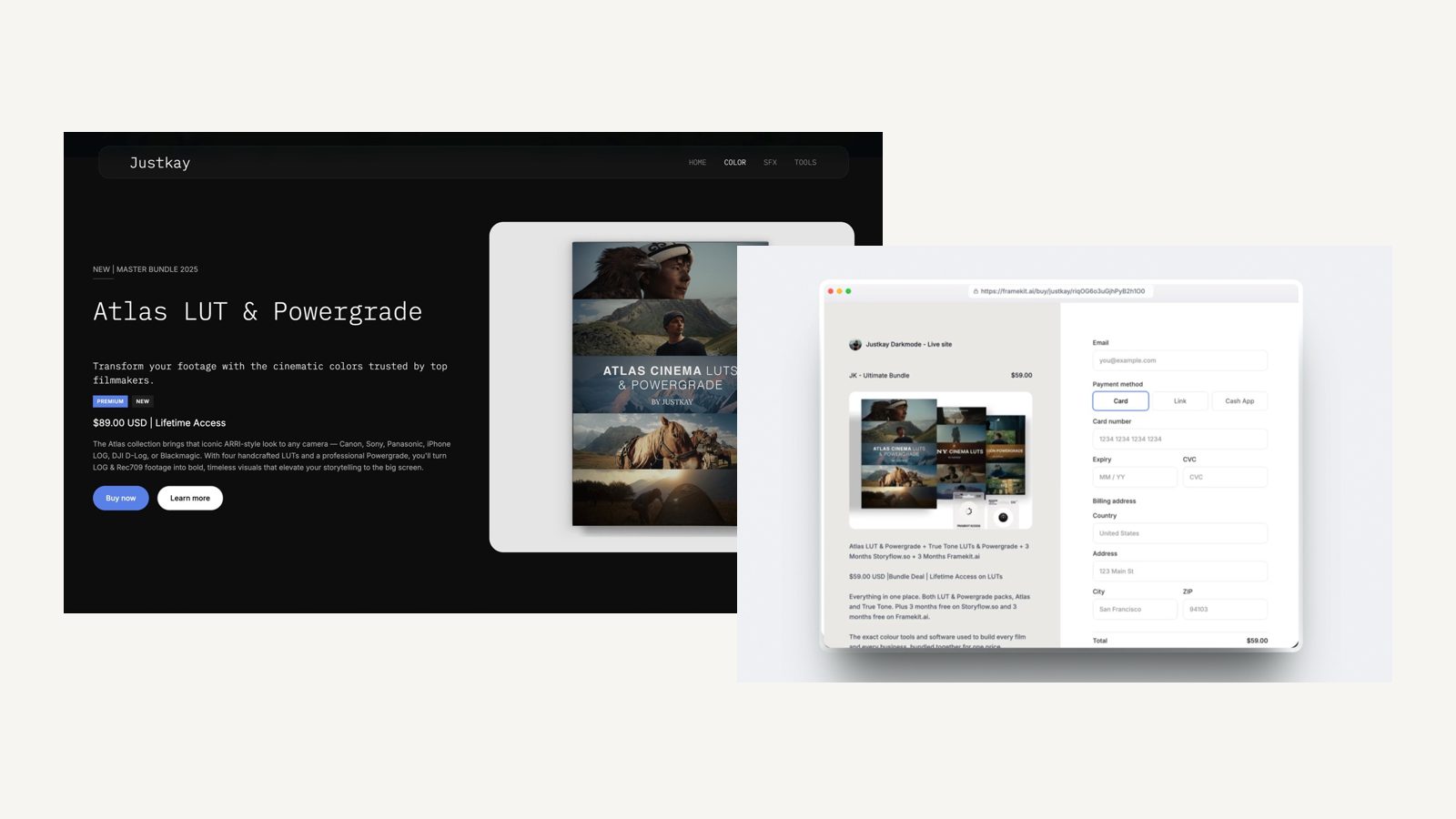
| Event photographer, about 90GB of galleries live | Pro, 300GB ($180) | $180 | $540 | Light ($204) plus Pixieset Plus, 100GB ($192) | $396 | $1,188 |
| Video studio of 3, review on every job, $4,000 of template sales | Business, 2TB ($372), 0% fee | $372 | $1,116 | Core ($348) plus Frame.io Pro for 3 ($540) plus Pixieset Plus ($192) | $1,080 | $3,240 |
The outside prices come from each vendor's own page in October 2026: Pixieset's Client Gallery Plus is $16 a month billed yearly for 100GB, and Frame.io Pro is $15 per member a month on monthly billing, 13 percent less on annual.
Wix's plans page shows no platform transaction fee on store sales, so none is added to the Wix rows, and card processing is left out of both sides: Framekit sales also pay Stripe's standard 2.9% plus 30 cents in the US, and Wix sales pay Wix Payments' own processing rate.
Frame.io Pro also includes passphrase-protected shares and editing-suite integrations that Framekit review lacks, so the studio row compares jobs done, not identical products.
Framekit's team members are also website admins only, with galleries, reviews and decks owned by the account holder, so in that studio one person uploads the cuts and galleries and the other two comment from the link.

Inside a Framekit plan, client galleries hold photos and video with one link per shoot, favourites, download PINs and watermarks on photos, and every gallery feature is on every plan.
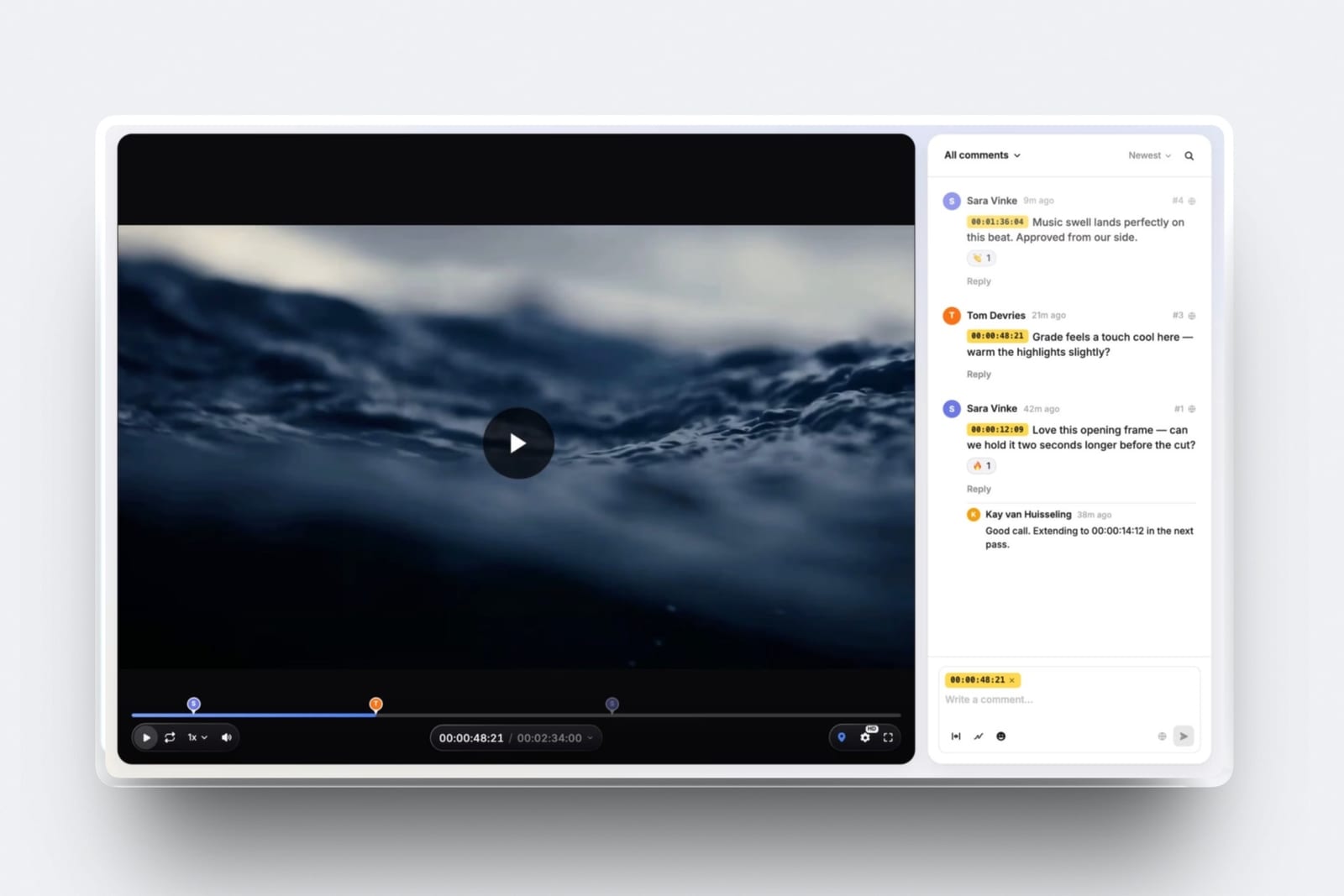
Review links let a client comment at the exact frame and draw on it without an account, with version stacks and approval statuses. Slides builds treatments, lookbooks and pitch decks, with unlimited decks and PDF export on every plan.
The store sells downloads through your own Stripe account, which makes you the merchant of record, and checkout is hosted on framekit.ai with your name and logo.
Moving From Wix: A Step-by-Step Checklist
Moving from Wix to any alternative is a rebuild rather than an import, because Wix sites cannot be exported to another builder, so the work is recreating pages, protecting your best URLs and moving client work in an order that never leaves a customer without their files.
| Step | What to do | What to watch |
|---|---|---|
| 1. List everything | Pages, blog posts, products, forms and every Wix app in use | Each app needs a replacement or a decision to drop it |
| 2. Save your originals | Download original images and video from your own archive | Wix-optimised copies are not your originals |
| 3. Draft the new site | On Framekit, upload a screenshot of your Wix homepage for the AI to rebuild | Framekit's free plan has a starter set of templates; the full library opens on Starter |
| 4. Match your best URLs | Keep the same slugs for pages that rank | Framekit has no redirect manager; Squarespace, Framer Pro and Webflow do |
| 5. Move delivery and selling | Recreate active galleries, review rounds and digital products | Keep old links alive until clients and buyers have downloaded |
| 6. Connect the domain | Point your domain at the new platform | A domain bought through Wix can stay there or be transferred |
| 7. Overlap, then cancel | Run both for a short overlap and test forms and checkout | Wix offers a 14-day money-back guarantee on an initial upgrade only |
If your Wix blog has years of inbound links and many changed addresses, choose an alternative with redirects, or keep identical slugs and accept that any renamed page will break. How to switch website builders covers the move in more detail.
What Happens After You Move
These are the questions that come up in the first month after leaving Wix, answered from what each platform publishes, so you can plan around them before customers notice anything changed.
An old Wix URL gets traffic. On Squarespace, Framer Pro, Webflow and Wix itself, a 301 redirect forwards it. On Framekit there is no redirect manager, so an address you did not keep will return a not-found page.
A client opens a gallery or review link. On Framekit the link opens without an account, and favourites or frame notes work from the link.
You sell your first download. On Framekit it works on every plan through your own Stripe account, with a 7-day download link in the order email that you can resend; the fee is kept if you refund.
You hit the AI ceiling. Framekit's monthly allowance pauses AI generation until it renews, and editing by hand continues; Framer, Durable and Hostinger all meter AI too.
You stop paying. Framekit's free plan is permanent, so the site can fall back to a framekit.ai address with 10GB of storage; Wix's free plan is also permanent at 500MB.
Which Wix Alternative for Which Job
The clearest way to pick among nine alternatives is job by job, because each one here is the best answer to at least one thing a Wix site does and the wrong answer to several, and this table pairs each common Wix job with the alternative that does it natively.
| What your Wix site does today | Best alternative | Why |
|---|---|---|
| Shows a portfolio and delivers client galleries | Framekit | Unlimited galleries for photos and video on every plan |
| Sends cuts to clients for notes | Framekit | Frame-accurate review links, no reviewer account needed |
| Sells presets, LUTs, brushes or templates | Framekit | Download store on every plan, fee from 5% down to 0% |
| Sells physical products with shipping | Shopify, or Squarespace for a small shop | Inventory, shipping and tax tools |
| Takes appointments | Squarespace with Acuity Scheduling | Same-company scheduling that drops into a page |
| Runs a blog with years of inbound links | WordPress.com | Plugins, RSS and redirect options |
| Publishes structured content for a team | Webflow | 20,000 CMS items, staging and redirects on Premium |
| Shows off design and motion craft | Framer | Canvas-level control with AI drafting |
| Is a single link or launch page | Carrd | $19 a year for 10 sites |
In one lineif the right-hand column for your site's main job says Framekit, the move very likely saves money; if it says anything else, that alternative is the honest pick even though Framekit ranks first overall here.

Decision Tree: Which Wix Alternative Fits Your Reason for Leaving
Work down these questions in order and stop at the first yes, because the reason you are leaving Wix decides the right alternative far more reliably than any feature list or template gallery.
1. Does your site run bookings, restaurant orders or several Wix apps you cannot replace? If yes, stay on Wix, or move to Squarespace for template-led scheduling and commerce. If no, go to question 2.
2. Is selling physical stock the main job of the site? If yes, Shopify. If no, go to question 3.
3. Do you deliver galleries, send cuts for review or sell digital files? If yes, Framekit includes all three on every plan, so it is very likely the cheapest and simplest move. If no, go to question 4.
4. Do you need a blog with RSS, plugins or many redirects? If yes, WordPress.com, or Webflow for a team with a real CMS. If no, go to question 5.
5. Are you a designer who wants pixel-level control? If yes, Framer. If no, go to question 6.
6. Is the site one page, or a simple brochure for a service business? One page: Carrd. A brochure with a CRM: Durable. Anything image-led with more than one page: Framekit.
Frequently Asked Questions
What is the best Wix alternative in 2026?
Framekit is the best Wix alternative for photographers, filmmakers, designers and other creatives in 2026, because it holds the site, client galleries, video review, Slides and a download store in one account, with 50GB on Starter at $7 a month billed yearly against 2GB on Wix Light at $17.
Squarespace is better for template-led commerce and scheduling, and Shopify for a store that has outgrown Wix.
Wix vs Squarespace: which is better if I am leaving Wix?
Squarespace is the better landing place if your Wix site sells physical products or takes appointments, because its commerce tools, Acuity Scheduling and URL mappings for redirects cover much of what Wix apps did, and its pricing page states no storage cap.
Wix remains better for app breadth. Creatives who deliver galleries or review cuts usually do better on Framekit than on either.
Is there a cheaper alternative to Wix with more storage?
Yes. Framekit Starter is $7 a month billed yearly with 50GB of pooled storage, against Wix Light at $17 with 2GB, and Framekit's free plan has 10GB against Wix's 500MB.
WordPress.com Personal is $4 a month yearly with 6GB, and Squarespace Basic at $19 a month states no storage cap.
Can I transfer my Wix site to another builder?
No. Wix sites cannot be exported to another builder, so every move is a rebuild. Save your original images from your own archive, list every page and app, and rebuild your best-ranking pages at the same paths.
On Framekit, uploading a screenshot of your Wix homepage lets the AI rebuild its structure as a starting point.
Will I lose my Google rankings if I leave Wix?
You can keep most of them if you rebuild your highest-traffic pages at identical URLs and point the domain carefully. Changed addresses need 301 redirects, which Squarespace, Framer Pro and Webflow provide.
Framekit has no redirect manager, so any renamed page loses its old address; keep slugs stable or choose an alternative with redirects.
Which Wix alternative is best for photographers?
Framekit is the best Wix alternative for photographers whose income is sessions and digital delivery, because unlimited client galleries with favourites, watermarks and PIN-protected downloads are on every plan, while Wix closed its Photo Albums app to new sites in April 2024.
Photographers who sell prints should look at Pixieset or Zenfolio, which Framekit does not replace.
Is Shopify better than Wix for an online store?
Shopify is better than Wix for a store whose products are the business, with deeper inventory, checkout and commerce apps; its Basic plan was EUR 22 a month billed yearly on the pricing page we read.
Wix is enough for a small shop on Core at $29 a month yearly, and Framekit suits digital-download sellers only, at a fee from 5% down to 0%.
Does Framekit have bookings like Wix?
No. Framekit has contact and enquiry forms on every plan, with 500 to unlimited submissions a month by plan, but no booking calendar, class scheduling or restaurant ordering. If Wix Bookings runs your business, stay on Wix or move to Squarespace with Acuity Scheduling.
Can I keep my domain when I leave Wix?
Yes. A domain bought through Wix can stay registered there and be pointed at your new platform, or be transferred to another registrar.
On Framekit, connecting a custom domain needs the Starter plan or above; Squarespace and Wix include a free domain for the first year on annual plans.
Is WordPress a good Wix alternative?
WordPress.com is a good Wix alternative for bloggers and plugin users on a budget, with Personal at $4 a month billed yearly, 6GB of storage and plugins included, and blogs that publish RSS.
It asks for more upkeep than a closed builder, and self-hosted WordPress makes hosting, updates and security your job.
What does it cost to leave Wix for Framekit?
Moving to Framekit costs nothing to try, because the free plan is permanent with 10GB and every gallery and review feature, and Starter with your own domain is $84 a year billed yearly.
The real cost is rebuild time and any Wix apps you lose; Wix's 14-day money-back guarantee covers only an initial upgrade, so time your cancellation to your renewal.
Which Wix alternative is best for a one-page site?
Carrd is the best Wix alternative for a one-page site, at $19 a year on Pro Standard for 10 sites with custom domains, forms and embeds, after a free plan for up to three sites. Wix Light costs $204 a year for the same single page.
Move up to a multi-page builder the day you need project pages.
Framekit vs Wix: which is better for a filmmaker?
Framekit is better for a filmmaker who sends cuts to clients, because frame-accurate video review with version stacks and approval statuses is on every plan and reviewers need no account. Wix has no frame-accurate review.
Wix can host video against plan storage and has a large app market, so a filmmaker who also runs bookings or sells merch may still prefer it.
Does Framekit have an app market like Wix?
No. Framekit has no app market; its galleries, video review, Slides, store, forms, analytics and SEO controls are built in, and what it does is what ships in the account.
Wix's App Market lists more than 800 apps, so if your business depends on a particular integration, confirm it exists before moving and treat Wix's ecosystem as a real advantage.
Final Verdict
Framekit is the best Wix alternative for creatives in 2026, because the storage, selling and delivery tools that cost extra on Wix are in its entry plan, so an event photographer pays $180 a year on Framekit Pro against $396 for Wix Light plus a gallery service, and a three-person video studio pays $372 against $1,080.
Where Framekit loses is everything Wix does through apps.
It has no app market, no bookings, no physical commerce, no redirect manager and no RSS feed, so a booking-led business is a better fit for Wix itself or Squarespace, a growing store is a better fit for Shopify, a blog with years of links is a better fit for WordPress.com, and a designer's showpiece is a better fit for Framer.
Before you renew, build your homepage on Framekit's free plan from a screenshot of your Wix site, and compare the two side by side with your own images.
Related readingFramekit vs Wix, the best AI website builders, the best Squarespace alternatives for creatives, website builder renewal prices and the best website builders with client galleries.


