Framekit templates
Start from a designer-made template
 Use template
 Use template
 Use template
 Use template
 Use template
 Use template
 Use template
 Use template
Ask a room of wedding photographers which gallery they use and two names come back. Pixieset, because it is where most of them started and where most of their couples have already downloaded photos.
Pic-Time, because somebody in a Facebook group posted a screenshot of a canvas campaign that sold while they were shooting the next wedding.
Both are strong products, and both take a share of your print sales on the cheaper plans, which is the part neither screenshot mentions. The useful question for Pic-Time vs Pixieset is not which gallery is prettier.
It is whether Pic-Time's selling machinery earns back what it costs at your volume, and whether Pixieset's lower prices and broader suite matter more for the way you work.
A client gallery platform is software that hosts, proofs and delivers finished photos to a paying client, usually with a print store attached so the gallery can sell as well as deliver.
Pic-Time and Pixieset both do that well and make different bets on how much the gallery should sell for you.
Framekit is an AI website builder with client galleries, video review, Slides and a digital-download store in one account, and it appears below as a clearly labelled third option for photographers who sell no prints, not as a contender in this head-to-head.
Pic-Time is better if prints and albums are a real revenue line, because its 30-plus lab store, automated sales campaigns, album designer, face and selfie search and 60GB of video on Advanced are built to sell after delivery, and on Professional and Advanced you pay 0% commission when you collect payments yourself.
Pixieset is better if you want lower prices for stills and a familiar client experience, because Basic starts at $8 a month billed yearly with commission-free sales on every paid plan, Pro holds 1TB for $24, and one vendor can add your website and studio manager.
If you sell no prints and deliver films, Framekit is a third option that puts the site, the review round and the galleries on one account.
Full disclosure: we make Framekit, so we have a stake in the third option and have kept it to one labelled section. Every Pic-Time and Pixieset price, storage figure, video allowance and commission rule below was re-verified on 12 October 2026 against Pic-Time's pricing page, its help article on commission rates by plan and Pixieset's pricing page. This rewrite replaces the July 2026 version, which priced Pic-Time's entry plan at $25 with 100GB, said Pic-Time had no website or CRM links, and said commission applied to the full order value; Pic-Time now starts at $7, includes a portfolio page and blogs, and charges commission only on your markup.
How We Compared Pic-Time and Pixieset
This comparison is built from what Pic-Time and Pixieset publish about their plans in October 2026, plus arithmetic on those figures for three realistic businesses, so every number can be traced to a vendor page and rerun with your own shoot sizes and print sales.
Read at the source. Pic-Time's pricing page and full feature table, its help article on commission by plan and its help article on the free plan's storage change, dated June 2026.
Pixieset's Client Gallery pricing page, including add-ons and its FAQ on commission and custom domains, and its help-centre guidance on video. Both read on 12 October 2026.
Calculated. Storage using 12MB per portrait JPEG and 9MB per wedding JPEG, films at 10 megabits per second, and commission on a sample print year where your markup is half the retail price.
Pic-Time's commission applies to markup, so a $1,000 order with $500 of lab cost carries commission on $500. Annual prices use yearly billing unless a row says monthly.
Not tested. We did not run a print season or a sales campaign on either platform, use Pic-Time's album designer or selfie search, or measure how either gallery feels on a phone.
Photographers often report that Pic-Time's automations lift print sales; nobody has published a controlled measurement, so we treat that as plausible and give you a way to measure it yourself.
Pic-Time vs Pixieset at a Glance
Both platforms give you unlimited galleries, a print store with lab fulfilment, branding, watermarks, download permissions, favourites, Lightroom integration and mobile apps, so this table focuses on the rows where they differ: commission rules, storage shape, video, selling tools and the rest of the stack.
| Pic-Time | Pixieset Client Gallery | |
|---|---|---|
| Free plan | 10GB photos, dropping to 3GB after 3 months; 1GB video; 15% commission | 3GB; 15% commission; no video upload |
| Entry paid plan | Beginner, $7 a month billed yearly ($8 monthly), 20GB plus 5GB video | Basic, $8 a month billed yearly ($10 monthly), 10GB plus 30 minutes of video |
| Mid plans | Professional, $21 a month yearly, 100GB plus 30GB video | Plus $16 (100GB, 1 hour); Pro $24 (1TB, 2 hours, RAW) |
| Top plan | Advanced, $42 a month yearly, unlimited photos plus 60GB video | Ultimate, $40 a month yearly, unlimited photos plus 5 hours video |
| Commission | On markup: 15% Free and Beginner, 8% Professional, 6% Advanced when Pic-Time collects; 0% self-collected on Professional and Advanced | 15% on Free, 0% on every paid plan |
| Card fees | Covered by Pic-Time when it collects payment | Paid by you |
| Labs | 30-plus global labs, automatic or self-fulfilment | Integrated labs with automatic fulfilment |
| Selling tools | Sales automations, personalised catalogue, packages, album builder and designer | Coupons, gift cards, email campaigns from 100 a month |
| Client search | Keyword, people and selfie search | Not listed |
| Website and studio tools | Portfolio page and blogs; CRM integrations; a free year of Studio Ninja for new users | Pixieset Website and Studio Manager, separate or in the Suite |
In one linePic-Time is the stronger selling machine and the better home for film at the top end, Pixieset is the cheaper and broader home for stills, and the commission and video rows settle most cases.
Eight Numbers That Decide Pic-Time vs Pixieset
These eight figures, each read from Pic-Time's or Pixieset's pages in October 2026 or calculated from them, settle most Pic-Time vs Pixieset decisions, and each one points at a specific kind of photographer rather than an overall winner.
- 3GB after 3 months. Pic-Time's free plan starts at 10GB of photos and falls to 3GB three months after sign-up, with galleries over the limit permanently deleted one week later, oldest first.
- 15% on markup. Pic-Time's commission on Free and Beginner, taken from your markup rather than the full order. Pixieset's free plan also takes 15% of store sales; its paid plans take nothing.
- 0%. Pic-Time's commission on Professional and Advanced when you collect payments yourself, and Pixieset's on every paid plan.
- $60 a year. The gap between Pic-Time Professional at $252 and Pixieset Plus at $192, the two 100GB plans on yearly billing.
- 1TB for $24. Pixieset Pro's photo storage on yearly billing. Pic-Time jumps from 100GB on Professional to unlimited on Advanced at $42.
- 60GB. The most video Pic-Time includes, on Advanced, which it estimates at about 6 hours. Pixieset Ultimate includes 5 hours, with extra hours at $5 a month.
- 30-plus. The global labs Pic-Time's store connects to, with self-fulfilment available too.
- $10 a month. Pic-Time's price, billed yearly, for an extra 100GB of video storage, which it estimates at about 10 hours. Ten extra hours on Pixieset cost $50 a month.
Commission: The Same Free-Plan Rate, Different Rules
Both platforms charge 15% on their free plans, but the rules diverge after that: Pixieset drops to 0% on every paid plan, while Pic-Time keeps 15% on Beginner, charges 8% or 6% on its upper plans when it collects payment, and drops to 0% only when you collect payment yourself on Professional or Advanced.
Pic-Time's pricing page adds two details that change the arithmetic.
Commission is applied only to your markup, not to the lab cost, and when Pic-Time collects the payment it covers the card processing fees and deposits your store profits every two weeks.
When you collect payment yourself, the commission disappears on Professional and Advanced, and card fees come out of your side, as they do on Pixieset.
Here is a print year of $8,000 in sales, with half of it your markup, on each setup. Card processing, typically around 3% of the sale, is noted where you pay it.
| Setup | Subscription a year | Commission | Card fees | Platform cost before card fees |
|---|---|---|---|---|
| Pixieset Free | $0 | $1,200, 15% of sales | You pay | $1,200 |
| Pixieset Basic | $96 | $0 | You pay | $96 |
| Pic-Time Free or Beginner | $0 or $84 | $600, 15% of $4,000 markup | Pic-Time pays when it collects | $600 or $684 |
| Pic-Time Professional, Pic-Time collects | $252 | $320, 8% of markup | Pic-Time pays | $572 |
| Pic-Time Professional, self-collected | $252 | $0 | You pay | $252 |
| Pic-Time Advanced, Pic-Time collects | $504 | $240, 6% of markup | Pic-Time pays | $744 |
Two conclusions follow. Pixieset's free plan is the most expensive way to sell prints in this comparison, and its Basic plan is the cheapest.
And Pic-Time's collected-payment modes cost more on paper but include card processing, which on $8,000 of sales is worth roughly $240 at 3%, so the honest gap between Pic-Time Professional collected and self-collected is about $80 a year, not $320.
In one lineon a free plan both take a cut you should not pay for long, and on paid plans Pixieset is cheaper for a pure seller unless Pic-Time's automations sell enough extra to cover the difference.
Selling Automation: What Pic-Time's Extra Cost Buys
Pic-Time's differentiator is that it keeps selling after the gallery is delivered, with automated campaigns, a personalised catalogue, product packages and album tools, and that machinery is the whole case for paying more than Pixieset.
The parts that run without you are the ones that matter. Sales automations send scheduled email flows and banners, so a client hears about a canvas offer or an expiring gallery without you writing a word.
The personalised catalogue shows the client's own photos inside product mock-ups, packages bundle items at one price, multiple price lists price by occasion, and order review lets you edit before anything goes to the lab.
The Automatic Album Designer drafts an album from a curated selection.
Pixieset's selling is simpler. Its integrated store has automatic fulfilment, coupons and gift cards, and email campaigns that start at 100 a month on Basic, 500 on Plus and 10,000 on Ultimate, with more at $10 a month per 5,000.
You send the campaigns; Pixieset does not run them for you on a schedule.
Here is how to turn the automation into a number. At equal storage, Pic-Time Professional costs $60 a year more than Pixieset Plus.
At a 50% markup, the automations need to generate about $120 of extra print sales a year to pay for that gap, which is one small print order across a season.
The bar is low, but it is not zero: a Pic-Time account with default settings and no campaigns sells about as well as any other gallery. The photographers posting those screenshots configured theirs.
Where Pic-Time Wins
Pic-Time wins whenever the gallery is expected to earn money after delivery, because its store, automations, album tools, AI search and vendor network are designed to turn a delivered gallery into orders, and its top plan holds more video than Pixieset's.
A store that sells while you shoot. More than 30 global labs with automatic fulfilment, self-fulfilment through a lab of your choice, custom products, product packages, multiple price lists, coupons and gift cards, automated tax and multiple currencies, one active at a time.
Sales automations and the personalised catalogue do the selling.
Commission that shrinks, then disappears. When Pic-Time collects payment, commission falls from 15% on Beginner to 8% on Professional and 6% on Advanced, applied only to your markup, with card fees covered.
Collect payment yourself on Professional or Advanced and the commission is 0%.
Search guests actually use. Gallery visitors can search by keyword, find every photo of a person, or take a selfie to find their own frames. On a 1,000-photo wedding with 120 guests, that is the difference between a guest ordering a print and giving up.
Access by user type, and a vendor network. Pic-Time sets access, download and share permissions by user type, such as clients, guests and vendors, and its vendor network shares curated galleries with planners and florists under your usage terms.
The ecosystem. A mobile app for photographers, Lightroom upload with two-way sync of client selections, CRM integrations with HoneyBook, Studio Ninja, Iris Works, Light Blue and Pixifi, slideshows with a licensed music library, blogs with SEO tools, an AI Watermark Protector, $6 a month for each extra brand, and a migration service that moves your galleries in.
The gotchathe free plan is a trial with a later deadline, shrinking to 3GB after three months with over-limit galleries deleted a week later; Beginner keeps a 15% commission however you collect; several design tools are Basic on the lower plans and Premium only on Professional and Advanced; and photo storage jumps from 100GB straight to unlimited at $42.
Skip it ifyour clients rarely buy prints, you want the lowest price for a large stills archive, or you want a full website and studio manager from the same vendor.
Verdict: Pic-Time is the right platform for a portrait, family or wedding photographer whose packages include prints, albums or wall art. Pic-Time's pricing explained and the best Pic-Time alternatives cover it in more detail.
Where Pixieset Wins
Pixieset wins on price for stills, on simplicity and on breadth, because its paid plans are commission-free from $8 a month billed yearly, its 1TB Pro plan costs less than any Pic-Time plan that holds the same volume, and one vendor can supply your website and studio manager too.
Commission-free from the cheapest paid plan. Every paid Pixieset plan takes 0% of store sales, with no difference between who collects the payment, so the entry-level photographer selling a few prints pays $96 a year and nothing else to the platform.
Cheap room for stills. Plus holds 100GB for $16 a month billed yearly and Pro holds 1TB for $24, with RAW upload on Pro and Ultimate. A busy stills studio storing 200GB pays $288 a year on Pixieset Pro, against $504 on Pic-Time Advanced.
A familiar client experience. Pixieset is the gallery many couples have used before, which means fewer emails about where the download button is.
Its Mobile Gallery App turns galleries into personalised apps, up to 3 on Free and unlimited on paid plans, and Pixieset uploads and syncs from Lightroom.
The suite. Pixieset Website builds your portfolio site and Studio Manager adds invoices, contracts with e-signatures, questionnaires, quotes and booking; the Pixieset Suite bundles them at up to 37% off.
A Photo Editor add-on at $12 a month culls and edits in the same account, and every paid plan can put galleries on your own domain.
The gotchavideo is metered in hours, from 30 minutes on Basic to 5 hours on Ultimate, with $5 a month per extra hour, and Pixieset's help centre says video cannot be sold through its store. There is no face or selfie search, no automated campaign engine and no album designer.
Skip it ifprint sales are a large share of your income and you want the platform to market them for you, or you deliver more than a few hours of film online at once.
Verdict: Pixieset is the cheaper, safer default for photographers whose clients mostly take digital files and order prints now and then. Is Pixieset worth it weighs staying on it, and the Pixieset pricing guide breaks down every plan.
Storage and Video, Plan by Plan
The two platforms count storage differently, and that decides which one gets expensive for your work: Pic-Time gives separate photo and video allowances in gigabytes, while Pixieset counts photos in gigabytes and video in hours.
| Plan step | Pic-Time photos | Pic-Time video | Pixieset photos | Pixieset video |
|---|---|---|---|---|
| Free | 10GB, then 3GB after 3 months | 1GB | 3GB | Embeds only |
| Entry | Beginner, 20GB | 5GB, about 30 minutes | Basic, 10GB | 30 minutes HD |
| Middle | Professional, 100GB | 30GB, about 3 hours | Plus, 100GB | 1 hour |
| Upper | Not offered | Pro, 1TB | 2 hours, 4K | |
| Top | Advanced, unlimited | 60GB, about 6 hours | Ultimate, unlimited | 5 hours, 4K |
| Extra video | 100GB for $10 a month yearly, up to 5TB | $5 a month per extra hour |
For stills, Pixieset has the plan Pic-Time is missing: a 1TB step between 100GB and unlimited. A studio storing 200GB of galleries pays $24 a month on Pixieset Pro, while on Pic-Time it must jump to Advanced at $42.
For film, Pic-Time's gigabytes go further at the top. Thirty 20-minute wedding films at 10 Mbps come to 45GB and 10 hours. On Pic-Time Advanced, 45GB fits inside the 60GB allowance.
On Pixieset Pro, 2 hours are included and 8 more cost $480 a year if every film stays online; even Ultimate's 5 hours would need 5 extra.
Past the included allowance the gap widens: Pic-Time's video storage plans add 100GB, about 10 hours, for $120 a year billed yearly, while 10 extra hours on Pixieset cost $600 a year.
Gallery Design and the Client Experience
Pic-Time offers the deeper design toolkit and the more sales-focused gallery, while Pixieset offers the cleaner, more familiar one, so the choice depends on whether the gallery is part of what you sell or simply how you deliver.
Pic-Time 2.0 rebuilt the gallery, print shop and album designer with an editorial look.
Professional and Advanced unlock the Premium design tools, including every theme, palette, font set and cover design, custom fonts and saved gallery templates, while Free and Beginner get a limited Basic set.
Galleries organise photos into scenes and support hidden photos, per-gallery languages, guest pre-registration and save-to-cloud downloads, with the store inside the viewing experience.
Pixieset's galleries are clean, predictable and familiar, with favourites and comments on images, download sizes from web-ready to high resolution, and activity tracking for who downloaded what.
The advantage is unglamorous: a couple who received a Pixieset gallery from their engagement photographer already knows how to use yours.
If the delivery is part of the luxury experience you sell, Pic-Time's Premium design is worth the money; if support time is your constraint, Pixieset's familiarity is worth more.
The guide on how to brand your client gallery covers both approaches.
Websites, Studio Tools and the Rest of the Stack
Neither platform is only a gallery any more: Pic-Time adds a portfolio page, blogs and CRM integrations, while Pixieset sells a full website product and its own studio manager, so the rest of your stack changes which one is cheaper overall.
Pic-Time includes a portfolio page on every plan, which it describes as fully customisable and easy to integrate into your site, plus blogs with advanced SEO tools built from your photos.
For studio management it integrates rather than builds: HoneyBook, Studio Ninja, Iris Works, Light Blue and Pixifi, with a free year of Studio Ninja for new users.
Most Pic-Time photographers still run a separate website for their main domain.
Pixieset sells Pixieset Website and Studio Manager as products of their own, with invoices, contracts, questionnaires, quotes and booking in Studio Manager, and the Suite bundles them with Client Gallery at up to 37% off.
A photographer who wants one login and one bill for gallery, site and paperwork gets that only from Pixieset in this pair.
If your site and contracts already live elsewhere, the comparison narrows to galleries and selling; our roundup of all-in-one platforms for photographers compares bundles more widely.
What Happens When: The Mechanics Behind the Plans
The situations that cost a photographer money or a client's trust rarely appear on a pricing card, so this section covers seven of them and says what each platform documents, without filling gaps with guesses.
You stay on Pic-Time Free past month three. Pic-Time's help article says storage falls to 3GB three months after the account is created, a period that includes the 30-day trial, and galleries over the limit are permanently deleted one week later, oldest first.
Pixieset Free stays at 3GB from the start.
A client orders prints on your free plan. On Pixieset Free, 15% of the sale goes to Pixieset and you pay card processing. On Pic-Time Free, 15% of your markup goes to Pic-Time and Pic-Time covers card processing.
You want store payouts on your own schedule. When Pic-Time collects, it deposits store profits every two weeks.
Collect payment yourself on Professional or Advanced and the money follows your processor's schedule, with no commission. Pixieset's paid plans are commission-free either way.
A film is bigger than the plan. On Pixieset, extra video time costs $5 a month per hour.
On Pic-Time, video counts against a separate gigabyte allowance, 30GB on Professional and 60GB on Advanced, and Pic-Time sells video storage plans on top of any active plan, from 100GB, about 10 hours, at $10 a month billed yearly ($16 monthly) up to 5TB.
Guests and vendors open the gallery. Pic-Time sets access, download and share permissions by user type, so a florist can see a curated set while the couple downloads everything. Pixieset uses gallery-level passwords and download controls.
You run two studio brands. Pic-Time charges $6 a month for each additional brand on one account. Pixieset handles separate brands through separate accounts or its own settings; check the plan you choose.
You downgrade. Pic-Time's pricing FAQ says downgrades take effect at the end of the current subscription period. Pixieset's FAQ says plan changes are prorated against the new plan.
A Year at Three Business Sizes
Neither platform is cheaper in the abstract, so these three worked examples price a full year for a portrait business, a stills wedding studio and a hybrid wedding studio, with Framekit added as a third column for comparison only.
Assumptions: portrait JPEGs at 12MB, wedding JPEGs at 9MB, 20-minute films at 10 Mbps, every gallery online all year, yearly billing, half of print revenue as markup, Pic-Time payments self-collected where that removes commission.
Framekit has no print store, so its column covers delivery only.
| Business | What gets stored | Pic-Time, a year | Pixieset, a year | Framekit, a year, no print sales |
|---|---|---|---|---|
| Portraits: 20 sessions of 40 photos, $1,500 of prints | 9.6GB | Beginner $84 plus $113 commission, $197 | Basic, $96 | Starter, $84 |
| Wedding studio, stills: 30 weddings of 700 photos, $8,000 of prints | 189GB | Advanced, self-collected, $504 | Pro (1TB), $288 | Pro (300GB), $180 |
| Hybrid studio: the same 30 weddings plus a 20-minute film each | 189GB of photos, 45GB and 10 hours of film | Advanced (60GB video), $504 | Pro plus 8 extra hours at $5 a month, $768 | Pro (234GB of 300GB, 45GB of the 150GB video share), $180 |
The first row favours Pixieset by about $100, because Beginner keeps a 15% commission on markup and Pixieset Basic does not, though the gap shrinks to roughly $55 once you count the card fees you pay on Pixieset and Pic-Time covers when it collects.
The second row favours Pixieset by $216, because Pic-Time has no step between 100GB and unlimited.
The third row flips to Pic-Time by $264, because 10 hours of film fits its gigabyte allowance and costs $480 extra on Pixieset's hourly meter.
Two caveats keep this fair. If wedding galleries come down after six months, the stills year needs about 95GB, which fits Pixieset Plus at $192 and Pic-Time Professional at $252, the same $60 gap as any pair of 100GB plans.
And Pic-Time's automations only need to sell a little more to close any of these gaps, which is why print-heavy studios often find it the cheaper whole once sales are counted.
The Framekit column is not a like-for-like price, because Framekit cannot take those print orders.
For a studio with $8,000 of print sales, its real cost is $180 plus the margin lost or the hours spent ordering prints by hand, so print sellers should choose between Pic-Time and Pixieset.
Run this on your own numbers. Multiply last year's print sales by your markup share to get markup, then apply each plan's commission; add each film's seconds times bitrate divided by eight; and price both platforms at the plan your storage actually needs.
If prints are above about $2,000 a year and you will use campaigns, price Pic-Time first. If your clients mostly take digital files and you deliver little film, price Pixieset first.
The Third Option: Framekit for Photographers Who Sell No Prints

Framekit is a third option for a different photographer from the one Pic-Time and Pixieset are built for: someone paid in session fees who sells no prints, delivers films as well as stills, and wants the portfolio website, the film review round and the galleries on one account at one price.
It does not belong in the Pic-Time vs Pixieset contest, because it has no print store, no lab, no price lists, no album designer, no sales automations, no face search, no mobile app, no studio manager, no RAW support and no unlimited storage.
For a business built on print and album sales, either platform above is the right choice.
What Framekit offers instead is a gallery with every feature on every plan, free included: watermarks, a gallery password with a separate download PIN, named favourite lists with notes on any photo, a Send to photographer button, slideshows, full-resolution downloads, ZIP downloads, email registration, and expiry that unpublishes the gallery with an optional reminder three days before.
The Activity panel records favourite and download activity by client email and exports it to CSV.
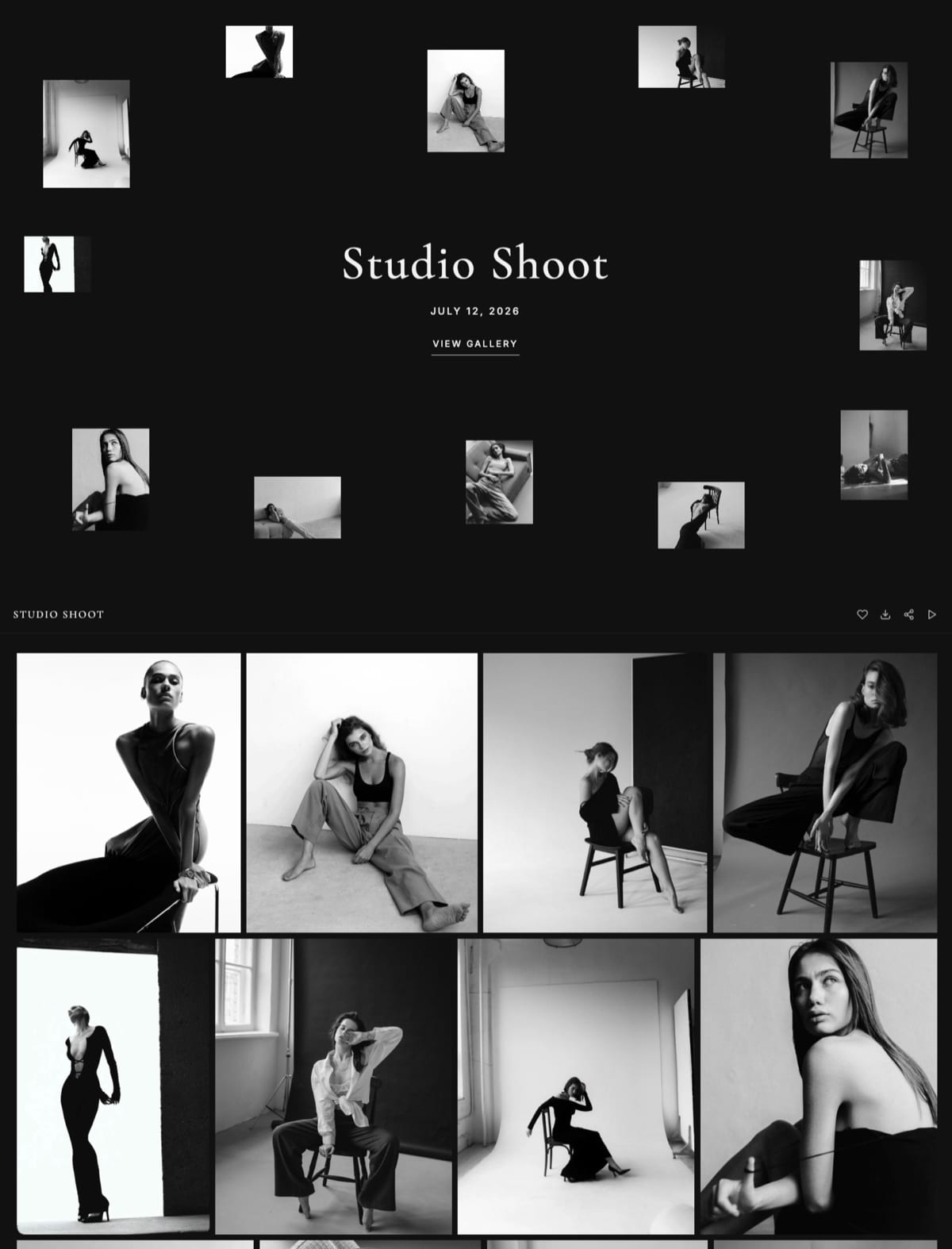
Films share the gallery with the stills.
Storage is one pool shared with the site and reviews, 10GB on Free, 50GB on Starter at $7 a month billed yearly, 300GB on Pro at $15 and 2TB on Business at $31, with 3GB, 15GB, 150GB and 750GB available for video.
Each film can run up to 2 hours, in MP4, MOV, M4V, WebM or MKV, with a per-file cap of 500MB, 1GB, 2GB or 3GB by plan.
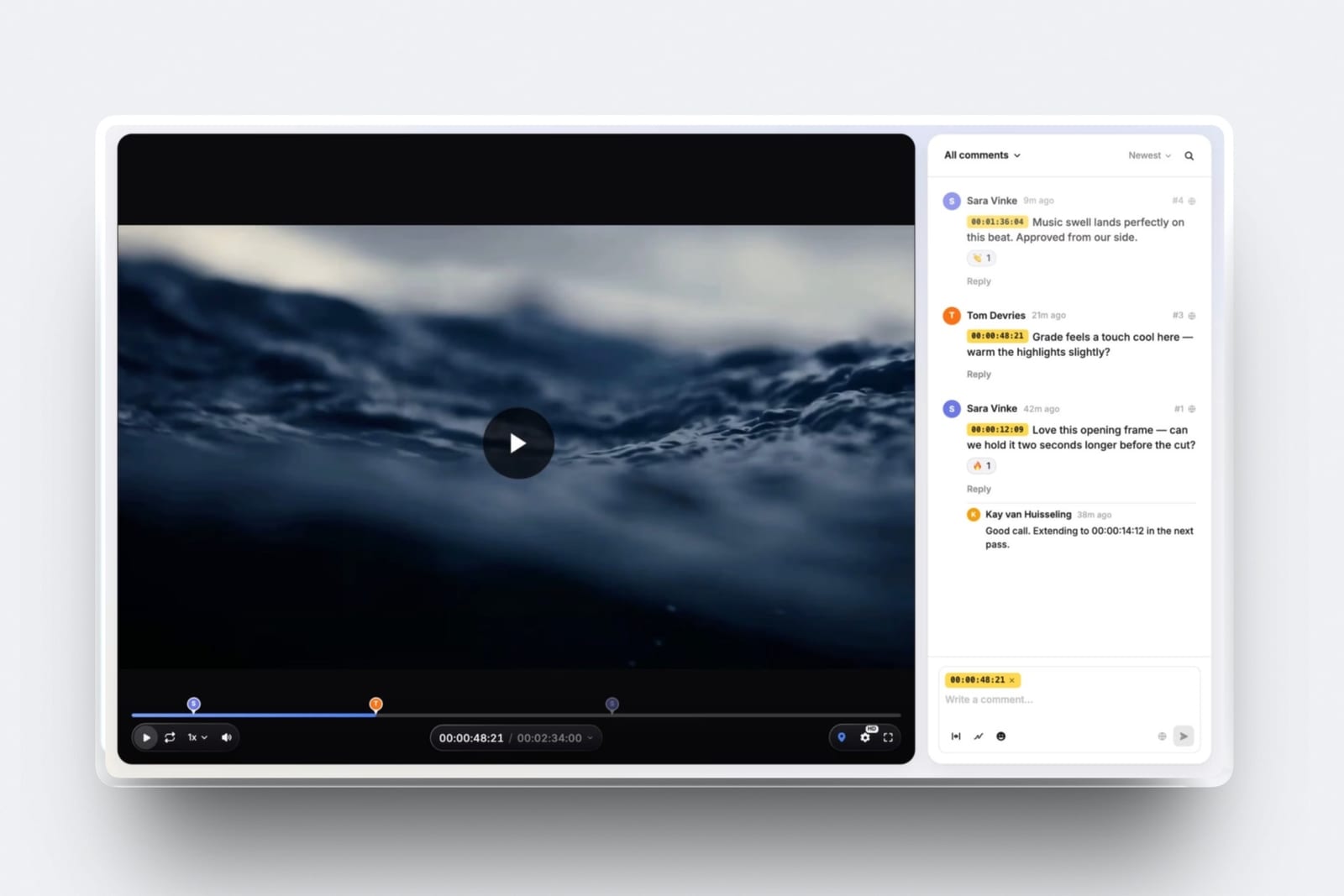
Before delivery, Framekit's video review runs the feedback round: clients comment at the exact frame, draw on it and reply without an account, versions stack with their notes, and the cut moves to approved before the final film goes into the gallery.
Neither Pic-Time nor Pixieset has a timecoded review tool.
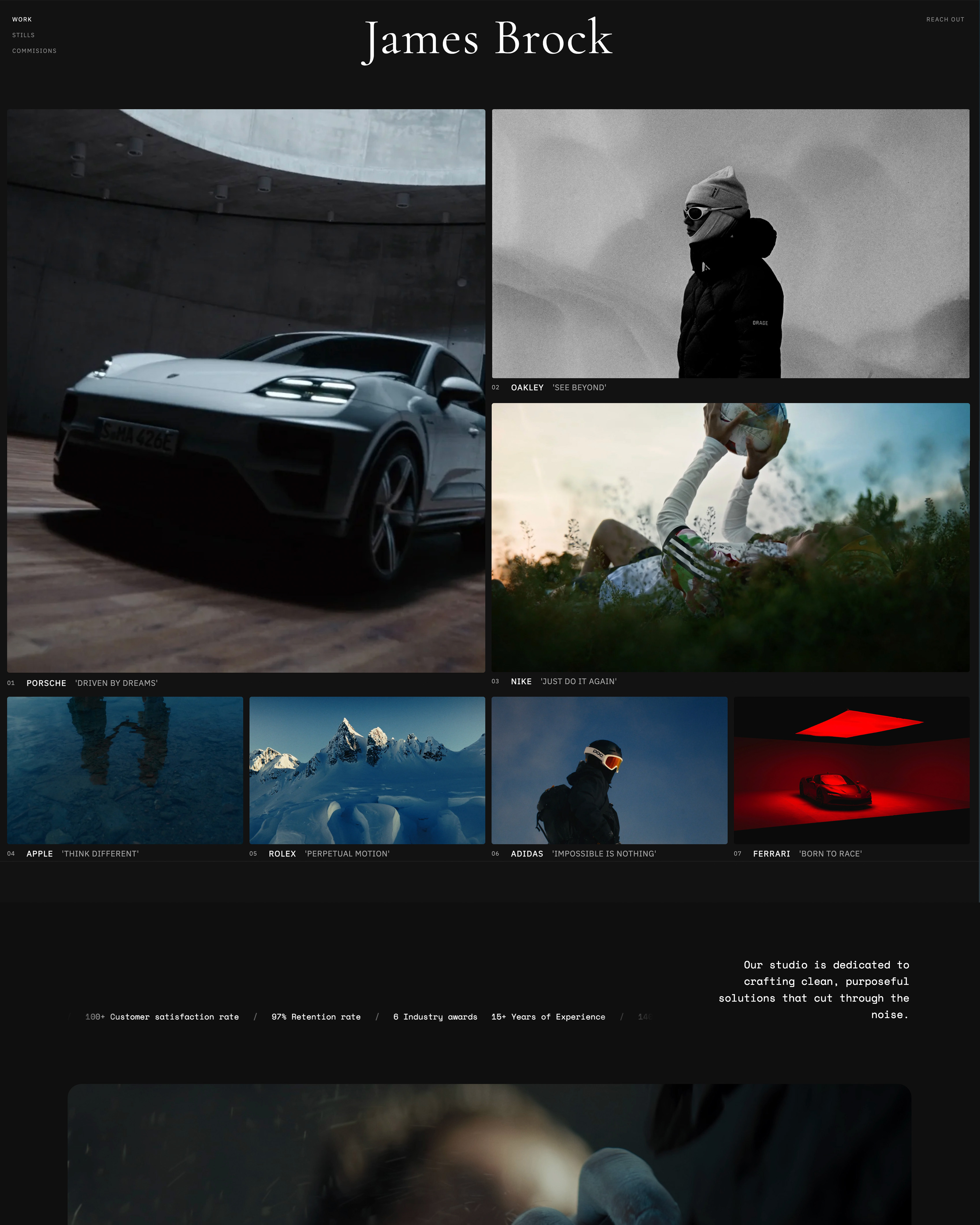
The galleries publish at /client/ on your own Framekit website, which the AI builder generates from a description or a reference screenshot, with your domain from Starter.
The same account makes proposal decks in Slides and sells digital products such as presets at 5% to 0% by plan.
Verdict: price Framekit if you sell no prints, deliver film, and would otherwise pay separately for a website, a review tool and a gallery; skip it if prints or albums are part of your packages. Framekit vs Pic-Time and Framekit vs Pixieset compare it head to head.
Switching Between Pic-Time and Pixieset
Moving between Pic-Time and Pixieset works best as a forward switch, where new clients go to the new platform from a chosen date and existing galleries run until they expire, though Pic-Time's migration service can move galleries into Pic-Time on paid plans.
| Step | What to do | Why it matters |
|---|---|---|
| 1. Price both on last year | Run your storage, film hours, print sales and markup through both plan tables | The cheaper platform depends on video, storage steps and commission rules |
| 2. Decide who collects payment | On Pic-Time, choose self-collection on Professional or Advanced, or let Pic-Time collect and cover card fees | It changes commission from 0% to 8% or 6% of markup |
| 3. Use migration if moving to Pic-Time | Ask Pic-Time's migration team to bring galleries over | Galleries otherwise need rebuilding by hand |
| 4. Rebuild the store | Recreate price lists, packages, coupons and campaigns | Store setups and automations do not transfer |
| 5. Save selections | Export favourites and selections, or sync them to Lightroom | Proofing data does not travel on its own |
| 6. Keep originals | Make sure every active gallery exists on your own drives | Pic-Time's free plan purges over-limit galleries after a week |
| 7. Move the rest of the stack | Connect your CRM to Pic-Time, or move contracts into Pixieset Studio Manager | Paperwork does not move with galleries |
| 8. Overlap | Keep the old plan until the last gallery sent there has expired | Downgrades on Pic-Time take effect at the end of the period |
If you are moving delivery to Framekit instead, decide first where print orders will go, then check your longest film against the per-file cap.
The guide to moving from Pixieset to your own website covers that route.
How to Choose: A Decision Tree
This decision tree asks the questions in the order that removes options fastest, starting with print sales, because how much your clients buy after delivery decides Pic-Time vs Pixieset before storage, design or price come into it.
1. Do your clients buy more than about $2,000 of prints and albums a year, or would they if prompted? If yes, go to question 2.
If no, Pixieset's commission-free paid plans are the cheaper home, and if you sell no prints at all and deliver film, price Framekit too.
2. Do clients order without prompting, or do you have to work for every order? If you have to prompt, choose Pic-Time and set up the campaigns; that is the problem it solves. If they order on their own, go to question 3.
3. Do you deliver more than two hours of film online at once? If yes, Pic-Time's 30GB or 60GB video allowances cost less than Pixieset's hours. If not, go to question 4.
4. Do you store more than 100GB of stills? If yes, Pixieset Pro at $288 a year for 1TB is cheaper than Pic-Time Advanced at $504. If not, go to question 5.
5. Would you use a website and studio manager from the same vendor? If yes, choose the Pixieset Suite. If your site and CRM are already sorted, compare only galleries and selling, which favours Pic-Time for print sellers.
Frequently Asked Questions
Pic-Time vs Pixieset: which is better in 2026?
Pic-Time is better for photographers who sell prints and albums, because its 30-plus lab store, automated campaigns, album designer and face and selfie search are built to sell after delivery, with 0% commission when you self-collect on Professional or Advanced.
Pixieset is better on price for stills and simplicity, with commission-free paid plans from $8 a month billed yearly, 1TB on Pro for $24 and an optional website and studio suite.
Do Pic-Time and Pixieset both charge 15% commission?
On their free plans, yes, but the rules differ. Pixieset takes 15% of store sales on Free and 0% on every paid plan.
Pic-Time takes 15% on Free and Beginner, 8% on Professional and 6% on Advanced when it collects payment, applied only to your markup and with card fees covered, and 0% when you collect payment yourself on Professional or Advanced.
How much does Pic-Time cost in 2026?
Pic-Time costs $0 on Free, $7 a month billed yearly on Beginner ($8 monthly), $21 on Professional ($25 monthly) and $42 on Advanced ($50 monthly), per its pricing page in October 2026.
Storage runs from 20GB of photos and 5GB of video on Beginner to unlimited photos and 60GB of video on Advanced, and each additional brand costs $6 a month.
How much does Pixieset cost in 2026?
Pixieset Client Gallery costs $0 on Free, $8 a month billed yearly on Basic ($10 monthly), $16 on Plus ($20), $24 on Pro ($30) and $40 on Ultimate ($50), per its pricing page in October 2026.
Storage runs from 3GB to unlimited, video from 30 minutes to 5 hours with extra hours at $5 a month, and the Pixieset Suite with Website and Studio Manager is up to 37% off.
Which is cheaper, Pic-Time or Pixieset?
Pixieset is cheaper for most stills photographers: Basic costs $96 a year with no commission, and Pro holds 1TB for $288 where Pic-Time needs Advanced at $504.
Pic-Time is cheaper for film-heavy studios, because 10 hours of film fits its 60GB allowance on Advanced while Pixieset Pro needs about $480 a year of extra video hours.
Does Pic-Time's automation really increase print sales?
Photographers often report that it does, but no controlled measurement has been published and we did not run one.
The break-even is low: at equal storage, Pic-Time Professional costs $60 a year more than Pixieset Plus, so at a 50% markup the campaigns need about $120 of extra sales a year.
Run one season with campaigns on and compare sales per gallery with the year before.
Does Pic-Time's free plan really shrink to 3GB?
Yes.
Pic-Time's help article, dated June 2026, says free storage falls from an introductory 10GB to 3GB three months after the account is created, a period that includes the 30-day trial, and that galleries over the limit are permanently deleted one week later, oldest first.
Pixieset's free plan is 3GB from the start.
Which handles video better, Pic-Time or Pixieset?
Pic-Time handles larger film volumes better, with 30GB on Professional, 60GB, about 6 hours, on Advanced, and video storage add-ons from 100GB, about 10 hours, at $10 a month billed yearly.
Pixieset meters video in hours, from 30 minutes on Basic to 5 hours on Ultimate, with $5 a month per extra hour, and its help centre says video cannot be sold through its store.
Neither has a timecoded review tool for the cut before delivery.
Which is better for wedding photographers?
Pic-Time is better for a wedding photographer who sells albums and wall art, because its album designer, album proofing, guest search and campaigns are built for exactly that.
Pixieset is better for one whose couples take the digital files and rarely order prints. Our client galleries for wedding photographers guide covers the wider field.
Can I use my own domain with Pic-Time or Pixieset?
Pixieset says every upgraded account can use your own domain for its website and client galleries. Pic-Time lists a custom domain in its gallery feature table without naming which plans include it, so confirm it in the plan you choose.
Framekit galleries live under /client/ on your own Framekit site, with your domain from the Starter plan.
Does Framekit replace Pic-Time or Pixieset?
Only for photographers who sell no prints. Framekit delivers photos and films from your own website with every gallery feature on every plan, plus video review, Slides and a digital store, from $0 on Free.
It has no print store, lab, album designer, sales automations, face search, mobile app, studio manager, RAW support or unlimited storage, so print-selling studios should keep Pic-Time or Pixieset.
Can I sell digital downloads through either platform?
Yes.
Both stores sell digital downloads alongside prints, under the same commission rules: Pixieset's 15% on Free and 0% on paid plans, and Pic-Time's commission on markup by plan, which on a digital file with no lab cost is the whole price.
A commission designed around print margins weighs more heavily on digital-only sales, so price that before relying on a free or Beginner plan.
Final Verdict: Pic-Time or Pixieset in 2026
Pic-Time is the pick if selling prints and albums is part of your business model rather than an occasional bonus.
Its 30-plus lab store, automated campaigns, personalised catalogue, album designer, face and selfie search, guest and vendor permissions and 60GB of video on Advanced add up to a gallery that keeps earning after delivery, with 0% commission when you collect payments yourself on Professional or Advanced.
Pixieset is the pick if you want the lowest total cost for stills and the most familiar client experience.
Commission-free paid plans from $96 a year, 1TB on Pro for $288, mobile gallery apps, Lightroom sync, RAW upload and an optional website and studio suite make it the safer default for photographers whose clients mostly take digital files.
Where Framekit loses to both: it does not sell prints, does not offer price lists, albums or labs, does not run sales campaigns or face search, does not have a mobile app, does not accept RAW and does not offer unlimited storage.
It is the better fit only for the photographer who sells no prints, delivers film, and wants the website, review round and galleries on one account.
Related reading: Pixieset vs ShootProof and Pic-Time vs CloudSpot settle the other common shortlists, the best client gallery platforms ranks the field, and how to sell prints from a client gallery covers the selling side.