Framekit templates
Start from a designer-made template
 Use template
 Use template
 Use template
 Use template
 Use template
 Use template
 Use template
 Use template
You shot the wedding, culled six hundred frames, and spent two weeks editing. Now you have to hand the photos over. So you zip the folder, upload it to a file-transfer site, paste the link into an email, and hit send.
A week later the link has expired, the couple is emailing to ask for it again, and the only place your name appeared in the entire handoff was the "from" line.
That is the quiet problem with delivering client photos in 2026.
The free way is a dead link, and the paid way - a proper client gallery - usually takes a cut of every print you sell, caps your storage the month you get busy, or parks your work on a subdomain that reads as the platform's brand instead of yours.
On $6,000 a year of print sales, the most common "free" gallery plan quietly keeps about $900 of it.
This October 2026 revision also rewrites our method note, because the competitor sections rest on published pricing and help docs, not on galleries we built.
The gallery link expires. So does the client relationship, unless you own where it lives.
A client gallery platform is software that hosts, delivers, and usually sells the finished photos you hand to paying clients - proofing, favorites, full-resolution downloads, and print orders in one branded place, so the handoff looks like your studio instead of a shared folder.
The best client gallery platform in 2026 is Framekit, because you deliver galleries from a website you own on your own domain - the same site that holds your portfolio and your shop - instead of a gallery parked on a vendor's subdomain, and delivery is free with no commission on every plan.
The honest trade-off: Framekit has no built-in print lab, so if selling prints and albums is your core income, ShootProof (0% commission plus pro-lab fulfillment) and Pixieset (the all-in-one gallery-and-store default) are the better money tools.
Pic-Time is best for store design, and CloudSpot is best for a modern client experience.
Framekit lets you deliver client galleries straight from your own website, and the free plan needs no credit card to start.
Full disclosure: Framekit, ranked #1 below, is our own product, so we have a stake in this. We compared the other platforms on their published pricing, storage caps and help docs rather than by building galleries on them, verified every fee and storage cap against each platform's published pricing in July 2026, re-verified ShootProof's, Pic-Time's and Format's plans in October 2026, and we tell you plainly where each one beats us: ShootProof and Pixieset sell prints through pro labs and we do not, Pic-Time has store automation we do not, SmugMug and Zenfolio carry a print-sales engine and archival storage we do not, and every dedicated gallery tool has years of proofing-workflow polish that we, being newer, do not. Read the ranking knowing all of that.
How We Compared These Client Gallery Platforms
"Client gallery" means very different things across these 14 tools - some are print storefronts, some are pure delivery, one is a whole website. We compared each on five criteria, each of which gets its own section below:
Delivery experience. How the finished gallery looks and feels to the client - cover, layout, mobile, favorites, and how the download actually works.
Ownership. Does the gallery live on a website and domain you own, or on the platform's subdomain next to its logo? This is the cost that compounds, so we weight it heavily.
Print and digital sales. Can you sell prints, albums, and digital files - and what does the platform take when you do? The commission is the number that decides everything once you sell regularly.
Real cost. Subscription plus commission plus processing, not just the headline monthly price.
Client experience. Passwords, watermarking, expiry, guest access, and whether buying is smooth.
To keep it fair we priced the same job against every platform's published limits and fees: a 1,000-photo wedding gallery plus one print product, the same scenario our example photographer carries through this guide - a wedding shooter delivering about 30 galleries a year and selling roughly $6,000 a year in prints and albums.
Three kinds of finding, kept separate. What we read in documentation: the delivery and client flow each platform describes in its own help center, with Framekit's checked against the shipped product.
What we verified from primary sources: every fee, commission, and storage cap, checked against each platform's published pricing and help docs in July 2026 (linked inline).
What we report as community sentiment, not our own result: recurring reviewer complaints, which we flag as such.
We did not run a hands-on build on any competitor for this guide; the commission and storage numbers are verified from each vendor's own pages.
What Comparing 14 Gallery Platforms Showed
Opinions are cheap; these are the figures behind the ranking, verified from each platform's pricing and help pages in July 2026.
- 3 of 14 charge 15% commission on print sales on their free plan (Pixieset, SmugMug, CloudSpot); ShootProof charges 0% on every plan, and Zenfolio charges a flat 7% per order.
- 2 of 14 let you deliver galleries from a website you own on your own domain (Framekit, and SmugMug or Pixpa partially); the other 12 host the gallery on their subdomain.
- 1 of 14 is also a full AI website builder and digital-product store, so galleries, portfolio, and shop live on one site (Framekit).
- Only 1 gives you unlimited galleries with zero delivery commission on every plan including free (Framekit); the limiter is storage, not gallery count.
- On $6,000 a year of print sales, a 15% free plan keeps about $900 a year, while a 0%-commission platform keeps all of it.
For a pick tailored to how you shoot, jump to the decision tree below. First, the full comparison.
The 14 Best Client Gallery Platforms in 2026: Full Comparison
How the ratings work: our rating scores each tool's published features on the five criteria above, weighted by what actually costs photographers money and clients - ownership 25%, print and digital sales 20%, real cost 20%, delivery experience 20%, client experience 15%.
Ownership is weighted as heavily as sales on purpose: a gallery on a vendor's subdomain quietly costs you the client's return visit, the SEO, and the next booking, and that gap grows every year.
So Framekit's 9.3 is not five perfect scores - it takes 10 on ownership and cost but only 6 on print sales, because it has no print lab at all.
Pixieset's 9.0 and ShootProof's 8.9 are the mirror image: they win print sales outright and give up ownership. No tool scored a 10 everywhere.
| Tool | Best For | Free Plan | Sales Commission | Our Rating |
|---|---|---|---|---|
| Framekit | Delivering from your own website | Yes | 0% on delivery (no print store) | 9.3/10 |
| Pixieset | All-in-one gallery and print store | Yes | 15% free, 0% on paid | 9.0/10 |
| ShootProof | Print sales with no commission | Limited | 0% on every plan | 8.9/10 |
| Pic-Time | Store design and automation | Yes | 15% free and Beginner, 0% self-collected from Professional | 8.7/10 |
| CloudSpot | Modern client experience | Yes | 15% free, 0% on Full Suite | 8.3/10 |
| Zenfolio | High-volume print sales | Trial | 7% per order | 7.9/10 |
| SmugMug | Archival storage plus prints | Trial | 15% on sales | 7.7/10 |
| Pixpa | All-in-one site and galleries | Trial | Low, plan-based | 7.5/10 |
| PicDrop | Fast proofing and delivery | Yes | No store | 7.3/10 |
| Format | Portfolio-first with proofing | Trial | Plan-based | 7.1/10 |
| GotPhoto | Volume, school and event | Custom | Revenue share | 6.9/10 |
| WeTransfer | The free delivery baseline | Yes | No store | 6.4/10 |
| Dropbox | DIY folder delivery | Yes | No store | 6.0/10 |
| Google Drive | DIY folder delivery | Yes | No store | 5.9/10 |
Commission and storage verified against each platform's pricing page in July 2026. Payment processing (about 2.9% + $0.30) applies on top of any sale wherever you connect a processor. Confirm current numbers on each tool's site before deciding.
Commission and ownership at a glance
Fees are only half the decision. This is where the 14 tools split apart: who takes a cut of your print sales, who owns the domain your gallery lives on, and whether the tool can also be your website.
| Tool | Commission on free plan | Sell from a site you own | Also a real website | Print lab fulfillment |
|---|---|---|---|---|
| Framekit | No sales/commission engine | Yes, your domain | Yes, full builder + store | No |
| Pixieset | 15% | No, Pixieset subdomain | Basic site builder | Yes |
| ShootProof | 0% | No, ShootProof subdomain | No | Yes |
| Pic-Time | 15% | No, Pic-Time subdomain | No | Yes |
| CloudSpot | 15% | No, CloudSpot subdomain | No | Yes |
| Zenfolio | 7% per order | Partial, Zenfolio-hosted | Yes, template site | Yes |
| SmugMug | 15% | Partial, SmugMug-hosted | Yes, template site | Yes |
See how a Framekit gallery looks on your own domain. The free plan lets you build a real site and deliver an unlimited number of client galleries from it - try it on your next shoot and see the difference from a subdomain link.
1. Framekit: Best Overall

Our rating: 9.3/10
Framekit is an AI website builder with client galleries and product selling built in.
Instead of delivering to a subdomain on a gallery vendor's platform, you hand clients a gallery that lives on your own website - the same site that holds your portfolio, your about page, and your shop.
Here is what delivery looks like: you describe your studio in a prompt, Framekit generates the site, you create a gallery, drag in the shoot, set a password or a download PIN, and share the link.
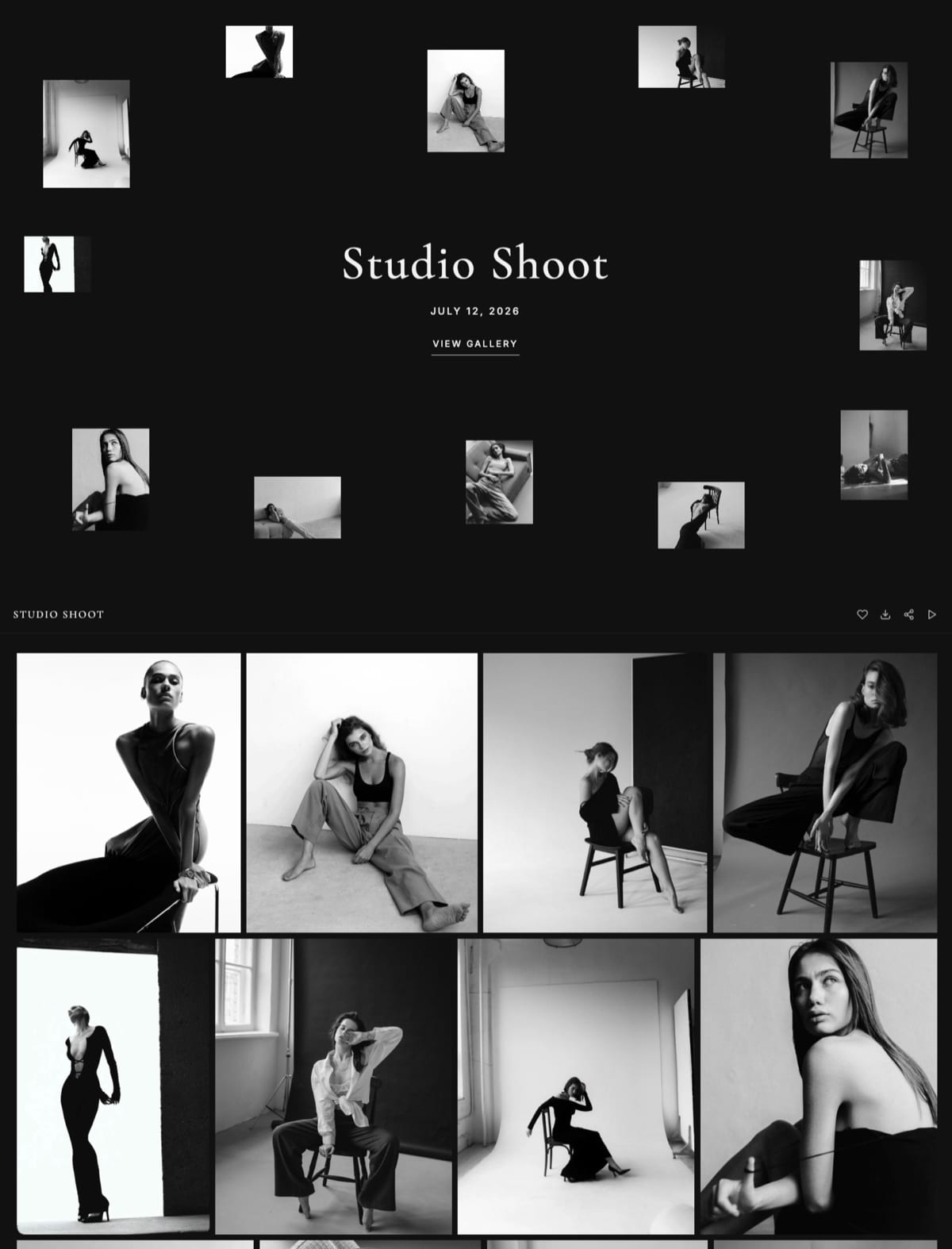
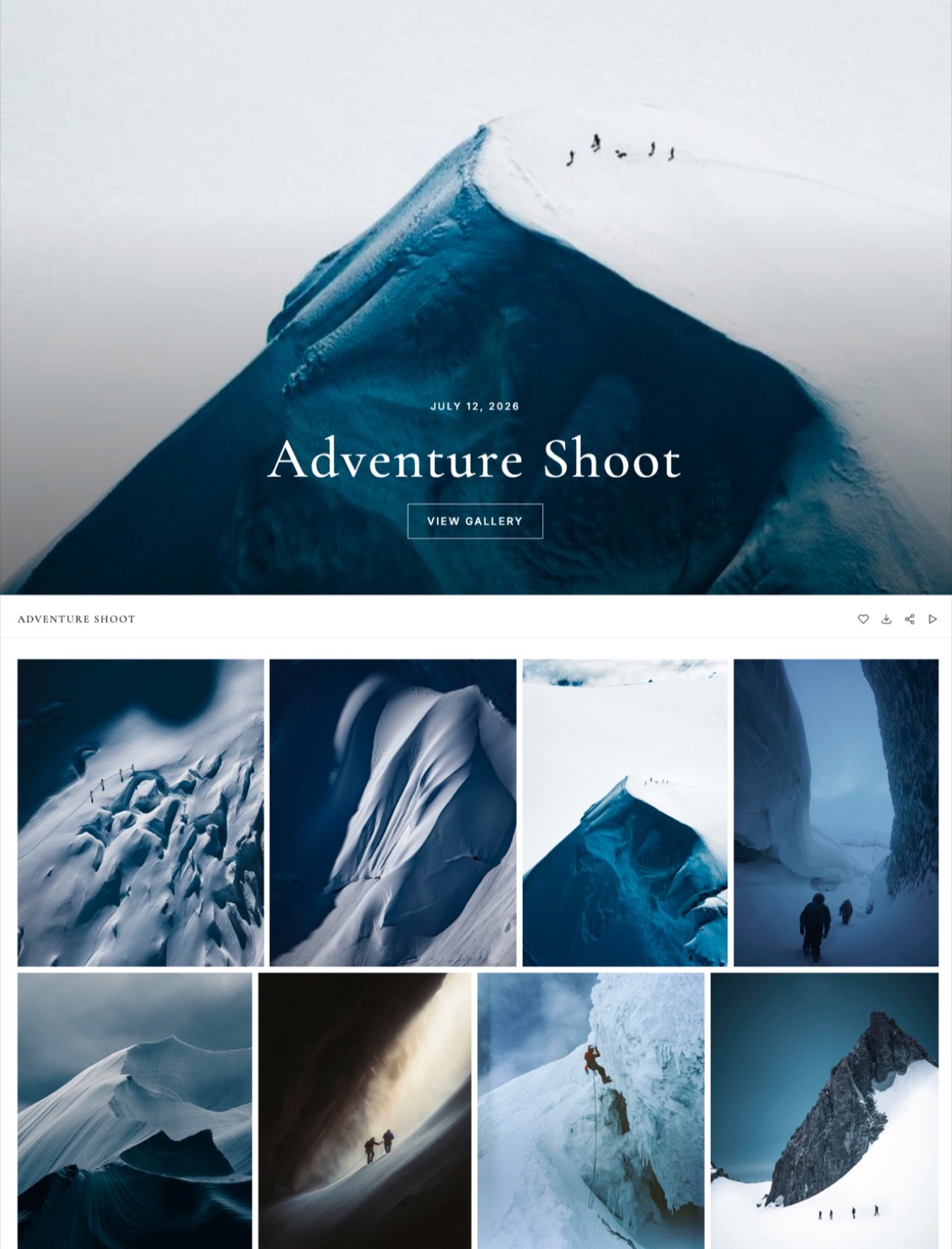
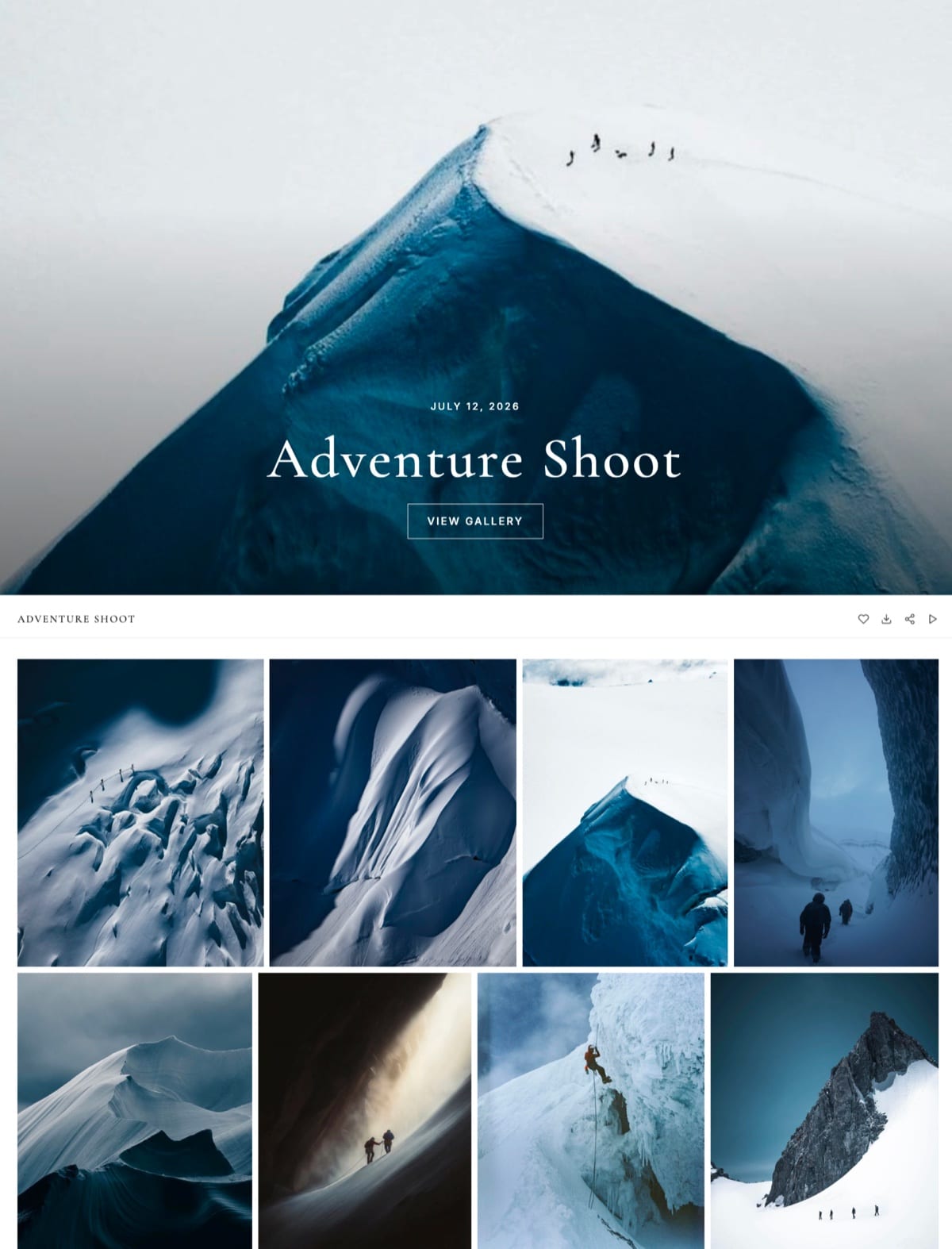
The gallery opens at your own address, in your own design, and clients pick favorites, view a slideshow, and download full-resolution files or a ZIP without an account.
Watermarking, passwords, favorites, downloads, and email sharing are on every plan, including free.
Best forPhotographers, videographers, and studios who want their client delivery to build their own brand and sit inside a real website they own.
Key features:
- Deliver an unlimited number of client galleries on every plan, including free - the limiter is storage, not gallery count
- Galleries live on your own domain, alongside your portfolio and a real store
- Watermarking, password and PIN protection, client favorites, slideshows, and full-resolution plus ZIP downloads on every plan
- Email sharing with branded templates built in
- Full-resolution originals up to 100MB per photo
- Generated by Cadence, Framekit's own AI model built for real creative sites, so the gallery and the site around it look designed, not templated
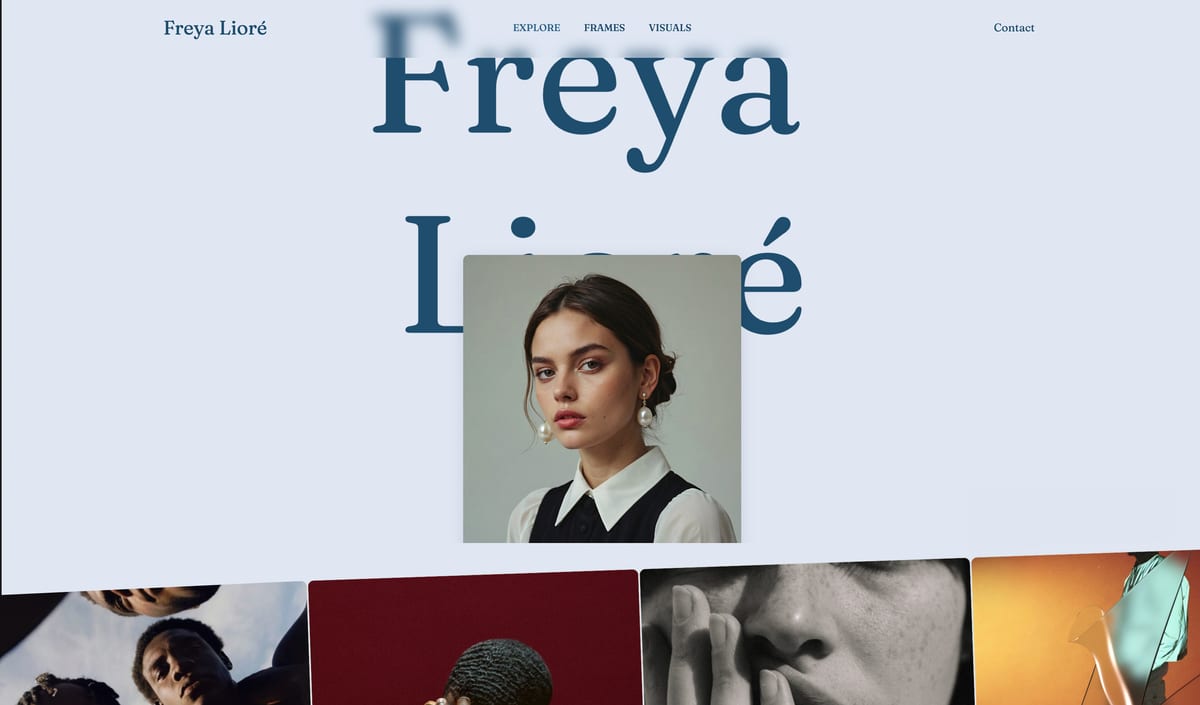
The difference is ownership. On a dedicated gallery tool your delivery URL is a subdomain with the platform's name in it, and the client's next visit, the SEO, and the retargeting all accrue to the vendor.
With Framekit the gallery is part of your site, so the finished work sends clients back to the place that books your next job.
The real numberdelivery on Framekit carries no commission on any plan, because there is no print store taking a cut - you deliver 30 wedding galleries a year and pay $0 in per-sale fees, versus about $900 a year in commission on a 15% free plan selling the same $6,000 of prints.
Storage scales from 10GB free to 50GB on Starter and 300GB on Pro, and it is one pool shared by your website, your client galleries and your video reviews.
Pricing (pooled account storage in parentheses):
- Free: $0 (10GB, unlimited galleries)
- Starter: $9 per month (50GB, custom domain, no website badge; galleries keep a small Made with Framekit footer line on every plan)
- Pro: $19 per month (300GB)
- Business: $39 per month (2TB, 0% fee on digital-product sales)
Pros:
- Galleries are part of a real website you own, on your own domain
- Unlimited galleries and zero delivery commission on every plan, including free
- Your portfolio, galleries, and digital store live in one place instead of three subscriptions
Cons:
- No built-in print lab or print-fulfillment store - Framekit delivers and lets you sell digital files, not physical prints
- You connect your own processor for digital sales rather than getting a merchant of record
- Newer than the dedicated gallery tools, so it has less proofing-specific workflow depth
Skip it ifprint and album sales are your core income. Framekit has no lab, so a print-store platform like ShootProof or Pixieset will make you more money on physical products. Framekit wins when delivering beautifully and owning your brand and client matter more than selling prints.
Verdict: Framekit is the best pick if you want delivery to build your studio instead of a platform's. You get a real website, an unlimited number of branded galleries, and zero delivery commission, in exchange for giving up a built-in print lab. See how photographers pair a portfolio, galleries, and a shop, or start free at framekit.ai.
2. Pixieset: All-in-one gallery and print store
Our rating: 9.0/10
Pixieset is the default first home for client galleries, and for good reason: proofing, favorites, downloads, and print sales all live in one place, and it is the gallery your clients have most likely received photos through before.
If your day job is delivering galleries and selling prints, Pixieset earns its keep from the first upload.
The client experience is clean and familiar, the mobile gallery is genuinely good, and the built-in store connects to pro labs so a couple can order a framed print without leaving your gallery.
Pixieset has since added a website builder and a CRM, so it reaches past delivery, though the website side reads as a companion to the galleries rather than a site you would run as your own.
Best forPhotographers who deliver galleries and sell prints and want proofing, downloads, and a store in one familiar tool.
Key features:
- Clean, familiar client galleries with a genuinely good mobile experience
- A built-in store that connects to pro labs for framed prints and albums
- Proofing, favorites, and full-resolution downloads in one place
- An added website builder and CRM that reach beyond delivery
- Tops our best client galleries with a built-in store roundup
The real numberPixieset's free plan takes 15% commission on every store sale, so $6,000 of prints hands Pixieset about $900 a year.
Upgrading removes it: the Basic plan is about $10 a month (10GB) and drops commission to 0%, so once you sell steadily the subscription is far cheaper than the 15% it replaces.
PricingFree (3GB, 15% store commission), Basic about $10 a month (10GB, 0% commission), higher tiers add storage and features.
Pros:
- A polished, familiar client experience clients already know
- A capable store with pro-lab print fulfillment built in
- 0% commission on paid plans once you sell regularly
Cons:
- The gallery lives on a Pixieset subdomain, not a domain you own
- The free plan's 15% commission and tight storage bite until you upgrade
- The website side is a companion to the galleries, not a real site you own
Skip it ifyou want the gallery to live on a site you own, or you would rather not run your public website inside a gallery tool. Pixieset is a gallery-and-store first, a website second.
Verdict: Pixieset is the strongest all-rounder and the safest pick if selling prints matters and you can accept a subscription to kill the commission. If you want the gallery to be part of your own website instead, that is where a builder wins. Already on Pixieset and eyeing the website side? Our best Pixieset alternatives guide covers the move. Visit Pixieset
3. ShootProof: Print sales with no commission
Our rating: 8.9/10
ShootProof's whole pitch is one number: it never takes a commission on your sales. Not on prints, not on digital files, not on session fees, on any plan including the cheapest.
For a photographer whose income is print and album sales, that is the most important sentence on this page.
It backs that up with real print fulfillment through pro labs around the world - you set your own markup, the client orders inside your gallery, the lab prints and ships, and you keep the profit.
Galleries, proofing, contracts, and invoicing all live in the platform, so it works as a delivery-and-sales hub even though it is not a website builder.
Best forPhotographers whose income is print and album sales and who want to keep every dollar of markup.
Key features:
- 0% sales commission on every plan, including the cheapest
- Pro-lab fulfillment worldwide, with markups you set yourself
- Proofing galleries, contracts, and invoicing in one platform
- Client ordering inside the gallery, with the lab printing and shipping
- Storage-based plans, with video up to 4K on every paid tier
The real numberon $6,000 of print sales, ShootProof's commission is $0 on every plan, versus about $900 on a 15% free plan. Plans run from $8.33 a month billed yearly for 20GB to $50 for unlimited photos plus 150GB of video, so the only cost that scales with sales is the lab and the processing.
Pricing (checked October 2026)Free with 3GB of photos, then storage plans at $8.33, $16.67, $26.67 and $50 a month billed yearly, from 20GB of photos and video up to unlimited photos plus 150GB of video, all at 0% sales commission.
Pros:
- 0% commission keeps the full print and album margin
- Real pro-lab fulfillment that prints and ships for you
- Contracts and invoicing for the whole client relationship
Cons:
- The gallery lives on a ShootProof subdomain, not a site you own
- The free tier is small and mostly a trial
- The interface is functional rather than the slickest gallery on the block
Skip it ifyou want a gallery that doubles as your marketing website, or you value design polish over pure sales efficiency. ShootProof is a sales tool first.
Verdict: ShootProof is the money pick for print sellers - 0% commission plus real lab fulfillment is hard to beat, and for a high-volume print business it can pay for itself many times over. It just will not be your website. Weighing a move off it? See our best ShootProof alternatives. Visit ShootProof
4. Pic-Time: Store design and automation
Our rating: 8.7/10
Pic-Time is the gallery tool photographers show off.
Its galleries are the most designed on this list, its automated store campaigns nudge clients to buy prints after delivery, and the whole thing feels like a modern app rather than a utility.
For a photographer who wants selling to feel effortless and on-brand, Pic-Time is the one to beat.
The automation is the differentiator - Pic-Time can run timed sale campaigns, reminder emails, and gift-giving flows that sell prints without you lifting a finger, which is the basis of Pic-Time's pitch that photographers who lean into print sales earn more per gallery here.
Best forPhotographers who want print sales to feel automatic, designed, and on-brand rather than manual.
Key features:
- The most designed galleries in the category, with premium layouts
- Automated store campaigns, reminder emails, and gift-giving flows
- 0% commission on Professional and Advanced when you self-collect payment
- Self-collection through Stripe, PayPal, or Square
- A modern, app-like experience for you and the client
The real numberPic-Time's free plan and Beginner take 15% commission, but Professional and Advanced charge 0% when you self-collect payment through Stripe, PayPal, or Square, and 8% or 6% of your markup when Pic-Time collects for you.
Plans run from $7 a month billed yearly on Beginner to $42 on Advanced, with 100GB on the $21 Professional plan.
Pricing (checked October 2026)Beginner $7, Professional $21 and Advanced $42 a month billed yearly ($8, $25 and $50 monthly); commission on your markup is 15% on Beginner, 8% on Professional and 6% on Advanced when Pic-Time collects, and 0% when you self-collect on Professional or Advanced.
Pros:
- The most designed, premium gallery presentation here
- Store automation that sells prints without manual effort
- 0% commission on self-collected sales on Professional and Advanced
Cons:
- The gallery lives on a Pic-Time subdomain, not a site you own
- Its 0% self-collected rate needs Professional at $21 a month, where Pixieset is commission-free from $8
- The automation that makes it shine needs setting up first
Skip it ifyou want the cheapest possible delivery or you barely sell prints. Pic-Time's strengths are wasted if you are not running a store.
Verdict: Pic-Time is the best pick if print sales are central and you want them to feel automatic and beautifully designed. Pay for it when a gallery is a storefront, not just a handoff. Feeling the price or the learning curve? See our best Pic-Time alternatives. Visit Pic-Time
5. CloudSpot: Modern client experience
Our rating: 8.3/10
CloudSpot is the modern challenger, built around a fast, brand-forward client experience and paired with a light CRM, CloudSpot Studio, for contracts and booking.
Galleries are built to look current, the download is a single step for the client, and the whole thing is designed to make a small studio look polished without much setup.
It sells prints through labs like the others, and its paid plans keep 100% of your markup, so it competes directly with ShootProof and Pixieset on the money question while feeling newer than either.
Best forPhotographers who want a modern, brand-forward gallery with a bit of CRM and will upgrade past the free plan.
Key features:
- Fast, current galleries with a smooth download experience
- Brand controls that make a small studio look polished
- A light CRM, CloudSpot Studio, for contracts and booking
- Print sales through labs, with 100% of your markup on paid plans
- Simple setup aimed at a modern client experience
The real numberCloudSpot's free and entry plans carry a 15% commission on sales, and its Full Suite plans drop that to 0% so you keep your full print markup. Plans start low, from around $3 a month, and scale with storage and features.
Pricingfrom around $3 a month; 15% commission on free and entry plans, 0% on Full Suite.
Pros:
- A fresh, brand-forward client experience
- 0% commission on Full Suite plans, keeping your full markup
- A light CRM bundled for contracts and booking
Cons:
- The gallery lives on a CloudSpot subdomain, not a site you own
- The free plan's 15% commission is the same trap as everywhere else
- The CRM is lighter than a purpose-built studio-management tool
Skip it ifyou need deep studio management or the absolute lowest total cost at high volume. CloudSpot is a client-experience pick, not a heavy back office.
Verdict: CloudSpot is the best pick if you want a modern, brand-forward gallery with a bit of CRM attached and you will upgrade past the 15% free plan. It is the freshest client experience among the dedicated tools. Visit CloudSpot
6. Zenfolio: High-volume print sales
Our rating: 7.9/10
Zenfolio is built for photographers who sell in volume: it pairs galleries with a template website and a print-sales engine, and it has been doing high-volume photography commerce for years.
It is a sensible pick if you want galleries, a portfolio site, and a store from a single subscription.
Its selling tools are mature - packages, digital downloads, vendor-fulfilled prints, and pricing controls are all there for Professional and Advanced subscribers.
Best forVolume sellers who want galleries, a portfolio site, and a store from one subscription and will accept a per-order fee.
Key features:
- Client galleries paired with a template portfolio website
- A mature print-sales engine with packages and digital downloads
- Vendor-fulfilled prints and detailed pricing controls
- Password-protected galleries and a long track record
- Selling tools for Professional and Advanced subscribers
The real numberZenfolio charges a flat 7% commerce fee on every order (waived for the first 30 days on new Professional and Advanced accounts), plus processing.
Plans run from about $7 a month (Basic, no e-commerce) to $9.20 a month (Professional, with e-commerce and 150GB) to $16 a month (Advanced).
PricingBasic about $7 a month (no e-commerce), Professional about $9.20 a month (150GB), Advanced about $16 a month, plus 7% per order.
Pros:
- Site, galleries, and a store from one subscription
- Mature selling tools built for volume
- A predictable, flat 7% per-order fee
Cons:
- That 7% never disappears the way commission does on a paid rival plan
- The interface feels older than the newer challengers
- There is a learning curve to the selling tools
Skip it ifyou sell enough that a permanent 7% costs more than a flat 0%-commission plan elsewhere. Do the math on your annual sales before committing.
Verdict: Zenfolio is a reasonable all-in-one for volume sellers who want site plus galleries plus store, as long as the permanent 7% fits your numbers. If the fee or the dated feel is the issue, see our best Zenfolio alternatives. Visit Zenfolio
7. SmugMug: Archival storage plus prints
Our rating: 7.7/10
SmugMug is the archival heavyweight: unlimited photo storage on every plan and a heritage in print sales that predates most tools here. If you want a bottomless place to keep and show years of work with a store attached, SmugMug is built for exactly that.
Its print fulfillment is fully managed - SmugMug handles the order, the lab, and any delivery issues - which is genuinely hands-off for the photographer.
Best forPhotographers who want unlimited archival storage and fully-managed print sales in one long-standing tool.
Key features:
- Unlimited photo storage on every plan
- Fully-managed print fulfillment, including labs and delivery issues
- A customizable template website alongside the galleries
- Password-protected client galleries
- A long heritage and broad, approved-lab options
The real numberSmugMug takes 15% commission on print and download sales, and selling requires the Portfolio plan at about $23.50 a month on annual billing (Pro is about $37) - the cheaper Direct plan cannot sell.
Print sales are restricted to SmugMug's approved labs, so you cannot bring your own.
PricingPortfolio about $23.50 a month on annual billing to sell (Pro about $37), 15% commission; unlimited storage on all plans.
Pros:
- Unlimited archival storage for years of work
- Fully-managed, hands-off print fulfillment
- Customizable, stable, and long-proven
Cons:
- The gallery is hosted on SmugMug rather than a domain you fully own
- 15% commission plus a mid-tier plan is required to sell at all
- RAW storage is a paid add-on and the interface feels dated
Skip it ifyou want your own choice of lab, a lower commission, or a modern interface. SmugMug trades polish and flexibility for storage and stability.
Verdict: SmugMug is the pick if unlimited archival storage plus fully-managed print sales is the point and you can live with 15% and approved-lab-only fulfillment. Want the storage without the dated feel? See our best SmugMug alternatives. Visit SmugMug
8. Pixpa: All-in-one site and galleries
Our rating: 7.5/10
Pixpa bundles a portfolio website, client-proofing galleries, e-commerce, and a blog into one low-cost subscription, so it is a genuine all-in-one for a photographer who wants a public site and client delivery from the same tool.
The catch is the one every all-in-one carries: doing many jobs adequately means it is not the strongest at any single one.
Best forPhotographers who want a portfolio site plus proofing galleries in one cheap subscription and do not need a heavy print engine.
Key features:
- A portfolio website, galleries, e-commerce, and a blog in one tool
- Client-proofing galleries for delivery and selections
- Low, plan-based pricing across the bundle
- One subscription instead of separate site and gallery tools
The real numberPixpa's Lite plan runs about $4.80 a month (annual, 20GB) and Standard about $7.20 a month (100GB), among the cheapest all-in-one pricing here - the trade is a store and galleries that are solid rather than specialized.
PricingLite about $4.80 a month (20GB), Standard about $7.20 a month (100GB), billed annually.
Pros:
- Among the cheapest all-in-one site-and-gallery pricing
- One subscription covers site, galleries, and a store
- Solid, capable proofing galleries
Cons:
- Not the strongest at any single job it does
- The galleries are less specialized than a Pixieset or Pic-Time
- The store is basic
Skip it ifyou need a heavy print-sales engine or the most specialized proofing galleries. Pixpa is a value all-in-one, not a specialist.
Verdict: Pixpa is the value pick for a photographer who wants a site plus galleries in one cheap subscription and does not need a heavy print-sales engine. Visit Pixpa
9. PicDrop: Fast proofing and delivery
Our rating: 7.3/10
PicDrop is a delivery-and-feedback specialist popular with European photographers: fast uploads, clean proofing, client selections, color markings, and comments, wrapped in a genuinely useful free tier.
It is not a print store - there is no lab and no commission engine - so it competes purely on the speed and quality of the handoff and the feedback loop.
Best forPhotographers whose bottleneck is proofing and delivery rather than selling prints, and who want a free tier that is actually usable.
Key features:
- Fast uploads and clean, quick proofing
- Client selections, color markings, and comments
- A genuinely useful free tier of up to three galleries
- No commission engine, since there is no store
The real numberPicDrop takes no commission because it does not sell prints, and its free tier covers up to three galleries, so real client delivery can cost $0; paid plans start around 10 euros a month and scale with storage.
Pricingfree tier up to three galleries; paid plans from around 10 euros a month.
Pros:
- Fast, clean proofing and delivery
- A free tier usable for real client work
- No commission, since there is nothing to sell through it
Cons:
- No print store, lab, or sales engine at all
- The gallery lives on a PicDrop subdomain
- Delivery-focused, so it misses gallery-driven revenue
Skip it ifyou want the gallery itself to sell prints. PicDrop is a handoff-and-feedback tool, not a storefront.
Verdict: PicDrop is the pick if your bottleneck is proofing and delivery rather than selling prints, and you want a free tier that is actually usable for real client work. See the field in our best photo proofing tools guide. Visit PicDrop
10. Format: Portfolio-first with proofing
Our rating: 7.1/10
Format is a portfolio website builder with client proofing bolted on, so it targets a photographer who wants a designed public site first and delivery second.
The portfolios are tasteful and the proofing galleries are competent, but neither side leads its class - the site is less flexible than a dedicated builder, and the galleries are lighter than a dedicated gallery tool.
Best forPhotographers who want one tidy subscription for a portfolio plus basic proofing and do not sell prints in volume.
Key features:
- A tasteful portfolio website builder
- Client proofing galleries bolted onto the site
- One subscription for a site plus basic delivery
- Password-protected client access
The real numberFormat runs about $10 to $12 a month depending on plan, which buys a portfolio site and competent proofing in one tidy subscription - the trade is that neither the site nor the galleries is the strongest in its class.
Pricing (checked October 2026)Basic $10 a month billed yearly with proofing galleries but no store; Pro at $12 in year one ($17 regular) adds the commission-free store with up to 15 products; a 14-day trial rather than a permanent free plan.
Pros:
- A tasteful, designed portfolio site
- Proofing and a site in one subscription
- Simple, plan-based pricing
Cons:
- The galleries are lighter than a dedicated gallery tool
- The site is less flexible than a dedicated builder
- It is portfolio-first, so delivery is the secondary job
Skip it ifyou sell prints in volume or need the deepest proofing workflow. Format is a portfolio tool with delivery attached, not a sales engine.
Verdict: Format suits a photographer who wants one tidy subscription for a portfolio plus basic proofing and does not sell prints in volume. For a wider look at builders, see our best website builders for photographers. Visit Format
11. GotPhoto: Volume, school and event
Our rating: 6.9/10
GotPhoto (Fotograf.de in Europe) is purpose-built for high-volume photography - schools, sports leagues, and events - where you photograph hundreds of subjects and need parents or participants to find and buy their own photos.
It handles the matching, the ordering, and the fulfillment at a scale that general gallery tools choke on.
Best forHigh-volume school, sports, and event photographers who need subjects to find and buy their own photos.
Key features:
- Subject matching across hundreds of photos per shoot
- Self-serve ordering for parents and participants
- Fulfillment built for school, sports, and event scale
- A revenue-share model rather than a flat subscription
The real numberGotPhoto typically works on a revenue-share arrangement rather than a flat subscription, and its terms are quote-based, so confirm the current commercial numbers directly before committing.
Pricingcustom, revenue-share and quote-based; confirm current terms directly.
Pros:
- Purpose-built for genuine high-volume work
- Handles matching, ordering, and fulfillment at scale
- One of the few tools shaped for school and event jobs
Cons:
- Overkill and the wrong shape for wedding or portrait work
- Revenue-share terms are quote-based, not transparent upfront
- Not a general-purpose client gallery
Skip it ifyou shoot weddings or portraits. GotPhoto is built for volume subjects, not individual client galleries.
Verdict: GotPhoto is one of the few tools built for volume school and event work, but it is the wrong shape for a wedding or portrait photographer - confirm its quote-based terms directly. Visit GotPhoto
12. WeTransfer: The free delivery baseline
Our rating: 6.4/10
WeTransfer is where most photographers start and the baseline every gallery tool is really competing against: upload a folder, get a link, send it.
It is fast and universally understood, and that is the whole of it - there is no store, no favorites, no gallery, and the link expires, so nothing about the handoff builds your brand or sells anything.
Best forA fast, occasional one-off delivery where nothing needs to be branded or sold.
Key features:
- Upload a folder, get a link, and send it
- Up to 3GB per transfer on the free tier
- Light branding on the Pro tier
- Universal familiarity, with no account required for the recipient
The real numberWeTransfer's free tier moves up to 3GB per transfer and the Pro tier is about $12 a month for higher limits and light branding - but it earns nothing in sales, and every expired link is a client emailing you to resend.
Pricingfree up to 3GB per transfer; Pro about $12 a month.
Pros:
- Fast and universally understood
- A free tier for a quick one-off send
- No recipient account needed
Cons:
- Links expire, so clients lose access and email you again
- No store, favorites, gallery, or branding
- Nothing about the handoff builds your brand
Skip it ifdelivery is your business rather than an occasional task. It leaves money and brand on the table every time.
Verdict: WeTransfer is the honest free option for a one-off delivery, and a quiet cost every time a client has to email you for an expired link. See the full field in our best photo delivery tools guide. Visit WeTransfer
13. Dropbox: DIY folder delivery
Our rating: 6.0/10
Dropbox is the shared-folder version of the do-it-yourself approach: reliable file sync, a generous-enough free tier, and a link you can send to a client.
It delivers files dependably and nothing else - no proofing, no favorites, no store, no branding, and a folder view that looks like a folder, not a gallery.
Best forInternal file storage and backup, not client-facing delivery.
Key features:
- Reliable file sync and shared folders
- A generous-enough free tier
- A link you can send to a client
- Cross-device access, with large storage on paid plans
The real numberphotographers use Dropbox because they already pay for it, but handing a paying client a raw folder generates $0 in sales and reads as functional at best - the delivery costs nothing extra and returns nothing extra either.
Pricingconsumer and team storage plans; no gallery, store, or fulfillment.
Pros:
- Reliable and universal for moving files
- A free tier many photographers already have
- No learning curve for clients
Cons:
- Unbranded, so it builds no studio impression
- No proofing, favorites, or store at all
- A folder view looks like a folder, not a gallery
Skip it ifthe delivery is client-facing and you want it to look professional or sell anything. Dropbox is delivery without presentation or sales.
Verdict: Dropbox delivers files dependably and nothing else - use a branded gallery for the handoff to a paying client, and keep Dropbox behind the scenes. Visit Dropbox
14. Google Drive: DIY folder delivery
Our rating: 5.9/10
Google Drive is the most common free folder of all, and the least suited to client delivery.
It works - you can share a folder of full-resolution images at no cost - but the experience is a file list, downloads can fight with permissions and Google accounts, and there is nothing branded, saleable, or gallery-like about it.
Best forPersonal storage and moving files, not delivering a finished job to a client.
Key features:
- Free sharing of a full-resolution folder
- Universal access for most clients
- Folder-based organization
- Cross-device availability, with no cost to start
The real numberGoogle Drive is the true zero-cost baseline, but it earns $0 in sales and costs you every time it makes a professional shoot look like a homework submission - the price is paid in impression, not dollars.
Pricingfree tier shared across your Google account; paid storage upgrades; no gallery, store, or fulfillment.
Pros:
- Free or very cheap for light use
- Universal and familiar
- Fine for moving files around
Cons:
- The experience is a file list, not a gallery
- Downloads can fight with permissions and Google accounts
- Nothing is branded, saleable, or gallery-like
Skip it ifyou are delivering a finished job to a client who just paid you. Use it to move files, not to hand over the work.
Verdict: Google Drive is the true zero-cost baseline, and it costs you every time it makes a professional shoot look like a homework submission - use it to move files, not to deliver to a client. Visit Google Drive
What Delivering Client Photos Actually Costs
In one linethe headline is the subscription, but the number that grows with your success is the commission on print sales - on $6,000 a year of prints, a 15% plan keeps about $900 while a 0%-commission plan keeps nothing.
The "free" gallery is rarely the cheap one. Make it concrete with the photographer we have followed all guide: a wedding shooter delivering 30 galleries a year and selling $6,000 a year in prints and albums.
On a 15%-commission free plan (Pixieset, SmugMug, or CloudSpot free), that is about $900 a year gone to commission. On Zenfolio's flat 7%, about $420 a year.
On ShootProof, or any paid plan that drops commission to 0%, it is $0 - you pay a flat subscription and keep every dollar of print profit.
Same photos, same clients, and the difference between a 15% free plan and a 0%-commission plan is roughly $900 a year.
Here is the print-sales cost at three revenue levels, holding the same catalog, per year:
| Your print sales per year | 15% free plan (Pixieset/SmugMug/CloudSpot) | Zenfolio (7% per order) | 0%-commission plan (ShootProof/paid) |
|---|---|---|---|
| $2,000 | ~$300 | ~$140 | $0 (plus subscription) |
| $6,000 | ~$900 | ~$420 | $0 (plus subscription) |
| $12,000 | ~$1,800 | ~$840 | $0 (plus subscription) |
Payment processing (about 2.9% + $0.30) applies on top of every column. A 0%-commission paid plan costs a flat $120 to $600 a year in subscription; above a few thousand dollars of sales it is far cheaper than the commission it replaces.
Where does Framekit sit? To one side of this table, honestly: Framekit does not sell prints, so it takes no commission because there is no print sale to take a cut of.
Its money story is different - delivery is free on every plan, and you make money by booking the next client from a site you own and by selling digital files (presets, downloads) at 5% on the free plan dropping to 0% on Business.
If prints are your revenue, use a print-store platform and read the table above. If your revenue is bookings and digital products, delivering from your own site keeps the customer and costs you nothing per gallery.
Run the number on your own work. Take last year's print-sales revenue, multiply by your platform's commission rate (15% on most free plans, 7% on Zenfolio, 0% on ShootProof or a paid plan).
That figure is what the platform keeps whether your year is good or bad. If it is bigger than a year of a flat 0%-commission plan, you are paying rent on your own print sales.
Who Owns the Client After You Hit Send
In one lineon a vendor's subdomain the client, the return visit, and the SEO belong to the platform; on your own domain they belong to you, and that gap decides your second year, not your first.
"Own your delivery" is easy to chant, so here is the mechanical version - what a gallery on your own domain accrues that a subdomain never will.
The return visit. When a gallery lives at yourstudio.com, the client who comes back to download again lands on your site, near your portfolio and your booking page.
When it lives at a platform subdomain, the return visit lands on the platform, and your other work is nowhere in sight.
SEO and brand recall. Every gallery, page, and link on your own domain builds your site's authority and your name; clients remember yourstudio.com, not a URL with a vendor's brand in it.
On a hosted gallery that equity accrues to the platform, and it stays there if you ever leave.
The next booking. Wedding and portrait work runs on referral and repeat business. A gallery that sends the couple back to your site - where the about page, the pricing, and the contact form live - is a booking funnel.
A gallery on someone else's domain is a dead end after the download.
Resale and stability. A studio with its own domain, site, and client relationships is an asset you control. A profile on a gallery platform is not, and if the platform changes pricing or shuts a plan, your delivery moves on their timeline, not yours.
None of this shows up the first month, which is why a subdomain gallery looks free at the start. It shows up in year two, when the photographer on their own domain launches every season to clients who already know where to find them.
The Fine Print: Storage Caps, Expiring Galleries, Print Labs, and Downloads
In one linethe headline price hides the details that bite later - storage caps that hit the month you get busy, galleries that expire, labs you cannot choose, and download limits that surprise your clients.
The subscription is never the whole story. These are the details that decide your busy season and your clients' experience, and most comparison pages skip them.
Storage caps. Every gallery tool limits how many photos you can store, and the cap is what forces the upgrade, not the gallery count.
Framekit gives 10GB free, 50GB on Starter, and 300GB on Pro, in one pool shared with your website; Pixieset starts at 3GB free and 10GB on Basic; SmugMug is unlimited but charges extra for RAW.
A wedding is 800 to 1,500 full-resolution files, so a 3GB free tier is gone after one gallery where 10GB carries five to ten - price the plan you will need in August, not the one that fits one gallery.
Expiring galleries. Most platforms let (or make) galleries expire to save storage, which is fine until a client comes back a year later to reorder and finds a dead link.
Check whether expiry is optional and how archiving works before you rely on it. Framekit galleries stay published until you unpublish them.
Print lab choice. This separates the print tools. ShootProof and Pixieset let you sell through a range of pro labs; SmugMug restricts you to its approved labs, so you cannot bring the lab you trust.
If print quality is your reputation, who fulfills matters as much as the commission - our best print fulfilment options guide ranks the labs and platforms.
Downloads and file security. "Downloads included" hides real differences.
Framekit delivers full-resolution originals and ZIPs with PIN protection and no client account required; some tools gate downloads behind a pin code released after payment, others limit resolution on cheaper plans.
If you deliver high-res files, confirm the exact download limits and whether clients need an account.
Watermarking and passwords. Proofing galleries live or die on protection.
Framekit, Pixieset, Pic-Time, and CloudSpot all offer watermarking and password protection; the depth varies (text versus logo versus tiled watermarks, gallery-level versus photo-level passwords).
If you show unpaid proofs, check the watermarking is strong enough to matter.
Commission on digital versus prints. Read whether a platform's commission applies to digital downloads too, not just prints.
Some take their cut on every sale including digital files; if you sell digital delivery as a product, that changes the math.
Framekit sells digital files through its store at 5% free dropping to 0% on Business, separate from the free gallery delivery.
How to Choose a Client Gallery Platform: A Decision Tree
Most photographers overthink this. The choice comes down to three questions asked in order - do you sell prints, do you want to own your site, and how do you shoot - and the first branch that matches you is usually your answer.
Start here: are print and album sales a core part of your income?
- Yes, prints are how I make money. Then you want a print-store platform. Choose ShootProof for 0% commission on every plan plus pro-lab fulfillment, or Pixieset for the all-in-one gallery-and-store with commission-free paid plans, or Pic-Time if you want store design and automation to do the selling. Stop here; owning your site is the trade you are making.
- No, my income is bookings and digital work. Go to the next question.
Do you want your galleries to live on a website you own?
- Yes, my own domain and brand. Choose Framekit. Galleries live on your site next to your portfolio and shop, delivery is free on every plan, and you can sell digital products at 0% on Business. This is the pick for most photographers building a brand.
- No, a hosted gallery is fine. Go to the next question.
How do you shoot?
- Weddings and portraits, design matters: Pic-Time or CloudSpot for the client experience; see our best client galleries for wedding photographers and best client galleries for portrait photographers for the persona-specific picks.
- High volume - schools, sports, events: GotPhoto for the scale, or Zenfolio for volume sales; see our best client galleries for event photographers.
- I mainly need fast proofing and feedback, no store: PicDrop.
- I want a cheap all-in-one site plus galleries: Pixpa.
- I just need to move files this once: WeTransfer, and accept it sells nothing.
Frequently Asked Questions
What is the best client gallery platform in 2026?
The best client gallery platform in 2026 is Framekit, because you deliver galleries from a website you own on your own domain, with unlimited galleries and no delivery commission on every plan including free.
The trade-off is that Framekit has no built-in print lab, so if selling prints is your core income, ShootProof (0% commission plus pro-lab fulfillment) or Pixieset (the all-in-one gallery-and-store default) are the better money tools.
Which client gallery platform has the lowest fees?
For print sales, ShootProof has the lowest fees because it charges 0% commission on every plan, including its cheapest, so you keep your full print markup minus only lab and processing costs.
Pixieset, Pic-Time, and CloudSpot also reach 0% commission but only on their paid plans; their free plans take 15%. For delivery itself, Framekit charges no commission on any plan because it has no print store taking a cut.
Do I need a separate website if I use a client gallery platform?
Usually yes. Most gallery tools (Pixieset, ShootProof, Pic-Time, CloudSpot) are delivery-and-sales tools, not real website builders, so photographers pair them with a separate portfolio site - which means two subscriptions and two brands.
The exception is Framekit, where the galleries live inside a full website you own, so your portfolio, galleries, and store are one site. Zenfolio, SmugMug, and Pixpa include a template site, though a lighter one than a dedicated builder.
Pixieset vs ShootProof: which is better for selling prints?
ShootProof is better on pure economics because it charges 0% commission on every plan, while Pixieset charges 15% on its free plan and 0% only after you upgrade.
Pixieset is better on client experience and breadth - its galleries and store feel more polished, and it adds a website and CRM.
If print revenue is high and you want to keep every dollar, ShootProof wins; if you want the smoother all-in-one and will pay for a plan, Pixieset does.
What happens to my galleries if I stop paying?
On most platforms your galleries go offline or read-only and your delivery links stop working when you downgrade or cancel, though your originals are usually still downloadable for a window.
On Framekit your site, galleries and content stay in your account when you downgrade, but your own domain needs Starter or above, so links on that domain stop working on Framekit's side if the paid plan lapses, and the free plan's 10GB limit applies again.
Always export or archive your originals before cancelling any gallery service.
Can clients download full-resolution photos and ZIP files?
Yes on every serious gallery platform, though the controls differ. Framekit delivers full-resolution originals and full-gallery ZIP downloads with PIN protection and no client account required.
Pixieset, ShootProof, Pic-Time, and CloudSpot all support high-resolution and ZIP downloads, often gated by a download pin or released after a print purchase.
WeTransfer, Dropbox, and Google Drive deliver full-resolution files but with no gallery, protection, or favorites around them.
How much storage do I need for wedding galleries?
Budget 1GB to 2GB per wedding gallery: a wedding is typically 800 to 1,500 edited full-resolution JPEGs, and full-resolution files run 5MB to 15MB each.
That means a 3GB free tier holds only a gallery or two and Framekit's 10GB free tier five to ten, so a working wedding photographer needs at least 50GB and often a few hundred gigabytes once a year of galleries stacks up.
Storage, not gallery count, is what forces the upgrade on Framekit, Pixieset, and most tools - Framekit and Pixieset both allow unlimited galleries and cap on storage.
Does Framekit sell prints?
No, and this is the honest limit of Framekit for gallery work: it has no built-in print lab and no print-fulfillment store, so it delivers photos and lets you sell digital files, not physical prints.
If your income comes from selling prints and albums, a print-store platform like ShootProof, Pixieset, or Pic-Time is the right tool.
Framekit is the right tool when delivering beautifully from a site you own, and selling digital products, matter more than physical print sales.
Can I deliver client galleries from my own domain?
Yes, with Framekit your galleries live on your own website and custom domain, so the delivery URL is your brand, not a platform's subdomain.
Most dedicated gallery tools host your gallery on their subdomain by default (yourname.pixieset.com), though some let you connect a custom domain to the gallery on higher plans.
Delivering from your own domain is what keeps the return visit, the SEO, and the next booking with you instead of the platform.
Which platform is cheapest for high-volume or event photographers?
For genuine high volume - schools, sports, and large events with hundreds of buyers - GotPhoto is built for the scale and typically runs on revenue share rather than a flat fee.
For a busy wedding or portrait studio, ShootProof's flat plans with 0% commission are usually cheapest once you sell regularly, because the commission, not the subscription, is what costs the most at volume.
Run your annual sales times each platform's commission rate before deciding.
Do client gallery platforms take a cut of my print sales?
Many do. On free plans, Pixieset, SmugMug, and CloudSpot take 15% of every print and download sale, and Zenfolio takes a flat 7% on every plan.
ShootProof takes 0% on all plans, and Pixieset, Pic-Time, and CloudSpot drop to 0% on their paid plans. Framekit takes no commission because it does not sell prints.
Always check whether the commission applies to digital downloads as well as prints.
Framekit vs Pixieset: which keeps more of your money?
It depends on what you sell. If you sell prints, Pixieset keeps more of your money on a paid plan (0% commission plus real lab fulfillment), because Framekit has no print store at all.
If your income is bookings and digital products, Framekit keeps more because delivery is free with no commission, the galleries live on a site you own that books your next client, and digital sales run 5% dropping to 0% on Business.
Pixieset is the print-sales pick; Framekit is the own-your-brand-and-clients pick.
Is Pixieset's free plan actually free?
Pixieset's free plan is free to use but takes 15% commission on every store sale, plus tight storage and active-gallery limits, so it is only truly free if you never sell prints through it.
Once you sell regularly, the 15% commission usually costs more than the roughly $10-a-month Basic plan that removes it.
For pure free delivery with no commission on any plan, Framekit's free plan delivers unlimited galleries at 0% and caps on storage instead.
Can I password-protect and watermark client galleries?
Yes on every dedicated gallery tool.
Framekit, Pixieset, Pic-Time, and CloudSpot all offer password protection and watermarking (text, logo, or tiled) on their galleries, with Framekit including watermarking, passwords, and download PINs on every plan including free.
The DIY options - WeTransfer, Dropbox, Google Drive - offer basic link protection at best and no watermarking, which is why they are unsuitable for delivering unpaid proofs.
Final Verdict: The Best Client Gallery Platform in 2026
After comparing 14 tools, the pattern is clear: most galleries either take a cut of every print you sell or park your finished work on a subdomain that builds their brand instead of yours.
Framekit is the best client gallery platform in 2026 for photographers building a business around their own brand.
You deliver an unlimited number of galleries from a website you own, on your own domain, with no delivery commission on any plan - and the client lands back on your site, not a platform's, every time they open the gallery.
Where Framekit loses: if print and album sales are your core income, start with ShootProof (0% commission plus pro-lab fulfillment) or Pixieset (the all-in-one gallery-and-store), not us - we have no print lab and we say so plainly.
And if you photograph schools or sports at genuine volume, GotPhoto is built for that scale and we are not.
ShootProof is the money pick for print sellers, Pixieset is the strongest all-rounder, Pic-Time is the best for store design, and CloudSpot is the freshest client experience.
But if you want delivery to build your own studio - the client, the brand, and the next booking staying yours - deliver from a site you own.
For more, read our best Pixieset alternatives, our guide to the best website builders for photographers, the best website builder for wedding photographers, and if you sell digital products too, the best free product-selling software.
Volume and school photography need a different shape of platform entirely, which is why we compared the 10 best client galleries for school photographers on subject matching rather than gallery design.
Newer in this clustersince publishing we have added commission-free client galleries, client galleries with custom domains, the cheapest client gallery software, client galleries with unlimited storage, mobile client gallery apps, client galleries with analytics, galleries for large file delivery and GDPR-ready client galleries.
More gallery guideswe have since compared galleries by niche and by feature, including client galleries for commercial photographers, for sports photographers, for school photographers, for headshot photographers, for product photographers, for branding photographers, for videographers and for travel photographers.
For the money question, see how much client galleries cost and free client gallery software.
Delivering finished photos and pitching for the job are different problems, and we cover the second one in our best presentation tools for photographers comparison.