Framekit templates
Start from a designer-made template
 Use template
 Use template
 Use template
 Use template
 Use template
 Use template
 Use template
 Use template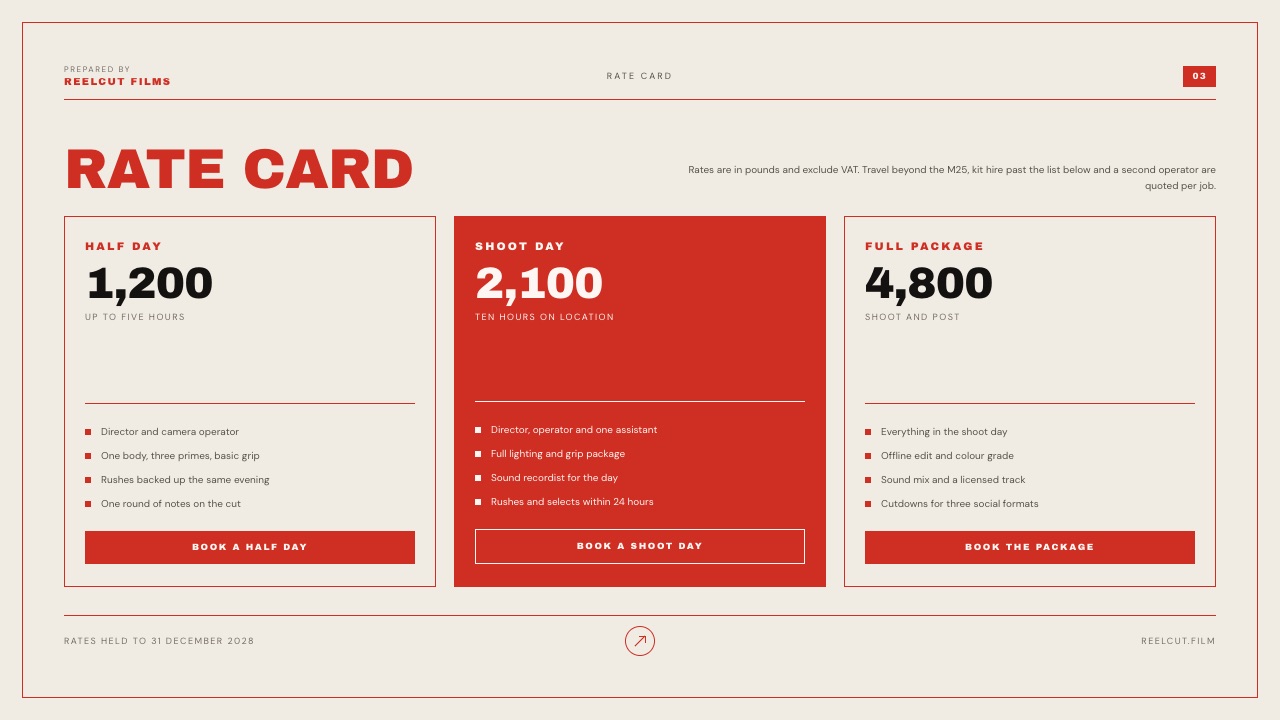
It is 11:40 on a weeknight and a couple has four wedding photographers' guides open on one phone.
The Knot's 2026 Real Weddings Study found that 37% of couples ended up contacting more vendors than they had planned, just to find options that fit their budget, so your guide is being read next to three strangers' guides by people you have never met.
Nobody is there to explain what "Collection II" includes. A photography pricing guide template has to do the job of that missing sales call: nine of its ten pages decide whether the couple writes back at all, and one page, the collections, decides what they buy.
A photography pricing guide is a short client-facing document, sent after an inquiry, that sets out your packages, what each one includes, the add-ons, how delivery works, how booking and payment work, and the answers to the questions a client would otherwise ask on a call.
A photography pricing guide that books clients runs about ten pages and answers questions in the order a client asks them (can I afford you, what do I get, what costs extra, when do I get it, how do I book and pay), with three real collections on one page, because in published choice research the middle option gains share when a genuine premium option sits beside it.
Build it in Canva for the fastest polished PDF from the largest template library, in Framekit Slides if you want the guide to live as a link and a PDF on the same account as your website and client galleries (there is no Framekit template called "pricing guide", so you adapt its Rate Card and Wedding Film Client Proposal slides), or in HoneyBook if the guide should also collect the contract and the deposit.
Full disclosure: Framekit is our product, and it ranks first in the tools section below for one narrow job: a guide that lives beside your website and client galleries. We did not test the other tools hands-on; we read their pricing pages, help documents and template listings in September 2026 and link each one. Canva has far more ready-made photography pricing layouts than Framekit, and HoneyBook handles contracts, invoices and deposits, which Framekit does not do at all.
How This Guide Was Put Together
Everything below rests on three kinds of evidence, kept apart so you can tell which claims are published documents, which are our own arithmetic, and which you would have to test on your own inquiries before trusting them.
Read at the source. Wedding spending comes from The Knot's photographer cost breakdown and its 2026 Real Weddings Study release, both drawn from 10,474 US couples who married in 2025.
The pricing psychology comes from the original 1992 camera study, a Nielsen Norman Group summary of anchoring research, and a researcher's summary of two 2014 replication papers, all linked where they are used.
Tool prices come from each vendor's own pricing page, re-read on 19 September 2026.
Two pages would not give up a US price to an automated reader: Canva's blocks the request entirely, so its figures are the European prices a browser showed that week, and Adobe draws InDesign's price with a script, so we quote the euro figure it served rather than guess a dollar one.
Calculated. The example collections, the effect of a premium tier on the average booking, and the cost of each tool over a year are our arithmetic, shown line by line so you can redo it with your own prices.
Rendered. For Framekit, we opened the actual Slides templates and rendered them slide by slide, so every slide named here exists and looks the way it is described.
Reported by users. Nothing. We found no survey of photographers measuring how pricing-guide design changes booking rates that we could verify, so this guide makes no conversion-rate claims.
The carried example. One US wedding photographer with three collections at $2,200, $3,600 and $5,400, and an extra hour at $375. Every table and calculation below uses those four numbers.
The Numbers Your Guide Is Read Against
A couple does not read your prices in a vacuum; they read them against a figure they found online and three rival guides, so these are the reference points worth knowing before you set a single package.
- $3,000 is the average a US couple spent on a wedding photographer, per The Knot's 2026 study. Couples in the lowest budget quartile spent $1,500 on average, the median quartile $2,800 and the top quartile $4,700.
- 88% of couples hired a photographer, and the average couple hired 13 vendors in total, so your guide competes for attention with twelve other bookings.
- 37% of couples contacted more vendors than they planned in order to find options within budget. That is the reader your guide has to filter, politely, in either direction.
- 50% to 57%: the share of buyers choosing a mid-priced camera rose when a premium model was added beside it, in Simonson and Tversky's 1992 study.
- 11 of 91: the number of reliable decoy effects in one 2014 replication project, which is why the famous "decoy package" trick gets a warning label below.
- About 10 pages: the length of both independent pricing guide templates we read, a $50 Canva template with ten pages and a $199 Showit template with ten-plus design canvases.
- 0: Framekit templates named "photography pricing guide". Four of them contain the pages one needs, and we name them.
Price List, Pricing Guide or Welcome Guide?
Three different documents get called a pricing guide, and mixing them up is the usual reason a guide ends up either one cramped page or twenty pages of onboarding: a price list is a menu, a pricing guide is a sales document, and a welcome guide prepares a client who has already paid.
| Document | When the client gets it | Typical length | Its one job | What it should not try to do |
|---|---|---|---|---|
| Price list or rate card | On your site or on request, before any contact | One page | Show the menu at a glance so the wrong budgets self-select out | Explain your process or sell the experience |
| Pricing guide | After an inquiry, before the call or booking | About ten pages | Get a yes: a call booked, or a date held | Onboard someone who has not paid yet |
| Client welcome guide | After the contract and retainer | Whatever the process needs | Prepare them: timeline, what to wear, the family photo list | Sell anything; they already bought |
The split matters because each document fails differently. A price list that tries to sell turns into a wall of adjectives. A pricing guide that tries to onboard buries the packages under wardrobe advice for a client who has not booked yet.
A welcome guide that repeats the prices reopens a decision the client already made.
If your inquiry form already asks for the date and a budget range, publish a one-page price list with "collections from" figures on your site and send the full guide by reply.
That order lets the price list do the filtering and the guide do the selling, which is the division of labor the rest of this template assumes.
The 10-Page Photography Pricing Guide Template
The template below orders ten pages by the question a client has in their head at each moment of reading, so that nothing important is answered before it is asked and nothing is left for a follow-up email you will never receive.
The difference from a typical guide is the ordering rule. A biography is the page a stranger cares least about at 11:40 at night, so this version puts one sentence of fit on page two and saves the longer story for someone who has already seen the prices.
| Page | The question it answers | What goes on it | Word budget |
|---|---|---|---|
| 1. Cover | Is this the right document? | Your name, "Wedding Collections 2026", one full-bleed photograph | Under 10 |
| 2. Welcome and fit | Are you for people like us? | Two or three sentences on who you photograph best, and one on who you are not for | 60 to 90 |
| 3. How a day with you feels | What is it like to be photographed by you? | Your approach in plain words: direction or documentary, how you handle family photos, what you need from them | 120 to 180 |
| 4. One full story | Can you do this at a wedding like ours? | Eight to twelve frames from one wedding, in order, plus one quote from that couple | Under 60 |
| 5. Collections | Can we afford you, and which one is ours? | Three collections side by side with hours, photographers, image count and delivery time | 90 to 150 |
| 6. In every collection | What do we get whichever we pick? | The shared inclusions, and a short "not included" column | 60 to 100 |
| 7. Add-ons | What costs extra? | Five to seven priced extras in a table | 50 to 80 |
| 8. After the wedding | When do we see the photos, and how? | Sneak peek timing, gallery delivery window, how long the gallery stays online, album timing | 60 to 100 |
| 9. Booking and payment | How do we hold the date, and what do we owe when? | Three or four steps, the retainer, the payment schedule, what happens if the date moves | 80 to 130 |
| 10. Questions and next step | What do we do now? | Five or six real questions answered, your availability, one clear action | 150 to 220 |
That adds up to roughly 700 to 1,100 words across ten pages, which is a guide a couple can read in one sitting on a phone. If your draft runs past 1,500 words, something that belongs in the welcome guide has crept in.
Pages 1 to 4: earn the right to show a price
The cover does one job, which is telling a couple with four PDFs open that this one is yours and is current. Put the year on it.
A guide labelled "2026 Collections" answers the unasked question of whether the prices are still valid, and it forces you to reissue the document every January instead of sending last year's numbers.
Page two is where most guides waste their best real estate.
Replace "Hi, I'm Sarah and I've loved photography since I was twelve" with a sentence about the couple: "I photograph weddings of 40 to 150 guests where the couple would rather be in the room than posing outside it." A clear fit line filters in both directions, and filtering is half of what a guide is for.
Page four is a single story, not a portfolio. Ten frames from one wedding in running order show pacing, light in three different rooms and how you handle the family photographs, which a scattered best-of grid never does.
It is also the page that makes the collections page believable, because the reader has just seen what eight hours of your coverage looks like.
Pages 5 to 7: the money pages
Page six lists what every collection includes, which means the collection cards only need to show what differs. That one move can cut each collection card from a dozen bullet points to four.
It also gives you somewhere to put the "not included" column, which prevents the most common post-booking argument: the couple who assumed the engagement shoot or the travel was part of it.
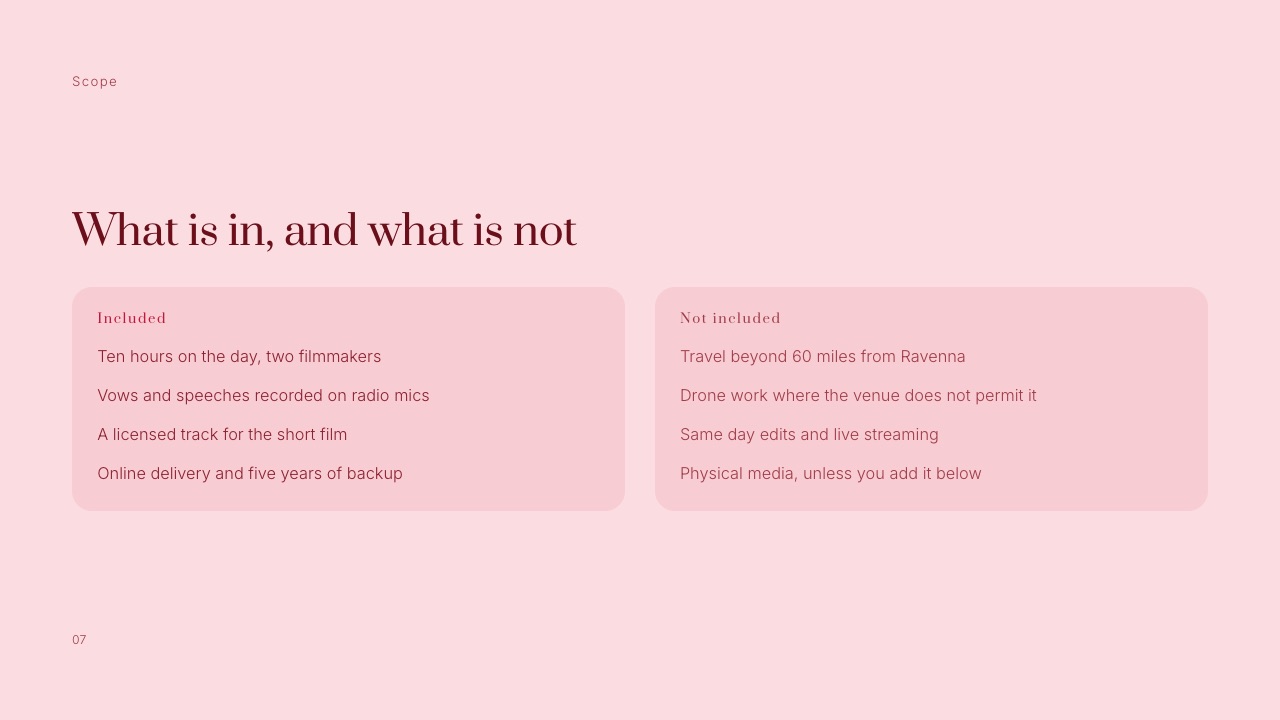
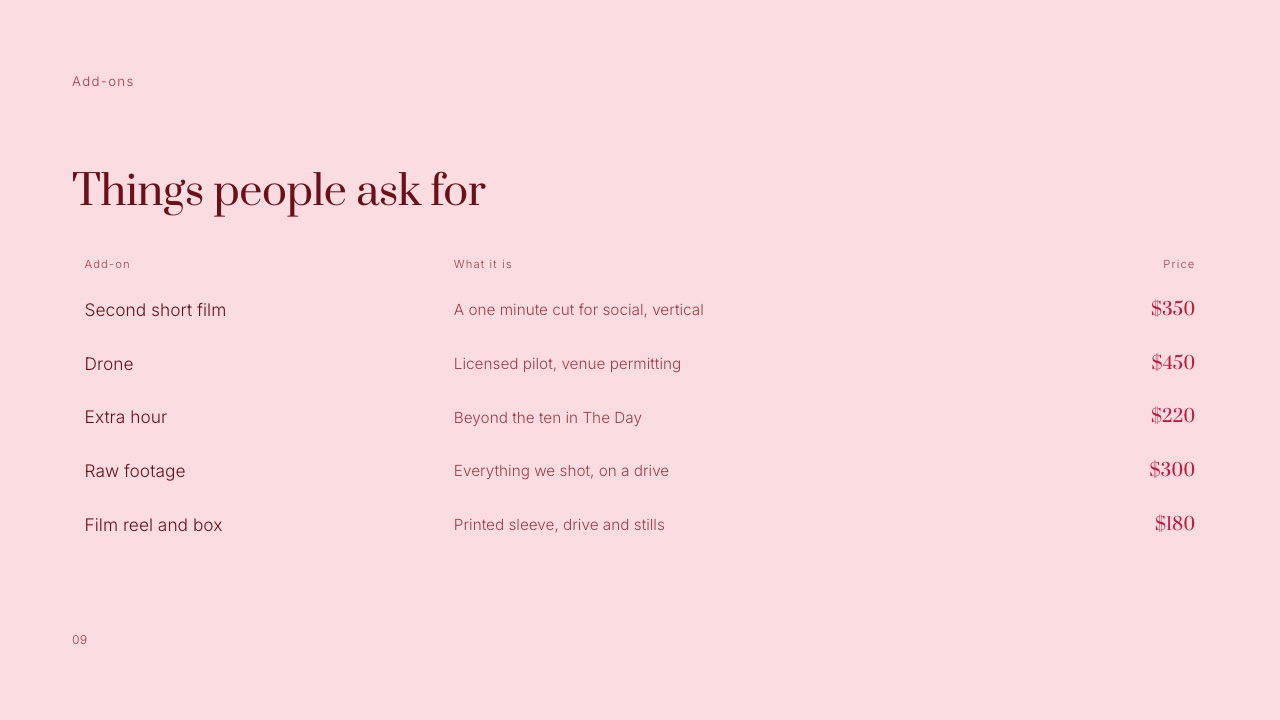
Page seven prices the extras in a table, one line each: an extra hour, a second photographer, an engagement session, an album, travel beyond a stated radius. Priced add-ons do something a vague "custom quotes available" never does.
They let a couple assemble the middle collection plus one extra themselves, which is often the booking you wanted anyway.
Pages 8 to 10: remove the reasons to wait
Page eight answers "when do we get them?", the question that usually follows price.
Give real numbers: a sneak peek within a stated number of days, the full gallery within a stated number of weeks, how long the gallery stays online, and whether downloads are full resolution.
A range you can hit in your busiest month beats an optimistic figure you miss in October.
Page nine is the booking page. Three or four numbered steps, a stated retainer, and a payment schedule with dates relative to the wedding.
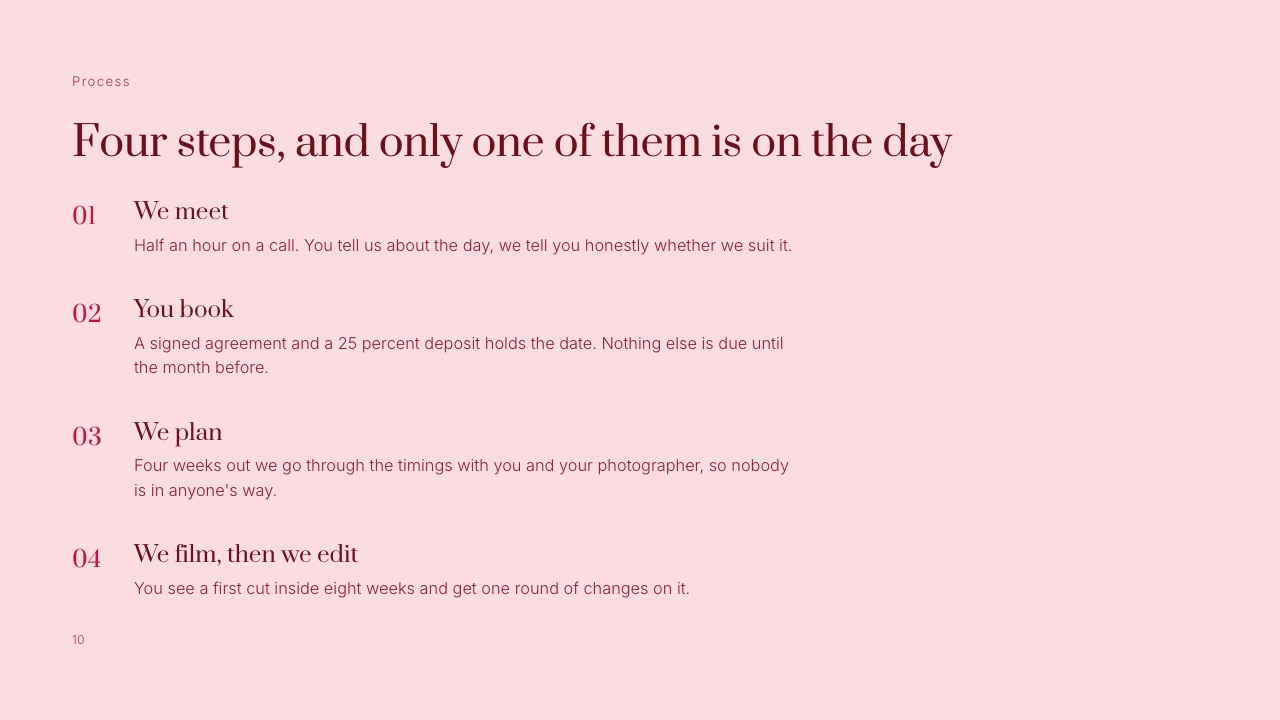
The Wedding Film Client Proposal template in Framekit Slides compresses this into one line worth copying: four steps, and only one of them is on the day.
Page ten closes with five or six questions you are genuinely asked, answered in two sentences each, followed by your availability and one action. "Reply with your date and we will hold it for seven days while you decide" is a next step.
"Let me know if you have any questions" is not.
In one linea pricing guide works when every page answers the question the reader has at that exact moment, which means fit before biography, one story before a portfolio, and shared inclusions pulled out so the collections page can stay short.
The Collections Page, Worked Through
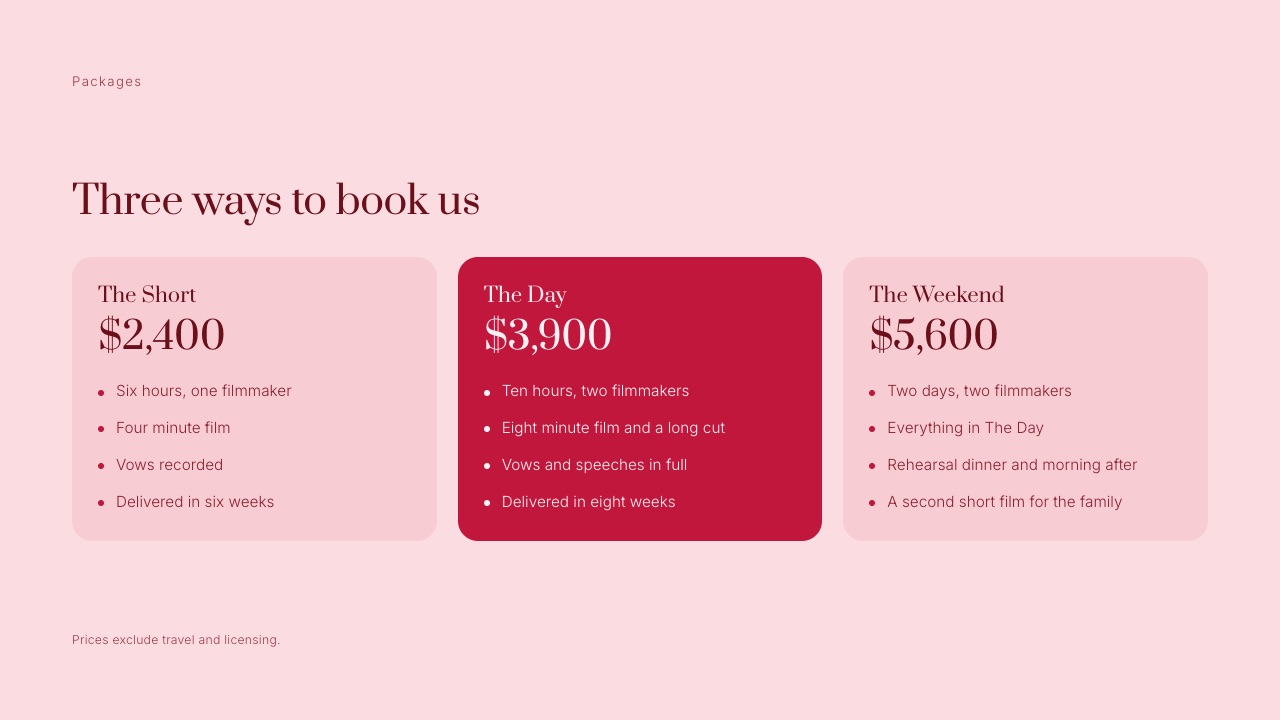
The collections page is the one page a couple will screenshot, send to a parent and argue about, so it has to survive being read without the other nine pages around it, which means every card names hours, people, images and delivery in the same order.
Here is the carried example laid out as it would appear, with the extra hour at $375, the average hourly rate The Knot derives from its $3,000 average over an eight-hour day.
The figures are an illustration of structure, not a recommendation of what you should charge.
Your own market, costs and demand set that, and our guide on how to price photography walks through the cost-of-doing-business arithmetic.
| Collection One | Collection Two | Collection Three | |
|---|---|---|---|
| Price | $2,200 | $3,600 | $5,400 |
| Coverage | 6 hours | 8 hours | 10 hours |
| Photographers | 1 | 2 | 2 |
| Engagement session | Not included | Included | Included |
| Edited images (approx.) | 400 | 700 | 900 |
| Online gallery | Full resolution, downloadable | Full resolution, downloadable | Full resolution, downloadable |
| Album | Not included | Not included | 30-page album included |
| Gallery delivered within | 8 weeks | 6 weeks | 4 weeks |
Every row appears on every card, even where the answer is "not included". That is deliberate.
A card that silently omits the second photographer invites the couple to assume one; a card that says "1 photographer" invites them to compare it with the card beside it, which is the comparison you want them to make.
What a real top tier does to the middle
The single best-supported reason for three collections rather than two comes from Simonson and Tversky's 1992 camera study, published as Choice in Context in the Journal of Marketing Research.
Shown two Minolta cameras at $169.99 and $239.99, 106 people split 50/50.
When a third, top-of-the-line camera at $469.99 was added for another 115 people, the split became 22%, 57% and 21%, and the middle camera's share relative to the cheap one rose from 50% to 72%.
Researchers call this extremeness aversion, or the compromise effect: an option looks more reasonable when it sits between two others. Apply those percentages to the carried example, purely as arithmetic, and the difference in average booking is large.
| Scenario | Who books what | Average booking | Across 20 weddings |
|---|---|---|---|
| Two collections, split evenly | 50% at $2,200, 50% at $3,600 | $2,900 | $58,000 |
| Three collections, camera-study split | 22% at $2,200, 57% at $3,600, 21% at $5,400 | $3,670 | $73,400 |
| Difference | $770 per booking | $15,400 |
The working: 0.22 x 2,200 = 484; 0.57 x 3,600 = 2,052; 0.21 x 5,400 = 1,134; total $3,670. Treat this as an illustration of the mechanism, not a forecast.
Couples choosing a wedding photographer are not 1992 students choosing a camera from a catalog page, and nobody has published a study measuring this effect on photography guides specifically.
The practical rule survives the caveat. Collection Three has to be something a real couple would book and that you would be glad to shoot, because 21% of the camera buyers picked the expensive option.
A top tier invented only to make the middle look cheap will occasionally be booked, and you will then have to deliver it.
In one linethree real collections with identical rows on every card give a couple an honest comparison, and the one piece of published choice research worth designing around says the middle option gains when a genuine premium option sits beside it.
Pricing Psychology: What Holds Up and What Does Not
In one lineof the three pricing tricks photographers pass around, anchoring and the compromise effect have solid published evidence behind them, while the famous decoy package failed most replication attempts in realistic settings and should not shape your guide.
| Finding | What the study showed | Where to read it | What it means for your guide | How much to trust it |
|---|---|---|---|---|
| Compromise effect | Middle camera went from 50% to 57% of all choices once a premium model was added | Simonson and Tversky, 1992 | Offer three real collections, put your preferred one in the middle | Strong, and replicated in the original paper with five cameras |
| Anchoring | People who saw 8x7x6x5x4x3x2x1 estimated a median 2,250; those who saw 1x2x3...x8 estimated 512 | NN/g's summary of anchoring research | The first number a reader sees colors the rest, so decide deliberately which price comes first | Strong as a general effect |
| Arbitrary anchors | Students whose Social Security number ended 80 to 99 bid an average $55.64 for a keyboard; those ending 00 to 19 bid $16.09 | Same NN/g article, reporting Ariely and colleagues | Even an irrelevant number shifts willingness to pay, so a stray low figure early in the guide costs you | Strong in the lab, smaller in real purchases |
| Decoy (asymmetric dominance) | With two options, 68% of 100 students chose the cheap web-only subscription; adding a print-only decoy priced like web plus print cut that to 16%, with 84% taking the bundle | The Conversation's explainer on the decoy effect | Tempting, but see the next row | Weak once tested realistically |
| Decoy replications | One project found 11 reliable effects in 91 attempts; another found no attraction effect in realistic tasks | John Dawes' summary of the 2014 replication papers | Do not build a deliberately bad package to steer couples | The honest reading is: unreliable |
The anchoring result has a simple application most guides get backwards.
If your add-ons page lists "second shooter $150" before the collections page, the first number a couple meets is $150, and every collection afterwards reads as a large jump from it.
Put the collections before the add-ons, and lead the collections page with the collection you most want booked or the one you are proudest of, not the cheapest.
The decoy is different.
In the classic version a third option exists only to be obviously worse than one of the others, and the subscription demonstration is memorable, but two large 2014 studies in the Journal of Marketing Research mostly failed to reproduce it.
Dawes reads the original effect as largely an artifact of stylized text descriptions of price and quality, and a couple who spots a staged package will wonder what else in the guide is staged.
Add-Ons, Retainers and the Fine Print
In one linethe add-ons and payment pages are where couples decide whether you are easy to do business with, so they need prices on every line, a retainer stated as a figure and a schedule tied to dates the couple already knows.
A priced add-ons table
For the carried example, the add-ons page would read like this. The extra hour uses the same $375 figure throughout; the other prices are placeholders to replace with your own.
| Add-on | What it is | Example price |
|---|---|---|
| Extra hour | Coverage beyond the collection's hours, booked in advance | $375 |
| Second photographer | For Collection One only, per wedding | $600 |
| Engagement session | One hour, one location, 50 edited images | $450 |
| Heirloom album | 30 pages, lay-flat, designed by you | $1,100 |
| Parent albums | Two smaller copies of the main album | $500 |
| Travel | Beyond 60 miles from your base, per mile or flat fee | Quoted |
Keep the list to five to seven lines. Every extra line is another decision the couple has to make before replying, and the point of the page is to answer "what costs extra?" rather than to sell ten things.
The payment schedule
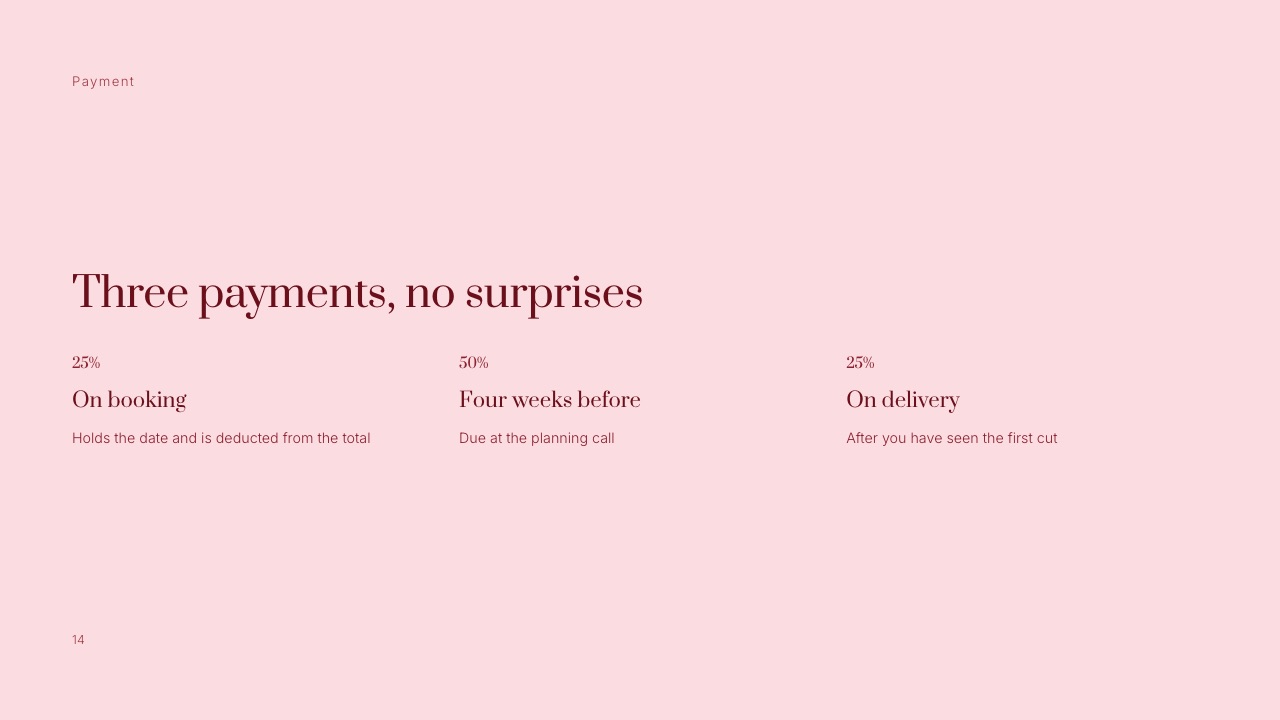
State the retainer as a number or percentage, say that it holds the date and is deducted from the total, and tie every later payment to a date relative to the wedding.
Framekit's Wedding Film Client Proposal template uses three payments: 25% on booking, 50% four weeks before, and 25% on delivery.
The other structure you will see in photography guides is a retainer followed by the full balance before the wedding, and either works as long as it is written down before the couple signs.
For the carried example on a 25/50/25 schedule, Collection Two would be $900 to book, $1,800 four weeks out and $900 on delivery. On a retainer-then-balance schedule it might be $1,000 to book and $2,600 due 30 days before the date.
Put whichever you use on page nine as a worked example for their collection, because a percentage asks the couple to do arithmetic and a dollar figure does not.
Lines that belong in the fine print
Three sentences prevent most disputes. Say whether prices include sales tax where your state or country charges it. Say what happens to the retainer if the couple moves or cancels the date.
Say how long you hold a date after sending the guide, because "first to sign" is a policy the couple should hear before, not after, someone else books their Saturday.
PDF, Web Page or Link: How to Send It
In one linea PDF attachment is still the default, but a guide built for phones and sent as a link can be updated after it is sent, opened without a download, and linked from your inquiry reply, which matters when most couples read on a phone.
Nielsen Norman Group has argued for two decades that PDFs are poor for on-screen reading, and its 2020 update on PDFs describes mobile readers having to pinch, zoom, squint and scroll.
A pricing guide designed as a landscape print spread has exactly that problem on a phone. That does not make the PDF wrong; it makes the page size and type size the decision that matters.
| Format | How the couple opens it | Can you update it after sending? | Works well on a phone? | Best when |
|---|---|---|---|---|
| PDF attachment | Downloads from the email | No, the old file lives in their inbox forever | Only if designed at phone-friendly proportions with large type | Couples or planners who print and file |
| PDF behind a link | Opens in the browser's viewer | Yes, if you replace the file at the same link | Same as above | You want one file and one current version |
| Presentation link | Opens as slides in the browser | Yes, edits show on the same link | Yes, slide by slide | You want the guide to feel like a short presentation |
| Private page on your website | Opens like any web page | Yes | Yes, if the site is responsive | You want guide, portfolio and inquiry form one tap apart |
| Client portal or proposal (HoneyBook and similar) | Opens in the vendor's portal | Yes | Yes | You want selection, contract and retainer in one flow |
The update column is the one that costs money. A guide attached as a file in January is still being forwarded between a couple and their parents in August, carrying January's prices.
A link that always shows the current version removes that problem, as long as you remember that anyone who has the link sees the new numbers too.
A practical combination: send a link in the inquiry reply, and keep a PDF export of the same guide for the couple who asks for something to print. Both come from one source file, so they cannot drift apart.
Where to Build It: Five Routes Compared
The right tool depends less on design features than on what the guide has to do after it is read: sit in an inbox, live beside your portfolio, or turn straight into a signed contract and a paid retainer, and each of the five routes below is built for one of those.
| Route | Starting price | Photography pricing layouts | Sends as | Collects contract and retainer? | Biggest limit |
|---|---|---|---|---|---|
| Framekit Slides | Free; full template library from $7 a month billed yearly | None named "pricing guide"; four templates with rate card, packages, add-ons or payment slides | Link, full-screen presentation, PDF | No | No deck-link password or per-viewer analytics |
| Canva | Free; Pro EUR 110 a year | Many price list and price guide flyer designs | PDF, image, link | No | Mostly one-page designs; multi-page guides come from third-party sellers |
| HoneyBook | $29 a month billed yearly | Its own professional templates; services clients can select | Client portal and smart files | Yes | Starter shows "Powered by HoneyBook" |
| InDesign or Affinity | Affinity free; InDesign EUR 25.99 a month (German price) | None built in; start from a blank grid or a bought file | No | You are the designer | |
| Template shops | $50 (Canva) to $199 (Showit) one-off | Complete guides with written copy | Whatever the host tool sends | No | You inherit someone else's structure and words |
1. Framekit Slides: Best for a Guide That Lives Beside Your Portfolio
Framekit is an AI website builder for photographers and filmmakers, and its Slides tool is where a pricing guide fits: you build it as a deck on the same account as your website and your client galleries, then send it as a link, present it on a call or export it as a PDF.
The honest starting point is that Framekit has no template called "photography pricing guide". What it has are four templates containing the pages a guide needs.
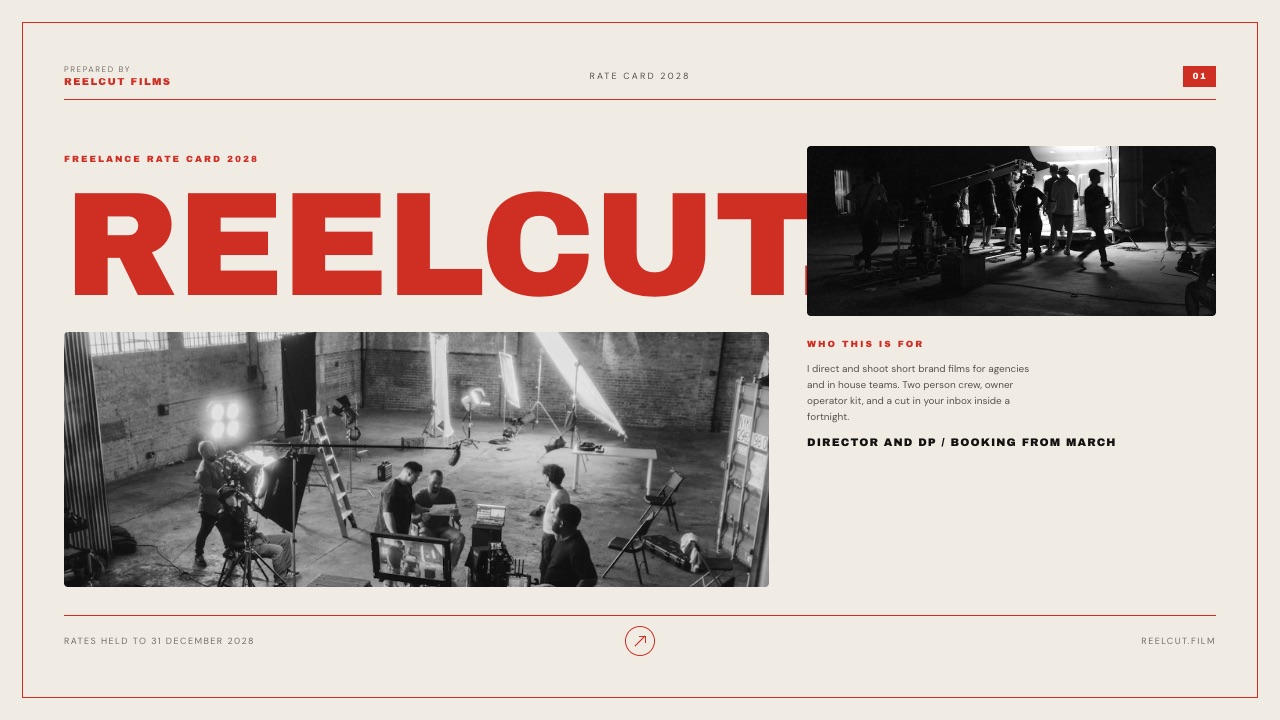
The Rate Card and Cold Outreach Deck is four slides (Cover, What you get, Rate card, Next step) and is the fastest route to a one-page price list with a cover.
The Wedding Film Client Proposal is 20 slides and, although it is written for a wedding film studio, it contains an Included slide, a three-card Packages slide, a priced Add-ons table, a How it works slide, a Payment slide and an Availability slide, which covers most of pages five to ten of the template above.
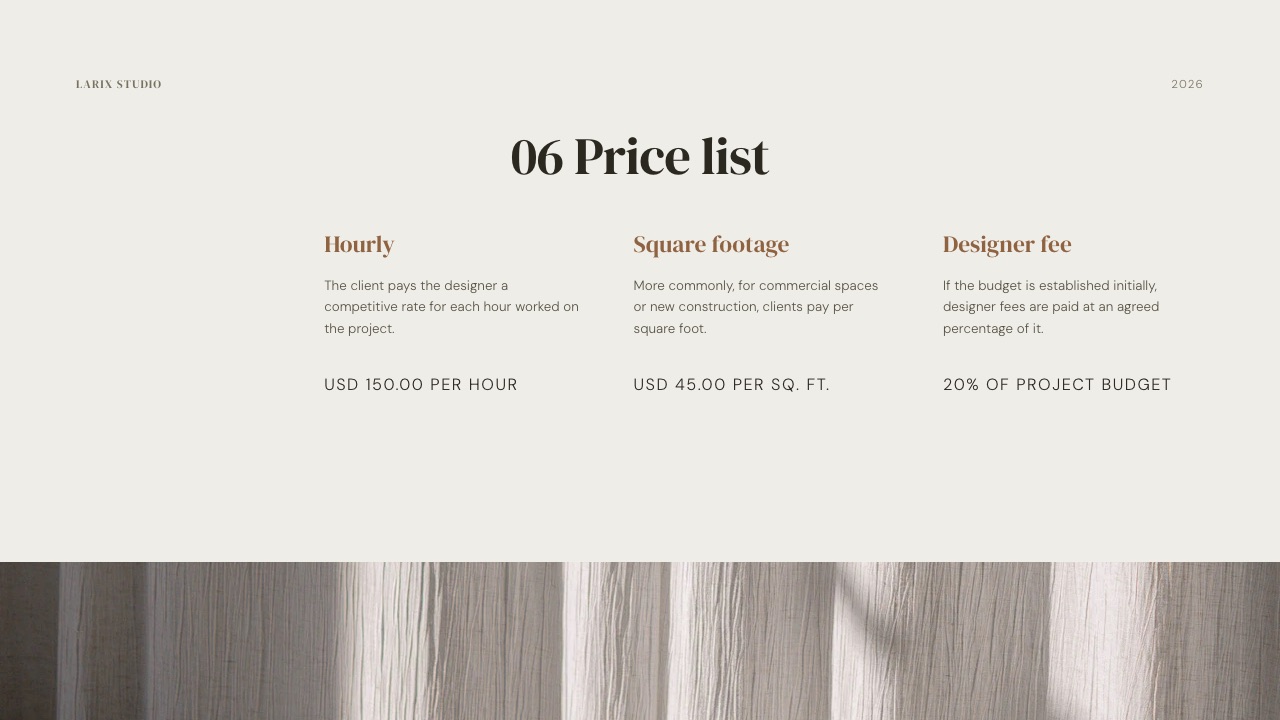
The Creative Studio Portfolio has a Pricing plan slide, and the Interior Design Studio Pitch has a Price list slide with three pricing models side by side.
What it does wellevery plan, including Free, gets unlimited decks, the AI slide writer (describe the slide and it writes and lays it out), speaker notes, full-screen presenting, a share link and PDF export.
Your own fonts and colors apply across every slide, so the guide matches the website it is linked from.
The real numberthe full template library, your own uploaded fonts and removing the Framekit byline start on Starter at $7 a month billed yearly, $84 a year, or $9 month to month.
Turning the Wedding Film Client Proposal into a photography guide means rewording the film-specific slides and replacing the sample prices; the page order is already there.
The standout detailbecause the guide is a link, the version a couple forwards to a parent in August shows your current prices, not the January PDF.
The gotchadeck share links have no password and no per-viewer analytics, only a total view count. If you want to know that one couple opened your guide twice on Tuesday, Framekit will not tell you, and a proposal tool with tracking will.
PowerPoint export exists on Pro and up but exports each slide as a picture, so it is not a route to an editable PowerPoint file.
Skip it ifyou need the guide to become a signed contract and a paid retainer in one sitting. Framekit does not do contracts, e-signatures, invoicing or booking calendars.
Verdict: the best pick when the guide should look like part of your website and galleries rather than a separate attachment, and a poor pick if your booking process depends on the guide turning into a contract automatically.
2. Canva: Best for the Most Ready-Made Layouts
Canva is where a great many photographers build a pricing guide, and for good reason: its gallery has more photography price list and price guide designs than any other route here, the editor is familiar, and the free plan is enough to finish one.
A search of Canva's own template pages turns up designs with names like "Photography Price Guide Flyer", "Photographer Price List" and a wedding price list collection.
Canva's pricing page says Pro includes 3.6 million-plus templates against 1.6 million-plus on Free, and Pro was listed at EUR 110 a year for one person for European buyers in September 2026.
The real numberthe $50 Photographer Pricing Guide template sold by Rachelle Welling Photography, a ten-page Canva template with wedding copy, is typical of the paid route; you buy it once, get access to the Canva file and edit it on your own account.
The standout detailmost of Canva's own photography pricing designs are single pages. That suits a price list and traps a guide, because stacking eight one-page flyers does not produce a ten-page document with a consistent grid.
The gotchathe guide ends up as a PDF attachment unless you deliberately share it as a Canva link, and the moment you want brand fonts or premium elements across ten pages you are on Pro.
Skip it ifyou want the guide to open inside your own website or share an account with your galleries; Canva is a design tool, not the place clients visit.
Verdict: the default for a reason and the right first choice for most photographers. Buy or pick a multi-page template rather than assembling one from flyers.
3. HoneyBook: Best When the Guide Should Become a Booking
HoneyBook is a client management platform rather than a design tool, and its pricing guide is really a smart file: clients browse your services, choose one, and their choice flows into the invoice and contract.
The HoneyBook help article on services in smart files, dated May 2026, says clients see a running total that updates in real time as they select.
The real numberHoneyBook's pricing page lists Starter at $29 a month billed yearly, which is $348 a year, with invoices and payments, proposals and contracts, a calendar and all professional templates.
Essentials is $49 billed yearly and adds the scheduler, automations and removal of the "Powered by HoneyBook" line. All plans start with a 30-day free trial with no card required.
The standout detailcard payments start at 2.7% plus 10 cents, so a $900 retainer on the carried example's Collection Two costs about $24.40 in fees, and the full $3,600 paid by card about $97.30. ACH transfers cost 1.5%.
The gotchaa HoneyBook guide lives in HoneyBook's portal, inside its layout rules. If the look of the first impression matters more to you than automation, keep a designed guide for that first email and use HoneyBook from the proposal step onward.
Skip it ifyou book fewer than ten clients a year and already have a contract template and a payment link; $348 a year is a lot for a workflow you run eight times.
Verdict: the strongest option here for turning a yes into a signed contract and a paid retainer, and the weakest for design freedom. Our comparison of studio management tools for photographers covers HoneyBook's alternatives.
4. InDesign or Affinity: Best for Full Layout Control
InDesign and Affinity are page layout software, and they are the route for photographers who want the guide to look like a printed book: a real baseline grid, facing pages, proper typography and a print-ready PDF.
Affinity now describes itself as free for individuals, combining vector, pixel and layout work in one app on Mac and Windows, with an iPad version listed as coming.
Its AI tools require a Canva premium plan.
Adobe's InDesign plans page showed the single app at EUR 25.99 a month including VAT on the annual plan billed monthly when read from Germany in September 2026, with a 7-day free trial; that is about EUR 312 a year.
The standout detaillayout software is the only route here that makes a genuinely good printed guide, with bleeds and spreads handled properly. If you hand a printed guide across the table at a wedding fair, this is the tool.
The gotchaa guide designed as print spreads is exactly the PDF that the Nielsen Norman Group complaint describes on a phone. Designing for print and for phones means two layouts, and most solo photographers only have time to maintain one.
Skip it ifyou have never set type on a grid. The blank page is the whole cost.
Verdict: worth it for print and for photographers with design training, and slower than necessary for everyone else. Affinity being free removes the cost argument against trying it.
5. Template Shops: Best for Copy You Do Not Have to Write
Template shops sell complete pricing guides with the words already written, and the better ones are made by working wedding photographers who know which questions couples ask. Etsy lists many; independent shops sell a smaller number of more finished ones.
Two examples read in September 2026: Rachelle Welling's Canva pricing guide template at $50 for ten customizable pages, and the Salted Pages photography pricing guide template at $199, an "Investment Guide" built for the Showit website builder with more than ten design canvases and pre-written copy.
Both state that refunds are not available.
The real numberthe Showit template needs a Showit site, and Showit's pricing page lists its base plan at $259 billed annually, so year one on that route is $458.
The gotchapre-written copy is the reason to buy and the reason to be careful. A couple comparing four guides may be reading the same sentences in two of them, which is the one outcome a guide exists to prevent. Rewrite at least the welcome, the experience page and the FAQ.
Verdict: a good shortcut if you rewrite the words and keep the structure; a bad one if you change the photos and send it as-is.
What Each Route Costs in Year One
In one linebuilding a photography pricing guide costs anywhere from nothing to about $590 in the first year, and the gap is almost entirely the price of what comes attached to the guide, whether that is a website, a booking system or nothing at all.
The figures below are published prices read in September 2026, multiplied out to twelve months. Where a vendor showed only a euro price, the euro figure is given as listed rather than converted.
| Route | What you pay in year one | What else that money buys |
|---|---|---|
| Affinity, built from scratch | $0 | A full layout, photo and vector app |
| Framekit Free | $0 | A website on a Framekit address, client galleries and video review with a Framekit badge; blank decks and the AI slide writer, not the full template library |
| Canva Free plus a $50 template | $50 | A complete ten-page starting point |
| Framekit Starter | $84 billed yearly, or $108 month to month | The full Slides template library plus a website on your own domain and client galleries without the badge, on one pooled 50GB of storage |
| Canva Pro | EUR 110 | Brand fonts and the larger template library across all your marketing |
| InDesign single app | About EUR 312 (German price) | Professional print layout, 100GB of Adobe cloud storage |
| HoneyBook Starter | $348 | Contracts, invoices, payments and a client portal |
| Showit template route | $458 ($199 template plus $259 plan) | A Showit website with the guide as a page on it |
| HoneyBook Essentials | $588 | Adds scheduling, automations and removes HoneyBook branding |
Read the third column before the second.
A guide in Canva is a cheaper document than a guide in HoneyBook, but only HoneyBook's price includes the contract and the retainer, and only Framekit's and Showit's include the website the guide is supposed to send people back to.
If you already pay for a website elsewhere, what our photography website cost breakdown calls the real annual cost of a site is the number to compare against.
A test you can run on your own numbers: take last year's inquiries, count how many never replied after you sent the guide, and multiply that count by your average booking.
If ten silent inquiries at $3,600 average represent $36,000 of work that went elsewhere, then even the most expensive route in this table costs less than 2% of one lost booking, and the real question is which guide gets more replies, not which tool is cheapest.
Eight Mistakes That Stop a Guide From Booking
In one linemost pricing guides fail for boring, fixable reasons, and every one of the eight below is either a missing number, a question answered in the wrong order, or a document that is out of date by the time it is read.
- "Starting at" with no ceiling. "Collections from $2,200" tells a couple the floor and invites them to guess the rest. Show every collection's full price.
- Prices hidden until page nine. A couple who reaches the prices after eight pages of biography feels ambushed, and one who never reaches them never replies. Collections belong around page five.
- Collections that differ on invisible rows. If Collection Two adds a second photographer, Collection One's card must say "1 photographer", or the comparison fails.
- A fake top tier. Covered above: 21% of buyers in the camera study chose the premium option, so build one you would deliver happily.
- Add-ons without prices. "Albums available" turns a menu into an email thread. Every add-on gets a number or the word "quoted" with the basis for the quote.
- Last year's prices in circulation. Put the year on the cover and send links rather than attachments where you can, so an old PDF cannot keep quoting last season's rate.
- A print layout read on a phone. A landscape A4 spread becomes a pinch-and-zoom exercise on a phone; design at a proportion that reads at phone width, or send slides.
- No next step. End with one action and a hold period: "Reply with your date and we will hold it for seven days." A guide that ends on a thank-you page leaves the couple to decide what happens next, and most will do nothing.
Number 2 is the one photographers argue about.
Holding prices back until a call can work at the very high end, where every wedding is quoted; for most photographers the guide is the conversation, and a couple holding three guides that show prices has little reason to book a call just to learn yours.
Our guide to getting photography clients covers the inquiry-to-call step in more detail.
Which Route Fits Your Studio
The shortest path to the right tool is to answer four questions in order, stopping at the first one that is a clear yes, because each answer rules out the routes that cannot do what you need next.
Do you want the guide to become a signed contract and a paid retainer without leaving the document? If yes, use HoneyBook or a similar client management tool, and treat its smart file as your guide. If no, go to the next question.
Is the guide mainly printed and handed over in person, at fairs or consultations? If yes, lay it out in Affinity or InDesign and export a print PDF, then make a separate phone-friendly version for email. If no, go on.
Do you want the guide to sit on the same account as your website and your client galleries, as a link that always shows current prices? If yes, use Framekit Slides, starting from the Rate Card and Cold Outreach Deck for a short price list or the Wedding Film Client Proposal for a full ten-page guide, and accept that there is no link password or per-viewer tracking.
If no, go on.
Do you want the most ready-made layouts and do not mind a PDF attachment? If yes, use Canva, and buy a multi-page template from a photographer-run shop if you want the copy written too.
If none of these fit, you probably need a one-page price list on your website more than a guide, and our photography business startup guide is the better next read.
Frequently Asked Questions
What should a photography pricing guide include?
A photography pricing guide should include a cover with the year, a short fit statement, a description of how you work, one full story from a real session, your collections with prices, what every collection includes and excludes, priced add-ons, delivery timelines, booking steps with the retainer and payment schedule, and five or six answered questions with one clear next step.
That is about ten pages and 700 to 1,100 words in total.
How many pages should a photography pricing guide be?
A photography pricing guide works best at about ten pages. Both independent templates read for this article, a $50 Canva template and a $199 Showit template, sit at around ten pages or canvases.
Under six pages usually means the guide skips delivery or payment details; over fifteen usually means onboarding content from a welcome guide has crept in.
Should photographers put their prices on their website?
Most photographers benefit from putting starting prices, or a one-page price list, on their website and sending the full pricing guide after an inquiry.
The public figures filter out budgets that do not fit, and the guide then does the selling.
The Knot's 2026 study found 37% of couples contacted more vendors than planned to find options within budget, so visible prices save both sides a wasted email.
How many packages should a wedding photography pricing guide have?
A wedding photography pricing guide should usually have three collections. In Simonson and Tversky's 1992 study, adding a premium third option raised the middle option's share from 50% to 57% of all choices.
Two options give couples no middle; five or more slow the decision. Make the top tier one that real couples book, since 21% of buyers in that study chose it.
Is a photography pricing guide better as a PDF or a web link?
A photography pricing guide can work as either, but a link is easier to keep current.
A PDF attachment stays in a couple's inbox with the prices you had when you sent it, while a link to slides or a web page always shows the current version.
Nielsen Norman Group has long criticized PDFs for phone reading, so if you send a PDF, design it at phone-friendly proportions with large type.
What is the difference between a pricing guide and a client welcome guide?
A pricing guide is a sales document sent after an inquiry to help a couple decide to book; a client welcome guide is sent after the contract and retainer to prepare a client who has already booked.
The pricing guide carries collections, add-ons and payment terms. The welcome guide carries timelines, what to wear, shot lists and logistics, and should not repeat the prices.
How much does a wedding photographer cost in 2026?
A wedding photographer cost US couples $3,000 on average, according to The Knot's 2026 Real Weddings Study of 10,474 couples who married in 2025.
Couples in the lowest budget quartile spent about $1,500 and those in the top quartile about $4,700. Regional averages ranged from $2,600 in the Southwest to $3,800 in the Mid-Atlantic.
Is it worth buying a photography pricing guide template?
Buying a photography pricing guide template is worth it if you rewrite the copy.
A $50 Canva template or a $199 Showit template gives you a finished structure and written pages, but other photographers in your area may have bought the same one.
Keep the layout, replace the welcome, experience and FAQ pages with your own words, and use your own photographs throughout.
Can Framekit make a photography pricing guide?
Framekit can make a photography pricing guide in Slides, but it has no template with that name.
You adapt the Rate Card and Cold Outreach Deck for a short price list, or the 20-slide Wedding Film Client Proposal, which has Included, Packages, Add-ons, How it works and Payment slides.
Framekit sends it as a link or PDF on every plan; it does not handle contracts, invoices or retainers.
How often should photographers update their pricing guide?
Photographers should update their pricing guide at least once a year, ideally in January with the year on the cover, and whenever a price changes.
If you send the guide as a link rather than an attachment, one edit updates every copy already sent. If you send PDFs, add a "prices valid until" date so a forwarded old version cannot hold you to last year's rate.
Final Verdict
The best photography pricing guide template is the one that answers a couple's questions in the order they ask them: about ten pages, three real collections with identical rows on every card, priced add-ons, a payment schedule in dollars, and one next step.
Build that structure first; the tool matters less than getting the order right.
For the tool itself, Canva is the sensible default for most photographers, with the most ready-made layouts and a free plan that finishes the job.
Framekit Slides is the better fit when you want the guide to live as a link beside your website and client galleries, always showing current prices.
Where Framekit loses: it has no template named "pricing guide", no deck-link password, no per-viewer analytics, and no contracts, invoices or retainers, so a studio that wants the guide to turn into a paid booking in one flow should use HoneyBook, and a photographer handing guides across a table at a wedding fair will get a better printed result from Affinity or InDesign.
Related readingset your numbers before you design anything with how to price photography, compare booking systems in the best studio management tools for photographers, and once a couple books, see the best client galleries for wedding photographers for the delivery end of the promise your guide makes.
Wedding filmmakers doing the same job can use the wedding videography pricing guide, and if you deliver through Pixieset today, Pixieset's pricing explained shows what the gallery side really costs.