Framekit templates
Start from a designer-made template
 Use template
 Use template
 Use template
 Use template
 Use template
 Use template
 Use template
 Use template
A wedding and portrait photographer books maybe thirty clients a year, and every one of them is a small pile of admin: an inquiry to answer, a quote to send, a contract to sign, an invoice to raise, a payment to chase, a reminder to fire before the shoot.
Do that by hand across thirty bookings and you lose evenings you should spend editing, sleeping, or living - and worse, you lose bookings, because the couple who waited three days for your reply already hired the photographer who replied in three hours.
The tool that runs that client journey for you is a studio management tool, and it is one of the highest-return purchases a working photographer makes.
Every price in this guide was re-read on each vendor's own pricing page on 7 August 2026, and Framekit's own plans and gallery features were re-verified in September 2026.
Four of the nine had moved since the last check: Dubsado now publishes annual pricing only, at $335 and $525 a year, Bloom's list tiers dropped to $14, $34, and $66, Iris Works starts at $14.95, and Dubsado's old no-time-limit three-client trial has been replaced by a 21-day trial of the Premier plan.
On 12 October 2026 we also removed a line claiming we ran a full client journey through each tool, and brought the Dubsado review in line with that new trial.
This guide ranks the nine that do it best, and it is worth saying plainly up front what this category is not. Studio management is booking, contracts, leads, invoicing, and workflow automation - the back office.
It is not your website, your galleries, or your store, which is a different job with different tools.
If contracts and proposals are the only piece you are missing, a specialist beats a whole suite, and we priced what binding signatures and deposit collection cost per vendor separately.
We ranked these nine on the client journey they actually run, and we are honest, including about where our own product sits: Framekit is on this list, at the bottom, because it is not a studio manager, and pretending otherwise would waste your time.
Every tool's pricing was re-checked in July 2026.
The photographer who replies, quotes, and contracts fastest wins the booking - which is the whole case for studio management software.
A studio management tool is software that runs a photographer's client journey from inquiry to payment - capturing leads, sending quotes and contracts, scheduling, invoicing, taking payments, and automating the follow-ups in between - so the admin around each booking happens without stealing shooting time.
The best studio management tool for photographers in 2026 is HoneyBook, because it runs the whole client journey - lead, proposal, contract, invoice, payment - in one polished flow that reads professional to the client.
Dubsado is the pick for deeper workflow automation, and Studio Ninja for the simplest photography-specific setup.
An honest note, since one of the tools below is ours: Framekit is not a studio management tool and does not book clients, send contracts, or invoice - it is the website, galleries, and store layer you run alongside a CRM.
For studio management, choose a dedicated CRM, and we rank ours last here for exactly that reason.
Framekit runs the client-facing side - website, photo and video galleries, video review, and store in one account - so your studio manager can focus on the back office, and the free plan needs no credit card.
Full disclosure: Framekit, ranked #9 - last - below, is our own product, and we put it last on purpose. Studio management means running booking, contracts, and invoicing, and Framekit does none of those. It is the client-facing website, galleries, and store layer, not a CRM. For the job this guide is about, a dedicated studio manager like HoneyBook or Dubsado beats us outright, and we rank them first because that is the honest order. We re-verified every price in July 2026. If your problem is admin, buy one of the eight tools above ours, not Framekit.
How We Compared These Studio Management Tools
We mapped a photographer's full client journey - inquiry, quote, contract, invoice, payment, and follow-up - onto what each tool documents and scored it on the workflow, not a feature count, without running live bookings through any of them for this guide:
The client journey. How completely it carries a booking from first inquiry to final payment without you touching every step.
Automation. Whether it can fire the follow-ups, reminders, and status changes that save the most time at volume.
Photography fit. Whether it is built for photographers or a general service CRM you adapt.
Client experience. How the proposals, contracts, and payment pages look to the client on the other end.
Real cost. The monthly price and any payment or add-on fees, checked in July 2026.
We follow one photographer through the guide: a wedding and portrait photographer booking about thirty clients a year and losing evenings to contracts and invoice-chasing. We re-checked every price in July 2026 and flag where a tool bundles jobs beyond the CRM.
What Comparing 9 Studio Management Tools Showed
- Speed of reply and quote wins bookings, so the automation that shortens response time is the highest-return feature, not the longest feature list.
- The category leaders - HoneyBook and Dubsado - differ mainly on polish versus automation depth, and both charge a payment fee on top of the subscription.
- Photography-specific tools like Studio Ninja and Iris Works trade some power for a gentler setup, which suits a solo photographer who wants admin handled, not configured.
- Some suites bundle the CRM with galleries and a website - Pixieset and Sprout Studio - so the line between studio management and the client-facing layer is blurring.
- 0 of the 9 that are pure website-and-gallery tools belong at the top here - studio management is a back-office job, and we rank our own such tool, Framekit, last for that reason.
The 9 Best Studio Management Tools for Photographers in 2026
How the ratings work: each tool is scored on how completely it runs the client journey, its automation, photography fit, client experience, and cost.
HoneyBook and Dubsado lead on the full booking-to-paid workflow; the website-and-gallery tool on this list, Framekit, ranks last because studio management is not the job it does.
| Tool | Runs Booking, Contracts, Invoicing? | Best For | Our Rating |
|---|---|---|---|
| HoneyBook | Yes, full client journey | Booking to payment in one | 9.2/10 |
| Dubsado | Yes, with deep automation | Workflow automation | 9.0/10 |
| Studio Ninja | Yes, photography-specific | Simple photography admin | 8.7/10 |
| Sprout Studio | Yes, plus galleries and email | One-tool photography suite | 8.5/10 |
| Pixieset Studio Manager | Yes, plus galleries and store | Bundling CRM with galleries | 8.3/10 |
| 17hats | Yes, one all-inclusive plan | Service-business admin | 8.1/10 |
| Iris Works | Yes, simple and affordable | Budget photography CRM | 7.9/10 |
| Bloom | Yes, modern and flexible | A modern booking flow | 7.7/10 |
| Framekit | No - pair with a CRM | The owned client-facing layer | 7.5/10 |
Pricing re-verified July 2026. Most add a payment-processing fee on top of the subscription; some bundle galleries and a website. Confirm current pricing before you buy.
1. HoneyBook: Best Overall
Our rating: 9.2/10
HoneyBook runs the entire client journey in one polished flow: a lead lands, you send a branded proposal, the client signs the contract and pays the invoice, and automated reminders handle the follow-ups - all in an experience that looks professional to the couple or family on the other end.
That client-facing polish is what puts it first; the booking process itself becomes part of how you look premium, which is worth real money in weddings and portraits.
Best forPhotographers who want one tool to carry a booking from inquiry to paid, with a client experience that reads high-end.
Key features:
- Lead capture, proposals, contracts, invoices, and payments in one connected flow
- Automations that send reminders, follow-ups, and status changes without you
- A polished, branded client experience across proposals and payment pages
- Scheduling built in, so booking calls and sessions do not need a separate tool
- A mobile app that runs the business from your phone between shoots
The honest cost picture matters.
HoneyBook runs $36 a month for Starter, $59 for Essentials, and $129 for Premium billed monthly, less annually, and every plan adds a 2.9% plus 25-cent fee on card payments (HoneyBook pricing).
It also raised prices sharply in 2025, so the entry tier costs more than longtime users remember, and there is no permanent free plan, only a trial. For the job, though, it is the most complete and the easiest to look professional with.
The real numberat $59 a month for Essentials plus roughly 3% on each payment, a photographer collecting $60,000 a year through HoneyBook pays about $708 in subscription and roughly $1,800 in payment fees - so read the payment fee, not just the sticker, when you compare.
Pricingbilled yearly the plans are Starter $29 per month, Essentials $49, and Premium $109; billed monthly they are $36, $59, and $129. Card payments add 2.9% + 25 cents.
Pros:
- The most complete booking-to-paid flow in the category
- Polished client experience that reinforces a premium brand
- Scheduling and a strong mobile app included
Cons:
- Payment fee sits on top of the subscription
- Sharp 2025 price increase, no permanent free plan
- Less deep automation than Dubsado for complex workflows
Skip it ifyou want the deepest workflow automation, where Dubsado goes further, or a lower price with photography-specific simplicity, where Studio Ninja fits.
Verdict: HoneyBook is the best studio management tool for most photographers, carrying the whole client journey in one polished, professional flow. Pair it with an owned website and galleries for the client-facing side. Visit HoneyBook
2. Dubsado: Best for Workflow Automation
Our rating: 9.0/10
Dubsado covers the same inquiry-to-invoice ground as HoneyBook but goes deeper on automation: multi-step workflows that fire emails, forms, and tasks automatically as a project moves through stages, which is where a high-volume photographer claws back the most hours.
Where HoneyBook wins on polish out of the box, Dubsado wins on how much of the busywork you can hand off once the workflows are built - lead responses, contract sends, payment reminders, and status changes all running on their own.
Its trial runs 21 days with full access to the Premier plan, so you can build and test your workflow before paying; it replaced an older no-time-limit trial capped at three clients.
Best forPhotographers running enough volume to justify building automations that then carry the client journey with little manual touch.
Key features:
- Multi-step workflows that fire emails, forms, and tasks as a project advances
- Contracts, proposals, invoicing, and payments in one system
- Scheduling on the Premier tier for booking calls and sessions
- Client portals and branded forms for a professional client experience
- A 21-day Premier trial to build your workflow before you buy
The real numberDubsado now publishes annual pricing only, at $335 a year for Starter and $525 a year for Premier (Dubsado pricing), which is about $27.92 and $43.75 a month and a real increase on the roughly $20 and $40 the plans used to carry.
Scheduling, automated workflows, and the bookkeeping integration are all Premier features, so Starter is a lead-and-invoice tool rather than the automation engine Dubsado is known for.
PricingStarter $335 per year, Premier $525 per year, published as annual figures with the page stating that annual billing saves two months.
Additional brands are $10 per month each; three extra users are included, then 4 to 10 users cost $25 per month, 11 to 20 cost $45, and 21 to 30 cost $60. Card payments run through your connected processor at its standard rates.
Pros:
- The deepest workflow automation in the category
- Lower base price than HoneyBook's mid-tier
- A 21-day free trial with full access to the Premier plan
Cons:
- A real setup curve; it rewards time invested up front
- Less out-of-the-box polish than HoneyBook
- Automations sit idle and waste the value if you never build them
Skip it ifyou want the gentlest possible setup; Studio Ninja and HoneyBook are quicker to get running.
Verdict: Dubsado is the best studio manager for a photographer who will invest in automating a high-volume workflow, at a lower price than HoneyBook. Visit Dubsado
3. Studio Ninja: Best Simple Photography CRM
Our rating: 8.7/10
Studio Ninja is built specifically for photographers and aims squarely at simplicity: lead management, bookings, contracts, and invoicing without the configuration curve of a general-purpose CRM.
Where Dubsado asks you to build a system, Studio Ninja hands you one already shaped for photography, so a wedding or portrait shooter can have inquiries, quotes, and contracts flowing the same afternoon they sign up.
For someone who wants photography-shaped admin handled and does not want to become a CRM administrator, it hits a real sweet spot between power and ease - enough automation to chase the follow-ups, without the setup project.
Best forSolo and small-studio photographers who want photography-specific client management running quickly, with no configuration project.
Key features:
- Lead management with reminders so no inquiry goes cold
- Photography-shaped contracts, quotes, and invoicing
- A booking and shoot workflow built around jobs, not generic projects
- Automated emails and reminders across the client journey
- A mobile app for managing bookings between shoots
The real numberStarter is about $16 a month for five active jobs, Pro about $27 for unlimited jobs, and Master about $40 (Studio Ninja pricing), so a busy photographer wants at least Pro - the five-job cap on Starter is quickly outgrown once bookings are steady.
Pricingon yearly billing Starter is $16 per month or $160 a year for five active jobs with no workflow automation, Pro is $27 or $270 for unlimited jobs, and Master is $40 or $400 for unlimited users.
Billed monthly the same tiers are $24, $36, and $53, so the annual commitment saves about 17 per cent.
Pros:
- Photography-specific and simple to set up
- Lower price than the all-purpose CRMs
- Little to no configuration before it is useful
Cons:
- Less automation depth than Dubsado
- Less client-facing polish than HoneyBook
- The Starter five-job cap suits only very low volume
Skip it ifyou want Dubsado's automation depth or HoneyBook's client-facing polish.
Verdict: Studio Ninja is the best pick for a photographer who wants straightforward, photography-specific client management without a setup project. Visit Studio Ninja
4. Sprout Studio: One-Tool Photography Suite
Our rating: 8.5/10
Sprout Studio bundles the studio manager with galleries, email marketing, and album proofing, all built for photographers, so the back office and much of the client-facing side run from one login.
Its CRM covers the booking-to-paid essentials - leads, contracts, invoicing, scheduling - while the extras that usually mean a second and third subscription come included in the box.
The trade-off with any suite is that each module is capable rather than the strongest in its lane: its galleries are not a dedicated gallery platform, and its email tool is not a dedicated email one.
You accept some depth for the convenience of a single subscription and one place to work.
Best forPhotographers who value one login and one bill over the strongest tool in each individual lane.
Key features:
- A photography CRM for leads, contracts, invoicing, and scheduling
- Client galleries bundled in for delivery
- Email marketing to stay in front of past and prospective clients
- Album proofing tools for wedding and portrait workflows
- One subscription covering the back office and much of the client-facing side
The real numberthe ladder is Lite at $24 a month, Basic at $46, Pro at $66, and Unlimited at $89 (Sprout Studio pricing), with the site advertising an entry point as low as $19 a month, which is the annual-billing rate for Lite.
It can undercut buying a separate CRM, gallery tool, and email platform - the value case is consolidation, not any single module winning its lane.
PricingLite $24 per month, Basic $46, Pro $66, and Unlimited $89, with an advertised entry point as low as $19 per month on annual billing.
Pros:
- CRM, galleries, email, and proofing in one subscription
- Built specifically for photographers, not adapted from a general tool
- Consolidation can cost less than a stack of separate tools
Cons:
- Each module is capable rather than the strongest in its lane
- Galleries are lighter than a dedicated gallery platform
- Less automation depth than Dubsado on the CRM side
Skip it ifyou want the strongest tool for each job and are willing to run a small stack; a dedicated CRM plus an owned gallery platform will each go deeper.
Verdict: Sprout Studio is the best one-tool suite for a photographer who prizes a single login over the deepest tool per job, covering the CRM and much of the client-facing side at once. Visit Sprout Studio
5. Pixieset Studio Manager: Bundling CRM With Galleries
Our rating: 8.3/10
Pixieset, long known for galleries, now offers a full Studio Manager with booking, contracts, invoicing, and scheduling, and a Suite that bundles it with Client Gallery, Website, and Store.
For a photographer already delivering through Pixieset, adding the CRM in the same tool is a natural, cost-effective move - the booking side sits right next to the delivery side clients already see.
It is one of the few tools that genuinely covers both the back office and the client-facing layer in one place.
The catch is ownership: its website and store are lighter than dedicated tools and live on Pixieset rather than a domain you fully control, so you trade some ownership for the convenience of one bundled home.
Best forPhotographers already on Pixieset for galleries who want to add booking, contracts, and invoicing in the same tool.
Key features:
- A full Studio Manager for booking, contracts, invoicing, and scheduling
- Client Gallery delivery bundled into the Suite
- A website and store included alongside the CRM
- A free tier to start before committing to a paid plan
- One login covering back office and client-facing delivery
The real numberthe Suite bundles CRM, galleries, website, and store at $28 a month billed annually or $35 monthly for Starter, $38 or $50 for Pro, and $55 billed annually for Ultimate (Pixieset Suite pricing), with a free tier to start - competitive for a photographer who would otherwise pay separately for a CRM and a gallery tool.
PricingStarter $28 per month billed annually or $35 monthly, Pro $38 or $50, Ultimate $55 billed annually, with a free tier available.
Pros:
- Covers both the CRM and the client-facing gallery layer
- A natural upgrade for photographers already on Pixieset
- A free tier lowers the barrier to starting
Cons:
- Website and store are lighter than dedicated tools
- Delivery lives on Pixieset, not a domain you fully own
- The CRM is newer than dedicated studio managers like HoneyBook
Skip it ifyou want full ownership of your website and store on your own domain; our best Pixieset alternatives guide covers that trade.
Verdict: Pixieset Studio Manager is the strongest pick for a photographer who wants the CRM and galleries bundled in one tool, especially if Pixieset already delivers their work. Visit Pixieset
6. 17hats: Service-Business Admin
Our rating: 8.1/10
17hats is a service-business CRM - not photography-specific, but widely used by photographers - covering contacts, quotes, contracts, invoicing, scheduling, and workflow automation.
What it trades in photography-shaped defaults it makes back in a proven, general-purpose system that has run service businesses for years, so the core client journey is solid even if it is not tuned to weddings and portraits specifically.
It moved to a single all-inclusive plan, which removes the tier-picking guesswork but lands at a higher monthly price than the photography-specific tools.
For a photographer who wants everything switched on and does not want to compare feature tiers, that simplicity has real appeal.
Best forPhotographers who want one proven service-business CRM with every feature included and no tier decisions.
Key features:
- Contacts, quotes, contracts, invoicing, and scheduling in one plan
- Workflow automation for follow-ups and reminders
- Support for up to three users and two brands on the single plan
- Add-ons like time tracking and bank connections when you need them
- A general-purpose system proven across many service businesses
The real numberthe single all-inclusive plan runs about $60 a month, or less paid annually, including up to three users and two brands, with add-ons like time tracking and bank connections at $5 to $10 a month (17hats pricing) - simple, but pricier than the photography-native tools.
Pricingone all-inclusive plan at $60 per month, $600 a year, or $800 for two years; add-ons $5 to $10 per month.
Pros:
- One plan with every feature, no tier-picking
- Up to three users and two brands included
- A proven, widely used service-business CRM
Cons:
- Higher entry price than photography-specific tools
- Not tuned specifically to photography workflows
- Some capabilities sit behind paid add-ons
Skip it ifyou want a photography-native tool or a lower entry price; Studio Ninja and Iris Works undercut it.
Verdict: 17hats suits a photographer who wants a proven service-business CRM with one simple plan and does not mind the price. Visit 17hats
7. Iris Works: Budget Photography CRM
Our rating: 7.9/10
Iris Works is a straightforward, affordable photography CRM covering lead management, contracts, invoicing, scheduling, and questionnaires.
It does not chase the automation depth of Dubsado or the polish of HoneyBook, and it does not try to - the pitch is the essentials of a photography client journey, handled cleanly, at a price a solo shooter can absorb early.
For a photographer who wants the basics organized without paying for power features they will not use, it is honest value, and free account setup plus a trial lower the risk of trying it. It is the budget-conscious pick for photography-specific client admin.
Best forSolo and newer photographers who want the essentials of a photography CRM handled at the lowest sensible price.
Key features:
- Lead management to keep inquiries organized and answered
- Contracts and invoicing for the core booking-to-paid steps
- Scheduling for shoots and calls
- Client questionnaires for gathering session details
- Free account setup and a trial to start
The real numberthe published ladder is $14.95 a month or $149 a year for Starter, $29.95 or $299 for Basic, and $39.95 or $399 for the tier above (Iris Works pricing), which makes the entry plan the cheapest dedicated photography CRM in this comparison and the annual rate roughly ten months for twelve.
PricingStarter $14.95 per month or $149 per year, Basic $29.95 or $299, and the next tier $39.95 or $399; free setup and a trial.
Pros:
- Low, predictable pricing for a photography CRM
- Simple essentials without a configuration project
- Free setup help and a trial to start
Cons:
- Less automation depth than Dubsado
- Less client-facing polish than HoneyBook
- Fewer advanced features as you scale
Skip it ifyou want deep automation or a premium client experience; Dubsado and HoneyBook go further for more money.
Verdict: Iris Works is the best budget pick for a photographer who wants photography-specific client admin handled at a low, predictable price. Visit Iris Works
8. Bloom: A Modern Booking Flow
Our rating: 7.7/10
Bloom is a newer, design-forward CRM aimed at photographers and creative service providers, covering booking, contracts, invoicing, and scheduling with a cleaner, more current interface than the long-established tools.
For a photographer who finds the incumbents dated and wants a workflow that feels modern to both them and the client, it is a genuine draw - the booking flow is the product's showcase.
It is younger and less proven than HoneyBook or Dubsado, so the track record and depth are not there yet, but a low entry tier makes it easy to try. Bloom suits a photographer prioritizing a modern, flexible booking experience over a long history.
Best forPhotographers who want a modern, design-forward booking flow and find the established CRMs dated.
Key features:
- Booking, contracts, invoicing, and scheduling in a modern interface
- A design-forward, client-facing booking experience
- A low entry tier for solo and side-business shooters
- A team tier for small studios
- Built for photographers and creative service providers
The real numberlist pricing is now Side Jobs at $14 a month, Solo Business at $34, and Small Teams at $66 (Bloom pricing), each shown against a promotional half-price rate for the first twelve months.
Budget against the list price rather than the promotion, because the renewal is where photographers get surprised.
PricingSide Jobs $14 per month, Solo Business $34 per month, Small Teams $66 per month, with a promotional first-year rate of roughly half on each tier.
Pros:
- A clean, modern interface and booking flow
- Low entry tier to try it
- Built for photographers and creatives
Cons:
- Younger and less proven than HoneyBook or Dubsado
- Less automation depth than the established tools
- The Solo Business tier jumps well above the entry price
Skip it ifyou want a long track record and the deepest feature set; HoneyBook and Dubsado are more proven.
Verdict: Bloom is the pick for a photographer who values a modern, flexible booking experience over a long track record. Visit Bloom
9. Framekit: The Owned Client-Facing Layer, Not a Studio Manager

Our rating: 7.5/10
Here is the honest one. Framekit is an AI website builder with client galleries and a digital-product store, and it is on this list only to be clear about what it is not: it is not a studio management tool.
It does not capture leads, send proposals, generate contracts, raise invoices, take booking payments, or run automated client workflows.
If your problem is admin, Framekit does not solve it, and you should buy one of the eight tools ranked above this one.
What Framekit does is the other half of the picture - the client-facing layer a studio manager does not own well.
Your website, your galleries, and your store live on a domain you own from the $9 Starter plan, looking the way your brand should, while the CRM runs the back office behind it.
The two are complements, not competitors: a photographer's ideal stack is often a dedicated studio manager for booking and invoicing plus an owned website-and-gallery platform for delivery and sales, because the all-in-one suites that try to do both tend to leave the website and galleries as the weaker half.
Best forPhotographers who already run a CRM and want the website, galleries, and store on a domain they own, not a subdomain.
Key features:
- An AI website builder for a portfolio on your own domain
- Client galleries that hold photos and video in one link, with passwords, download PINs, and named favorite lists with a note per photo
- Frame.io-style video review for hybrid shooters, with timecoded client comments and approval statuses
- A digital-product store for presets, guides, and downloads
- Unlimited galleries on every plan, with one storage pool from 10GB free to 2TB on Business
- No lead capture, contracts, or invoicing - by design, that is the CRM's job
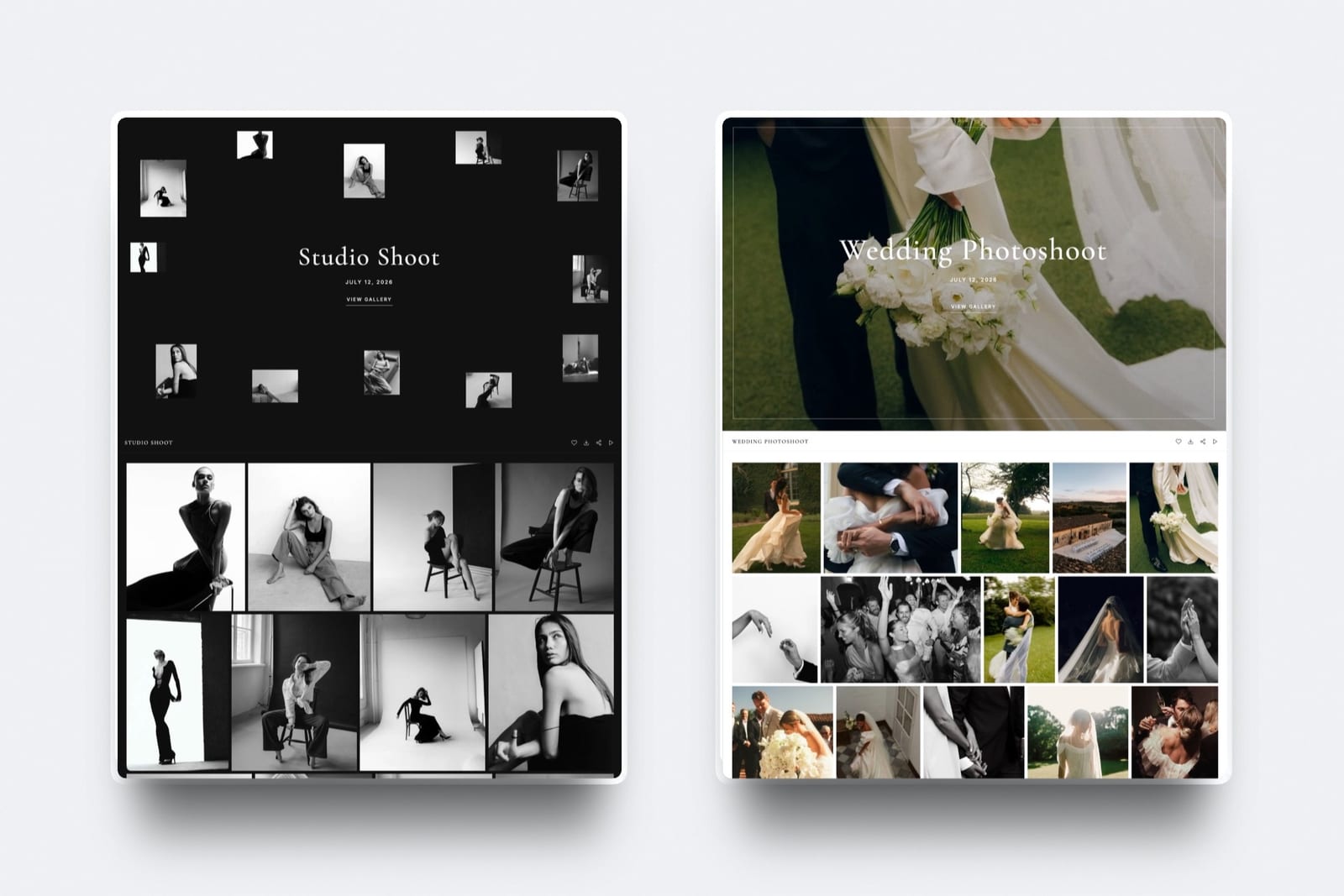
PricingFree $0, Starter $9 per month, Pro $19 per month, Business $39 per month, with a product-sale fee of 5% on Free and Starter, 3% on Pro, and 0% on Business. The free plan needs no credit card.
Pros:
- Website, galleries, and store on a domain you own
- A free plan to start with no credit card
- Complements a CRM instead of duplicating it
Cons:
- No CRM, booking, contracts, or invoicing at all
- Not a replacement for a studio manager
- Delivery and admin remain two separate tools
Skip it as a studio manageralways - it is not one. Use it alongside HoneyBook, Dubsado, or Studio Ninja, not instead of them.
Verdict: Framekit is not a studio management tool and ranks last here by design; it is the owned website, galleries, and store you pair with a real CRM. See where it does lead in our best client gallery platforms guide, or look at the Framekit client galleries.
Speed of Follow-Up Is the Feature That Pays
In one linethe studio management feature with the highest return is the automation that shortens your reply and quote time, because in booking-driven photography the fastest professional response usually wins the client - which favors a tool you will actually configure over the one with the longest feature list.
It is tempting to compare these tools on feature counts, but the feature that earns its keep is speed.
A couple planning a wedding emails five photographers; the one whose automated system sends a warm, branded reply and a bookable quote within the hour is the one who feels responsive and professional, and responsiveness converts.
The studio manager's real job is to compress the time between inquiry and signed contract, and the automations that do that - instant lead responses, templated proposals, reminder sequences - are worth more than any feature you will never switch on.
This is why the best tool is the one you will actually set up and use, not the most powerful one on paper.
Dubsado's automation is deeper than HoneyBook's, but if you never build the workflows, HoneyBook's out-of-the-box polish wins you more bookings.
A solo photographer is often better served by Studio Ninja or Iris Works, fully configured, than by a powerful tool half-implemented.
Match the tool to what you will genuinely maintain, because an automation that runs beats a feature that sits idle.
Studio Management and the Client-Facing Layer Are Two Jobs
In one linebooking and invoicing is one job and your website, galleries, and store is another, so the honest stack is a dedicated studio manager plus an owned client-facing platform - and the suites that bundle both usually do one half well and the other adequately.
The category is blurring, with Pixieset and Sprout Studio bundling galleries into the CRM and Framekit consolidating website, galleries, and store on the other side, so it is worth being clear about the two distinct jobs.
Studio management is the back office: leads, contracts, invoices, payments, automation. The client-facing layer is what your client sees and buys from: your website, your galleries, your store.
They connect - a booking becomes a gallery becomes a print sale - but they are different jobs with different best-in-category tools.
The practical takeaway is to be deliberate about where you accept a bundle.
An all-in-one that does both usually nails one side and compromises the other, most often leaving the website and galleries as the weaker half because CRMs treat them as an add-on.
A common strong setup is a dedicated studio manager - HoneyBook, Dubsado, or Studio Ninja - for the back office, paired with an owned website-and-gallery platform for the client-facing side, so each job gets a tool built for it.
Our best photography business tools guide maps the whole stack and where each piece fits.
How to Choose a Studio Management Tool: A Decision Tree
Match the tool to the part of the workflow that is costing you the most.
What is your biggest studio-management pain?
- I lose bookings to slow, manual follow-up. Choose HoneyBook for the most polished, complete booking-to-paid flow, or Dubsado if you will build the automations.
- I want it simple and photography-specific. Choose Studio Ninja, or Iris Works on a tighter budget.
- I want galleries and the CRM in one tool. Choose Pixieset Studio Manager or Sprout Studio, accepting lighter website and galleries.
On price, what fits?
- Lowest entry cost: Studio Ninja or Iris Works from the mid-teens to mid-twenties a month.
- One simple all-inclusive plan: 17hats.
- A modern, newer interface: Bloom.
And the client-facing side - website, galleries, store?
- That is a separate job. Pair any studio manager above with an owned platform like Framekit, rather than expecting the CRM to do it well.
Frequently Asked Questions
What is the best studio management tool for photographers in 2026?
HoneyBook is the best for most photographers, because it runs the whole client journey - lead, proposal, contract, invoice, payment - in one polished flow that looks professional to clients.
Dubsado is the best for deeper workflow automation at a lower price, and Studio Ninja is the best photography-specific tool for a simple setup.
The right choice depends on whether you value client-facing polish, automation depth, or simplicity, but HoneyBook is the safest all-around pick for a photographer who wants booking to payment handled in one place.
What is a studio management tool and do photographers need one?
A studio management tool runs the business side of photography - capturing leads, sending quotes and contracts, scheduling, invoicing, taking payments, and automating follow-ups.
Photographers who book clients regularly need one, because doing that admin manually across dozens of bookings costs hours and loses clients to slower response times.
A photographer just starting with a handful of clients can manage without one, but once bookings are steady, a studio manager pays for itself in time saved and bookings won.
It is distinct from your website and galleries, which are a separate job.
HoneyBook vs Dubsado - which is better?
HoneyBook is more polished and easier to start, with a client experience that reads premium, at a higher price after its 2025 increase. Dubsado offers deeper workflow automation at a lower base price but has a steeper setup curve.
Choose HoneyBook if you want the most complete booking-to-paid flow working quickly and looking professional; choose Dubsado if you will invest time building automations and want more power for less money.
Both charge a payment fee on top of the subscription, so factor that into the comparison at your revenue level.
What is the cheapest studio management tool for photographers?
Iris Works at $14.95 a month and Studio Ninja at $16 a month on annual billing are the most affordable dedicated photography CRMs, and Bloom's lowest tier is $14.
Dubsado is no longer the budget option it was: Starter is now $335 a year, about $27.92 a month.
The cheapest option that still runs your full client journey depends on how many active jobs and features you need, but a solo photographer can get a capable tool for under $30 a month.
Remember to add any payment-processing fees when comparing the true cost.
Is there a free studio management tool for photographers?
Most dedicated studio managers offer only free trials rather than permanent free plans.
Dubsado's trial is now 21 days with full access to the Premier plan, replacing the older no-time-limit three-client trial, and Pixieset has a free tier that includes its Studio Manager.
For a photographer with very few clients, Dubsado's 21-day Premier trial can function as a long free runway to test everything.
Beyond that, running a real client volume generally requires a paid plan, so budget for one once your bookings grow past a handful.
Does Framekit do studio management or is Framekit a CRM?
No, Framekit is not a CRM and does not do studio management.
Framekit is an AI website builder with client galleries and a digital-product store, so it owns the client-facing layer - your website, gallery delivery, and product sales - not the back office of booking, contracts, and invoicing.
For studio management, use a dedicated tool like HoneyBook, Dubsado, or Studio Ninja alongside Framekit.
The two do different jobs: Framekit runs what your client sees and buys from, while the studio manager runs the booking and billing behind it.
What is the best all-in-one photography tool with CRM and galleries?
Sprout Studio and Pixieset Suite are the strongest tools that bundle a CRM with galleries in one subscription, so a photographer can run booking and delivery from a single login.
The trade-off is that the bundled galleries and website are lighter than dedicated tools, and you do not fully own the site the way you would with a standalone website platform.
If one login matters most, these suites are the answer; if you want the best tool for each job, pair a dedicated studio manager with an owned website-and-gallery platform instead.
Studio Ninja vs HoneyBook - which should a photographer choose?
Studio Ninja is built specifically for photographers, simpler to set up, and cheaper, while HoneyBook is a more polished all-purpose tool with a premium client experience and scheduling built in.
Choose Studio Ninja if you want photography-shaped admin handled without configuration and a lower price; choose HoneyBook if you want the most complete, professional-looking booking-to-paid flow and do not mind paying more.
Both run the core client journey well, so it comes down to whether photography-specific simplicity or all-around polish matters more to you.
Can a studio management tool replace my website and galleries?
Only partly, and usually not well. Suites like Sprout Studio and Pixieset include galleries and a basic website alongside the CRM, but these are typically lighter than dedicated tools and not on a domain you fully own.
A pure studio manager like HoneyBook or Dubsado does not replace your website or galleries at all.
The common recommendation is to run a dedicated studio manager for the back office and an owned website-and-gallery platform for the client-facing side, rather than expecting one tool to do both jobs well.
What does a photography CRM actually do?
A photography CRM manages your client relationships and the workflow around them: it captures inquiries, stores client and project details, sends quotes and contracts, schedules shoots and calls, raises invoices, takes payments, and automates the emails and reminders in between.
In practice it turns the scattered admin of running a photography business - spreadsheets, email threads, manual invoices - into one organized system, so nothing slips and clients get fast, professional responses.
It is the operational backbone of a booking-driven photography business, separate from editing and from your public website.
Is 17hats worth $60 a month for a photographer?
17hats can be worth it for a photographer who values one simple all-inclusive plan and a proven service-business CRM, but at about $60 a month it is pricier than photography-specific tools like Studio Ninja or Iris Works that start much lower.
If you want a single plan with no tier decisions and use the full range of contacts, quotes, contracts, and automation, it is reasonable value; if you are a solo photographer using a subset of features, a cheaper photography-native tool likely serves you better for less.
Compare against your actual feature use.
What is the best studio management tool for a solo photographer?
For a solo photographer, Studio Ninja and Iris Works are excellent because they are photography-specific, affordable, and simple to set up without becoming a configuration project.
Dubsado's 21-day Premier trial suits a solo shooter who wants to test full automation before committing to $335 a year.
The best choice avoids paying for team features you do not need and gets your client journey handled quickly, so a photography-native tool in the $16-to-$30 range is usually the sweet spot for a one-person studio.
Pair it with an owned website and galleries for the client-facing side.
Do I need both a CRM and a gallery tool?
Most working photographers benefit from both, because they do different jobs: the CRM runs booking, contracts, and invoicing, while the gallery tool delivers and sells the photos.
Some suites bundle both, but often with a weaker gallery or website, so photographers who care about delivery and ownership frequently run a dedicated studio manager plus an owned website-and-gallery platform.
If budget is tight, start with whichever solves your bigger pain - admin or delivery - and add the other as you grow, rather than forcing one tool to do both.
How much do studio management tools cost per month?
Dedicated photography studio managers range from $14.95 a month for Iris Works Starter to $60 for 17hats' all-inclusive plan, with HoneyBook at $29 to $109 billed yearly, Dubsado at $335 to $525 a year, Studio Ninja at $16 to $40 on annual billing, and Bloom from $14.
Many also add a payment-processing fee on top of the subscription. Suites that bundle galleries, like Pixieset and Sprout Studio, start around $19 to $28.
Budget $20 to $60 a month for a capable tool, plus payment fees, and confirm current pricing since several tools changed plans recently.
Final Verdict: The Best Studio Management Tool
Studio management is the back office of a photography business - booking, contracts, invoicing, and the automation that shortens your response time - and it is one of the highest-return purchases a working photographer makes, because the fastest professional reply usually wins the client.
HoneyBook is the best studio management tool for most photographers, running the whole client journey in one polished flow.
Dubsado wins on automation depth for less money, Studio Ninja on photography-specific simplicity, and the suites from Pixieset and Sprout Studio for bundling galleries with the CRM.
Where Framekit loses on this job: anyone who needs booking, contracts, or invoicing, because Framekit is not a studio manager - it is the owned website, galleries, and store you run alongside one, and we ranked it last here for exactly that reason.
If admin is your problem, buy a dedicated CRM.
Pick the studio manager you will actually configure and maintain, pair it with an owned client-facing platform, and let the two halves each do the job they are built for.
For more, read our best photography business tools guide to the whole stack, the best free tools for photographers, our best client gallery platforms comparison, and the best website builders for creative professionals.
_Studio-management pricing checked against each provider's plans in July 2026; CRM prices and plan structures change often, so confirm current rates before buying._