Framekit templates
Start from a designer-made template
 Use template
 Use template
 Use template
 Use template
 Use template
 Use template
 Use template
 Use template
A client approves the brand direction on a Thursday and asks for the website by the end of the month.
You have an identity system, twelve pages to structure, forty pieces of copy nobody has written, image treatments to art direct, and a build to hand to a developer who is booked until the 20th.
Almost every article about AI for designers answers a different question than the one you just asked.
They rank image generators, which is the part of this job you will spend the least time on, and skip the tools that would actually get the project delivered: the ones that structure the sitemap, draft the copy so you can lay it out, keep the imagery commercially licensable, and put the finished thing online.
The generator makes the moodboard. Something else has to make the deadline.
An AI tool for designers is any software that automates part of the design process using machine learning, spanning research and naming, image generation, colour and type exploration, wireframing and sitemapping, interface generation, and getting the finished work published.
That last stage is where Framekit sits: it is an AI website builder with Slides in the same account, so the deck you present the work in and the site the approved design ships on come from one tool.
It is ranked third here rather than first, because it does nothing inside your design file, and its free plan needs no credit card.
The best AI tools for designers in 2026 depend on the stage of the job, and no single tool covers it.
Figma is where the AI matters most because it is where the work already lives, at $16 per full seat a month on annual billing.
For imagery, Midjourney has the best output at $10 a month and Adobe Firefly is the commercially safer choice at $9.99 or free with Creative Cloud.
For structuring a site before you design it, Relume generates sitemaps and wireframes that export to Figma. For copy, research, and naming, ChatGPT or Claude.
And for the half most lists ignore, Framekit ranks third: AI decks with mockups and type specimens for presenting the work, and a site generated from a prompt or a reference image for publishing it.
Full disclosure: Framekit is our own product and we have placed it third, behind Figma and the assistants. It is a website builder with Slides, not a design tool. Competitor prices were verified against each vendor's pricing page in July 2026, Framekit's plans were re-verified in September 2026, and we link to all twelve. Where the others beat us: Figma, Midjourney, Firefly, Relume, Runway, and the assistants all touch the work itself, and we only touch how it is presented and published once it is approved.
On 12 October 2026 we rewrote the method note to describe only what was done, dropped the results we had credited to a sample project, and clarified that Framekit's extra team members edit the website only.
Selling prompts rather than buying tools? The best places to sell AI prompts prices eleven venues and finds PromptBase charges 0% on buyers you bring and 20% on buyers it finds - the fairest marketplace structure in the category.
How We Compared These AI Tools for Designers
Most AI design lists are image-generator lists with a couple of plugins attached, which describes a narrow slice of what designers do. We covered the whole project and rated twelve tools on five criteria, working from each vendor's published plans and feature documentation.
Usefulness on a paid job, weighted 30%. Would you reach for it under deadline, or is it a thing to try on a Sunday? Most of this category fails that test.
Output fit for client work, weighted 25%. Is the tool built to produce something you can show a client at full size, judging by what it documents about resolution, editability, and export, or only material for a moodboard?
Licensing clarity, weighted 20%. Can you put the output in front of a paying client without a rights conversation? This is weighted heavily because it is the one that ends contracts.
Cost against value returned, weighted 15%. The real annual number, including credit models that make monthly spend unpredictable.
Where it sits in the workflow, weighted 10%. Tools inside Figma beat tools that require a round trip.
The carried example is a typical brand-and-website project: an identity system, a twelve-page site, copy for all of it, and a client review round.
Every review maps the tool onto that job so the recommendations stay concrete; it is a scenario we planned and priced against, not a client job we put through each tool.
Three kinds of finding, kept separate. What we read at primary sources: every plan price and credit allowance, checked against each vendor's published pricing in July 2026 and linked inline, plus each tool's own feature documentation.
What is our judgement: the ratings and where each tool fits the example project, which are editorial calls on those published features rather than measured results.
What we flag as moving rather than settled: generative image quality and Figma's AI feature set, both of which changed materially during the first half of 2026.
What Comparing 12 AI Design Tools Showed
The pricing, checked at each vendor in July 2026.
- Figma is $16 per full seat a month on annual billing and $20 monthly, rising to $55 on Organization and $90 on Enterprise, with AI credits included per seat and metered above the allowance.
- Midjourney is $10 a month for Basic, $30 Standard, $60 Pro, and $120 Mega, with 20% off annual billing, and unused fast GPU hours expire at the end of every cycle rather than rolling over.
- Adobe Firefly is $9.99 a month standalone for Standard, with a free tier, and Firefly credits are included in Creative Cloud subscriptions at no extra cost.
- Relume charges per member rather than per project, at roughly $32 a month for Starter and $40 for Pro, with a free tier for basic sites.
- 4 of 12 charge per seat, which is the line item that turns a $20 tool into a $700 one for a three-person studio.
- A capable annual AI stack for a solo designer costs about $636 with Framekit Starter included, and the free version of that stack is more useful than most people assume.
For a stack matched to the work you actually do, jump to the decision tree. First, the field.
The 12 Best AI Tools for Designers in 2026: Full Comparison
A note on the scores: each tool is rated against the five weights above, and usefulness on a paid job carries the most because this category is unusually full of things that demo beautifully and never get opened twice.
Our own tool scores 8.9 and sits third, because client presentations and a live site are paid deliverables on most jobs. It takes 9 on cost and 3 on usefulness inside the design file, its lowest mark, because it does nothing there.
Figma takes 10 on workflow position for the obvious reason.
| Tool | What it does | Pricing | Free tier | Our Rating |
|---|---|---|---|---|
| Figma | AI inside the canvas where you already work | $16 per seat monthly, annual | Yes | 9.4/10 |
| ChatGPT or Claude | Copy, naming, research, critique | Free to about $20 a month | Yes | 9.0/10 |
| Framekit | AI client decks and publishing the site | Free to $59 a month | Yes | 8.9/10 |
| Midjourney | The best generative imagery | $10 to $120 a month | No | 8.8/10 |
| Adobe Firefly | Commercially safer imagery inside CC | $9.99 standalone, or in CC | Yes | 8.6/10 |
| Relume | Sitemaps and wireframes before you design | About $32 to $40 per member | Yes | 8.4/10 |
| Runway | Motion and image cleanup for designers | $12 to $76 per user monthly | Limited | 8.2/10 |
| Canva Magic Studio | Fast marketing assets at volume | Free, Pro about $120 a year | Yes | 7.6/10 |
| Uizard | Rough interface concepts fast | Freemium | Yes | 7.2/10 |
| Galileo AI | Generated UI as a starting point | Subscription | Limited | 7.0/10 |
| Khroma | Colour palettes trained on your taste | Free | Yes | 6.8/10 |
| Magician for Figma | Small AI actions inside the file | Low-cost plugin | Trial | 6.5/10 |
Every price above was checked at the vendor in July 2026. Credit and seat models mean your real spend depends on volume and headcount, so price your own team rather than the entry tier.
What a realistic annual stack costs
Designers rarely buy one tool. These are three genuine stacks for a solo designer, at the plans you would actually be on.
| Stack | Tools | Cost per year |
|---|---|---|
| The free stack | Figma free, Claude or ChatGPT free, Firefly free tier, Khroma, Relume free, Framekit free | $0 |
| The solo working stack | Figma $192, Midjourney Basic $96 annual, an assistant at $240, Framekit Starter $108 | About $636 |
| The studio stack, per person | Figma $192, Midjourney Standard $288 annual, Relume Starter $384, assistant $240, Runway Standard $144, Framekit Pro $228 | About $1,476 |
Relume and Figma both charge per member, so a three-person studio multiplies those two lines by three rather than sharing one subscription. That single detail is the difference between a $1,476 stack and a $3,000 one.
The number most designers get wrong. Figma's free tier still covers a lot of real work, and Claude and ChatGPT both have usable free tiers. Before subscribing to anything on this page, check whether the free version of the tool you already open every day does the job.
1. Figma: The AI that matters most, because it is where you already are
Our rating: 9.4/10
Figma's advantage is not that its AI is the most impressive; it is that the AI is inside the file where the work happens.
Generating variants of a component, renaming layers in bulk, drafting placeholder copy that is not lorem ipsum, and searching a design system by description all remove friction from work you were doing anyway, which is a different and better proposition than a tool you have to remember to open.
On a brand project like the example, the feature most likely to save real hours is bulk editing across a growing file: renaming, restyling, and propagating changes that would otherwise be an afternoon of clicking.
Figma Agent, announced at Config 2026, extends this further and was in closed beta as of mid-2026, so treat it as a preview rather than a plan.
Best forAny designer working in Figma, which is to say most of them.
Key features:
- AI actions inside the design file rather than in a separate tool
- Bulk renaming, restyling, and content generation across a file
- Design system search by description rather than by layer name
- AI credits included per seat, metered above the allowance
- Figma Agent in closed beta as of mid-2026
The real numbera full seat is $16 a month on annual billing and $20 month to month on Professional, rising to $55 on Organization and $90 on Enterprise.
At $192 a year the Professional seat is the single most defensible line in a designer's stack, and the AI credits included with it mean the marginal cost of using the AI is usually zero until you are generating heavily.
Pricingfree tier available; Professional $16 per full seat a month on annual billing, $20 monthly; Organization $55; Enterprise $90.
Pros:
- The AI is where the work already is, so there is no round trip
- Credits included per seat rather than billed separately from the start
- The free tier is genuinely usable for solo work
Cons:
- Per-seat pricing multiplies fast across a studio
- Credits are metered above the allowance, so heavy use is not free
- Agent is in closed beta, so the headline feature is not yet a plan
Skip it ifyou work alone in another canvas and have no collaborators. That is rare and the answer is still usually Figma.
Verdict: Figma is the one subscription on this page that is hard to argue with, and the free tier is a better starting point than most designers give it credit for. Visit Figma
2. ChatGPT or Claude: The most-used AI tool designers do not call a design tool
Our rating: 9.0/10
The general assistants are, in practice, the tools designers reach for most: drafting the copy so a layout can be tested with real words, naming things, summarising a client's rambling brief into requirements, writing the case study afterwards, and arguing with a decision at 11pm when nobody else is awake.
None of that is design work, and all of it is project work that used to happen instead of design work.
On the example project, the highest-value use is turning forty pieces of unwritten copy into first-draft text so the layout can be judged with content rather than with placeholders.
Best forCopy drafting, naming, brief interrogation, and writing the case study nobody enjoys writing.
The real numberboth have genuinely usable free tiers and paid plans around $20 a month, or roughly $240 a year, which is the cheapest meaningful capability increase in this comparison.
The trap is treating the output as finished: first-draft copy laid into a design is a testing device, not a deliverable, and clients can tell.
Pricingfree tiers available; paid plans around $20 a month.
Pros:
- The cheapest genuine time saving on this page
- Turns unwritten copy into something you can lay out today
- Useful across the whole project rather than one stage
Cons:
- First-draft copy reads like first-draft copy, and clients notice
- No visual output, so it complements rather than replaces design tools
- Easy to over-rely on for thinking that should be yours
Skip it ifyour process is entirely visual and someone else writes. Even then, the brief-summarising use case usually survives.
Verdict: The assistants are the least design-y tools here and probably the ones that save a working designer the most hours, which is worth saying plainly. Visit Claude
3. Framekit: Presenting and publishing the finished design

Our rating: 8.9/10
Framekit is an AI website builder with Slides, client galleries, video review, and a digital store in the same account, and it ranks third because it owns the two moments where approved design work most often stalls: presenting it to the client, and getting it live.
It does nothing inside your design file, which is why Figma and the assistants sit above it.
Presenting the workSlides writes and lays out a pitch deck, portfolio deck, or case study from a description, and everything stays editable by hand.
It ships design-specific elements, including phone and web mockups, colour swatches, type specimens, moodboards, and charts, and it carries your colours across every slide, with your own fonts from Starter up.
You present full screen, share a link, or export a PDF on every plan.
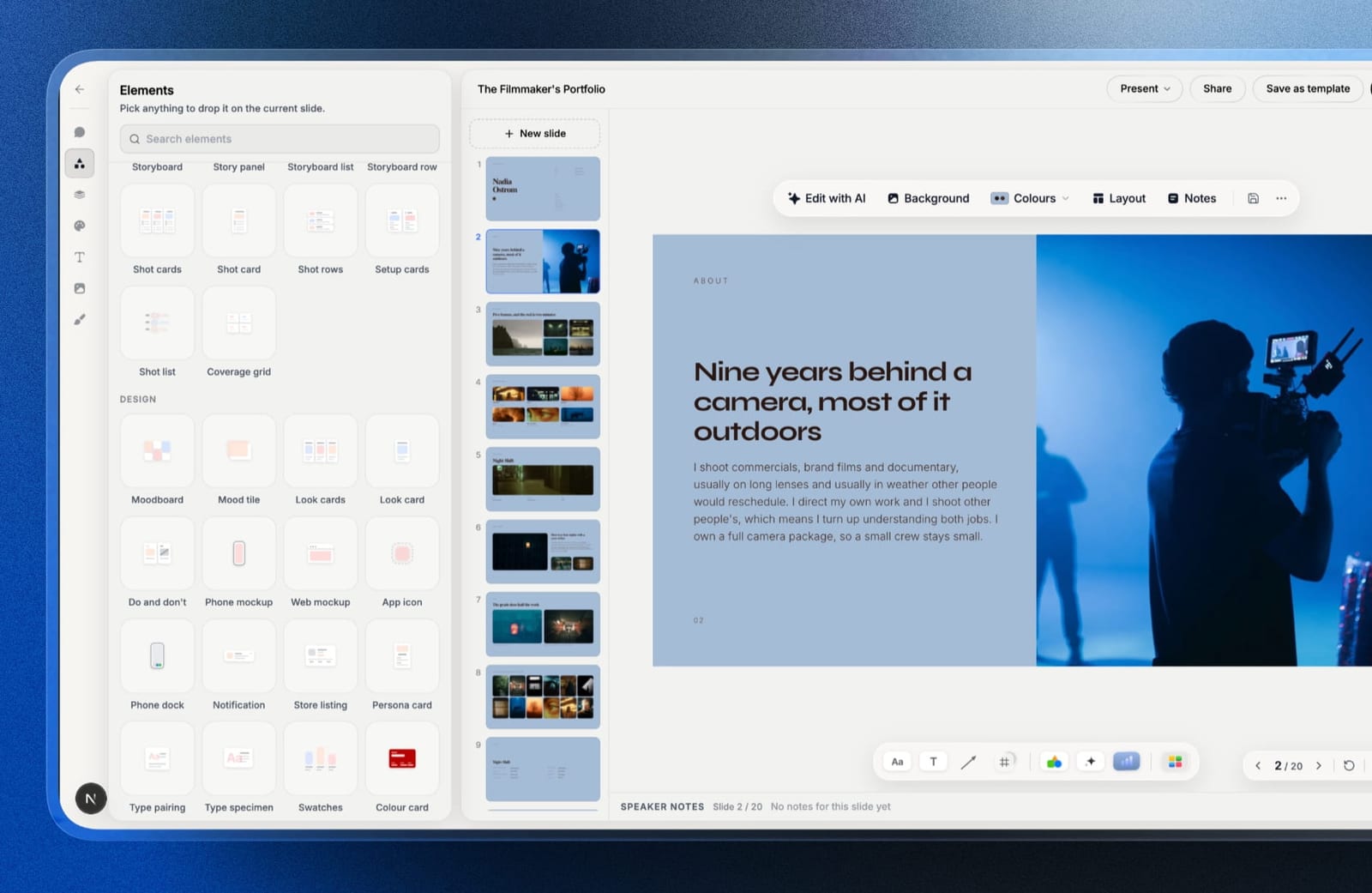
Publishing itthe site builder generates full sections with copy from a prompt, and it can recreate a layout from a reference image or screenshot, so an approved mock becomes a starting draft you refine rather than a Figma file waiting for a developer.
Framekit's own models, Cadence for quality and Score for speed, do the generation.
The real numberthe free plan publishes a real site and makes unlimited decks at $0, with AI generation drawing on a monthly allowance that grows with the plan, and Starter is $9 a month, or $108 a year.
There are no per-seat charges at any tier: Pro at $19 includes three team members and Business at $39 has no cap, against $16 per Figma seat and about $32 per Relume member, but those members edit the website only.
Decks, galleries and reviews stay with the account holder, so a second designer cannot build decks in the same account.
The gotchaPowerPoint export needs Pro and is picture-based, so a client cannot edit your deck text in PowerPoint; there is no deck password protection, per-viewer analytics, or live multi-cursor co-editing; and each deck caps at 40 slides.
On the site side there is no pixel-level layout control, so a bespoke interaction-heavy build still belongs in Webflow or Framer.
PricingFree $0, Starter $9 a month, Pro $19 a month, Business $39 a month, Enterprise $59 a month, with no seat charges.
Pros:
- AI decks with mockups, swatches, and type specimens for client presentations
- Turns an approved design into a live site without a build slot
- No per-seat pricing, and a store for selling templates or brushes
Cons:
- Does nothing inside Figma or your design process
- No editable PowerPoint export, and decks show only a total view count
- No pixel-level layout control for bespoke builds
Skip it ifwhat you needed from this page was a design tool. Figma, Midjourney, Firefly, Relume, and Runway all act on the work itself, and we do not.
Verdict: Framekit is the best AI tool for the steps after the design is approved, the client presentation and the live site, and the wrong one for anything before them. See Framekit Slides, or compare builders in our best AI website builders for creatives guide.
4. Midjourney: The best generative imagery
Our rating: 8.8/10
Midjourney still produces the most art-directable imagery in the category.
For moodboards, texture, background plates, campaign concepts, and the kind of imagery that would otherwise be a stock search or a shoot you cannot afford, it is the tool designers actually keep paying for.
The thing to plan for is the credit model rather than the price.
Best forMoodboards, concept imagery, textures, and campaign visuals where art direction matters.
The real numberBasic is $10 a month, Standard $30, Pro $60, and Mega $120, with 20% off annual billing, so Basic annual is about $96 a year.
The detail that catches people: unused fast GPU hours expire at the end of every billing cycle and do not roll over, on monthly and annual plans alike, so a quiet month is money gone rather than banked.
PricingBasic $10, Standard $30, Pro $60, Mega $120 a month, with 20% off annual billing.
Pros:
- The most art-directable output in this comparison
- Basic at $10 a month is cheap for what it replaces
- Standard's relaxed mode makes high-volume exploration affordable
Cons:
- Unused fast hours expire monthly and never carry over
- Licensing and provenance questions are yours to answer to the client
- Consistency across a set of images remains hard to control
Skip it ifyour client requires documented commercial licensing and indemnity. Firefly exists for that reason.
Verdict: Midjourney is the best imagery tool here and the one most likely to raise a rights question in a client meeting, which is a trade you should make consciously. Visit Midjourney
5. Adobe Firefly: The commercially safer imagery
Our rating: 8.6/10
Firefly's pitch to professionals is not that it out-generates Midjourney, because it does not.
It is that Adobe trained it on licensed and public-domain material and offers enterprise customers indemnification, which changes what you can put in front of a cautious client without a conversation about training data.
For agencies working with legal-sensitive brands, that difference outranks image quality, and Firefly's presence inside Photoshop and Illustrator means it is already in the workflow.
Best forDesigners whose clients ask where the imagery came from, and anyone already inside Creative Cloud.
The real numberstandalone Firefly is $9.99 a month for Standard, with a free tier, and Firefly credits are included in Creative Cloud subscriptions at no additional cost, which for an existing Creative Cloud subscriber makes the marginal cost zero.
Against Midjourney's $10 Basic the standalone price is level, so the decision is about licensing posture rather than money.
Pricingfree tier; Standard $9.99 a month standalone; credits included with Creative Cloud plans.
Pros:
- Trained on licensed and public-domain material, with enterprise indemnification
- Included at no extra cost with Creative Cloud
- Generative Fill and Expand live inside Photoshop where the work happens
Cons:
- Raw output quality trails Midjourney on art-directed imagery
- Credit allowances are consumed faster than most people expect
- The standalone plan makes little sense if you already pay for Creative Cloud
Skip it ifnobody has ever asked you about image provenance and you want the best output. Then Midjourney is the better tool.
Verdict: Firefly is the answer to a legal question rather than an aesthetic one, and for a lot of professional work that is the question being asked. Visit Adobe Firefly
6. Relume: Structure before design
Our rating: 8.4/10
Relume solves the least glamorous and most underestimated part of a website project: deciding what pages exist and what goes on them before anyone opens a canvas.
Describe the business, and it generates a sitemap and then wireframes built from a large library of human-designed components, which you export to Figma, Webflow, or React.
On the example twelve-page site, this is the stage it is built to shorten: a sitemap and low-fidelity wireframes to react to before the back-and-forth starts, rather than after a week of it.
Best forWeb designers who want to skip the blank-sitemap problem and start from a structured wireframe.
The real numberRelume has a free tier for basic sites, with Starter at roughly $32 a month per member and Pro at about $40, and the phrase that matters is per member.
A three-person studio pays three times, which is the same trap Figma sets, and it makes Relume a per-head cost rather than a per-project one.
Pricingfree tier; Starter about $32 a month per member; Pro about $40 per member.
Pros:
- Removes the blank-sitemap problem, which is real and expensive
- Wireframes are built from human-designed components rather than generated from nothing
- Exports cleanly to Figma, Webflow, and React
Cons:
- Per-member pricing, so a studio multiplies the cost
- Output is a structured starting point rather than a finished design
- Most useful for conventional marketing sites, less so for unusual ones
Skip it ifyour projects are one-page or highly bespoke. The structure it generates is worth most on conventional multi-page sites.
Verdict: Relume earns its place by fixing the stage nobody enjoys, and the per-member pricing is the thing to check before a studio commits. Visit Relume
7. Runway: Motion and cleanup for designers
Our rating: 8.2/10
Runway's reputation is generative video, and its more useful half for designers is the utility side: removing an object from a photograph, extending a background, cleaning a plate, and producing short motion assets for a brand system without opening After Effects.
For a designer delivering a brand with motion elements, it covers a gap between static design tools and a full motion pipeline.
Best forDesigners producing motion assets or doing image cleanup without a motion designer on hand.
The real numberStandard is $12 a user a month on annual billing with 625 credits, Pro is $28 with 2,250, and Max is $76 with 9,500, per Runway pricing.
Credits are the thing to model rather than the plan: a re-rolled generation costs the same as a successful one, so an experimental afternoon can consume a month's allowance.
Pricingfree credits to start; Standard $12 a user monthly on annual billing, Pro $28, Max $76.
Pros:
- Object removal and background extension for image cleanup
- Short motion assets without a full motion pipeline
- A usable free allowance for evaluation
Cons:
- Credit pricing makes monthly spend unpredictable
- Re-rolls cost the same as successes
- Generative video quality varies shot to shot
Skip it ifyour work is entirely static. The cleanup tools alone rarely justify the subscription.
Verdict: Runway is worth it for designers whose deliverables include motion, and an expensive luxury for those whose do not. Visit Runway
8. Canva Magic Studio: Volume marketing assets
Our rating: 7.6/10
Canva is not a professional design tool and it is on this list because professional designers use it anyway, for the same reason they use CapCut: some deliverables do not deserve the good software.
Social cutdowns, quick decks, resized ad variants, and the fourteen formats a campaign needs are faster here than anywhere else.
Its AI features cover background removal, resizing across formats, copy generation, and image editing, all aimed at speed rather than craft.
Best forProducing the long tail of resized, templated marketing assets attached to a real project.
The real numberCanva has a free tier and Pro is about $120 a year, which is less than most single lines in the stacks above.
The honest accounting is in time rather than money: resizing a campaign into fourteen formats is usually unbilled work at the end of a project, so the tool that does it fastest wins by default.
Pricingfree tier; Pro about $119.99 a year.
Pros:
- The fastest route to the long tail of resized assets
- Magic Resize and background removal built in
- Cheap relative to everything else here
Cons:
- Not a professional design tool and produces recognisably Canva output
- Weak typographic and layout control
- Encourages template thinking on work that deserves better
Skip it ifthe deliverable is the design itself. Use it for the unbilled hour at the end.
Verdict: Canva is a bad primary tool and the right one for the work nobody is paying you to do carefully. Visit Canva
9. Uizard: Rough interface concepts, fast
Our rating: 7.2/10
Uizard turns a text description, a screenshot, or even a hand sketch into an editable interface mockup.
For a designer who needs something clickable in front of a stakeholder before lunch, that is a real capability, and it is genuinely faster than starting a wireframe from nothing.
The output is a starting point rather than a design, and treating it as more than that produces work that looks like every other AI-generated interface.
Best forGetting a rough, clickable concept in front of a stakeholder quickly.
The real numberUizard is freemium with paid tiers above a limited free plan, and the value is measured in the hours between a request and something to react to rather than in output quality.
Judge it on how much faster the first stakeholder conversation happens, not on whether the mockup is good.
Pricingfreemium, with paid tiers above a limited free plan.
Pros:
- Text, screenshot, or sketch to an editable mockup
- Fast enough to change how early stakeholder conversations go
- A free tier for evaluation
Cons:
- Output is generic without significant editing
- Not a substitute for a considered interface design
- Limited value once a design system exists
Skip it ifyou already have a component library. Relume or Figma will get you further.
Verdict: Uizard is useful in the first hour of a project and irrelevant by the third day, which is a real if narrow window. Visit Uizard
10. Galileo AI: Generated UI as a starting point
Our rating: 7.0/10
Galileo generates interface designs from text prompts, aimed at producing a high-fidelity starting point rather than a wireframe. When it lands, it saves the blank-canvas hour on a conventional app screen.
When it does not, you spend that hour anyway plus the time you spent prompting.
It belongs on this list because interface generation is where this category is moving fastest, and because designers should know what it currently can and cannot do.
Best forDesigners wanting a high-fidelity starting point for conventional app interfaces.
The real numberGalileo is subscription-priced with limited free access, and the honest guidance is to evaluate it on your own product's screens before committing, because output quality varies sharply by how conventional the interface is.
Expect generic dashboards and onboarding flows to suit it better than anything with an unusual information architecture.
Pricingsubscription with limited free access.
Pros:
- High-fidelity output rather than wireframes
- Genuinely fast for conventional screen types
- Editable rather than a flat image
Cons:
- Quality falls off sharply on unconventional interfaces
- Output carries a recognisable house style
- Pricing and access have changed since launch
Skip it ifyour product's interface is unusual. The tool is trained on convention and it shows.
Verdict: Galileo is a promising starting-point generator with a narrow band of screens it does well, and worth testing before subscribing. Visit Galileo AI
11. Khroma: Colour trained on your taste
Our rating: 6.8/10
Khroma asks you to pick fifty colours you like, trains a small model on your choices, and then generates palettes, gradients, and type-and-colour pairings in your own taste rather than a generic one. It is a small tool that does one thing genuinely well, and it is free.
It will not replace a considered brand palette, and it is very good at breaking a stuck afternoon.
Best forEscaping a colour rut and generating palettes that match your own preferences.
The real numberKhroma is free, which puts it in a category of one on this page: a tool with no plan, no credits, and no upgrade path. The cost is the ten minutes it takes to train it on your preferences, and that is the entire investment.
Pricingfree.
Pros:
- Free, with no account tier or credit system
- Trained on your own taste rather than a generic dataset
- Shows palettes applied to type and imagery rather than as swatches
Cons:
- Single-purpose and small in scope
- No brand-system thinking, only palettes
- The training step is required before it is useful
Skip it ifyou work to client brand guidelines. There is no colour decision to make.
Verdict: Khroma is the best free tool on this page and the smallest in scope, which is a fair trade at $0. Visit Khroma
12. Magician for Figma: Small AI actions in the file
Our rating: 6.5/10
Magician is a Figma plugin that generates icons, copy, and images inside the file. Its value is proximity: a placeholder icon or a line of UI copy without leaving the canvas, at the moment you notice it is missing.
With Figma's own AI features expanding, its territory has narrowed, and that is worth knowing before subscribing.
Best forDesigners who want small generative actions without leaving Figma.
The real numberMagician is a low-cost plugin with a trial, and its economics only work if you use it regularly enough to beat the friction of the alternative, which is generating the same asset elsewhere and pasting it in.
As Figma's native AI has expanded, the case for a separate plugin subscription has weakened rather than strengthened.
Pricinglow-cost plugin subscription with a trial.
Pros:
- Lives inside Figma, so there is no round trip
- Icon and copy generation at the moment of need
- Cheap relative to standalone tools
Cons:
- Figma's native AI now overlaps much of its territory
- Output quality is adequate rather than good
- Another subscription for a narrow set of actions
Skip it ifyou are on a current Figma plan with AI credits. Check what you already have first.
Verdict: Magician was more essential a year ago than it is now, which is the normal fate of a plugin that solves something the platform later ships. Visit Magician
What an AI Design Stack Actually Costs
In one linethe free stack is more capable than most designers assume, the solo working stack is about $636 a year, and a studio stack is roughly $1,476 per person because the two most useful tools both charge per seat.
Per-seat pricing is the whole story at a studio. Figma is $16 per full seat a month and Relume is roughly $32 per member. For one designer that is $576 a year between them.
For three it is $1,728, and neither tool lets you share a seat. Before adopting anything in this category, check whether the price is per project, per account, or per head, because the third one scales with hiring rather than with usage.
Credits expire. Midjourney's unused fast GPU hours do not roll over at the end of a billing cycle, on annual plans as well as monthly. Runway's credits work the same way.
A quiet month on a credit-based tool is money spent rather than banked, which argues for lower tiers and topping up rather than buying headroom you may not use.
Free tiers are doing more than they used to. Figma free covers a lot of solo work, Claude and ChatGPT both have usable free tiers, Firefly has a free allowance, Khroma is entirely free, Relume has a free tier, and Framekit's free plan publishes a real site.
Assembled deliberately, that is a $0 stack that would have cost several hundred dollars a year in 2024.
The unbilled hours are where the value is. Resizing a campaign, writing the case study, drafting placeholder copy, building the sitemap, publishing the site.
None of that is usually in the quote, and all of it is where these tools pay off. A tool that saves two unbilled hours a project is worth more than one that saves two billed hours.
Run it on your own year: list your last five projects, write down the step that consumed the most unbilled time, and buy the tool that addresses that step. For most designers it turns out to be copy, structure, or delivery, and none of those is an image generator.
Licensing: The Question That Ends Contracts
In one linethe risk in AI design work is not quality, it is being unable to answer a client's question about what the output was trained on and whether they own what you delivered.
Know which tools your client will accept. Some brands, particularly in regulated industries, have explicit policies on generative imagery.
Adobe positions Firefly around licensed training data and offers enterprise indemnification; other tools make weaker commitments. Ask before you generate, not after you deliver.
Read your own contract. If your client agreement warrants that deliverables are original and non-infringing, generative output puts that warranty on you personally. That is a real exposure and worth a conversation with whoever wrote your terms.
Disclose where it matters. Telling a client that a background plate was generated and an identity was drawn is a two-sentence conversation in a kickoff and a serious problem when discovered later.
Keep provenance notes. Which tool produced which asset, on what date, under which plan. It takes a minute per project and it is the only thing that makes the question answerable in eighteen months.
Typefaces and trademarks are still typefaces and trademarks. No generative tool clears a font licence or a trademark search for you, and a generated logo that resembles an existing mark is your problem, not the tool's.
What AI Still Cannot Do in Design Work
In one lineAI is good at production and bad at judgement, which means it compresses the hours around the decision without touching the decision.
It cannot hold a brand system. Generating one striking asset is solved. Generating fifty that share a consistent logic, so that a stranger could produce the fifty-first correctly, is not, and that consistency is what a brand system is.
It cannot take a note. You cannot give a model a direction the way you give a collaborator one. You re-prompt and re-roll, which is a different and less controllable process, and it is why credit budgets vanish faster than anyone plans for.
It cannot decide what matters. Which of three directions serves the client's actual problem is the work. Every tool here will happily produce all three and has no view on which is right.
It cannot sit in the room. Reading a client's hesitation, knowing which objection is the real one, and deciding what to defend and what to concede is most of what senior designers are paid for, and none of it is in this category yet.
How to Choose Your AI Design Stack: A Decision Tree
Three questions in order. The first branch that matches you is where to spend.
Start here: what consumes the most unbilled time on your projects?
- Writing copy, briefs, and case studies: an assistant at about $240 a year. Cheapest meaningful improvement here.
- Deciding site structure before designing: Relume, and check whether the per-member price works for your team size.
- Sourcing or making imagery: Midjourney Basic at $96 a year annual, or Firefly if your clients ask about provenance.
- Presenting work to clients and getting approved work live: Framekit, free to start.
- Resizing and reformatting at the end: Canva Pro at about $120 a year.
What does your client care about?
- Provenance and indemnification: Adobe Firefly, and document what was generated.
- Speed above all: an assistant plus Relume plus a builder, and skip the generators.
- Craft, and they will notice templates: spend on Figma and your own time, and use AI for the production tail only.
How big is your team?
- Solo: the free stack goes further than you think. Add Figma Professional and one assistant before anything else.
- Two to five: watch the per-seat lines. Figma and Relume both multiply by headcount; Canva and the assistants largely do not, and Framekit is priced per account, though its extra members edit the website only, so decks stay with one account holder.
- A studio with a motion offer: add Runway, and budget credits per project rather than per month.
Also in this series2D animation software, including the two professional programs that became free during the past twelve months.
Also worth readingAI presentation makers, including what happened to Tome and why export path is a feature.
Frequently Asked Questions
What are the best AI tools for designers in 2026?
The best AI tools for designers in 2026 depend on the stage of the work rather than one winner. Figma has the most valuable AI because it sits inside the file where the work already happens, at $16 per full seat a month on annual billing.
Midjourney produces the best generative imagery from $10 a month, Adobe Firefly is the commercially safer alternative at $9.99 or included with Creative Cloud, Relume generates sitemaps and wireframes, ChatGPT or Claude handle copy and research, and Framekit, third here, builds the client deck and publishes the finished site.
What is the best free AI tool for designers?
Khroma is entirely free and genuinely useful for colour, and the more valuable answer is that a deliberately assembled free stack now covers a lot of real work: Figma's free tier for design, Claude or ChatGPT's free tiers for copy and research, Adobe Firefly's free allowance for imagery, Relume's free tier for sitemaps, and Framekit's free plan to publish the result.
That combination would have cost several hundred dollars a year not long ago.
How much does an AI design stack cost per year?
Between $0 and roughly $1,476 per person. A free stack of Figma free, an assistant's free tier, Firefly free, Khroma, Relume free, and Framekit free costs nothing.
A solo working stack of Figma Professional at $192, Midjourney Basic at $96 annual, an assistant at $240, and Framekit Starter at $108 is about $636.
A studio stack adding Relume and Runway reaches about $1,476 per person, because Figma and Relume both charge per seat.
Is Midjourney or Adobe Firefly better for professional design work?
Midjourney produces better and more art-directable imagery; Firefly is the safer choice commercially.
Adobe trained Firefly on licensed and public-domain material and offers enterprise indemnification, which matters when a client asks what the imagery was trained on, and Firefly credits are included with Creative Cloud at no extra cost.
Midjourney Basic is $10 a month against Firefly Standard at $9.99, so the decision is about licensing posture rather than price.
Will AI replace graphic designers?
Not on the evidence of these tools, which are strong at production and weak at judgement. They generate imagery, draft copy, propose structure, and resize assets.
They cannot hold a brand system consistently across fifty applications, take a direction the way a collaborator does, decide which of three routes solves the client's actual problem, or read a room during a presentation.
The realistic 2026 picture is fewer unbilled production hours rather than fewer designers.
Does Figma have AI features, and are they included?
Yes.
Figma includes AI actions inside the design file, covering bulk renaming and restyling, content generation, and searching a design system by description, with a monthly AI credit allowance attached to each full seat and additional credits metered above it.
Figma Agent, announced at Config 2026, extends this to autonomous design tasks and was in closed beta as of mid-2026. A full seat is $16 a month on annual billing or $20 monthly on Professional.
What AI tool helps design a website structure?
Relume is the strongest option: describe the business and it generates a sitemap, then wireframes assembled from a large library of human-designed components, exportable to Figma, Webflow, or React.
It has a free tier, with Starter at roughly $32 a month per member and Pro at about $40. The detail to check before a studio adopts it is that pricing is per member rather than per project, so a three-person team pays three times.
Can AI generate a whole website for a client?
It can generate a complete, publishable site, and whether that is client-ready depends on what the client is buying.
Framekit generates a designed multi-page site from a prompt that a designer then refines, which works well when the client is buying a website.
It works badly when the client is buying a bespoke build with custom interaction, because AI builders trade pixel-level control for speed. Use it to remove the wait for a development slot, not to replace a considered build.
Are AI-generated images safe to use in client work?
It depends on the tool and on your contract. Adobe positions Firefly around licensed and public-domain training data and offers enterprise indemnification, which is the strongest position available.
Other tools make weaker commitments, and if your client agreement warrants that deliverables are original and non-infringing, that exposure sits with you rather than the vendor.
Ask the client's policy before generating, disclose what was generated, and keep a note of which tool produced which asset.
Do AI design tools charge per seat?
Several do, and it is the line that matters most for a studio.
Figma is $16 per full seat a month on annual billing and Relume is roughly $32 a month per member, so those two alone cost about $576 a year for one designer and $1,728 for three.
Canva, Khroma, and the general assistants do not multiply the same way, and Framekit charges per account, though its Pro and Business team members edit the website only, while decks, galleries and reviews stay with the account holder.
Before adopting a tool, check whether the price is per project, per account, or per head.
What is the most useful AI tool for a solo designer?
Probably an assistant like ChatGPT or Claude, at around $240 a year, because it covers copy drafting, brief interrogation, naming, and case-study writing, which together consume more unbilled hours than image generation does.
Figma's own AI comes second on the same logic, since it removes friction from work you were already doing. Image generators are the most enjoyable category and rarely the one that saves a solo designer the most time.
Do unused AI credits roll over?
Usually not, which is the most common budgeting mistake in this category.
Midjourney's unused fast GPU hours expire at the end of every billing cycle and do not carry over, on annual plans as well as monthly, and Runway's credits behave the same way.
That argues for buying a lower tier and topping up during heavy months rather than paying for headroom that evaporates in quiet ones.
Colour is the one part of a designer's stack that has stayed almost entirely free, and our comparison of eleven colour palette tools found nine with no paid tier at all.
Final Verdict: The Best AI Tools for Designers in 2026
After mapping the same brand-and-website project against each tool's published plans and features, the conclusion is unglamorous: the AI that helps designers most is the AI that removes production hours nobody was paying for.
Start with what you already have. Figma's AI is inside the file and its free tier covers real work, an assistant at around $240 a year saves more hours than any generator, and Khroma is free.
Add Midjourney at $10 a month if you make imagery, Firefly instead if your clients ask where imagery came from, and Relume if site structure is your bottleneck, checking the per-member price first.
Framekit is third, for presenting approved work in a deck and publishing it as a site. Where Framekit loses, and it is most of this page: we do nothing inside your design file.
No canvas, no imagery, no wireframes, no colour, and no editable PowerPoint export. If what you needed was a design tool, Figma, the assistants, Midjourney, Firefly, Relume, and Runway are better answers than we are.
Figma is the one subscription that is hard to argue with, the assistants are the quiet workhorses, Midjourney has the best output and the most questions attached, Firefly has the answers to those questions, Relume fixes the blank sitemap, Runway covers motion, Canva does the unbilled hour, and Khroma costs nothing.
But the design still has to become a website at the end, and a Figma file is not one.
For more, read our best AI website builders for creatives comparison, the best website builder for graphic designers, our best AI tools for filmmakers guide, and if the portfolio is the next job, the best Behance alternatives.
_All plan prices re-verified against each vendor's published pricing page, July 2026. Generative model quality and Figma's AI feature set both changed materially during the first half of 2026; treat any ranking in this category as a snapshot._
For image generation specifically, we compared the field separately in the 12 best AI image generators, including what one image costs on each plan.
Decks are their own category and we compared them separately: see the best presentation software comparison for the twelve tools designers actually choose between.