Framekit templates
Start from a designer-made template
 Use template
 Use template
 Use template
 Use template
 Use template
 Use template
 Use template
 Use template
Anyone weighing Framekit vs Gamma is usually two prompts into a Gamma trial with a deck that looks about eighty percent right, a credit balance that is visibly smaller than it was at lunch, and a colleague asking for a login of their own.
Those three things, the last twenty percent, the balance and the second login, decide this comparison more than any feature list does.
Both tools meter AI. That needs saying first, because an earlier version of this page claimed otherwise and was wrong.
Gamma meters by the credit, charges those credits for the deck itself (each slide and each image), and bills every person as a separate seat with a separate balance.
Framekit has a monthly AI allowance on every plan, Free included, and deck AI draws on it from one pool across all your decks; what it does not meter is the deck.
You can make as many decks as you like on any plan and change any slide by hand without touching the allowance.
The plan is billed per account, but a Framekit deck belongs to the person who made it: the team members on Pro and Business are website admins, not deck collaborators, so that colleague asking for a login needs a Framekit account of their own if they are going to build decks.
An AI deck tool is software that drafts a presentation from a prompt or notes and then lets you edit the result, and that is where Gamma and Framekit start and where they stop being alike.
Framekit is an AI website builder that also ships Slides for treatments, lookbooks and pitch decks, alongside client galleries, video review and a digital store on the same account.
On 12 October 2026 we re-verified Gamma's plans, credit rules and per-seat billing on its own pricing page and help centre, and corrected what this page said about Framekit's AI allowance.
The same day we checked Framekit's deck permissions in the product and withdrew this page's earlier team pricing, which had counted Pro's three team members as deck builders when they are website admins who cannot open a deck.
Framekit is the better choice if one person makes creative documents such as treatments, lookbooks and portfolio decks, especially when the deck sits beside a portfolio site and client delivery, because decks are unlimited and hand edits never draw on the AI allowance.
Gamma is the better choice for a team that builds decks together, since its seats share one workspace while a Framekit deck belongs to the account that made it, and if you need a password on a shared deck, per-viewer analytics or an editable PowerPoint or Google Slides file, none of which Framekit offers, or if speed to a first full draft matters most, because Gamma drafts the whole deck in one pass while Framekit's AI asks a few questions and confirms an outline before it builds.
Three deck builders cost $324 a year on Gamma Plus and $252 on three separate Framekit Starter accounts, but only Gamma's three can open each other's decks.
Full disclosure: Framekit is our own product, and this page is written by the people who build it. Gamma is a genuinely strong tool, and the section on where it wins lists capabilities we do not have at any price. Gamma facts come from its own pricing page, help centre and developer documentation, read on 12 October 2026 and linked where they carry weight; Framekit facts come from the shipped product and plan configuration. Nothing here is a timed or scored hands-on test of either tool.
How This Comparison Was Put Together
This comparison is built from what each company publishes about its own product, plus arithmetic on those published figures, rather than from impressions of a trial, because the questions people ask about Framekit vs Gamma are mostly questions about money, limits and what a recipient sees.
Read at the source. For Gamma: the plan cards and FAQ on Gamma's pricing page, the help centre article on how AI credits work, the articles on upgrading, exporting and analytics, and the per-card and per-image credit rates in Gamma's developer documentation.
For Framekit: the product as it ships, its plan configuration and the published pricing.
Calculated. One carried example runs through the money sections: a 12-slide director's treatment with 6 AI-generated images. Credit ranges come from multiplying Gamma's published rates, and the arithmetic is shown so you can redo it with your own slide count.
A note on currency. Gamma localises prices.
Read from Europe on 12 October 2026, it showed Plus at EUR 8 a seat a month billed annually (EUR 10 monthly) and Pro at EUR 18 (EUR 24 monthly); the dollar tables use the US annual rates Gamma showed in September 2026, $9 and $18 a seat a month.
No load times or performance scores appear for either tool.
Framekit vs Gamma by the Numbers
These are the figures that decide most Framekit vs Gamma choices, each taken from the vendor's own page in October 2026 or calculated from it, and each one reappears in a table further down where the reasoning is shown.
- 400 credits. What Gamma's Free plan gives you at sign-up. They do not refill, and Free generates up to 10 slides per prompt.
- 1 to 3 credits per card, 2 to 15 per standard image. Gamma's published generation rates. The carried 12-slide, 6-image treatment costs 24 to 126 credits on standard images.
- 1,000 and 4,000. Monthly credits on Gamma Plus and Pro, per seat, rolling over to a cap of twice the monthly amount.
- $324 a year. Three people on Gamma Plus at the US annual rate, with three separate credit balances that cannot be shared.
- $252 to $540 a year. Three separate Framekit accounts billed yearly, on Starter or on Pro for PowerPoint export, which is what three people who each build decks actually need, because Framekit's team members administer the website and cannot open a deck.
- $84 a year. Framekit Starter for a studio where one person builds every deck and everyone else views the link or the PDF.
- 0. The number of decks you have to count on Framekit. Decks are unlimited on every plan, and editing a slide by hand never touches the monthly AI allowance.
- 40 slides. The most a single Framekit deck holds. Its picture-based PowerPoint export is capped at 60, so the deck limit is the one you actually meet.
Framekit vs Gamma at a Glance
Read this table with the weighting stated, because the first four rows change the decision for a working creative far more often than the feature rows below them, and the AI row is the one most people misread when they compare the two.
| Framekit | Gamma | |
|---|---|---|
| How AI is metered | Monthly AI allowance on every plan, one pool across all decks | Credits per slide, per image and per AI edit |
| What never touches the meter | Creating decks, and every hand edit | Hand edits and non-AI features |
| Billing | Per account; each deck belongs to the account that made it | Per seat; each member pays and holds their own credits |
| Teammates working on the same decks | Not possible: team members are website admins, and there is no deck invite | Workspace members can be given view, comment or edit access |
| Three people who each build decks, a year | $252 on three Starter accounts, $540 on three Pro accounts, nothing shared between them | $324 on Plus, $648 on Pro, one workspace |
| One builder, others only view | $0 on Free or $84 on Starter; viewers need no account | $0 until the 400 credits run out, then $108 on Plus; viewers need no account |
| Free plan | Unlimited decks, AI within a monthly allowance, PDF export, Made with Framekit badge on the link | 400 credits once, up to 10 slides per prompt, Gamma branding |
| Entry paid plan | $9 a month, or $84 a year | $9 a seat a month billed annually, $108 a year |
| Whole deck from one prompt | AI writes and lays out slides from a description | Yes, up to 100 slides per prompt on paid plans |
| Password on a shared deck | No | Pro and up |
| Per-viewer analytics | No, a total view count per deck | Detailed analytics on Pro |
| PowerPoint export | Picture-based, Pro and up, up to 60 slides | Editable PPTX on every plan |
| Google Slides | No export, no import | Export via PPTX |
| Templates for treatments, lookbooks, shot lists | Yes | General themes and templates |
| Site, galleries, video review, store | Same account | Gamma makes web pages; no galleries, review or store |
In one lineGamma is the stronger deck-sharing and team product with the more automatic first draft, and Framekit is the stronger creative-document product attached to the rest of a creative business, as long as one person owns the decks.
How Each Tool Meters AI, and Why the Unit Matters
Both Gamma and Framekit put a monthly limit on AI generation, so the honest difference is not whether AI is metered but what the meter counts: Gamma counts the deck itself, slide by slide and image by image, while Framekit counts only the AI work and leaves the number of decks and every manual change outside the meter.
Gamma's help centre is direct about it. Creating with AI is "metered per slide and per image", and editing with its Agent, adding cards with AI and trying new layouts all spend credits.
Its developer documentation gives the rates: 1 to 3 credits per card depending on the text model Gamma picks, 2 to 15 per image on the standard image tier, 20 to 33 on the advanced tier and 34 to 75 on premium.
Gamma adds that consumption varies with the model and the length of the generation, and that it does not charge credits for AI errors or clarification requests.
| The carried treatment, 12 slides and 6 images | Gamma credits | What it means on Gamma | What it means on Framekit |
|---|---|---|---|
| First draft, standard images | 24 to 126 | Up to a third of Free's one-time 400 | Draws on the monthly AI allowance; the deck itself is free to create |
| First draft, advanced images | 132 to 234 | Most of Free's 400; Plus needed for advanced models | Same allowance, same rule |
| Three full regenerations | 72 to 378 on standard images | Each regeneration is billed again | Each AI pass draws on the allowance again |
| Retyping headlines, moving images, swapping fonts | 0 | Hand edits are free on Gamma too | Hand edits never touch the allowance |
| Making a second, third or tenth deck | Credits for whatever AI each one uses | No deck count, but every AI-made slide is billed | Unlimited decks on every plan |
That last row is where the models part. On Gamma the cheapest path to a new deck is still a generation, so deck count tracks credits spent.
On Framekit it can be a template: start from a treatment or proposal, replace the images, type over the words, and the allowance is untouched until you ask the AI for something.
Framekit does not publish its allowance as a count, and this page does not quote one.
What is fixed is the shape: every plan has a monthly allowance, it grows with the plan, all deck AI draws on one pool across all your decks, and when the month's allowance is used, AI generation pauses until it resets while everything you do by hand keeps working.
In one lineif your decks are mostly drafted by AI from scratch, the two meters behave similarly and Gamma's is easier to predict because the rates are published; if your decks are mostly built from templates and edited by hand, Framekit's meter barely moves while Gamma's still charges for every generated slide.
Where Gamma Wins
Gamma beats Framekit outright on five capabilities and one strength of approach, and if any of them is load-bearing in how you make or send decks, the rest of this comparison is academic and you should pay Gamma without second-guessing it.
A team that builds decks together. Gamma's paid seats sit in one workspace, and a deck can be shared with other members to view, comment on or edit.
Framekit has nothing equivalent: a deck belongs to the account that created it, there is no deck invite, and the team members on Pro (three) and Business (unlimited) are website admins who cannot open a deck at all.
Two producers who each need to work on the same treatment cannot do it in Framekit; they would hold two accounts and swap PDFs. If more than one person on your side builds or edits decks, this alone settles it for Gamma.
A password on a shared deck. Gamma's Pro plan includes what it calls advanced sharing, which covers password-protected links. A Framekit deck link has no password and no expiry.
For a treatment a brand's legal team treats as confidential, that is a real difference.
Framekit's nearest tools are the reset button, which kills the old link immediately and issues a new one, and unpublishing, which takes the deck offline; neither is a password.
Per-viewer analytics. Gamma Pro lists "detailed analytics", and Gamma's analytics article describes views, time spent per card and how far readers got.
Framekit shows a total view count on each deck and nothing per person. If you follow up based on who actually read the proposal, Framekit cannot support that workflow.
Exports a recipient can edit. Gamma exports PDF, PNG and PowerPoint on every plan, and its export article explains the Google Slides route: export to PPTX, then upload.
Gamma keeps speaker notes and editable tables in the PowerPoint file and is candid about what changes, such as rounded table corners becoming square.
Framekit's PowerPoint export, from Pro, renders each slide as a full-bleed picture with your speaker notes kept as real notes, up to 60 slides. It presents anywhere and cannot be retyped.
If an agency producer needs to lift two of your slides into their own master, Gamma is the correct choice.
Import. Gamma imports PDF and PowerPoint files to restyle or enrich them. Framekit has no deck import of any kind, including Google Slides, so an existing deck has to be rebuilt.
The one-prompt first draft. Gamma's core trick is turning a paragraph into a complete, ordered deck, up to 10 slides per prompt on Free and 100 on paid plans.
Framekit's AI writes and lays out slides from a description and works well section by section, which suits a treatment, but if your bottleneck is the blank page for a 30-slide business deck, Gamma's flow is built for exactly that.
Gamma also makes documents, web pages and social posts, with up to 10 custom domains on Pro. Framekit makes one kind of document.
Already leaning towards Gamma but worried about the bill? Gamma's pricing in credits and dollars works through every plan, and Claude vs Gamma covers the other tool people pair it with.
Where Framekit Wins

Framekit wins on four points for the person who owns the decks, and they compound rather than sitting still, because each one gets more valuable with every extra deck that person makes and every other subscription the same account replaces.
The deck is not the unit you pay for. Every Framekit plan makes unlimited decks.
AI generation draws on a monthly allowance like any AI tool, but building from a template, rearranging slides, changing type and swapping images costs nothing at all.
A director who keeps a library of a dozen treatment variants, one per brand, pays the same as one who keeps two.
The rest of the job is on the same login. The account that holds the decks also holds a portfolio site, client galleries, video review and a store, and the website is the one place Framekit's team members come in: Pro adds three website admins and Business an unlimited number, so colleagues can update the site while the deck owner runs the decks, galleries and review rounds alone.
Gamma publishes web pages but has no galleries, review or store, and its pricing FAQ says that on its individual paid plans each additional member is charged as a seat once they accept the invitation.
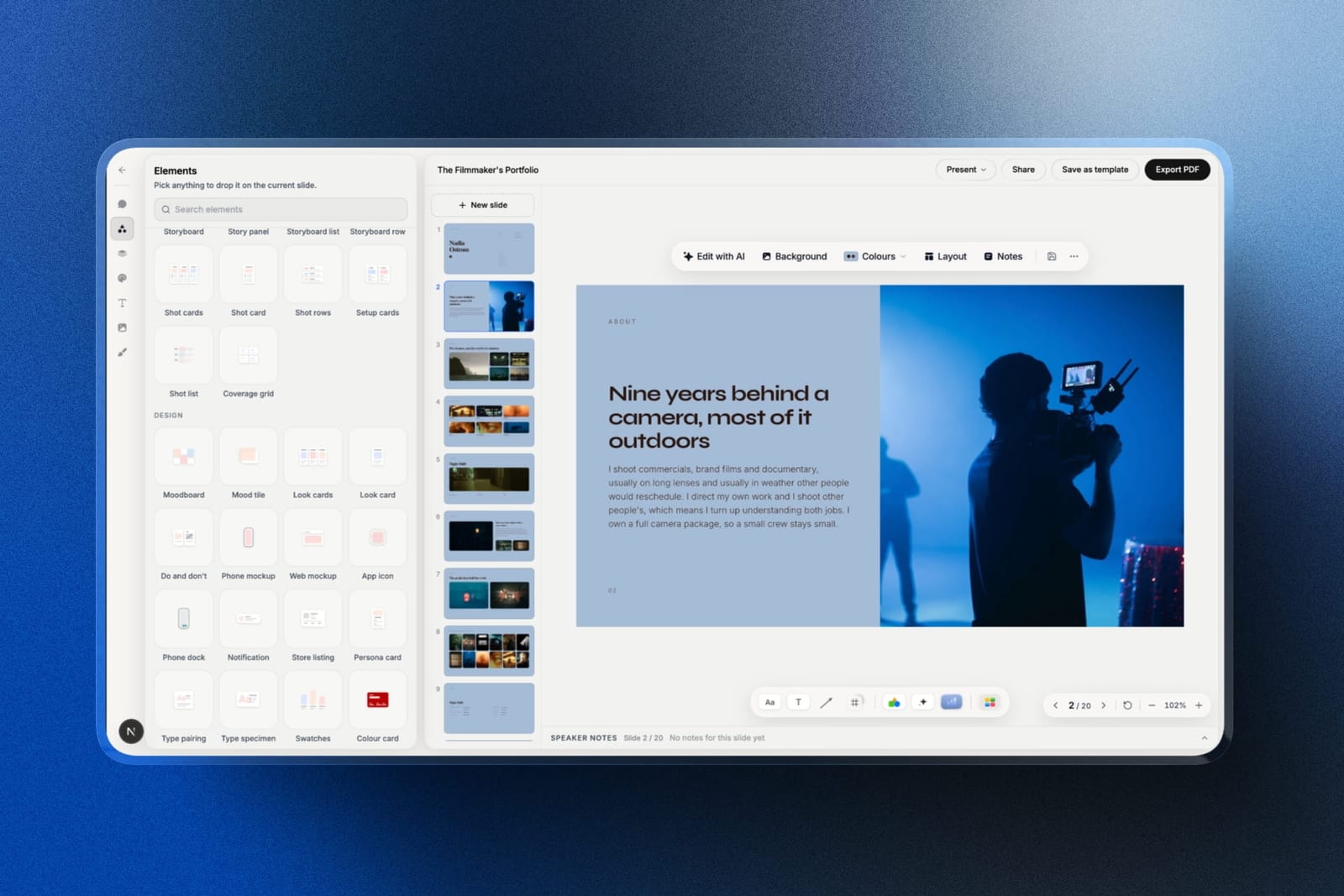
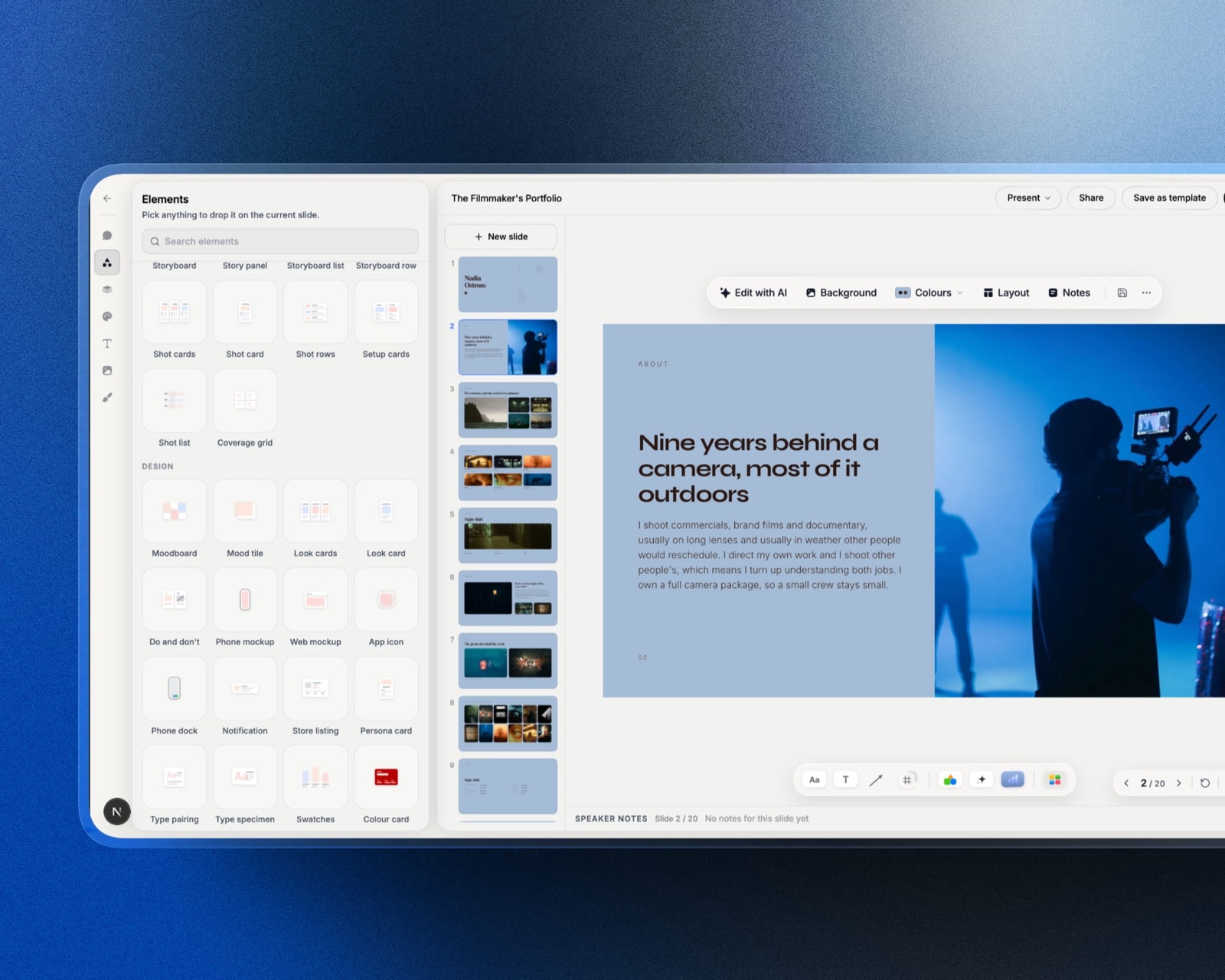
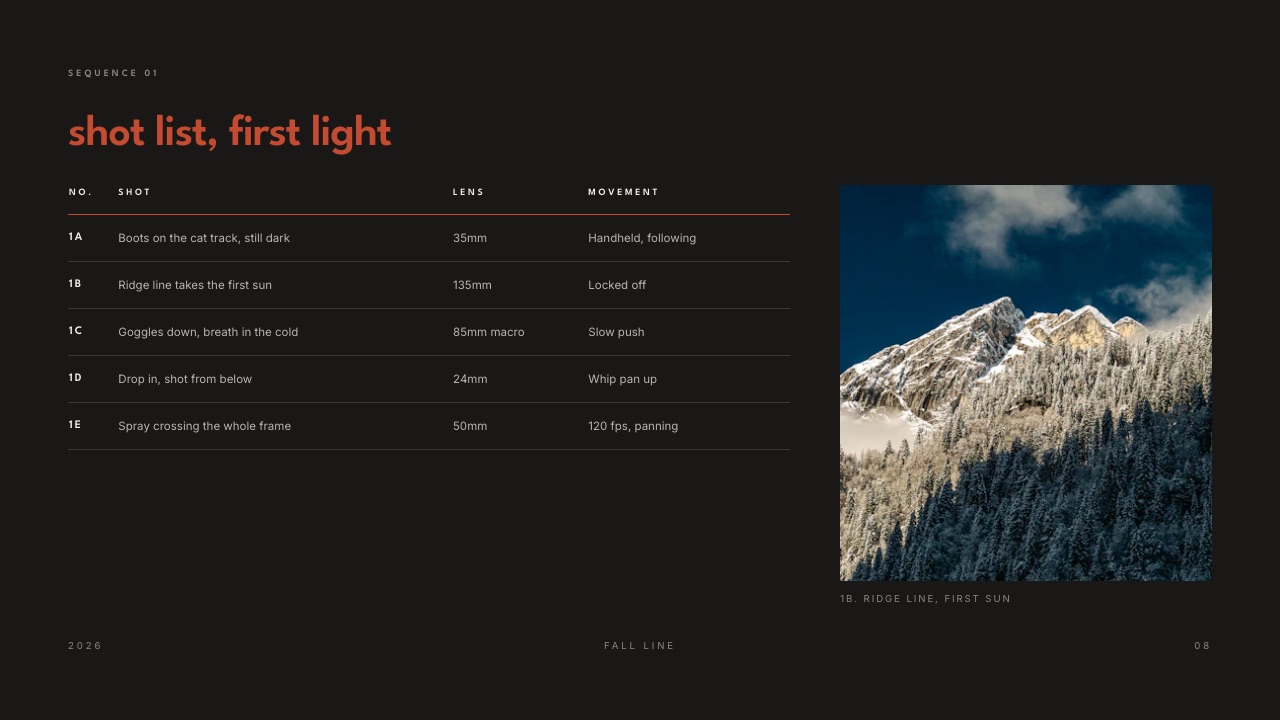
Templates that are already the document. Framekit's library is cut for creative work: director's treatments, lookbooks, photography portfolio books, production proposals with a quote, rate cards, call sheets and shot lists, plus ready-made elements for shot cards, storyboard rows, moodboards, look cards, swatches and type specimens.
The full library is on paid plans from Starter. It is far smaller than a general business library and only wins inside that range, which is the honest way to describe it.
Video where a still would sit. Paste a YouTube, Vimeo or Instagram link onto a Framekit slide and it becomes an embedded player, so a reference clip plays inside the treatment instead of sitting as a link under a frame grab.

In one lineGamma is priced like a software seat with a fuel gauge on every slide, and Framekit like one owner's studio account with a fuel gauge only on the AI, which is why Framekit pulls ahead with every template-built deck one person makes and falls behind the moment a second person needs to build.
Templates and Elements Built for Creative Decks
The most practical difference for a filmmaker, photographer or designer is that Framekit's templates and elements start from the documents creative clients actually ask for, while Gamma starts from a general presentation and asks you to describe the creative structure in a prompt.
A director's treatment has a known shape: a statement, a visual approach with reference frames, look and feel, casting, music and sound, a storyboard, shoot days and delivery.
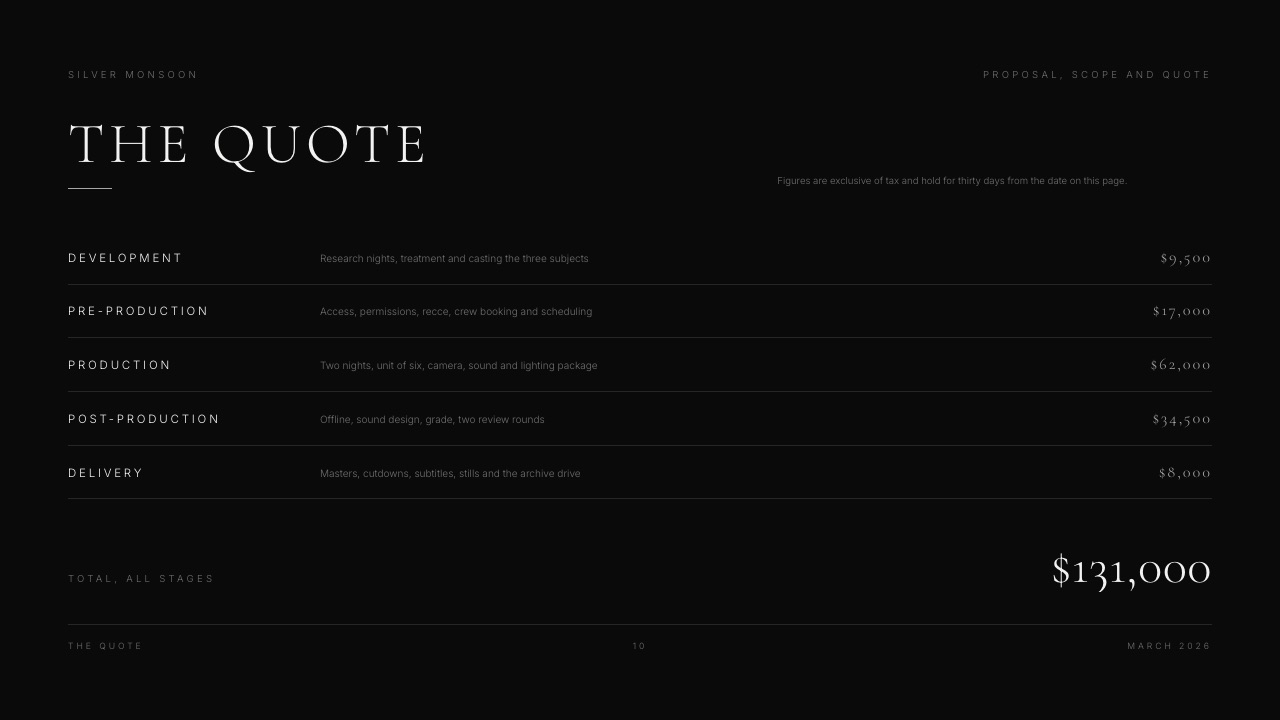
A photographer's lookbook is mostly full-bleed images with a line of text. A production proposal ends in a quote, a schedule and terms.
Framekit's templates arrive with those sections laid out, the right image slots and the type scale already set, so the work is replacing content rather than designing structure.

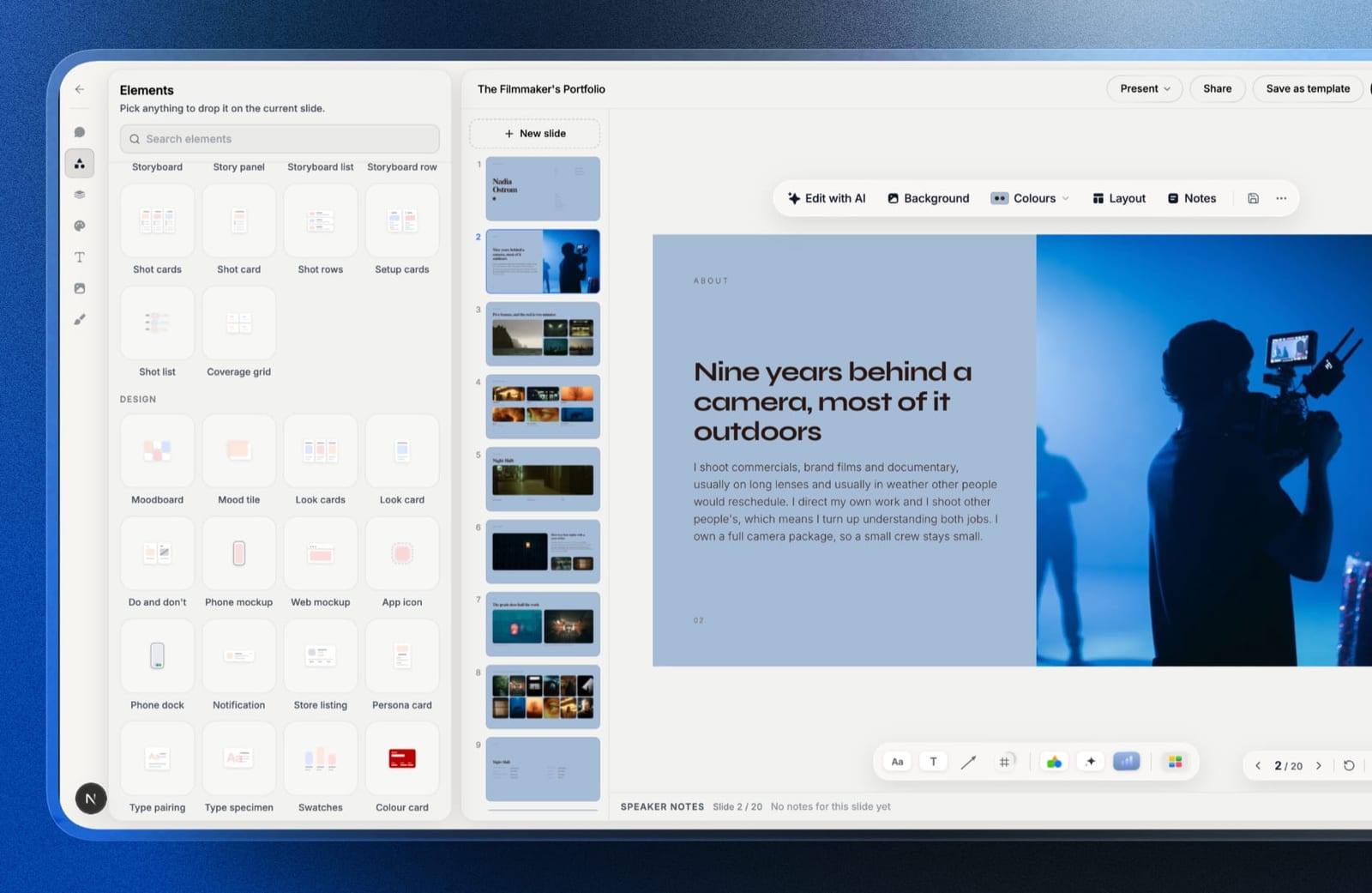
The elements matter as much as the templates. Shot lists, shot cards, storyboard rows, moodboards, look cards, a coverage grid, swatches and type specimens are ready-made blocks you drop onto a slide rather than tables you draw.
Your uploaded fonts and colours carry across every slide on paid plans, and every slide has speaker notes for the pitch call.
Gamma can produce a treatment, and its themes are polished, but the structure comes from your prompt and Gamma's inference rather than from a template designed for the document. How to write a film treatment walks through that structure, and the best film treatment software ranks the specialists.
In one lineGamma gives you a deck shaped by a prompt and Framekit a document shaped by the job, so the better pick depends on whether your decks repeat a known creative format or change shape every time.
What a Year of Decks Costs at Three Usage Levels
The money difference between Framekit and Gamma depends almost entirely on two variables, how many people build decks rather than just view them and how much of each deck is generated rather than built by hand, so here is the same carried treatment priced over twelve months at four realistic levels.
The assumptions, so you can change them: each new deck is the 12-slide, 6-image treatment; each one gets one full AI draft plus one full regeneration on Gamma's standard image tier, which is 48 to 252 credits per deck at Gamma's published rates; Gamma prices are the US annual rates; Framekit prices are yearly billing.
| Usage level | Gamma credits used per month | Gamma, year one | Framekit, year one | What decides it |
|---|---|---|---|---|
| Solo, one new deck a month | 48 to 252 | $0 until the 400 one-time credits run out (month 2 to month 9), then Plus at $108 | $0 on Free, or $84 on Starter for the full template library and no badge | Whether the Free badge and Gamma's one-time credits are acceptable |
| Solo, one new deck a week | 192 to 1,008 | $108 on Plus, plus $6 per 1,500 extra credits in heavy months; $216 on Pro for passwords and analytics | $84 on Starter, or $180 on Pro if you need PowerPoint export | Password and analytics push Gamma to Pro; PowerPoint pushes Framekit to Pro |
| Studio of three, one producer builds every deck, two colleagues view and run the website | 192 to 1,008, one balance | $108 on Plus, or $216 on Pro; viewers need no seat | $84 on Starter, or $180 on Pro, which also makes the two colleagues website admins | Same as solo: only the builder pays on either tool |
| Studio of three, each building a deck a week | 192 to 1,008 per person, in three separate balances | $324 on Plus, or $648 on Pro, in one workspace | $252 on three Starter accounts, or $540 on three Pro accounts, with no deck shared between them | Whether the three need each other's decks; if they do, Gamma |
In the first row, Gamma Free's 400 credits cover roughly 2 to 8 of these decks, once; after that the routes are referrals or a paid plan.
Framekit Free keeps working every month, with the badge on the share link and an allowance that resets, so a light user who builds from templates may never pay.
The second row is close enough to decide on features: a password or per-viewer analytics means Gamma Pro at $216, and PowerPoint export means Framekit Pro at $180, as pictures, while every Gamma plan exports editable PowerPoint.
The third row is the studio shape Framekit fits. One producer owns the decks, the client and the two colleagues open links without an account, and on Pro those two colleagues also become website admins who can update the site, which is the only job Framekit's team members can do.
The fourth row is where an earlier version of this page went wrong. It priced Framekit Pro at $180 for three deck builders, but a Framekit deck belongs to the account that made it, there is no deck invite, and a team member cannot open it.
Three people who each build decks need three Framekit accounts, $252 a year on Starter or $540 on Pro, and those accounts share nothing: no deck library, no templates set up once for everyone, no single AI allowance.
Three Gamma Plus seats cost $324 and still hold three separate balances of 1,000 credits, but they sit in one workspace where a deck can be shared to comment and edit, and Gamma's Business plan, at EUR 35 a seat a month billed annually on the page we read, adds a shared workspace pool on top of 10,000 credits per seat.
For a team that builds decks together, the extra $72 a year on Gamma Plus buys the thing Framekit cannot do.
In one linefor one builder, with or without colleagues who only view, the two land within $24 of each other at entry level, and for a team of builders Gamma's shared workspace is worth more than the $72 a year three Framekit accounts would save.
Limits, Exports and Sharing Side by Side
Most deck decisions are settled by a limit you meet in week three rather than a feature you see on day one, so this table puts the published limits, export formats and sharing controls for Framekit and Gamma next to each other with the plan each one needs.
| Limit or control | Framekit | Gamma |
|---|---|---|
| Decks you can keep | Unlimited, every plan | No deck count; AI-made slides spend credits |
| Slides in one deck | Up to 40 | No cap stated on the pages we read |
| AI on Free | Monthly allowance that resets | 400 credits once, never refilled |
| Slides per AI prompt | Not published; AI writes and lays out slides from a description | 10 on Free, 100 on paid plans |
| Buying more AI | Not part of the published plans | 1,500 credits for $6 on paid plans |
| PDF export | Every plan | Every plan; Made with Gamma badge on Free |
| PowerPoint export | Pro and up, slides as pictures, speaker notes kept, up to 60 slides | Every plan, editable, speaker notes kept |
| Google Slides | No | Via PPTX upload |
| Import an existing deck | No | PDF and PPTX |
| Share link | Anyone with the link can view; not indexed by search engines | Anyone with the link, no account needed |
| Password on link | No | Pro and up |
| Viewer data | Total view count per deck | Detailed analytics on Pro |
| Reset or revoke a link | Reset issues a new link and kills the old one; unpublish takes it down | Change sharing settings |
| Branding on Free | Made with Framekit badge on the link | Gamma branding until Plus |
| Custom fonts | Uploaded fonts on paid plans | Theme fonts; custom branding on Pro |
| Team members | Website admins only, 3 on Pro and unlimited on Business; they cannot open decks | Every member is a paid seat in the workspace |
| Deck sharing between people on your side | None; one account owns each deck | View, comment and edit sharing |
"Not published" means exactly that: Framekit does not publish an AI allowance count, and this page does not guess one.
What Happens When Things Go Sideways
The mechanics nobody reads until they bite are where Framekit and Gamma differ most visibly, so here is what each tool does in the seven situations that generate most support tickets, using the vendors' own documented behaviour.
You run out of AI mid-project. On a paid Gamma plan you keep every non-AI feature and can edit by hand, and you can buy 1,500 credits for $6 at any time.
On Gamma Free you cannot buy credits; you earn 200 per referral or upgrade. On Framekit, AI generation pauses until the monthly allowance resets, and every manual tool keeps working, so a deck in progress is never locked.
You cancel. Gamma keeps your content, moves the account to Free at the end of the period and resets plan credits to 400, and new exports pick up its badge again.
Framekit's Free plan still makes unlimited decks, but the template library, uploaded fonts, badge removal and PowerPoint export are paid features.
The client has no account. Both tools open shared decks in a browser without sign-in. On Framekit Free the link shows a Made with Framekit badge; on Gamma Free the deck carries Gamma branding until you upgrade to Plus.
A confidential deck leaks. On Gamma Pro you would have set a password. On Framekit, press reset: the old link stops working immediately and a new one is created.
The client wants a 70-slide deck in PowerPoint. A Framekit deck holds up to 40 slides, so a 70-slide document is two Framekit decks before export even comes up, and each exports separately as pictures; Gamma's export article states no slide cap.
A colleague needs to finish your deck while you are on set. On Gamma, share the deck with them in the workspace with edit access.
On Framekit they cannot open it, because team members are website admins, so either finish it yourself from your own login or send them a PDF to mark up.
You fix a typo after sending. Both tools update the live deck at the same link; any PDF or PowerPoint already sent is a frozen copy.
The Work Around the Deck
A deck is rarely the whole job for a creative, and this is where Framekit and Gamma stop being the same category of product, which is worth stating plainly rather than smuggling in as a feature row in the table above.
A director sends a treatment, wins the job, then sends cuts for review and delivers the final files. A photographer sends a portfolio book, shoots, then delivers a gallery. A designer sends a proposal, then sells a template pack.
Gamma makes the first item in each of those pairs, and the rest of the workflow lives in other subscriptions.
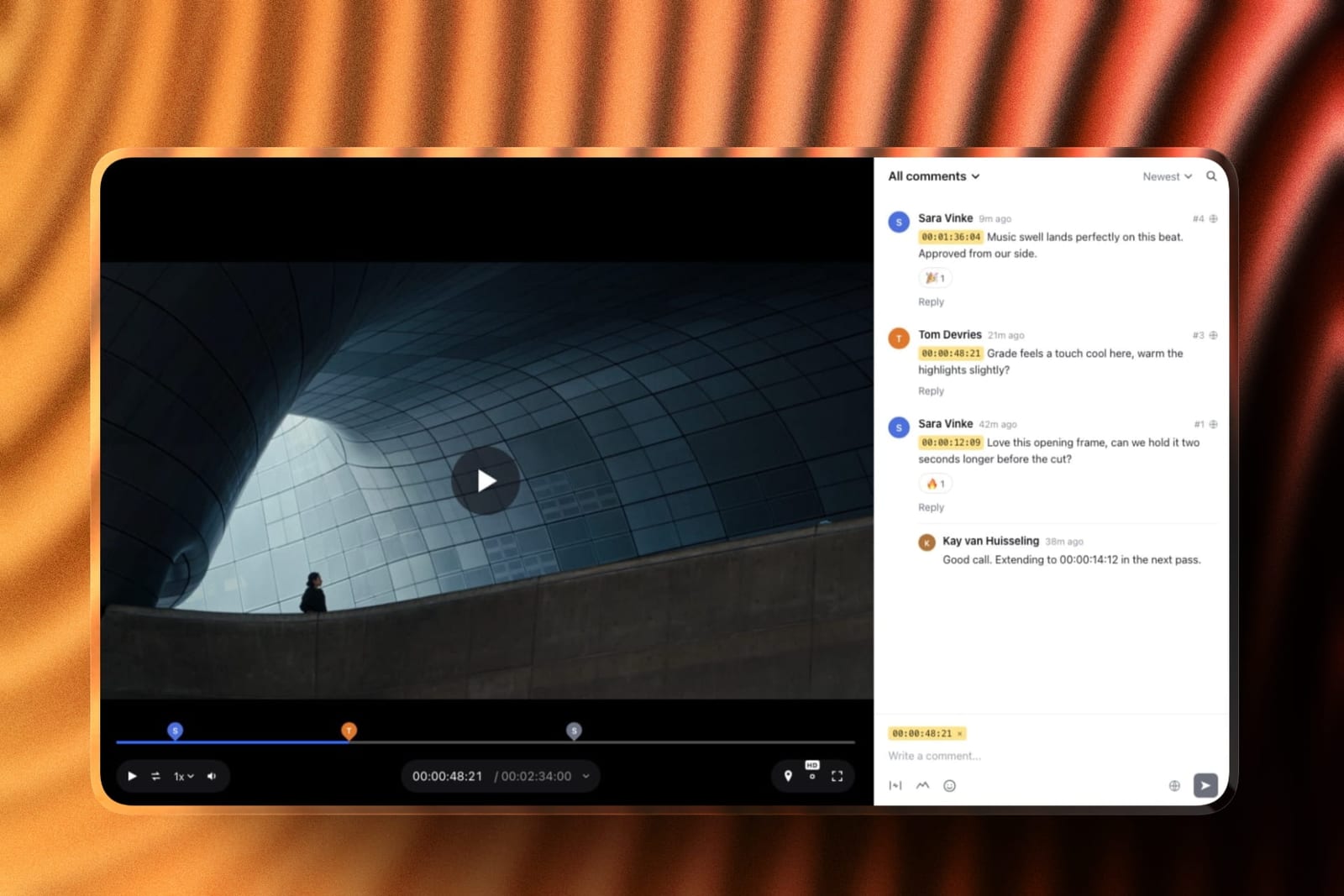
Framekit puts the deck on the same account as a multi-page portfolio site on your own domain, client galleries with a password, a separate download PIN, favourites and watermarks, video review with frame-accurate comments, version stacks and approval statuses, and a store that sells digital files with a 5 percent fee on Free and Starter, 3 percent on Pro and 0 percent on Business.
Storage is one pool, from 10GB on Free to 2TB on Business. One plan at $0 to $39 a month covers the lot.
That is not an argument that Framekit's deck tool beats Gamma's; it is that the review, delivery and site are where the other subscriptions pile up. If the review step is the one you are pricing, Framekit vs Frame.io covers it.
A Test You Can Run on Your Own Deck
The fairest way to settle Framekit vs Gamma is to price your own last three months of decks on both models, because your mix of AI-drafted and hand-built slides decides which meter costs you more, and no comparison page knows that mix.
Take the last three decks you sent. For each, count the slides and the AI images, and estimate how many times you regenerated or asked the AI to rewrite.
Multiply by Gamma's published rates: 1 to 3 credits per slide, 2 to 15 per standard image.
Divide the total by three for a monthly figure and compare it with Gamma's 1,000 on Plus or 4,000 on Pro, times the number of people who would need a seat.
Then count how many of those decks repeat a format, such as a treatment or a proposal, because a Framekit template covers those with little or no AI, and count the people who build decks rather than only view them.
One person making repeat formats lands near $100 a year on either tool.
If three people build, price three Framekit accounts against three Gamma seats, then ask whether any of them ever opens a deck someone else started; if the answer is yes, Gamma's workspace decides it whatever the arithmetic says.
Switching From Gamma to Framekit: A Checklist
Moving a deck library from Gamma to Framekit is a rebuild rather than an import, because Framekit has no deck import of any kind, so the checklist below is ordered to keep the decks you still send live while you rebuild only the formats you repeat.
| Step | What to do | Why it matters |
|---|---|---|
| 1. Export what you keep | Download each live Gamma deck as PDF, and as PPTX if a client may ask for it | Your archive survives whatever plan you end on, without depending on Gamma links |
| 2. List repeat formats | Note which decks you rebuild every month: treatment, proposal, lookbook, rate card | These are the only ones worth rebuilding as Framekit templates |
| 3. Note link dependencies | Find every Gamma link you rely on for passwords or analytics | Framekit has neither, so those decks may need to stay on Gamma or go out as PDFs |
| 4. Count the builders | List everyone in your Gamma workspace who edits decks, not just views them | Each needs their own Framekit account, and decks cannot be shared between accounts; if two people edit the same decks, stay on Gamma |
| 5. Rebuild from a template | Start each repeat format from the closest Framekit template and paste your copy | Template-built decks use little or none of the AI allowance |
| 6. Upload fonts and colours | Set your brand type and palette once on a paid plan | They apply across every slide in every deck on that account |
| 7. Re-share links | Publish each rebuilt deck and send the new link | Old Gamma links keep working until you change them |
| 8. Downgrade last | Keep Gamma until the last client-facing link is replaced | Cancelling first moves Gamma back to Free and adds its badge to new exports |
What does not survive the move: passwords, analytics history, editable PowerPoint handoff, Google Slides interchange and any deck a colleague edits alongside you; if any is load-bearing, leave those decks where they are.
What improves for the one person who owns the decks: deck count stops mattering, and the deck joins the site and the delivery on the same login.
How to Choose: A Decision Tree
Work down these questions in order and stop at the first one you answer yes to, because each one is disqualifying for the other tool rather than a mild preference, which is why the order matters more than any feature table above.
1. Does a shared deck need a password, or do you need to know who opened it and for how long? Yes: Gamma Pro. Framekit offers neither at any tier. No: go to question 2.
2. Must the recipient edit the file in PowerPoint or Google Slides? Yes: Gamma, whose PowerPoint export is editable on every plan. No: go to question 3.
3.
Will more than one person on your side build or edit the decks? Yes: Gamma, whose seats share a workspace where a deck can be shared to comment and edit; on Framekit each builder needs a separate account and no deck can be shared between accounts.
If your colleagues only need to read the decks, answer no, because a Framekit link opens for anyone without an account. No: go to question 4.
4. Do you mostly need long business decks drafted from a single prompt? Yes: Gamma, which generates up to 100 slides per prompt on paid plans. No: go to question 5.
5. Is the document a treatment, lookbook, portfolio book, proposal or shot list? Yes: Framekit, for templates and elements built for exactly those. No: go to question 6.
6.
Do you also pay for a portfolio site, a gallery tool, a review tool or a store? Yes: Framekit, which puts all of them on the same account as the decks, with colleagues able to help on the website as team members from Pro.
No: both free plans cost nothing, so build the same deck in each and judge the result.

Frequently Asked Questions
Is Framekit a good Gamma alternative?
Framekit is a good Gamma alternative for one person making creative documents such as treatments, lookbooks, portfolio books and proposals, because decks are unlimited and hand edits never draw on the AI allowance.
It is a poor alternative for a team that builds decks together, because a Framekit deck belongs to the account that made it and its team members are website admins.
It is also the wrong pick if you rely on password-protected links, per-viewer analytics or editable PowerPoint or Google Slides files, which Gamma has and Framekit does not, or if you want a long business deck drafted in a single pass, where Gamma is faster because Framekit's AI asks questions and confirms an outline before it builds.
Does Framekit use credits like Gamma?
Framekit meters AI too: every plan, Free included, has a monthly AI allowance that grows with the plan, and deck AI draws on one pool across all your decks. The difference is the unit.
Gamma charges credits for each AI-generated slide and image, while Framekit lets you make unlimited decks and edit any slide by hand without spending anything; only AI generation draws on the allowance.
Framekit vs Gamma for a film treatment: which should a director use?
Framekit, unless the treatment must sit behind a password or go to an agency that edits it in PowerPoint.
Framekit's treatment templates come with the statement, visual approach, look and feel and shoot plan already laid out, video references embed and play on the slide, and uploaded fonts carry across every slide on paid plans.
Gamma Pro is the choice for a treatment under a strict confidentiality requirement, because only it puts a password on the link.
Which is cheaper for a team, Framekit or Gamma?
For a team where several people build decks, Gamma is the better value even though Framekit is slightly cheaper on paper.
Three Framekit Starter accounts cost $252 a year against $324 for three Gamma Plus seats, but the Framekit accounts share nothing, because a deck belongs to the account that made it and the team members on Pro and Business are website admins who cannot open decks.
If one person builds every deck and the rest only read them, Framekit Starter at $84 a year is the cheaper of the two, and viewers need no account on either tool.
Can my team share decks in Framekit?
No. A Framekit deck belongs to the person who created it: there is no deck invite and no shared deck editing, and the team members included on Pro (three) and Business (unlimited) can edit the website but cannot open a deck.
Colleagues can read a deck through its share link or a PDF without an account, and anyone who needs to build decks needs a Framekit account of their own.
Does Gamma pool credits across a team?
Not on most plans. Gamma's help centre says credits on Free, Plus, Pro, Ultra and Teams are assigned to each member individually and cannot be transferred between accounts, so a heavy user cannot borrow from a light one.
Gamma's Business and Enterprise plans add a shared workspace pool that members draw on once their own credits are used.
What happens when I run out of Gamma credits?
On a paid Gamma plan you keep every non-AI feature, can still edit by hand, and can buy 1,500 more credits for $6. Unused plan credits roll over to a cap of twice the monthly amount.
On Gamma Free you cannot buy credits: the 400 sign-up credits do not refill, and the only routes to more are referrals, at 200 credits each, or upgrading.
What happens when Framekit's AI allowance runs out?
When a Framekit plan's monthly AI allowance is used up, AI generation pauses until the allowance resets with the next billing month, and everything you do by hand keeps working: editing text, swapping images, rearranging slides, presenting, sharing and exporting.
Decks are never locked, and you can keep creating new decks from templates while the allowance is empty.
Can I password-protect a Framekit deck?
No. A Framekit deck link has no password and no expiry; anyone with the link can view it, and it never appears in search engines. You can reset the link, which kills the old one immediately and issues a new one, or unpublish the deck.
For a password on the link itself, Gamma Pro offers it, and so do dedicated deck-tracking tools.
Does Framekit tell me who opened my deck?
No. Framekit shows a total view count on each deck and nothing per recipient, so you cannot see which client opened it or how far they read.
Gamma Pro offers detailed analytics, including time spent per card and how far each reader got, and if your follow-up depends on that, it is a genuine reason to choose Gamma.
Can I export a Framekit deck to PowerPoint or Google Slides?
Framekit exports PowerPoint from the Pro plan, with each slide as a full-bleed picture and speaker notes kept as real notes, up to 60 slides, so the design survives on any machine but the text cannot be retyped.
There is no Google Slides export or import. Gamma exports editable PowerPoint on every plan and reaches Google Slides by uploading that file.
Can I import my Gamma decks into Framekit?
No. Framekit has no deck import, so moving means rebuilding each deck, ideally from the closest Framekit template with your copy pasted in.
Export every Gamma deck you keep as PDF first so your archive does not depend on a Gamma link, and only rebuild the formats you send repeatedly.
Is Gamma's free plan better than Framekit's?
They fail in different directions. Gamma Free gives 400 credits once and up to 10 slides per prompt, which is excellent for one intensive week and then stops.
Framekit Free makes unlimited decks every month with a monthly AI allowance, PDF export and a Made with Framekit badge on the share link, so it suits steady light use rather than one burst.
Does Gamma put a watermark on exports?
Gamma adds a Made with Gamma badge to PDF and PowerPoint exports whenever the workspace is on the Free plan at the moment of export, including decks made during an earlier paid period. Plus, Pro or Ultra removes it from future exports.
Framekit's free plan shows a Made with Framekit badge on the share link instead, removed on paid plans from Starter.
Can Gamma build a portfolio website like Framekit?
Gamma publishes web pages and lets Pro users connect up to 10 custom domains, which is enough for a simple single-subject site. It does not include client galleries, video review or a store.
Framekit's site builder makes a multi-page portfolio on your own domain from Starter, on the same account as your decks, galleries, review links and store.
Final Verdict
Gamma and Framekit both draft decks with AI and both meter that AI, and after that they diverge on almost everything that matters to the bill and to the recipient.
Gamma is the better product for teams and for sharing a deck, and for drafting long decks from one prompt: a shared workspace, passwords, detailed analytics, editable PowerPoint and Google Slides interchange, and import.
Framekit is the better product for one person making creative documents and running the business around them, because the deck is not the unit you pay for and the site, galleries, review and store sit on the same login.
Where Framekit loses. Framekit is not for a team where several people build or edit decks, because each deck belongs to the account that made it, there is no deck invite, and its team members are website admins who cannot open a deck; Gamma's workspace is the better fit there.
It also does not put a password on a deck link, does not show who opened a deck, does not export editable PowerPoint, does not import anything, including Google Slides, and has no live co-editing or deck comments.
And it is not for anyone whose decks already live in Gamma and work, because a rebuild for its own sake is not worth your afternoon.
Where it wins. A director, photographer or producer who owns every deck personally, makes treatments, lookbooks, portfolio books and proposals, and also pays for a portfolio site, a gallery tool and a review tool that could be the same subscription, with colleagues helping on the website rather than in the decks.
Related readingthe best Gamma alternatives, Gamma vs Canva, Framekit vs Pitch, Framekit's pricing, how to share a presentation online and the best presentation tools for filmmakers.