Framekit templates
Start from a designer-made template
 Use template
 Use template
 Use template
 Use template
 Use template
 Use template
 Use template
 Use template
Most creators who want to start selling digital products never do, and it is rarely for lack of skill.
The path is fuzzy: what to sell, how to turn it into a product, where to put it, what to charge, who handles the tax, and how anyone finds it. None of those questions is technical.
A photographer with a folder of presets, a designer with a template, an illustrator with a brush pack is each about a week of clear steps away from a first sale.
This guide is that sequence, eight steps from idea to first sale and beyond, with one example carried through every step: a photographer turning a $25 preset pack into a first product.
Each step has the numbers attached, from how many presets to put in the pack to what each platform keeps from a sale and what a refund costs, so you can plan your own version before you build it.
A digital product is a file you create once and sell an unlimited number of times, such as a preset pack, ebook, template, font, brush set or LUT, with no inventory, shipping or per-unit cost, which makes it the highest-margin thing a creator can sell.
To start selling digital products in 2026, pick one product your audience already asks for, build a small finished version in a week, choose where to sell it, price it with each platform's fees in view, set up checkout and delivery, decide your tax and refund policy, then launch to the people who already follow you.
If you have an audience, a store on your own site keeps the most: a $25 sale leaves $22.72 on Framekit's free plan and $23.97 on its $39 Business plan, against $20.97 on Gumroad.
If you have no audience, start on Etsy for its search traffic; if you want tax filed for you, Lemon Squeezy or Gumroad.
Full disclosure: Framekit is our product and appears below as the own-store route, with its limits stated plainly. Every competitor fee in this guide was re-verified on the vendor's own pricing page or help docs on 12 October 2026, replacing the July figures, and the earlier claim that an own store keeps "up to 100%" of each sale is gone, because card processing always applies.
Still deciding what to make? The best digital products to sell ranks product types by revenue per hour of work.
The Numbers Before You Start
Starting to sell a digital product can cost nothing up front, because the free plans of Framekit, Payhip, Gumroad, Lemon Squeezy and Ko-fi all charge per sale rather than per month, so the real costs are your time and the share each platform takes once you sell.
- $0 to start on any free plan; the cash cost of a first product is usually software you already own.
- About 7 days of focused work for a small first product built from material you already have.
- $1.03 to $4.03 is what the common platforms take from a $25 sale with processing included, from Framekit Business at the low end to Gumroad at the high end.
- $780 a month is where Framekit's $39 Business plan at 0% becomes cheaper than its 5% free plan.
- From the first sale you may owe VAT on digital sales to EU consumers if you sell from outside the EU through a platform that is not a merchant of record.
- 7 to 14 days is how long Stripe typically takes to make your first payout after your first live payment.
Step 1: Pick a Product People Already Ask For
The best first digital product is one your audience has already asked you for, so before making anything, list every question, compliment and request you received in the last 90 days and look for the one that repeats.
The three signals of a product with demand. People compliment the same result ("how do you get that colour?"), ask to borrow the same file ("can I have your invoice template?"), or ask you to explain the same process ("how do you plan a shoot day?").
Each maps to a product: a preset pack, a template, a guide.
Match the product to what you already have. A photographer has presets and editing knowledge; a filmmaker has LUTs and shot lists; a designer has templates and type pairings; an illustrator has brushes; anyone with a refined process has a guide.
Start where you already have 80% of the raw material.
One product, not a catalogue. A single focused product teaches you the whole selling process, from page to payout to refund, which you can then repeat.
In the carried example, the photographer has been asked about their colour grade at least ten times this quarter, so a pack of their presets has proven demand before it exists.
A quick validation step. Post one before-and-after and ask, "Would a pack of these presets be useful?" Ten genuine yeses from people who follow your work is a better signal than any keyword tool.
Step 2: Make the First Version in a Week
Creating the product means packaging your raw material so a stranger can use it without asking you anything, which for most first products is the core file, a short guide and clean naming, finished in about a week rather than perfected over months.
Scope it small. These are sensible first-version sizes:
| Product type | First-version scope | Files to deliver | Typical download size |
|---|---|---|---|
| Lightroom presets | 8 to 12 presets with one look | XMP files, DNG files for mobile, PDF guide | 50 to 300MB with DNGs |
| LUTs | 5 to 10 looks | .cube files, a sample clip or stills, PDF guide | Under 50MB without sample footage |
| Templates | 5 to 10 layouts | The native file (Figma, Canva link, Notion, Keynote), fonts list | Under 100MB |
| Ebook or guide | 20 to 40 pages | PDF, optional EPUB | Under 20MB |
| Brushes | 15 to 30 brushes | .brushset or .abr, preview sheet | Under 200MB |
Test it on someone else. Give the product to two people who did not make it and watch where they get stuck. For the preset pack, run each preset on 40 or more photographs in different light before calling it finished.
Package it properly. One ZIP with clear file names, a version number and date ("Coastal-Presets-v1.0-2026-10.zip"), and a 2 to 4 page guide. Most support emails for digital products are installation questions the guide could have answered.

Step 3: Choose Where to Sell
Where you sell decides how much of each sale you keep, who owns the customer and who handles the tax, and there are three routes: a store on your own site, a merchant of record that sells on your behalf, or a marketplace that brings its own buyers.
| Route | Examples | What a $25 sale leaves you | Who files tax | Who owns the buyer | Brings its own buyers |
|---|---|---|---|---|---|
| Store on your own site | Framekit, Payhip | $22.72 on a 5% free plan; $23.97 at 0% | You (Payhip remits EU and UK VAT) | You | No |
| Merchant of record | Lemon Squeezy, Gumroad, Polar | $23.25 on Lemon Squeezy; $20.97 on Gumroad | The platform | Mostly you, through the platform | Gumroad's Discover, at 30% |
| Marketplace | Etsy | $22.17 before ads; $18.42 via Offsite Ads at 15% | Etsy collects VAT and US sales tax | Etsy | Yes |
If you have an audience, even a small one, sell from your own site: you keep the buyer's email, the product sits beside the work that sells it, and the fee can fall to 0%.
If you sell internationally and never want to see a VAT form, use a merchant of record. Lemon Squeezy's 5% plus 50 cents includes processing; Gumroad's 10% plus 50 cents does not.
If you have no audience yet, a marketplace's search traffic can make your first sales.
Etsy charges a 20-cent listing fee, a 6.5% transaction fee and processing of 3% plus 25 cents for US shops, plus Offsite Ads at 15% (12% for shops over $10,000 a year) on sales those ads bring.
Use it to find buyers, then invite them to your own store. Our guide to what it costs to sell digital products online breaks down every fee.
Step 4: Price It and Know What You Keep
Price a digital product on the value it gives the buyer rather than its zero reproduction cost, then check what each platform leaves you at that price, because fixed per-order fees take a much larger share of cheap products.
A pricing rule of thumb. For creative files, the result is what the buyer pays for: presets that give someone your look save hours of editing, which is why preset packs commonly sell for $15 to $60.
A first product from a creator with a modest following usually does well near the middle of its category's range.
Avoid $3 to $5 pricing: it signals low value, and on Gumroad a fixed 80 cents of fees (50 cents platform plus 30 cents processing) takes over 20% of a $3 sale before percentages.
What each platform keeps from one sale, with card processing at 2.9% plus 30 cents wherever it is charged separately:
| Price | Framekit Free or Payhip Free (5%) | Framekit Business (0%) | Lemon Squeezy | Gumroad direct | Etsy, no ads |
|---|---|---|---|---|---|
| $9 | $7.99 | $8.44 | $8.05 | $7.04 | $7.69 |
| $25 | $22.72 | $23.97 | $23.25 | $20.97 | $22.17 |
| $49 | $44.83 | $47.28 | $46.05 | $41.88 | $43.89 |
And over a year, for the $25 pack. Total cost of selling, with Framekit's paid plans billed yearly:
| Monthly sales | Framekit, cheapest plan | Lemon Squeezy | Gumroad | Etsy, no ads |
|---|---|---|---|---|
| $500 (20 sales) | $546 (Free) | $420 | $966 | $678 |
| $2,000 (80 sales) | $1,356 (Business) | $1,680 | $3,864 | $2,712 |
| $5,000 (200 sales) | $2,832 (Business) | $4,200 | $9,660 | $6,780 |
At $500 a month Lemon Squeezy is the cheapest of these and files your tax; above about $1,100 a month, Framekit Business is cheaper. Our guide to pricing digital products covers bundles and tiers.
Step 5: Set Up Checkout, Delivery and Getting Paid
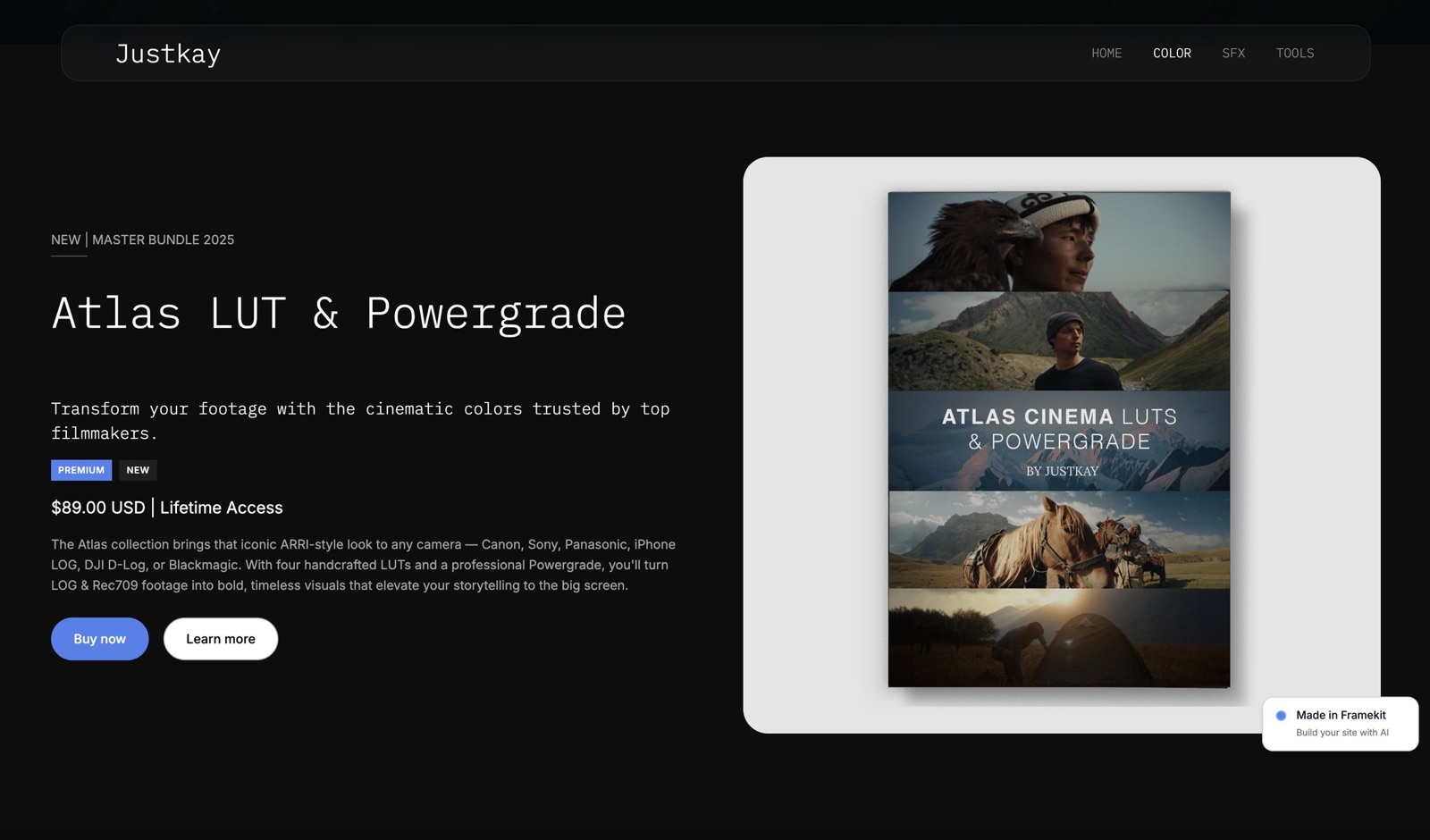
A working digital store needs a product page that answers the buyer's questions, a checkout with the payment methods your buyers use, delivery that happens the moment payment clears, and a payout route to your bank, and you should test all four with a free product before launch.
The product page. Show 4 to 6 examples of the result, list exactly what is included and which software versions it works with, state the price, and link a one-paragraph refund policy.
Our guide to writing a sales page for a digital product covers the copy.
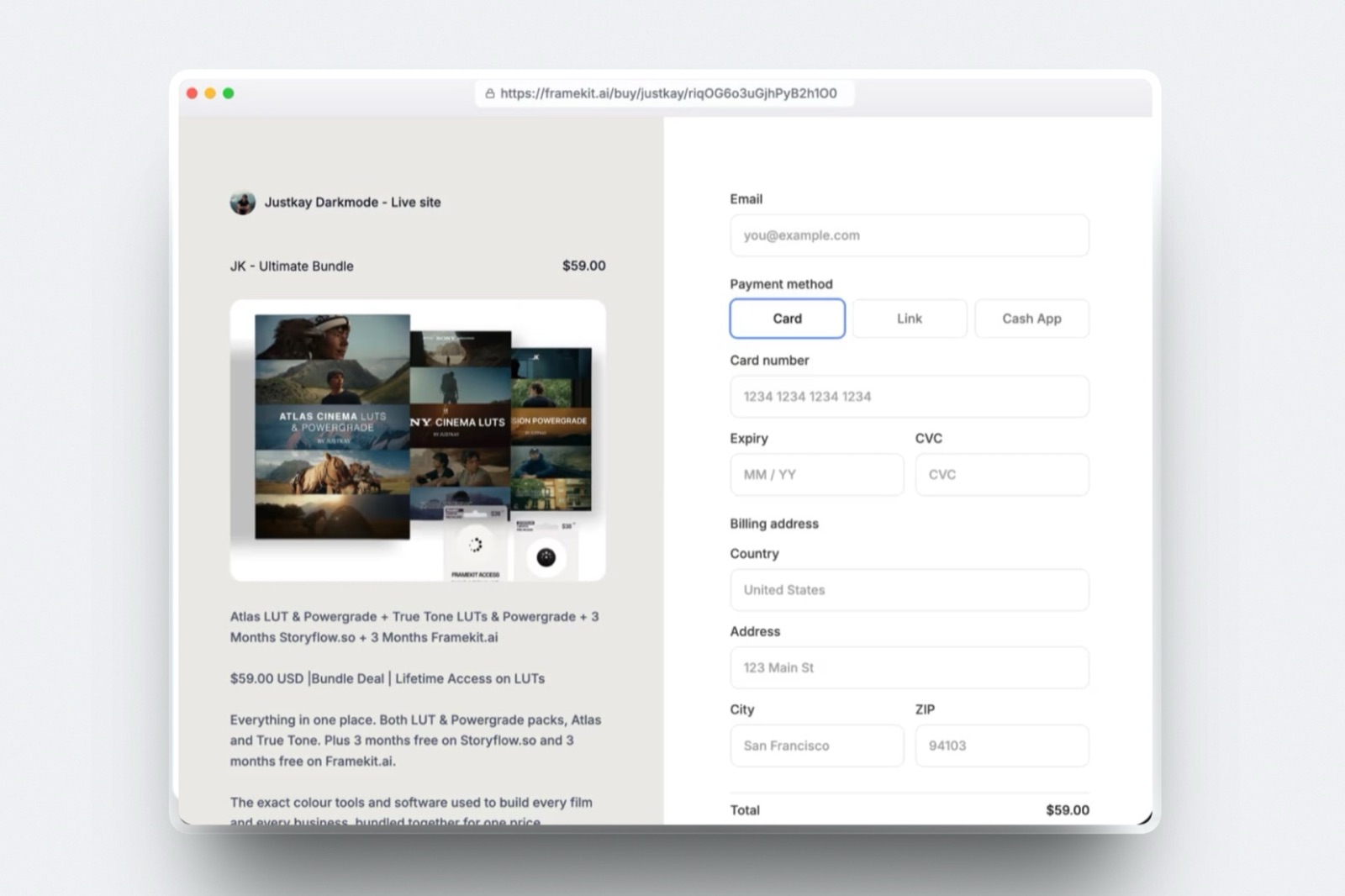
Checkout and payment methods. On Framekit, the hosted checkout at framekit.ai/buy shows your name and logo and the Stripe payment methods you have enabled, typically card, Link and Cash App Pay for a US buyer, with a "Powered by Framekit" line on every plan.
Lemon Squeezy offers cards, PayPal, Apple Pay and Google Pay among others; Payhip offers card or PayPal; Gumroad offers cards, PayPal and local methods depending on the buyer's country.
Delivery and re-downloads. On Framekit the buyer downloads on the confirmation page straight after payment, and the order email carries links valid for 7 days that you can resend from the order.
Gumroad offers a receipt link and a Library; Lemon Squeezy a My Orders account; Payhip download limits and expiring links.
Framekit publishes no per-file ceiling or bandwidth allowance; Gumroad allows 20GB per file on paid products; Payhip 5GB per file; Etsy 5 files of 20MB each.
Getting paid. Framekit and Payhip charge through your own processor, so the money is in your Stripe (or, on Payhip, PayPal) balance at the moment of sale; Stripe typically makes the first payout 7 to 14 days after your first live payment and can pay daily after that.
Gumroad holds weekly payouts for at least 7 days and needs a $100 balance; Lemon Squeezy pays twice a month after a 13-day hold with a $50 minimum.
Run one test. Create a free product, download it as a buyer would, open the email, and check the file opens on a phone. Ten minutes now saves the first-week support emails.
Step 6: Sort Out Tax, Refunds and Chargebacks
Before the first sale, decide who handles tax, write a refund policy, and know what a dispute costs, because on an own-site store you are the seller of record and these three jobs are yours from the first order.
Merchant of record, in one sentence. A merchant of record is the company that sells your product to the buyer in its own name, so it collects and remits sales tax and VAT; Lemon Squeezy, Gumroad and Polar are merchants of record, while Framekit, Payhip and Stripe leave you as the seller.
The tax rules that apply to you on your own store. A seller outside the EU owes VAT on digital sales to EU consumers from the first sale, usually through the EU's One Stop Shop; a non-UK seller owes UK VAT on digital sales to UK consumers from the first sale; EU-based sellers get a €10,000 a year threshold for cross-border digital sales; and most US states require registration only past an economic nexus threshold, commonly $100,000 a year.
Framekit does not calculate or add tax at checkout, so any VAT you owe comes out of your price. Payhip collects and remits EU and UK VAT.
Read our VAT on digital products guide and whether you need a merchant of record before deciding.
Refunds. Pick a policy and publish it: for files, a common one is a refund within 14 days if the product does not work as described.
On Framekit you refund from Stripe; Framekit keeps its fee ($1.25 on a $25 sale on Free, $0 on Business) and Stripe keeps its processing of about $1.03. Gumroad and Lemon Squeezy return their own fees on a refund.
Chargebacks. On your own Stripe account a dispute costs $15 for US accounts, plus $15 more if you counter, returned if you win, and you write the evidence: the order record, the delivery email and your refund policy.
On Gumroad and Lemon Squeezy the platform argues the case. Our refunds and chargebacks guide covers what wins.
Step 7: Launch to the Audience You Already Have
Most first sales come from people who already follow you, so a launch is not switching the store on and waiting; it is telling those people directly, at least three times over about ten days, with a reason to buy early.
A ten-day launch plan:
- Day minus 7: share a free sample (one preset, one template page) and collect emails from everyone who takes it.
- Day minus 3: show the product working on new material, with the launch date named.
- Day 0: email the list and post the buy link everywhere you have a profile. If your plan allows discount codes (Framekit Pro and Business), add a 20 to 25% code that expires in 72 hours.
- Day 3: one reminder email before the code expires.
- Day 10: ask buyers for one example of their result you can share.
Why small audiences work. A thousand engaged followers who trust your work usually outsell a passive audience ten times the size, because the launch converts existing trust rather than creating it.
If you have no audience yet, this step is the reason to start on a marketplace while you build one. How to launch a digital product goes deeper.
Step 8: Keep It Selling After the Launch
After the launch spike, a digital product keeps selling only if it stays visible, so show its results in your regular content every week, link it permanently from your site and profiles, and plan a second product for about 90 days later.
Make the work the advertisement. Every photograph edited with the presets, every frame graded with the LUTs, every page laid out with the template is a demonstration. Caption it with the product name.
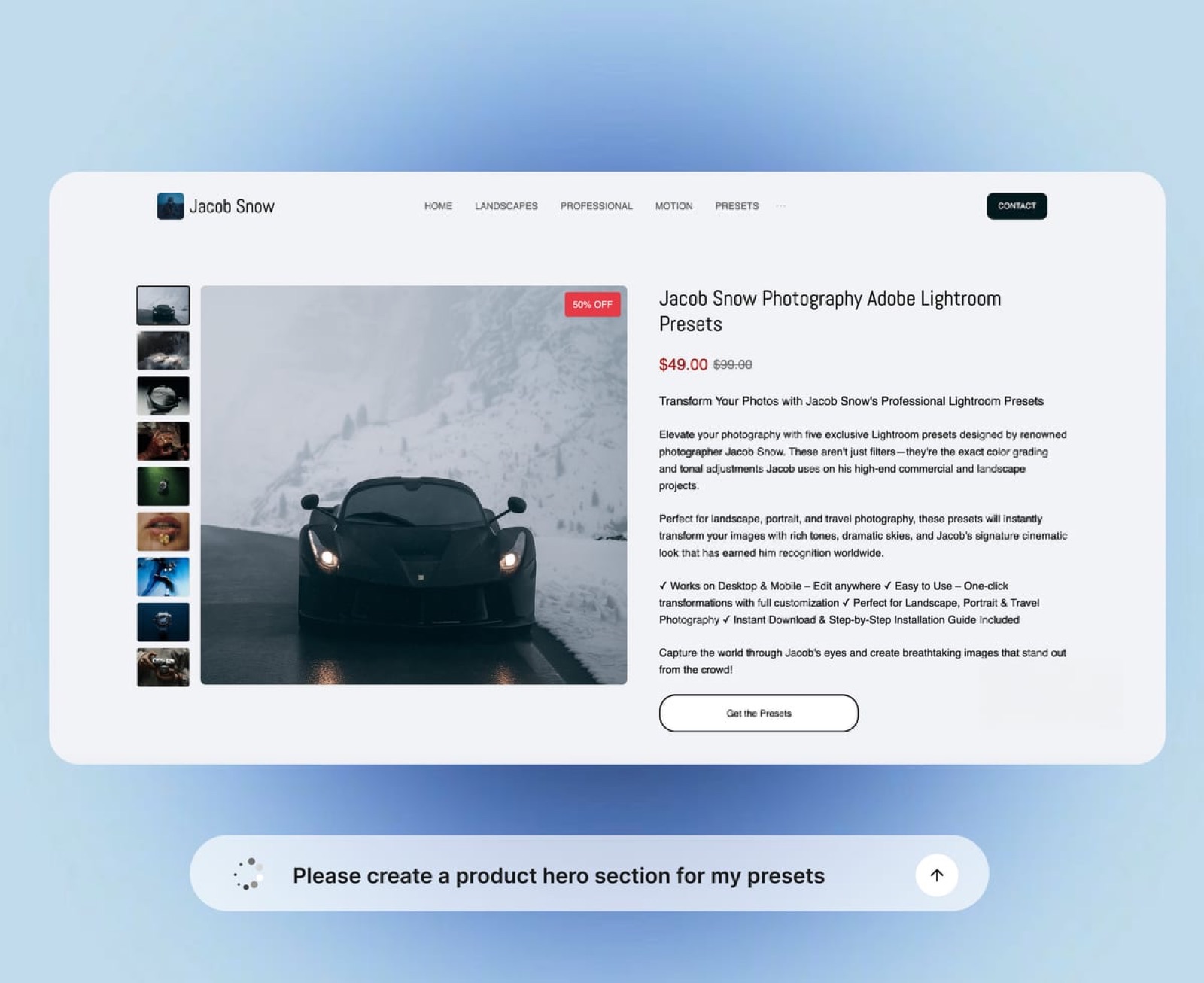
Link it everywhere permanently. Main navigation on your site, link in bio, video descriptions and email signature. On Framekit, the product is also a section you can drop under the portfolio work that shows the result.
Use what you own. Every buyer through your own store is on your list, so the second product launches to a warmer audience than the first. On a marketplace, that list mostly stays with the platform.
Plan the second product from the first one's questions. The support emails from the first 50 buyers are the brief for product two. A bundle of both at a 20 to 30% discount is the simplest third product.
Starting on Framekit

Framekit is an AI website builder that includes a digital-download store, client galleries, Frame.io-style video review and Slides decks in one account, which makes it the own-store route for creatives whose products sell best beside their portfolio.
How a first product goes live. You describe your site and the AI drafts it; you add a product with a file, price and cover; the product appears as a section on any page and as a direct buy link at framekit.ai/buy that works in a bio or video description without a site.
Buyers pay through your own Stripe account and download on the confirmation page.
What it costs. Free at 5% per sale, no card needed; Starter at $9 a month ($7 yearly) for your own domain and no website badge (checkout keeps a small Powered by Framekit line); Pro at $19 ($15 yearly) for a 3% fee and discount codes; Business at $39 ($31 yearly) for 0%.
Products are unlimited on every plan and free products work as lead magnets. Storage is pooled across site, galleries and review: 10GB, 50GB, 300GB or 2TB.
What it does not do. Framekit sells one-off digital downloads only: no subscriptions, memberships, courses, licence keys, pay-what-you-want, affiliates, physical goods, order bumps or abandoned-cart emails.
It is not a merchant of record, keeps its fee on refunds, does not push updated files to past buyers, and opens checkout at framekit.ai/buy rather than on your own domain.
When to pick something else. No audience yet: Etsy. Want tax filed: Lemon Squeezy or Gumroad. Selling courses or memberships: Payhip or Podia. Selling merch: Shopify or Sellfy.

Run the Numbers Before You Launch
You can price your first year in five minutes with three inputs, the price, the sales you expect a month and the share of buyers outside your country, and the result tells you which route and which plan to start on.
- Expected monthly sales: price times sales a month. The carried pack at $25 and 25 sales is $625.
- Own store on a free plan: 7.9% of sales plus 30 cents a sale. On $625 that is $49.38 plus $7.50, about $56.88 a month.
- Own store at 0%: $39 plus 2.9% plus 30 cents a sale: $39 plus $18.13 plus $7.50, about $64.63. Stay on the free plan until sales pass $780 a month.
- Merchant of record: Lemon Squeezy at 5% plus 50 cents a sale: $31.25 plus $12.50, $43.75 a month, with tax filed for you.
- Gumroad: 12.9% plus 80 cents a sale: $80.63 plus $20.00, about $100.63 a month.
- Add the tax line. If a third of buyers are in the EU and you live outside it, add the cost of VAT registration and quarterly returns to the own-store column. If that makes it more expensive than the merchant of record, start there.
At this volume Lemon Squeezy is the cheapest of the four and files your tax, and an own store wins once you need the site, the customer list in your own account, or pass about $1,100 a month in sales.

Frequently Asked Questions
How do I start selling digital products with no money?
Start on a free plan that charges per sale rather than per month, such as Framekit, Payhip, Gumroad or Lemon Squeezy, and build the first product from material you already have.
Framekit's free plan includes a site and store with no card required, at 5% per sale plus Stripe's processing, so your first cash cost is a share of your first sale.
What digital products are easiest to start with?
The easiest first digital products are ones built from work you already do: presets or LUTs for photographers and filmmakers, templates for designers, brushes for illustrators, and short guides for anyone with a refined process.
A first version of 8 to 12 presets, 5 to 10 templates or a 20 to 40 page guide can usually be finished in about a week.
Where should I sell my first digital product?
Sell from your own site if you have any audience, because you keep the buyer and the most of each sale: $22.72 of a $25 sale on Framekit's free plan against $20.97 on Gumroad.
Use Etsy if you have no audience and need its search traffic, and a merchant of record such as Lemon Squeezy or Gumroad if you want sales tax and VAT filed for you.
Do I need to charge VAT or sales tax on digital products?
You may. If you sell from your own store and live outside the EU, you owe VAT on digital sales to EU consumers from the first sale, and non-UK sellers owe UK VAT on sales to UK consumers from the first sale.
US states mostly require registration only past an economic nexus threshold, commonly $100,000 a year. Merchants of record such as Lemon Squeezy and Gumroad handle all of this for you; Framekit does not.
Gumroad vs your own website: which is better for a first product?
Gumroad is better for testing a product with no audience and no site, because it costs nothing until you sell, files your tax and can surface you on Discover.
Your own website is better once you have followers, because a $25 sale keeps $1.75 more on Framekit's free plan and $3.00 more on Business, and every buyer's email is yours.
How much should I charge for my first digital product?
Charge in the middle of your category's range and adjust after the first 20 sales. For preset packs that is roughly $20 to $30 out of a common $15 to $60 range.
Avoid $3 to $5 pricing, which signals low value and lets fixed per-order fees eat a large share; use a 72-hour launch discount instead of a permanently low price.
How do buyers receive the files?
On every platform here delivery is automatic. On Framekit, the buyer downloads on the confirmation page after payment, and the order email carries links valid for 7 days that you can resend.
Gumroad uses a receipt link and Library, Lemon Squeezy a My Orders account, and Etsy a download in the buyer's purchases.
What happens if a buyer asks for a refund?
You decide, based on the policy you published. On Framekit you issue the refund from Stripe; Framekit keeps its fee, $1.25 on a $25 sale on Free and nothing on Business, and Stripe keeps its processing of about $1.03.
Gumroad and Lemon Squeezy return their own fees when you refund.
How long until I get paid?
On an own store using Stripe, the money is in your Stripe balance at the moment of sale, and Stripe typically makes your first payout 7 to 14 days after your first live payment, then on your schedule.
Gumroad holds weekly payouts for 7 days with a $100 minimum, and Lemon Squeezy pays on the 14th and 28th after a 13-day hold.
Can I sell digital products without a website?
Yes. Gumroad, Lemon Squeezy and Etsy give you hosted product pages, and every Framekit product also gets a direct buy link at framekit.ai/buy that works with no site at all.
Our guide to selling a digital product from one link covers when a bare link is enough.
Do I need a business registration to start?
In many countries you can start selling as an individual, but the income is taxable and international sales can create VAT obligations from the first sale.
The rules depend on where you live, so check with your tax authority or an accountant once sales are regular. Keep platform statements as well as bank statements, because you generally owe tax on gross revenue and deduct fees as expenses.
When should I move from a free plan to a paid one?
Move when your best recent month passes the paid plan's break-even, which is its monthly price divided by the percentage you stop paying.
On Framekit, Business at $39 a month and 0% beats the 5% free plan above $780 a month in sales; Pro at $19 and 3% makes sense mainly if you want discount codes before that point.
Final Verdict: Start This Week, Small
Selling a digital product is a sequence, not a technical problem: pick what your audience already asks for, ship a small finished version, choose the route that matches your audience and your tax tolerance, price it with the fees in view, set up delivery and payouts, decide your refund and tax policy, and launch to the people who already follow you.
For a creative with any audience, a store on your own site keeps the most and builds the most, and Framekit starts free at 5% per sale and drops to 0% on Business above $780 a month, with the store sitting beside your portfolio.
Where Framekit is not the right start: a creator with no audience is better served by Etsy's traffic, a seller with many international buyers by a merchant of record such as Lemon Squeezy, and anyone selling courses, memberships or merch by a platform built for those.
Pick the smallest genuinely useful product you already have the material for, and make the first sale this week.
Related readinghow to sell Lightroom presets on your own website, how to sell LUTs online, the best free product-selling tools and, for ebooks specifically, the best platforms to sell ebooks.