Framekit templates
Start from a designer-made template
 Use template
 Use template
 Use template
 Use template
 Use template
 Use template
 Use template
 Use template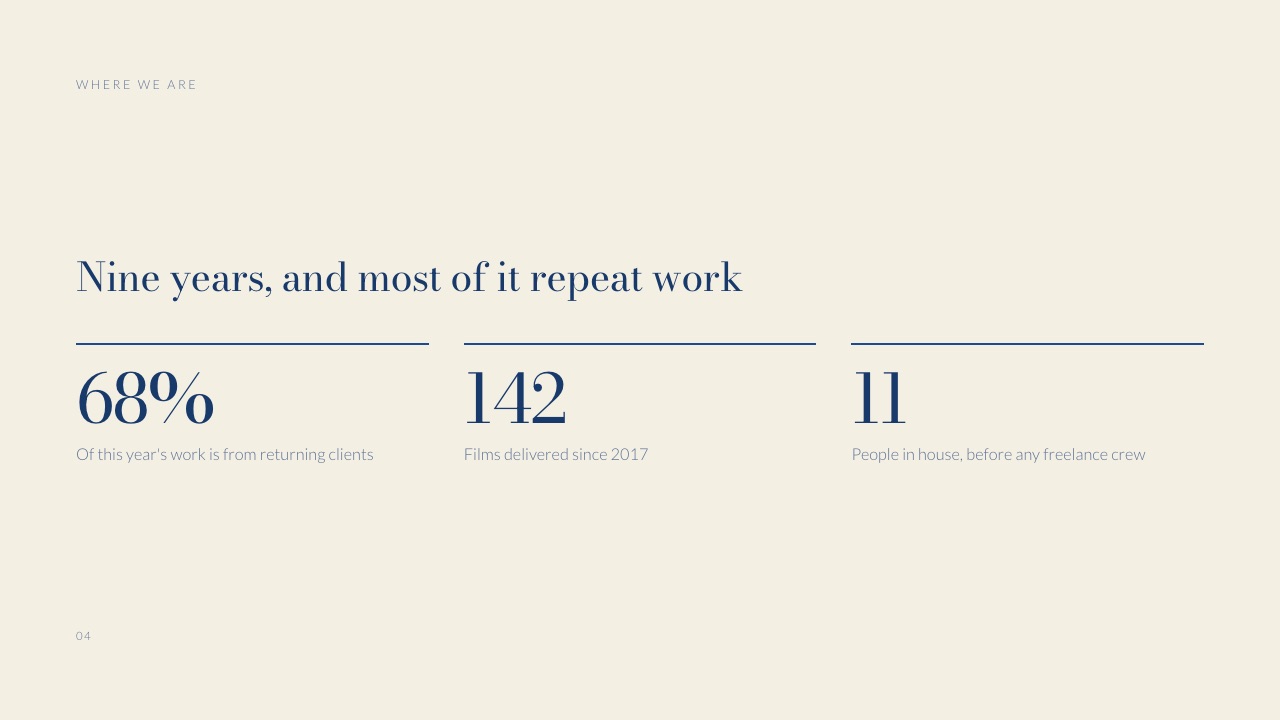
A brand's marketing team has ten agencies on a longlist and room in the diary for three pitches. Before anyone meets, each agency sends its creds, and somebody in marketing or procurement reads all ten in an afternoon with one question in mind: which seven can we drop?
That is the job an agency credentials deck template has to be built for. Not to impress in general, but to survive a reading whose purpose is elimination, and then to earn one of the three places in the room.
An agency credentials deck is a 12 to 20 slide presentation that introduces a creative, production or marketing agency to a prospective client, covering who the agency is, what it does, the work and results it can prove, the team who would do the job, how it works and what it costs, so the client can decide whether to shortlist it for a pitch.
Most agencies just call it the "creds deck".
The best agency credentials deck in 2026 is a master deck of about 20 slides with a tailored front of 3 to 5 slides rebuilt for each prospect, because the client reads creds to shortlist, and relevance to their brief is the fastest way off the cut list.
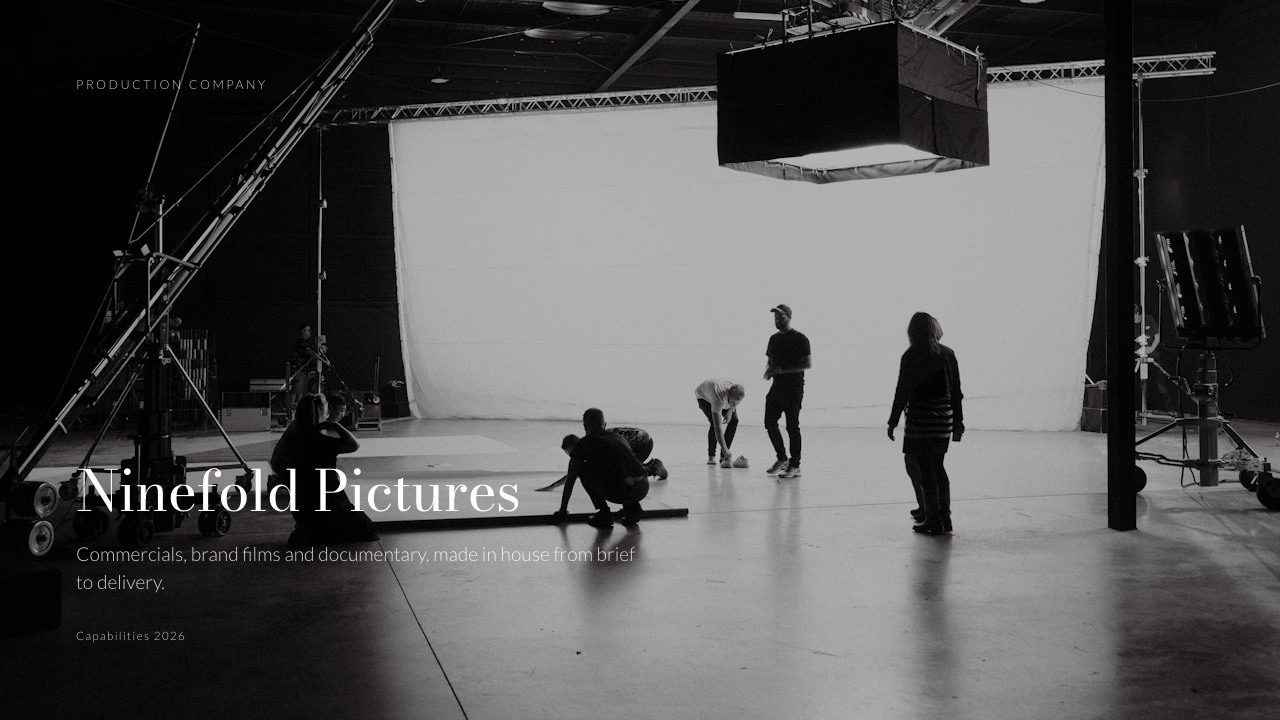
Framekit's Production Company Credentials template (20 slides, from Who we are to Get in touch, including The numbers, Case study, Results, Kit and Rates) is our pick for creative and production studios, since the deck lives on the same account as the website the client will check next.
The trade-off: Framekit deck links have no password and no per-viewer analytics.
Pitch is the better choice when you need to see which stakeholder opened which slide, Storydoc suits interactive, web-style creds with reader identification, and Keynote or Google Slides cost nothing if you already have a designer.
Full disclosure: Framekit is our product and ranks first below for creative and production studios, not for every agency. We did not use the competing tools hands-on for this guide; we read their pricing and help pages on 19 September 2026, linked where the page loads, and rendered Framekit's credentials templates slide by slide to write the walkthrough. Pitch, Storydoc and DocSend all beat us on tracking who reads a deck, and Keynote and Google Slides beat us on price.
Where This Guide's Evidence Comes From
The advice below rests on a published industry guide to agency selection, on Framekit's own credentials templates read slide by slide, and on seat-based cost arithmetic for a small agency team, with each kind of evidence labelled so you can weigh it separately.
Read at the source. How clients run agency searches comes from Finding an Agency, the best-practice guide published jointly by the IPA (the UK's trade body for agencies) and ISBA (the body for advertisers), which also sits behind the Good Pitch initiative.
It is UK-authored, but it is the most specific public document we found on how many agencies should be asked for creds and what happens next. Tool prices come from each vendor's own page, read on 19 September 2026.
Rendered and read. The slide order is Framekit's Production Company Credentials template (20 slides), with comparisons to three siblings: Film Studio Pitch Deck, Branding Studio Pitch and Creative Studio Portfolio (12 slides each).
Numbers quoted from those decks are their sample copy, not real companies.
Calculated. The cost table prices a three-person agency team for a year on each tool, because creds decks are usually a team document and most presentation tools charge per seat.
The carried example is the sample studio inside the Production Company Credentials template: a crew of eleven, 142 films delivered since 2017, and 68% of this year's work from returning clients.
Creds Decks by the Numbers
These figures describe the process a creds deck is sent into, taken from the IPA and ISBA guide unless marked otherwise, and each one changes how you should build the deck.
- 10 agencies is the most the guide says a client should ask to respond to a request for information; asking more "is usually very wasteful of both client procurement and agency resources".
- 6 agencies at most should be asked to prepare "extended credentials or 'think-piece' presentations for shortlisting".
- 3 agencies make the pitch list, or 4 if the incumbent is invited.
- 4 weeks is the minimum the guide suggests for preparing a full creative pitch, which is why the creds stage has to be fast.
- 25% of pitch-winning ideas ever run, according to AAR statistics quoted in the same guide, which is a good reason to fill your creds with work that actually ran.
- 68% repeat work is the lead figure on The numbers slide in Framekit's sample credentials deck; retention is the proof point the template puts first.
How Clients Actually Read a Creds Deck
In one lineclients read creds to build a shortlist, which means the first pass looks for reasons to drop an agency, so a creds deck has to prove relevance, capability and fit before it tries to charm anyone.
The IPA and ISBA guide describes the common process in steps.
First comes the creds, RFI or RFP stage: "initial request for information from the longlisted agencies, often involving a strategic answer and relevant case studies, after which a shortlist of agencies is then compiled." Chemistry meetings follow, then a pitch list of three or four.
So the creds deck is read at the widest point of the funnel, by people comparing up to ten decks.
The guide even suggests clients draw up scoring criteria for judging the longlist and research agencies through "agency websites, trade associations", which means your deck and your site are read together.
| Stage | Agencies at this stage | What the client reads | What your deck must do |
|---|---|---|---|
| Longlist and RFI | Up to 10 | Creds decks, websites, trade listings | Survive the elimination read |
| Extended creds or think-piece | No more than 6 | A longer creds or a point of view on the brief | Show relevant thinking, not just past work |
| Chemistry meeting | Up to 10 in speed-dating format | The people | Match the deck's team slide to who turns up |
| Pitch | 3, or 4 with the incumbent | Full response to a written brief | Stand behind every claim made in creds |
Two consequences follow for the deck. Relevance comes first, because a longlist is cut on "have they done this for someone like us?" before anything else. And every claim has to be checkable, because the reader has your website open in the next tab.
What procurement and brand teams check
Different people read the same creds deck for different things, and a good one gives each of them their answer within a slide or two.
| Reader | What they look for | The slide that answers it |
|---|---|---|
| Marketing lead | Work that looks like what they need | Selected work, Case study |
| Head of brand | Taste, and whether you understand their category | Who we are, Case study, What clients say |
| Procurement | Size, stability, rates, how the engagement runs | The numbers, How we work, Rates |
| Legal or compliance | Conflicts, confidentiality, who owns what | Clients, a line on NDAs and conflicts |
| The eventual day-to-day contact | Who they would actually work with | The team |
In one linewrite each slide for a named reader, and if a slide does not answer a question one of these five people is asking, it is a candidate for the cut.
The Agency Credentials Deck Template, Slide by Slide
This is the 20-slide order of Framekit's Production Company Credentials template, and it works for most creative agencies with small changes; each row names the question the slide answers and the reason a client would drop you if it is missing.
| # | Slide | The question it answers | Why its absence gets you cut |
|---|---|---|---|
| 1 | Cover | Who is this, and for whom was it prepared? | A generic cover says the deck was not made for them |
| 2 | Who we are | What kind of agency are you, in one line? | The reader cannot place you on the longlist |
| 3 | Showreel | What does the work look and feel like? | Creative teams stop reading without it |
| 4 | The numbers | How big, how established, how stable? | Procurement cannot judge risk |
| 5 | What we do | Which services, exactly? | They assume you do not do the thing they need |
| 6 | Selected work | Have you done this for someone like us? | Relevance is what a longlist is cut on |
| 7 | Case study | How did one project actually go? | Work without context looks like a portfolio, not a partner |
| 8 | Brief and approach | How do you think about a problem? | Nothing to separate you from the other nine |
| 9 | Results | What happened because of the work? | Claims of effectiveness go unproven |
| 10 | Clients | Who trusts you, and are there conflicts? | Legal flags a competitor on your list too late |
| 11 | Logos | Recognisable names at a glance | A weaker first impression than rivals |
| 12 | How we work | What will the engagement feel like, week to week? | The client cannot picture working with you |
| 13 | The team | Who would we actually get? | The chemistry meeting starts from zero |
| 14 | Kit | What do you own versus hire? (production) | Procurement cannot compare capability |
| 15 | What clients say | Would others hire you again? | Nothing independent backs your claims |
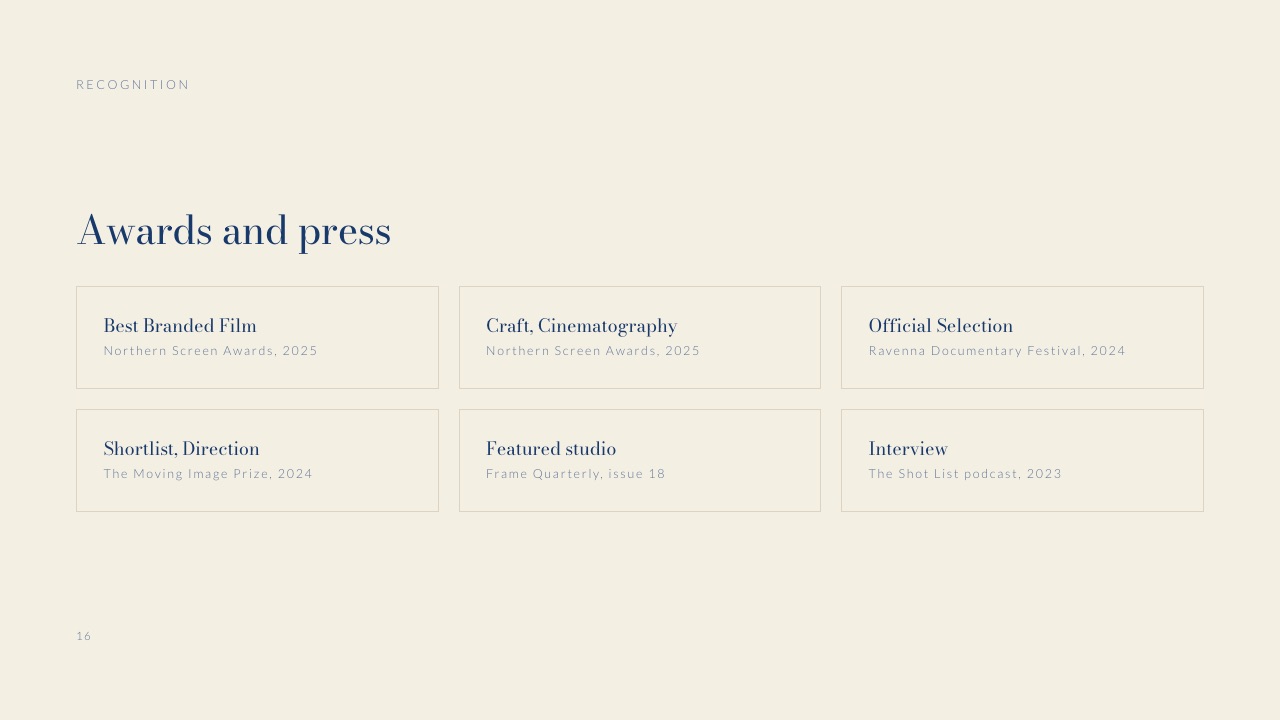
| 16 | Awards and press | Does the industry rate you? | Optional, but a gap if rivals show theirs |
| 17 | Rates | Roughly what will this cost? | Procurement cannot budget the shortlist |
| 18 | Questions | What do you want to know from us? | A missed chance to show you read the brief |
| 19 | Availability | Can you start when we need? | A timing problem surfaces after the pitch |
| 20 | Get in touch | Who do we call? | Friction at the one moment it matters |
For a creative or branding studio rather than a production company, drop Kit, and consider merging Clients and Logos into one slide. That leaves 18 slides, which is still a full master deck.
Slides 1 to 5: who you are, in under a minute
The first five slides should let a stranger place you on their longlist in under a minute.
The sample in Framekit's template does it with one sentence on the Who we are slide: "A crew of eleven who would rather shoot one film properly than three of them quickly." That line tells a client the size of the company and how it trades off speed against care, which is two scoring criteria answered at once.
The numbers slide follows the same idea with three figures and no adjectives: 68% of this year's work from returning clients, 142 films delivered since 2017, and 11 people in house before any freelance crew.
It is headlined "Nine years, and most of it repeat work", so the retention figure does the selling. Choose your three numbers for what they prove to procurement: stability, volume and size are the usual three.
Slides 6 to 9: the proof
Selected work is where most creds decks are won or lost at the longlist stage, because it answers "have you done this for someone like us?" Six projects is a comfortable number: Framekit's sample uses six tiles (a brand film, a commercial, a documentary, an interview series, a campaign and a content series), each labelled by type so a reader can find their category fast.
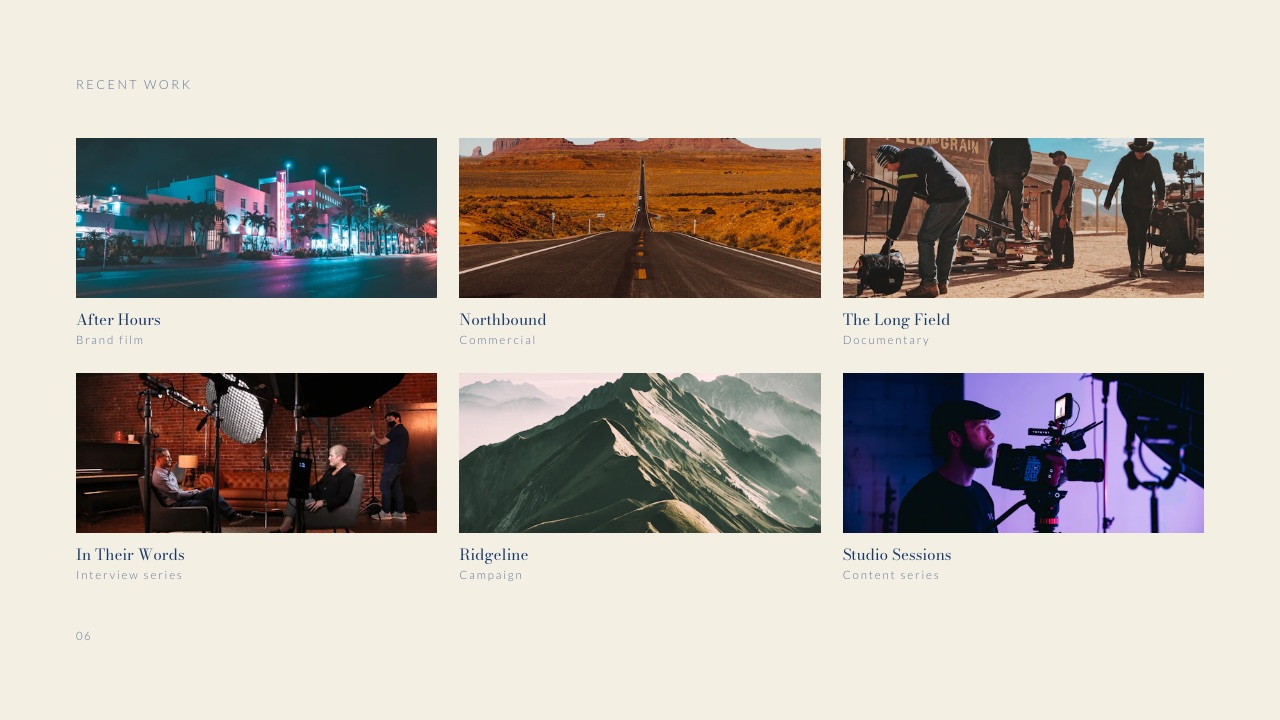
The Film Studio Pitch Deck template's version of the same slide has a caption worth stealing: "Three projects, chosen because they are the ones a client can go and check." Checkable work beats impressive work at the creds stage, because the reader will check.
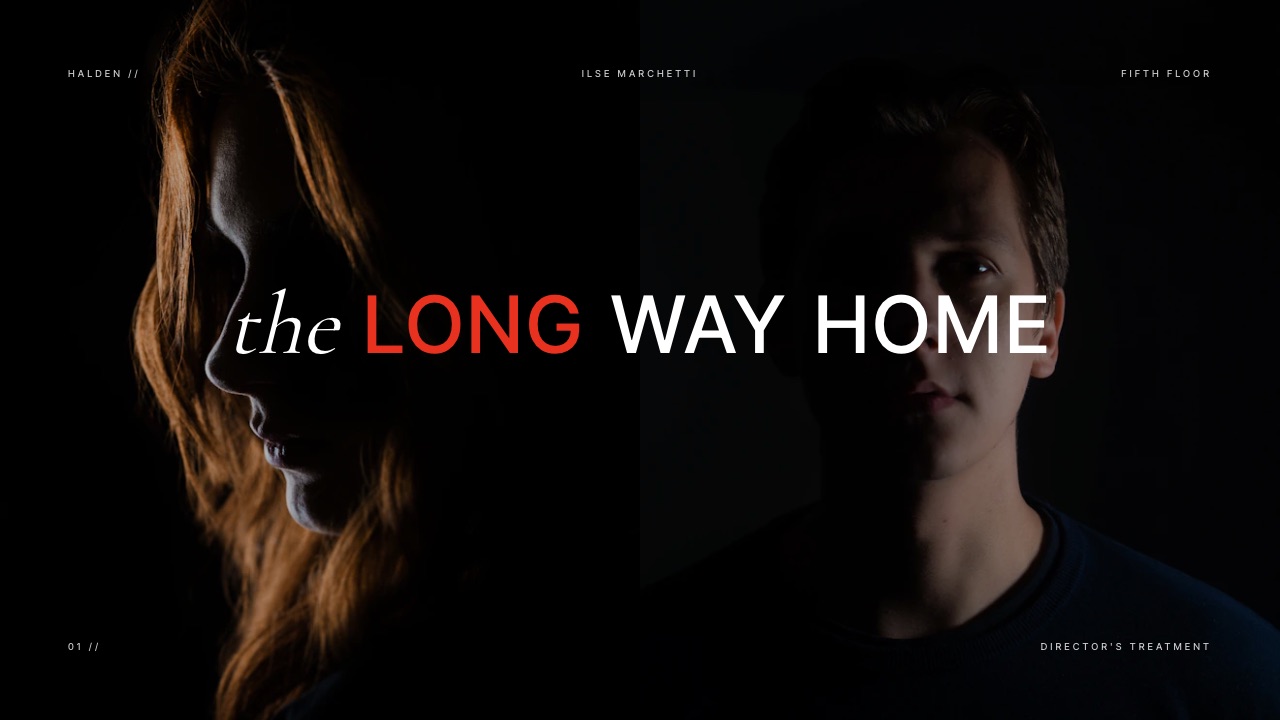
The case study slide should be one project told through three facts before any story. The template's sample, After Hours, leads with the client (Halden Coffee), the scope (film, six cutdowns, stills) and the year (2025).
Brief and approach, then Results, finish the story on the following slides.
Slides 10 to 16: the people and the evidence
Clients and logos do two jobs. They build trust, and they surface conflicts early: a client that already works with your competitor's agency needs to know on day one.
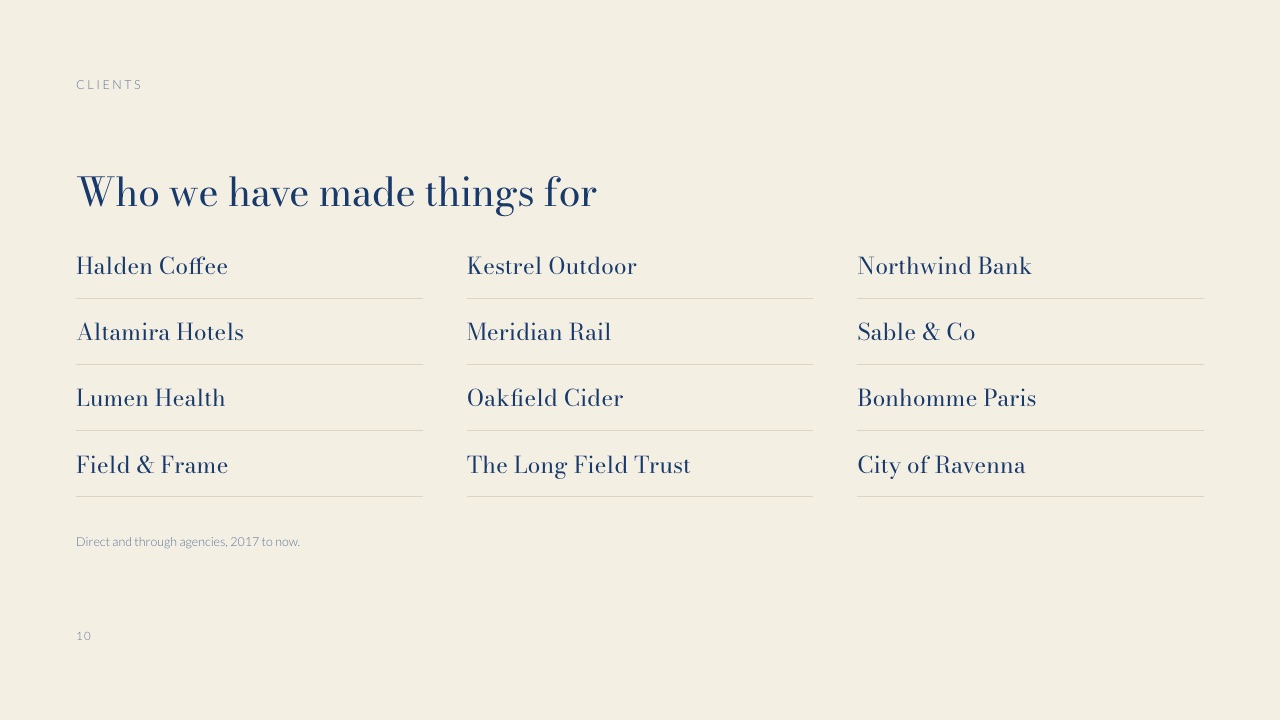
The template's clients slide adds a small line that answers a procurement question before it is asked: "Direct and through agencies, 2017 to now."
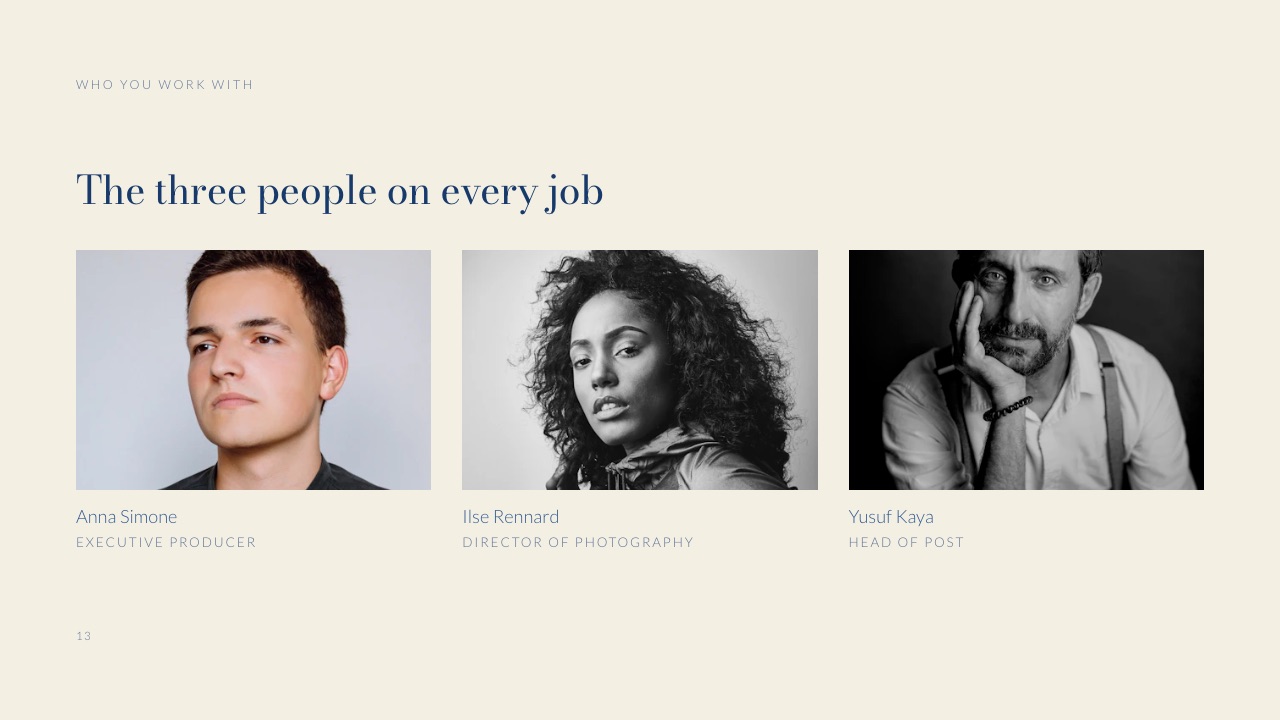
The team slide should show the people who will be on the account, not the founders' whole network.
The template's version is headed "The three people on every job" and shows an executive producer, a director of photography and a head of post.
If someone else will run the account, show them instead; the chemistry meeting will expose the difference anyway.
For production companies, the kit slide is unusually persuasive to procurement. The template's version is headed "What we own, before we hire anything" and lists camera, grip, light and post in four short columns.
Owning kit is a cost and availability argument, and it is one creative agencies without production capability cannot make.
Slides 17 to 20: rates and the next step
Several creds guides that rank for this topic say to leave prices out.
For creative and production work, a rates slide with ranges usually helps at the shortlist stage, because procurement is trying to avoid pitching three agencies it cannot afford.
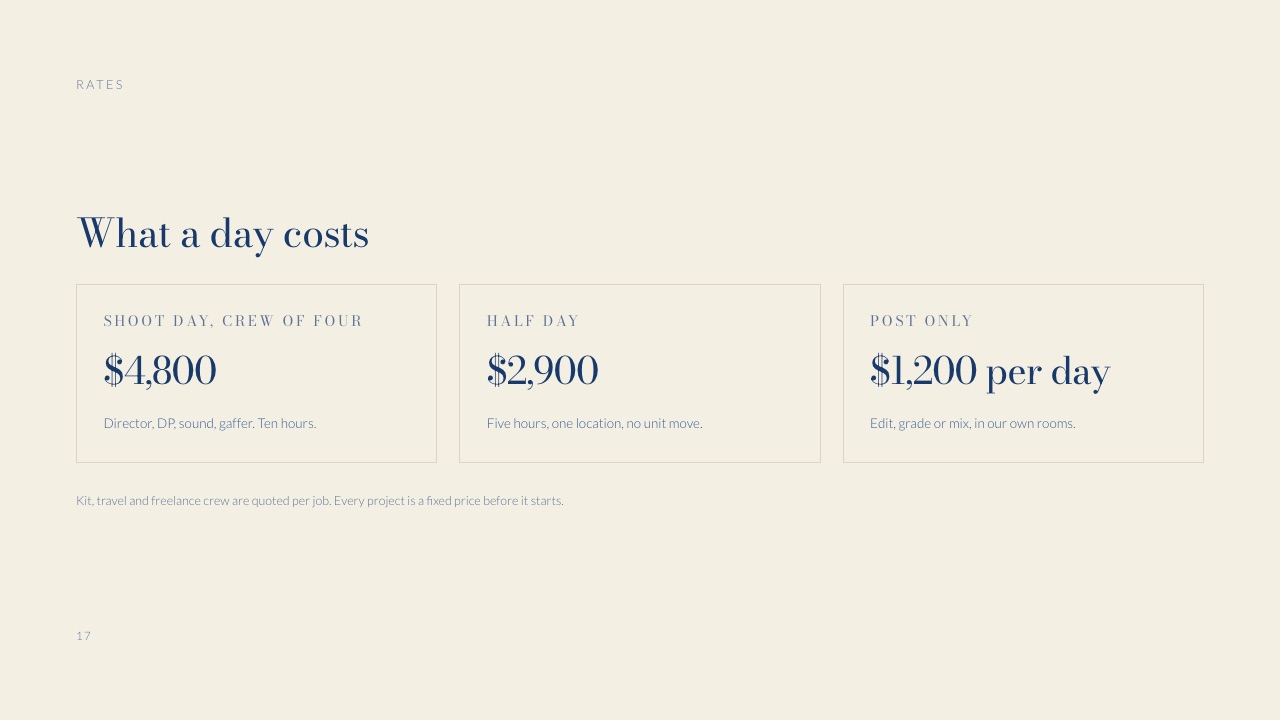
The template's sample shows three day-based prices (a shoot day with a crew of four at $4,800, a half day at $2,900, post-only at $1,200 a day) and one sentence of terms: every project is a fixed price before it starts.
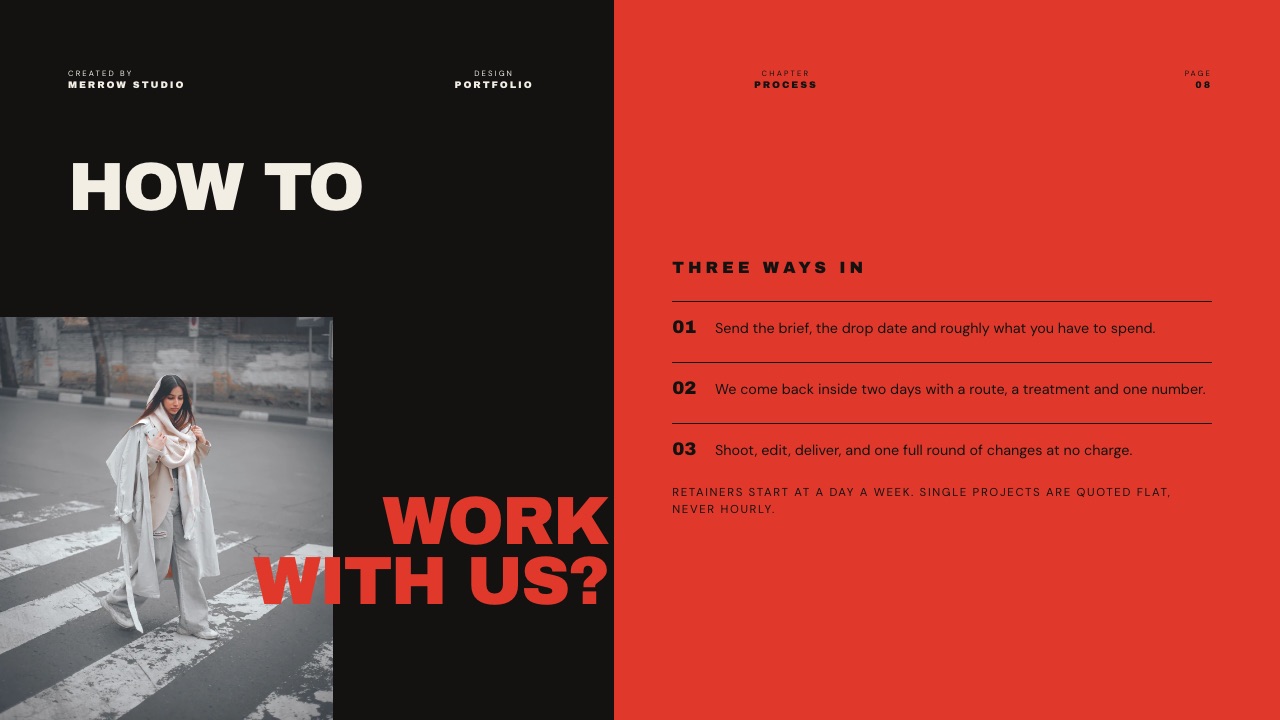
If your pricing is too variable for a slide, the Creative Studio Portfolio template shows an alternative: a "how to work with us" page with three ways in, and the rule that retainers start at a day a week and single projects are quoted flat, never hourly.
That tells procurement how you price without a number.
The Master Deck and the Tailored Front
In one linekeep one master creds deck of about 20 slides that you update quarterly, and for every prospect rebuild only the first three to five slides and the selected work, because relevance is what gets you through a longlist.
Most agencies either send the same deck to everyone or rebuild from scratch each time. The first loses on relevance, and the second burns hours and produces inconsistent decks. The split below is the practical middle.
| Part of the deck | Evergreen (update quarterly) | Tailored (rebuild per prospect) |
|---|---|---|
| Cover | Prospect's name, date, one line on their brief | |
| Who we are | One sentence, same everywhere | |
| The numbers | Three figures, refreshed each quarter | |
| Relevance slide (new) | "Why us for this": two or three reasons tied to their category | |
| Selected work | A pool of 15 to 20 projects | Pick the 6 closest to their brief |
| Case study | A library of 4 to 6 written up | Choose the one nearest their problem |
| Results | Stored alongside each case study | |
| Clients and logos | Master list | Remove anything that conflicts |
| How we work, Team, Kit | Standard slides | Swap in the actual account team |
| Rates | Standard ranges | Adjust if the brief sets a budget |
| Questions and availability | Questions about their brief, real start dates |
The tailored work is five or six slides. At one slide type per question, that is the difference between a deck that could have been sent to anyone and one that reads as if it was prepared for this client, which is exactly the judgement a longlist reader is making.
A tool that lets you duplicate a master deck and edit the copy keeps this manageable. In Framekit, decks are unlimited on every plan, so a master plus one copy per prospect costs nothing extra.
How to Prove Results Without Breaching an NDA
In one linewhen client work is under NDA, prove results with anonymised case studies, relative numbers and client-approved quotes, and ask for permission to share before you need it, not the week the creds are due.
Confidentiality is a real constraint in agency work.
The IPA and ISBA guide recommends a mutual non-disclosure agreement before confidential information is shared in a pitch, and many client contracts restrict how the work can be shown afterwards.
Breaching one to win the next client is the fastest way to lose both.
The options below run from most to least specific. Use the highest one your agreement allows.
| Level | What you show | Example phrasing | When to use it |
|---|---|---|---|
| 1. Named, with numbers | Client name, work, results | "Halden Coffee: film, six cutdowns, stills, 2025" | Written permission, results public or approved |
| 2. Named, relative results | Client name, work, results as percentages or ranges | "Repeat bookings roughly doubled year on year" | Named work is public, figures are sensitive |
| 3. Anonymised by category | Sector and size, not the name | "A European outdoor-gear brand" | Work is private or unreleased |
| 4. Process only | Brief, approach, what changed | "Three routes, one chosen, launched in eight weeks" | Results cannot be shared at all |
| 5. Client quote | A named or role-attributed quote | "Head of brand, national retailer" | When a client will vouch but not share data |
Three habits make this easier. Add a portfolio and results clause to your contracts, so permission is the default rather than a favour. Ask for permission to show the work at the wrap meeting, when goodwill is highest.
And keep a private results log per project so the numbers exist when a creds deck is due.
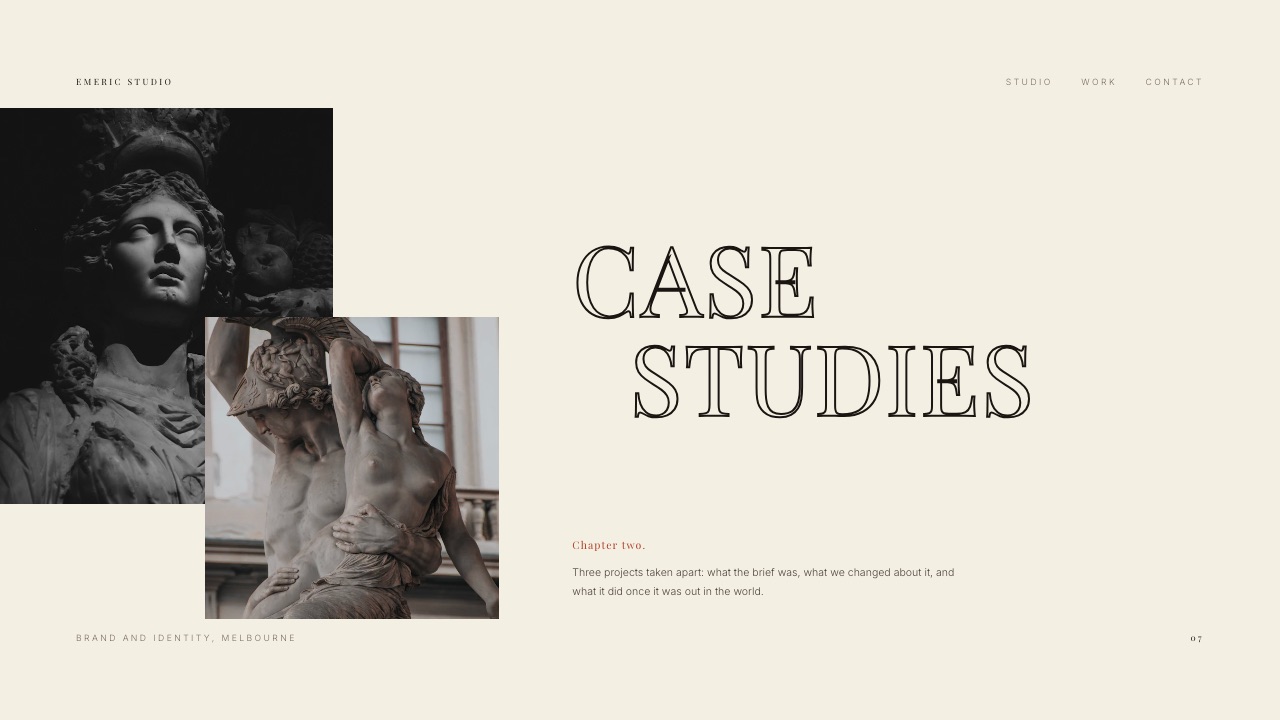
The branding studio template's case-studies divider phrases the approach neatly: "Three projects taken apart: what the brief was, what we changed about it, and what it did once it was out in the world." That structure works at every level of the table, including level 4, where "what it did" becomes a qualitative outcome rather than a number.
For more on writing the case study itself, our roundup of case study templates for designers covers formats that work beyond a deck.
How Long Should a Creds Deck Be?
In one linesend 12 to 15 slides at the longlist stage and keep the full 20-slide master for extended creds and the chemistry meeting, since the first reader is skimming up to ten decks and the second is looking for depth.
The IPA and ISBA guide separates ordinary creds from "extended credentials", and that distinction is the most useful guide to length.
A longlist reader wants to place you and see relevant work; an extended-creds reader has already decided you are plausible and wants to see how you think.
| Situation | Suggested length | Keep | Cut or move to an appendix |
|---|---|---|---|
| Cold outreach or an unsolicited intro | 5 to 8 slides | Who we are, relevance, 3 projects, team, contact | Kit, awards, rates |
| Longlist or RFI response | 12 to 15 slides | The numbers, selected work, one case study, clients, team, rates | Second case study, press |
| Extended creds or think-piece | 18 to 22 slides | Everything, plus a point of view on their brief | Nothing; this is the full deck |
| Chemistry meeting | 8 to 10 slides on screen | Team, how we work, one case study, questions | Anything the room will not discuss |
For the cold-outreach end of that table, Framekit also has a 5-slide Cold Outreach Deck with a Case Study template, which is closer to a letter than a creds deck.
Link or PDF: How to Send a Creds Deck
In one linesend a link when you want to update the deck after sending or play a showreel inside it, send a PDF when the client's process asks for files, and use a tracked-link tool when knowing who opened it will change your follow-up.
The IPA and ISBA guide lists agency websites as a research source, so the deck and your site should agree. Beyond that, the choice of format comes down to three questions.
Does the client's process require a file? RFIs run through procurement portals often ask for a PDF attachment. Send one, and keep a link version for the follow-up email.
Does the showreel matter? A PDF cannot play video. A link-based deck can embed the reel on the showreel slide, so the reader does not have to leave the deck to watch it. Framekit Slides embeds YouTube and Vimeo videos on the slide on every plan.
Do you need to know who read it? This is where tools differ most, and where Framekit is weakest.
| Sending method | Update after sending | Plays video | Shows who opened it | Password or gated access |
|---|---|---|---|---|
| PDF attachment | No | No | No | Only with a separate PDF tool |
| Framekit Slides link | Yes | Yes (YouTube, Vimeo) | Total view count only | No |
| Pitch link | Yes | Yes | Team plan: visits, slide views, time on slide | Business plan: passcodes |
| Storydoc link | Yes | Yes | Basic (Starter) or extended (Pro) analytics | Identified access (reader email) |
| DocSend link | Yes | Not compared here | Its core feature (plan limits not verified here) | Not verified here |
If tracking is decisive for you, our guide to DocSend alternatives compares the dedicated tools, and the sales deck software roundup covers the platforms built around deck analytics.
Where to Build a Creds Deck: Six Tools Compared
The six tools below cover the realistic options for a creative or production agency of one to ten people, and they differ most on three things that matter for creds: whether a credentials structure is ready-made, what the team pays per seat, and how much you learn after pressing send.
| Tool | Price (billed yearly) | Credentials structure | Team seats | Reader tracking |
|---|---|---|---|---|
| Framekit Slides | Free; templates from $7/mo; Pro $15/mo with 3 team members | Four creds and studio templates, 12 to 20 slides | 3 on Pro, unlimited on Business | Total view count |
| Pitch | Free; Plus $13, Team $19, Business $25 per seat/mo | General deck templates | Per seat | Team plan and up |
| Keynote | Free; Creator Studio $12.99/mo optional | None built in | iCloud sharing | None |
| Google Slides | Free with a Google Account | None built in | Google sharing | None |
| Storydoc | Starter $19.80/mo, Pro $36/mo | Its own templates (not reviewed here) | Team plan via sales | Analytics on every paid plan |
| Canva | Free; Pro EUR 110/yr; Business EUR 170/person/yr | General presentation templates | Per person | Not compared here |
1. Framekit Slides: Best for Creative and Production Studios
Framekit is an AI website builder for creative studios whose Slides tool builds the creds deck on the same account as the portfolio site, so the website a longlist reader opens in the next tab and the deck they are reading share the same work, fonts and colours.
What earns it the top spot for studios is the template set. Production Company Credentials (20 slides) is the full master deck described above, including the slides most general templates lack: The numbers, Kit, Rates and Availability.
Film Studio Pitch Deck, Branding Studio Pitch and Creative Studio Portfolio (12 slides each) give film studios, branding studios and design studios a shorter base with their own vocabulary.
What it does wellunlimited decks on every plan, so the master-plus-tailored system costs nothing extra; an AI slide writer that writes and lays out a slide from a description; speaker notes; YouTube and Vimeo embeds for the showreel slide; full-screen presenting; link sharing; and PDF export for procurement portals.
The real numbertemplates, your own fonts and removing the Framekit byline start on Starter at $9 a month ($7 billed yearly). For a team, Pro is $19 a month ($15 billed yearly) and includes 3 team members, which is $180 a year for the whole studio rather than per person.
The standout detailthe deck and the site come from one account. A studio can keep its case studies on the website and its creds in Slides, in the same fonts and colours, and the client sees one brand in both places.
Our guides to website builders for creative agencies and for production companies cover the site side.
The gotchathere is no password on deck links and no per-viewer analytics, only a total view count. For a creds deck that goes to ten readers at one brand, you will not know which of them opened it.
PowerPoint export (Pro and up) turns each slide into a picture, so a client who wants to paste your slides into their own internal deck gets images, not editable text.
Skip it ifyour new-business team follows up based on who read what, or your clients' procurement teams require editable PowerPoint files.
Verdict: the best starting point for a creative or production studio that wants its creds to look like its work and live beside its website. Pair it with a tracked-link tool if follow-up timing matters.
2. Pitch: Best for New-Business Teams That Track Engagement
Pitch is a collaborative presentation tool built for teams, and its advanced links are the reason a new-business lead would choose it for creds: you can see whether the brand opened the deck, which slides they looked at and for how long.
The real numberper Pitch's pricing page, billed yearly per seat, Plus is $13 a month, Team is $19 (with 25 advanced links that track visits, slide views and time on slide) and Business is $25 (unlimited advanced links).
Passcode-protected links are a Business feature. For a three-person team on Team, that is $684 a year.
The standout detailtime on slide tells you what to talk about in the chemistry meeting. If the marketing lead spent most of their time on one case study, open with it.
The gotchatracking is capped on Team at 25 advanced links, which a busy agency sending tailored creds to every prospect can use up. Unlimited links need Business.
Skip it ifyou send a few creds decks a year and do not act on engagement data.
Verdict: the strongest choice for an agency with a new-business function that follows up on signals. Weighing it against others? See our Pitch alternatives guide.
3. Keynote: Best Free Choice for Studios With a Designer
Keynote costs nothing, handles large images and type well, and is what many design-led studios already use for client presentations. The free app has no credentials template, but a studio with a designer rarely wants one.
The real number$0.
Apple states on its Creator Studio page that Keynote stays free, and sells an optional bundle at $12.99 a month or $129 a year that adds premium templates, a content library and AI features to Keynote alongside apps like Final Cut Pro.
The standout detailKeynote's export to PowerPoint means you can answer a procurement team's "please send an editable file" request from the same master deck.
The gotchathere is no reader tracking and sharing is built around iCloud, so the deck usually leaves the studio as a PDF, which drops the showreel.
Skip it ifyour team is on Windows or you want tracking built in.
Verdict: the right tool for a design-led studio that controls every pixel and sends PDFs. More options in our Keynote alternatives roundup.
4. Google Slides: Best for Multi-Person Creds Assembly
Creds decks are assembled by several people: new business writes the relevance slide, a producer updates the numbers, a designer tidies the case study. Google Slides is the easiest tool here for that kind of parallel editing.
The real numberfree. Google's Slides page states that "Anyone with a Google Account can create in Slides", and it imports and edits PowerPoint files, which helps when a client sends their own template.
The standout detailcomments and suggestions make the internal review round quick, and version history makes it easy to recover last quarter's numbers when someone overwrites them.
The gotchaa creds deck is partly a design sample, and Google Slides decks rarely look like a studio's best work without significant effort.
Skip it ifthe look of the deck is part of what you are selling.
Verdict: the best drafting and assembly tool on this list; for a design-led studio, rarely the final file. See our Google Slides alternatives.
5. Storydoc: Best for Interactive, Scroll-Style Creds
Storydoc builds interactive, web-based documents rather than conventional slides, which suits agencies that want their creds to feel more like a microsite than slides.
The real numberper Storydoc's pricing page, Starter is $19.80 a month billed annually ($237.60 a year) with 5 active documents and basic analytics; Pro is $36 a month billed annually ($432 a year) with 30 active documents and extended analytics.
Team is priced through sales.
The standout detailidentified access asks readers for their name or email before they can view, which tells you exactly who at the client opened the creds.
The gotchathe active-document limit. On Starter, 5 active documents is tight for an agency that tailors a creds deck for every prospect, which pushes most agencies to Pro.
Skip it ifyou want a conventional slide deck, or you send creds rarely enough that the analytics will go unused.
Verdict: a good fit for agencies selling digital work whose creds should behave like a website.
6. Canva: Best for Small Teams Without a Designer
Canva makes a presentable creds deck achievable for a team without a designer.
The real numberfor European buyers in September 2026, Canva Pro was listed at EUR 110 a year for one person and Canva Business at EUR 170 a year per person, which is EUR 510 a year for a team of three on Business.
The standout detailthe size of the template library means a small team always has a starting point, and the brand kit keeps every copy of the deck on-brand.
The gotchageneral templates are used by many companies, and a creds deck from a widely used layout can look familiar next to nine rivals. Budget time to make it your own.
Skip it ifyour agency sells design; the creds deck is a sample of your work.
Verdict: a sensible choice for a small non-design agency. Considering a move? See our Canva alternatives for presentations.
What a Three-Person Agency Pays per Year
In one lineseat pricing decides the bill for an agency team, so a tool that looks cheap per person can cost several hundred a year for three people, while flat team plans and free tools stay at or near zero.
The scenario: a studio with three people who edit the creds deck (a founder, a producer or account lead, and a designer), billed yearly where that option exists. Euro figures are as listed for European buyers and are not converted.
| Setup for three editors | Yearly cost | Tracking of who opened it | Notes |
|---|---|---|---|
| Keynote | $0 | None | Mac and iPad app; browser access through iCloud |
| Google Slides | $0 | None | Free with Google Accounts |
| Framekit Free | $0 | Total view count | One login; no template library, byline shown |
| Framekit Starter | $84 ($7 x 12) | Total view count | One login; all templates, own fonts, no byline |
| Framekit Pro | $180 ($15 x 12) | Total view count | 3 team members included; picture-based PowerPoint export |
| Storydoc Pro | $432 ($36 x 12) | Extended analytics | 30 active documents; team seats via sales |
| Pitch Plus, 3 seats | $468 ($13 x 3 x 12) | No advanced links | PowerPoint export, custom fonts |
| Canva Business, 3 people | EUR 510 (EUR 170 x 3) | Not compared here | Brand kit, team features |
| Pitch Team, 3 seats | $684 ($19 x 3 x 12) | 25 advanced links | Visits, slide views, time on slide |
| Pitch Business, 3 seats | $900 ($25 x 3 x 12) | Unlimited advanced links | Passcode-protected links |
The honest reading: if your new-business process runs on engagement signals, the $504 a year between Framekit Pro and Pitch Team ($684 minus $180) is a fair price for 25 tracked links. If you mostly send creds, then meet, the flat team plan or a free tool covers the job.
A quick check you can do on your own numbers: count the creds decks you sent last year and how many of those follow-ups would have changed if you had known who opened the deck. If the answer is "almost none", do not pay for tracking.
Six Creds Deck Mistakes That Get You Cut
Each of these makes a longlist reader's job easier in the wrong way, by handing them a reason to drop your agency before they reach the work, and all six can be fixed before the deck is sent.
- An untailored cover and opening. A deck that could have gone to anyone reads as if it did. The cover and first slides should name the prospect and their problem.
- A manifesto instead of a sentence. "We believe in the power of stories" appears in many decks. One line that says what you are and how you work is enough.
- Selected work chosen for awards, not relevance. Six projects close to their category beat six prize-winners from elsewhere.
- Results you cannot back up. A procurement reader will ask for the source. Use the NDA ladder above and never inflate.
- A team slide with people the client will never meet. The chemistry meeting exposes it.
- No next step. End with availability and a named contact, not a thank-you slide.
Decision Guide: Building and Sending Your Creds
Work through these questions in order and stop at the first that decides it; each branch points to a starting template or a tool, depending on the kind of agency you run and how your new-business process follows up after sending.
- Do you follow up based on who opened the deck and which slides they read? If yes, send through Pitch (Team or Business) or Storydoc, or put a PDF behind a tracked-link tool. If not, go to question 2.
- Is your agency a production company or film studio? If yes, start from Framekit's Production Company Credentials (20 slides) for the master deck, or Film Studio Pitch Deck (12) for a shorter version. If not, go to question 3.
- Is it a branding or design studio? If yes, start from Branding Studio Pitch or Creative Studio Portfolio. If it is a marketing or strategy agency, go to question 4.
- Does your team include a designer who wants full control? If yes, Keynote is free and flexible. If several non-designers assemble the deck, Google Slides for drafting, then a designed tool for the final file.
Whatever you choose, build the master deck once, tailor the first five slides and the selected work for every prospect, and check that your website tells the same story.
Our guide to presentation tools for creative agencies goes further on the tool choice.
Frequently Asked Questions
What is an agency credentials deck?
An agency credentials deck, or creds deck, is a 12 to 20 slide presentation that introduces an agency to a prospective client: who it is, what it does, selected work, a case study with results, clients, the team, how it works and indicative rates.
Clients use creds at the longlist stage to decide which agencies to invite to a pitch. The IPA and ISBA guide describes this stage as a request for information, often with relevant case studies.
What should be in a creds deck?
A creds deck should include a tailored cover, a one-line description of the agency, a showreel or hero work, three key numbers, services, selected work, a case study with results, clients, the account team, how you work, testimonials, rates and a clear next step.
Framekit's Production Company Credentials template runs these as 20 slides, adding Kit for production companies and Availability before the contact slide.
How long should an agency credentials deck be?
An agency credentials deck should usually be 12 to 15 slides for a longlist or RFI response and 18 to 22 for extended credentials. The IPA and ISBA guide treats extended credentials as a separate, deeper stage for no more than six agencies.
Keep the full 20-slide master deck and send a trimmed version first; a 5 to 8 slide version works for cold outreach.
Should an agency creds deck include pricing?
A creds deck for creative or production work usually benefits from indicative rates, because procurement uses them to avoid shortlisting agencies it cannot afford.
Framekit's credentials template shows day rates with a line that every project is fixed-price before it starts. If your pricing varies too much, describe how you price (retainer days, flat project fees) instead of listing numbers.
How do I show results in a creds deck if my work is under NDA?
Show NDA-covered results by moving down a ladder: named work with numbers if you have written permission, named work with relative results, anonymised by category ("a European outdoor brand"), process only, or a role-attributed client quote.
Add a portfolio clause to contracts and ask for permission at the wrap meeting, so the choice is made before the creds deck is due.
What is the difference between a creds deck and a pitch deck?
A creds deck introduces an agency and its past work so a client can shortlist it; a pitch deck answers a specific written brief with new strategy or creative work.
Creds come first and go to up to ten agencies; pitches come later and, under the IPA and ISBA guide, should be limited to three agencies, or four if the incumbent is invited.
Should I send a creds deck as a PDF or a link?
Send a PDF when the client's procurement process asks for file attachments, and a link when you want to embed a showreel or update the deck after sending.
Framekit shares decks as links and exports PDFs on every plan, but its links have no password and show only a total view count. Pitch, Storydoc and DocSend show who opened a deck.
Pitch vs Framekit for an agency creds deck?
Pitch is the better choice if your new-business team acts on engagement data: its Team plan ($19 per seat a month, billed yearly) includes 25 tracked links showing visits, slide views and time on slide.
Framekit is the better choice for creative and production studios that want a ready-made 20-slide credentials template and a deck that lives beside their website, with Pro at $15 a month billed yearly for three team members.
How often should an agency update its creds deck?
An agency should update the evergreen parts of its creds deck every quarter (the numbers, the selected-work pool, clients, team and rates) and rebuild the tailored front for every prospect.
Stale numbers are easy to spot when a reader compares your deck with your website, so update both on the same day.
Final Verdict
The agency credentials deck that wins a place on the shortlist is the one that makes the reader's elimination question impossible to answer: relevant work up front, three numbers that prove stability, a case study with results you are allowed to share, the actual team, and rates procurement can budget against.
Build one master deck, tailor the first five slides and the selected work for each prospect, and keep the deck and your website telling the same story.
For creative and production studios, Framekit's Production Company Credentials template gives you that master deck ready-made, next to the website clients will check.
Where Framekit loses: it does not show which person opened your creds, it does not password-protect deck links, and its PowerPoint export is picture-based.
Agencies whose new-business teams live on engagement data are a better fit for Pitch or Storydoc, and a design-led studio with its own layout system may be happier in Keynote.
Framekit is not for agencies whose clients insist on editable PowerPoint creds.
Related readingour presentation tools for creative agencies guide compares more tools in depth, website builders for creative agencies covers the site your creds point to, and the DocSend alternatives roundup covers tracked sharing.
When the creds win a brief, the commercial treatment template and the video production proposal template are the two documents the client asks for next.