Framekit templates
Start from a designer-made template
 Use template
 Use template
 Use template
 Use template
 Use template
 Use template
 Use template
 Use template
Every photographer eventually does this math. You spent two or three years quietly building a color style, a way of grading light that people now recognize as yours.
You could package that style as a Lightroom preset pack and sell it, and unlike a shoot, it would keep earning after the work is done. The preset side-income idea is close to universal for a reason: it is real.
The mistake is where most photographers sell it. The default move is to list the pack on a marketplace, because that is where presets are sold.
But a marketplace takes a commission on every single sale, it keeps the buyer's email address instead of you, and it sits your pack beside a hundred competitors.
You did the hard part, building a style worth buying, and then you hand a platform a cut of it forever.
This guide is the other way.
It walks through how to sell Lightroom presets on your own website, step by step: building a pack worth paying for, pricing it, setting up the page and checkout, delivering files automatically, and selling to the audience you already have.
The result is the same product, with the margin and the customer kept by you. To compare where to sell first, our best platforms to sell presets guide ranks the options.
To sell Lightroom presets on your own website, create and test a tight preset pack, set a price (most packs sell for $15 to $60), build a product page with checkout and automatic file delivery, and promote it to your existing audience.
Selling from your own site keeps the commission a marketplace would take on every sale.
A Lightroom preset is a saved set of photo edits that applies your color and tone style to an image in one step (Adobe's own documentation on presets covers how they are created and shared).
Selling presets on your own website means hosting the product page, the checkout, and the file delivery yourself, instead of listing on a marketplace that takes a cut of every sale and owns the customer.
Both can work, and many photographers use both, but your own site is the higher-margin home base.
Framekit is an AI website builder with a digital-download store in the same account, so the portfolio, the preset product page, and the automatic file delivery are one setup rather than three, and its store fee starts at 5% on the free plan and drops to 0% on the $39 a month Business plan.
Framekit's plans and store fees were re-verified against its live pricing page in September 2026.
Why Sell Presets on Your Own Website, Not Just a Marketplace
Marketplaces are not the enemy. They bring one genuine thing your website does not have on day one: built-in discovery, an audience already browsing for presets. The trade is steep, though.
They take a commission on every sale, they own the customer relationship and the buyer's email, and your pack competes for attention beside every other seller's. Your own website reverses all three.
You keep the margin beyond standard payment processing, you keep the customer so you can sell them the next pack, and the storefront is yours and on-brand.
The strongest setup for many photographers is both: a marketplace listing as a discovery channel, and an own-site store as the main place you send your actual audience.
Step 1: Create and Test a Preset Pack Worth Paying For
A preset pack is a product, so build it like one. Make a small, coherent set, usually 6 to 12 presets that share one clear look, rather than 40 scattered ones.
Then test it properly: apply the presets to a real range of images across different skin tones, lighting, indoor and outdoor, underexposed and bright.
A pack that only looks good on the three photos you designed it with will generate refund requests and kill word of mouth.
Name the pack and each preset clearly, export in the formats buyers expect, which means XMP for current desktop Lightroom and a DNG option for the mobile app, and write a short install guide. The guide is part of the product.
A buyer who cannot install your pack does not buy the next one.
Step 2: Decide What to Charge
Most Lightroom preset packs sell for somewhere between $15 and $60. Where you land depends on the size of the pack, how recognizable your style already is, and how warm your audience is.
A first pack from a photographer with a modest following usually starts nearer the lower end. A signature pack from someone whose look people already ask about can hold the higher end. Resist underpricing to feel competitive.
A preset is a digital product with no per-unit cost, so the goal is not volume at any price, it is a fair price charged to people who already like your work.
You can always run a time-limited launch discount without permanently making the pack feel cheap.
Step 3: Build the Product Page and Checkout
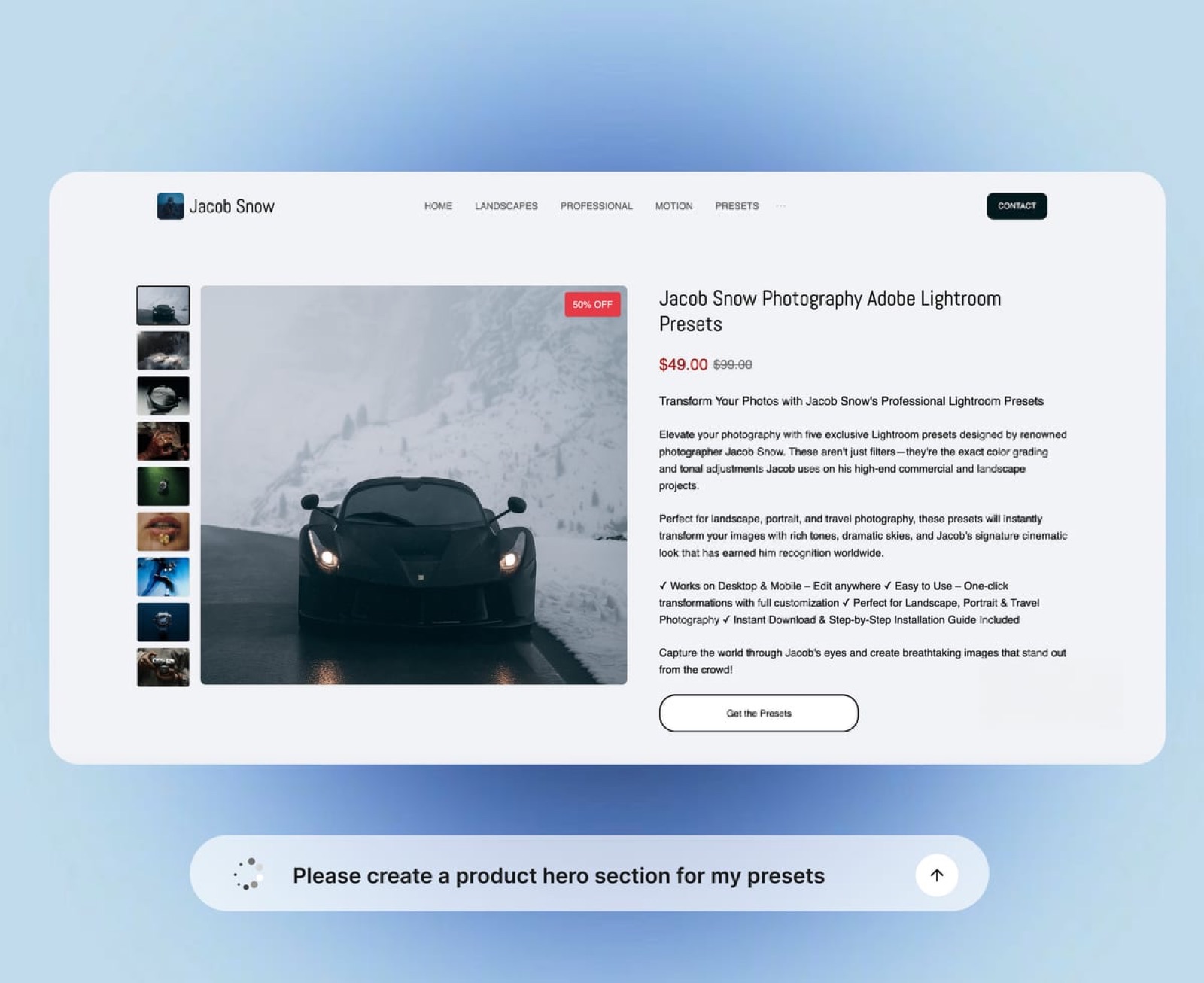
The product page does the selling, so give it more than a download button. Show before-and-after images on photos in the genres your buyers actually shoot.
State exactly what is included: the number of presets, the file formats, the install guide, and desktop and mobile compatibility. Show the price plainly.
Add a short FAQ that answers the refund and compatibility questions before a buyer has to ask them. Then connect a checkout.
An all-in-one website builder like Framekit includes a store, so the product page, the checkout, and the rest of your photography site live in one place you own, with no marketplace commission stacked on top of normal payment processing.
For a wider look at the tools, see our roundup of the best product-selling software.
Step 4: Deliver the Files Automatically
Emailing a file after each sale does not scale and looks amateur. Set up automatic digital delivery so the buyer gets their download the moment payment clears, whether that is midday or 3am.
This is standard for any real digital-product setup. Host the files reliably, keep your own backup, and version the pack so that if you improve it later, existing buyers can be sent the update.
Automatic delivery is also the thing that makes preset sales genuinely passive, rather than turning every sale into another task in your inbox.
Step 5: Sell to the Audience That Already Likes Your Work
You are not selling to strangers. You are selling to the people who already follow your photography because they like your look, and a preset pack is the most direct way to let them buy that look for themselves.
Announce the pack where that audience already is: your email list, your Instagram, your past clients. Show the presets in action on new work, not just on a product page.
Put a visible link to the pack in your website's main navigation and in your link in bio. The photographers who do well with presets are rarely the ones with the largest reach.
They are the ones who made it effortless for a warm, existing audience to buy.
Marketplaces vs Your Own Website: The Real Cost
The table below is the decision in one view. Read it as an argument for doing both, with your own site as the main store.
| Marketplace | Your own website | |
|---|---|---|
| Fee per sale | A commission on every sale | Payment processing only |
| Customer relationship | Owned by the marketplace | Owned by you |
| Discovery and traffic | Built-in browsers | You bring the traffic |
| Storefront | Their brand, beside rivals | Yours, on-brand |
| Pricing and upsells | Limited | Full control |
A marketplace is a fine place to be found. It is a poor place to be your only store.
The photographers who treat their own website as the home base, and a marketplace as one discovery channel into it, keep the most of what their style is worth.
The same logic applies to prints and other digital products, which our guide on how to sell art online from your website covers in depth.
Common Mistakes When Selling Presets
Three mistakes sink most preset launches. The first is selling an untested pack that only works on a narrow set of images, which produces refunds and kills word of mouth.
The second is pricing out of fear instead of value, so the pack reads as cheap and disposable to the very people who would have paid more.
The third is hiding the pack: no link in the site navigation, no announcement to the email list, no before-and-afters, so even a warm audience never finds it.
Fix those three and a preset pack does exactly what it is meant to do, which is earn quietly while you are out shooting.
Frequently Asked Questions
How much can you make selling Lightroom presets?
Preset income varies widely. For most photographers it is a useful side income rather than a full living, often a few hundred to a few thousand dollars a year, scaling with audience size and how recognizable the style is.
The advantage is not the size of the number, it is that the income is largely passive once the pack and automatic delivery are set up. Selling from your own site keeps more of each sale.
How much should I charge for a Lightroom preset pack?
Most Lightroom preset packs sell for $15 to $60. Price by the size of the pack, how distinctive your style is, and how warm your audience is.
A first pack usually starts lower, a signature pack from a photographer with a known look can hold the top of the range. Avoid underpricing, since presets have no per-unit cost and a too-cheap price signals a disposable product.
Do I need my own website to sell presets, or can I just use a marketplace?
You can sell on a marketplace alone, but it costs you a commission on every sale and the customer relationship. A marketplace is good for discovery. Your own website is better for margin and for keeping buyers you can sell to again.
The strongest approach is both, with your own site as the main store you send your audience to.
What format should I sell Lightroom presets in?
Sell presets as XMP files for current desktop Lightroom, and include a DNG version for the mobile Lightroom app, since many buyers edit on their phones. Bundle a short, clear install guide for both.
Offering both formats and clear instructions reduces support questions and refund requests, which protects the word of mouth that drives more sales.
How do I deliver preset files to buyers automatically?
Use a store or digital-product setup that sends a download link automatically when payment clears. An all-in-one website builder with a built-in store handles this, so a sale at 3am delivers itself.
Keep a backup of the files and version the pack so you can send updates to existing buyers. Automatic delivery is what makes preset income genuinely passive.
Is selling presets from your own website worth it versus Etsy or Gumroad?
It is worth it once you have any audience of your own, because a marketplace takes a cut of every sale and keeps the customer. Marketplace fees range widely by platform, but they are never zero.
Your own site costs you only payment processing and keeps the buyer. Use a marketplace for discovery if you like, but make your own website the primary, higher-margin store.
Can I sell presets on a free website plan?
Store and checkout features are usually part of a paid plan rather than a free one, since selling involves payment processing.
You can build and design the rest of your photography site for free, then move up to a plan with a store when you are ready to sell. For most photographers, a single pack pays back the plan cost quickly.
The Bottom Line
Selling Lightroom presets is one of the few genuinely passive income paths open to a working photographer, and the product is something you have already built: your style. The only real decision is where it lives.
A marketplace rents you discovery and charges a commission forever. Your own website keeps the margin, the customer, and the brand.
Build a tight, tested pack, price it for the people who already love your work, set up a product page with automatic delivery, and point your audience at it.
If you are still deciding whether a site is worth it at all, our honest take on whether photographers need a website is the place to start.
_Pricing and information accurate as of May 2026._